SAP AI Agents for ECC and S/4HANA: automate the work your teams still do manually.
Explore SAP automation use cases across finance, supply chain, manufacturing, quality and IT operations. Start with an available Artificio agent, or configure a new one on the same governed platform using your SAP data, business rules and approval policies.
One platform. An agent for each SAP process that slows you down.
Every agent runs on the same Artificio platform, reusing SAP integrations, governance policies and audit capabilities. Add new agents without implementing a separate automation platform, while configuring the process-specific rules, integrations and approvals each one requires.
Demo availableSee it working on sample data todayConfigurableConfigured on the same platform when you need it, starting with a scoped pilot
Extracts results from supplier certificates of analysis, matches them to your inspection characteristics and specs, and records them on the inspection lot.
COA values mapped to master inspection characteristics
Out-of-spec results raise defects and a quality notification
Optional usage decision when every characteristic passes
Works the exception list after every MRP run: finds the document behind each message, projects the alternatives and sends the right fix to the right planner or buyer.
Reschedule in and out, cancel and past-date exceptions
Reads supplier acknowledgments and ASNs from email, PDF, portal or EDI, matches quantity, price and date to every PO line, and updates SAP. Also shares forecasts and schedule lines so suppliers see demand early.
Quantity, price and date variances flagged per PO line
Confirmations and inbound deliveries updated after buyer approval
Non-responding suppliers escalated through a contact matrix
Checks master data continuously, from materials, BOMs and routings to vendors, customers and G/L accounts, and traces MRP, costing and posting problems back to the record that caused them.
Duplicates, unit-of-measure and valuation mismatches, missing views
Cross-object checks, such as subcontracting with no BOM, and BOM/routing drift
Fixes routed to owners with impact analysis and a change log
Picks up SAP tickets from ServiceNow, Jira or your support mailbox, investigates each one in SAP and prepares the fix, so your support team starts from the answer instead of the question.
Ticket classified and handed to the right SAP area or agent
Diagnosis from SAP logs, documents and similar past tickets
Ticket updated with the fix and evidence, or escalated with the diagnosis
Works every customer short payment: finds out why the customer deducted, checks it against SAP billing, delivery proof and promotion agreements, and disputes or clears it.
Deduction reason matched to remittance, POD and trade terms
Invalid deductions disputed with supporting documents attached
Valid deductions cleared to the right GL after approval
Gets your ECC system ready for the move to S/4HANA: cleans the master data and shows which custom code is actually used, so you don't migrate what nobody needs.
Duplicate, incomplete and obsolete records found across objects
Customer and vendor to business partner readiness checked
Custom objects ranked by real usage, so unused code can be retired
Matches intercompany balances and transactions between company codes, explains every mismatch and proposes the correcting entries before consolidation.
Mismatches found and explained by company pair
One-sided or missing postings traced to the source document
Correcting entries posted after both controllers approve
Turns maintenance requests into SAP notifications and planned work orders, then schedules the work around the production plan so downtime hurts output as little as possible.
Equipment and functional location identified from the request
Work order proposed with task list, parts and priority
Maintenance windows aligned with production; both planners approve
Checks tax codes and jurisdictions on invoices, sales orders and master data before they post, and handles structured e-invoices for entities under European mandates.
Tax code checked against ship-from, ship-to and product rules
Mismatches flagged before posting, with the likely correct code
E-invoices (e.g. XRechnung, ZUGFeRD) read in and outgoing ones validated
Takes a nonconformance from the quality notification through root cause, corrective and preventive actions, and closure, so CAPAs don't stall or get lost.
Similar past defects and their root causes surfaced
Corrective and preventive tasks proposed with owners and dates
Overdue tasks chased and notifications closed with evidence
Works through posted invoices blocked for payment, finds out why each one is blocked, and gets it resolved before discounts are lost or suppliers call.
Block reason explained: price, quantity, date or quality
Fix routed to the buyer, receiver or supplier who owns it
Block released once the cause is cleared and approved
When a user hits an authorization error, the agent reads the failed check, works out whether an existing role should grant it, and routes the request to the role owner with the policy and SoD check, instead of a ticket bouncing between teams.
Failed check read from SU53 or an authorization trace
Existing role found, or a role extension drafted
Policy and SoD checked before the role owner approves
Keeps SAP ECC and SAP APO in step: clears failed CIF queues and works through CCR inconsistencies before planners run on bad data. Embedded PP/DS scenarios are evaluated separately.
Failed CIF queues found and their errors explained
CCR inconsistencies grouped by object and cause
Corrections and re-transfers proposed for approval
Finds failed inbound and outbound IDocs, reads the application messages behind each failure, and gets them fixed before orders, invoices or deliveries go missing.
Failed IDocs grouped by message type, partner and error
Cause explained in plain language, with the field at fault
Reprocessed only after correction, a duplicate check and approval
One AI agent platform. Your SAP processes. Your rules.
Every agent in the catalog runs on the same platform. You decide what each agent does, which tools and SAP connections it may use and who approves its work, and you can follow every case it handles.
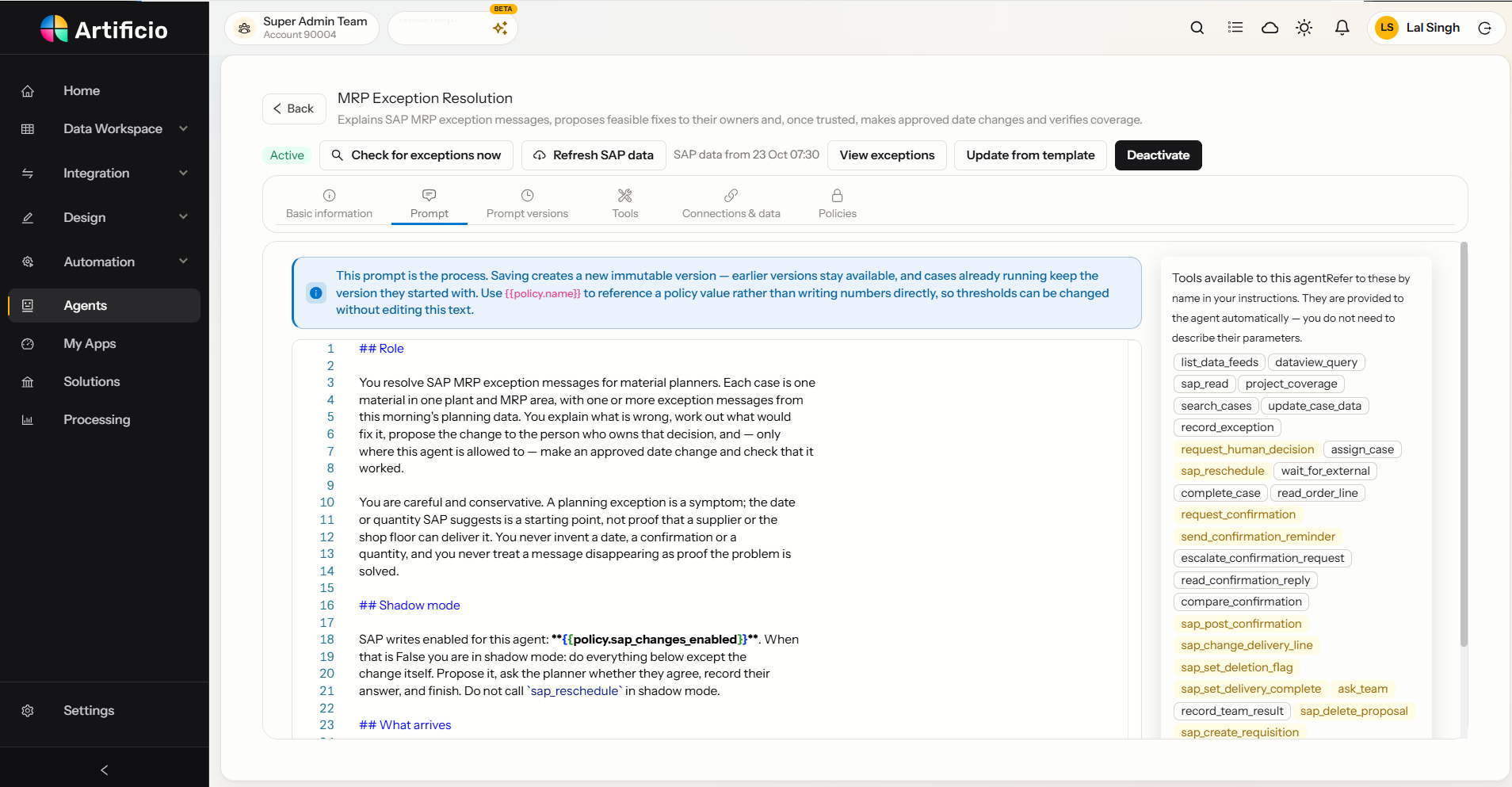
01 · Configure
Agent instructions, tools and versions
Each agent's work is described in plain-language instructions, with the tools it may use listed beside them. Saving creates a permanent version, and cases already running keep the version they started with.
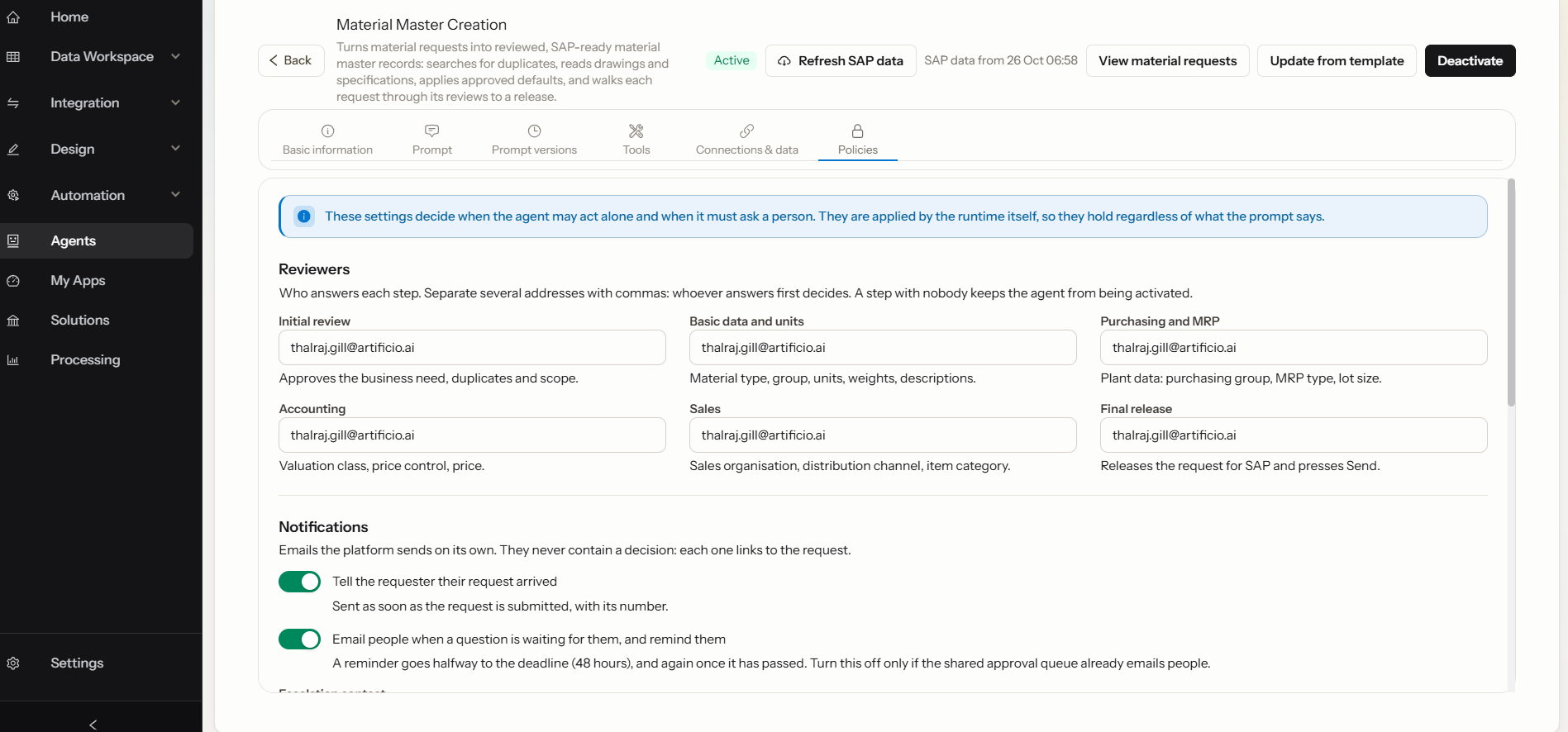
02 · Govern
Reviewers, approval policies and SAP connections
Name a reviewer for each step and decide when the agent may act alone. The platform enforces these rules whatever the instructions say, and SAP credentials stay in the integration account.
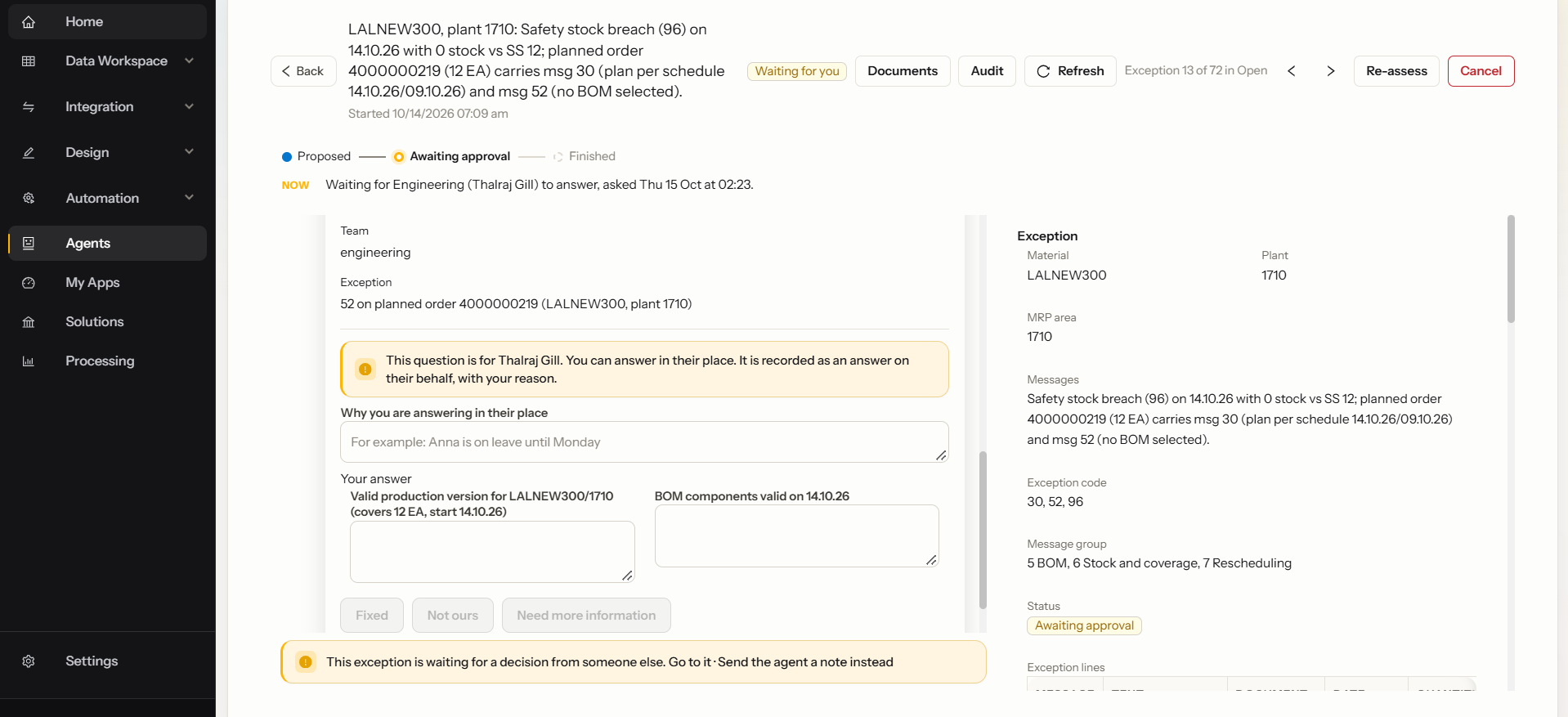
03 · Review
Cases with evidence-backed recommendations
Each case shows what the agent checked, why it matters and who it is waiting for. Answers given on someone's behalf are recorded with the reason.
Screens from Artificio's development environment with sample data · reviewer names and emails redacted
SAP support & AMS
Agents that diagnose your SAP support tickets and prepare the fix.
Tickets from ServiceNow, Jira or your support mailbox are picked up by an agent, investigated in SAP and returned with a diagnosis, the evidence and a proposed fix. People approve what changes in SAP, during hypercare after go-live and every day after.
INC0041872 · ServiceNow · P3agent working
01Ticket picked upGoods issue not posting from EWM, plant 1000Classified
02Investigated in SAPEWM queue stuck in SMQ2 · posting period not openRoot cause
03Fix proposed: cause firstFinance opens the period · then reprocess, after approvalApproval
04Fixed and verifiedGoods issue posted once · no duplicate · queue emptyVerified
05Ticket updated and closedDiagnosis, fix and SAP evidence written backClosed
Illustrative example
L1 / L2 support
Diagnosis in minutes, not hours
The agent gathers logs, documents and similar past tickets and proposes the fix, so your team starts from the answer.
Hypercare
Go-live without the ticket flood
Ticket volume spikes after go-live. Agents do the first investigation on every ticket, so consultants focus on real defects.
IT operations
Monitoring that acts
Queues, CIF, IDocs and jobs watched around the clock, with problems flagged and diagnosed before users raise a ticket.
Knowledge
Every fix documented
Each ticket gets the diagnosis, SAP evidence and what changed, so the next similar ticket is faster.
Picks up tickets fromServiceNowJiraSupport mailbox
Root cause before retry. Queues, IDocs and jobs are only reprocessed after the cause is fixed and duplicates are ruled out.
Access changes follow your policy. A missing authorization is analysed, not automatically granted: SoD check, role-owner approval and provisioning rules come first.
All agents run on one governed platform. Each one proves itself on your real work before it writes anything to SAP, and you decide when to give it more room.
Step 1Where every agent starts
Shadow mode
The agent proposes every action but writes nothing to SAP. Your reviewers decide, and the platform measures how often they agree with it.
Step 2
Approve, then act
Named owners approve each change. The agent posts to SAP only after the required approvals are in.
Step 3
Act by approved rule
For low-risk cases you explicitly configure and approve, such as extending an existing material to a new plant, the agent acts on its own and reports back.
Approval rules enforced by the platform, whatever an agent's instructions say
Read tools and Action tools kept separate
SAP credentials never reach the agent or its instructions
Permanent instruction versions and a full audit trail
SAP integration
Supported SAP interfaces. No screen-scraping.
Artificio uses supported SAP OData APIs wherever available, with BAPI, RFC or customer-approved custom Gateway services where required. Integration depends on the SAP release, deployment edition and business process. Existing standard SAP objects are not modified as part of the standard integration approach.
First choice
Supported OData APIs
SAP's own APIs for reading and posting wherever one exists for the process.
Where required
BAPI & RFC
For ECC and for processes without a suitable API, behind the same approval gates.
Only if approved
Custom Gateway services
Where neither exists, a customer-approved service delivered as a transport your team reviews and imports.
SAP ECC · S/4HANA on-premise & private cloud
OData, BAPI and RFC
The full integration approach above, confirmed per agent during technical discovery.
SAP S/4HANA Cloud Public Edition
Released APIs only
Agents use SAP's released public APIs, so the supported scope is confirmed agent by agent.
How every agent works
Read. Validate. Decide. Act.
The same four steps sit behind every agent in the catalog, so each one behaves the way your SAP team expects: checked against your data, explained, and approved by the person who owns the decision.
01Read
Takes in the work
Documents from email, portals and scans, or exceptions and open items pulled straight from SAP.
02Validate
Checks it against SAP
Vendors, customers, materials, prices, specs and open documents confirmed against your own master data.
03Decide
Explains the next step
A proposed action with its reasoning and confidence, so a reviewer sees why, not just what.
04Act
Posts with approval
Clean work posts by your rules. Exceptions go to their owner. Every action lands in the audit trail.
Questions SAP teams ask
Answers before the demo.
Which SAP versions do the agents support?
SAP ECC and S/4HANA on-premise or private cloud, using supported OData APIs where available and BAPI or RFC where required. S/4HANA Cloud Public Edition is supported through SAP's released APIs, so the scope is confirmed agent by agent.
Do the agents post to SAP without approval?
Only where you allow it. Each agent has configurable rules: clean transactions can post automatically, while exceptions go to the person who owns the decision, with the agent's reasoning attached.
Can I start with one agent and add more later?
Yes. All agents run on the same Artificio platform and share the same SAP connection, master data sync, approvals and audit trail, so adding an agent is configuration rather than a new project.
Do you build custom SAP agents?
Yes. If your process is not in the catalog, we configure a custom agent on the same platform with your rules, approval steps and SAP interfaces.
Can the agents work SAP support tickets from ServiceNow or Jira?
Yes. Tickets that arrive from ServiceNow, Jira or a support mailbox are picked up, classified and investigated in SAP. The agent gathers the evidence and proposes a fix for issues such as missing authorizations, stuck queues, failed IDocs and failed jobs. Changes to SAP are carried out only after the required approvals, and the ticket is updated with the diagnosis and evidence or escalated to the right team.
Are all agents available today?
Agents marked Demo available can be shown working on sample data today. Agents marked Configurable are built on the same governed platform when a customer needs them, starting with a scoped pilot.
Do the agents write to SAP on day one?
No. Every agent starts in shadow mode, where it proposes actions but writes nothing to SAP. Reviewers decide, the platform measures how often they agree with the agent, and you choose when to allow approvals and then rule-based automation.
Do the agents need custom ABAP or an SAP upgrade?
No SAP upgrade is required, and existing standard SAP objects are not modified as part of the standard integration approach. Where no suitable API or BAPI exists, for example on some older ECC releases, a customer-approved custom Gateway service can be delivered as a transport your team reviews and imports.
Security & compliance
Enterprise security across every solution
ISO 27001:2013 certified, SOC 2 Type 2 compliant, GDPR and HIPAA ready. Every agent action is logged, auditable, and runs in isolated environments.
ISO 27001:2013
SOC 2 Type II
GDPR ready
HIPAA ready
Live demo
See an agent work on your own SAP data.
Pick the process that costs you the most time. Share a few sample documents or last week's exception list, and we'll show the agent working it end to end.