

Help and support
Overview:
The process of setting up and using Artificio to send WhatsApp messages to customers via Facebook Business and WhatsApp Developer accounts.
Here's a breakdown of the help and support information it provides:
Key areas of support:
- Connecting WhatsApp with Artificio:
- The process involves connecting Artificio to your Facebook Business account.
- You'll need to create a Facebook Business profile and a WhatsApp Developer account.
- Once connected, Artificio will provide a WhatsApp number or display your number in a list.
Creating WhatsApp Business Templates:
- Templates are created within your Facebook Business account's WhatsApp Manager section by clicking on Create Template button and providing template details.
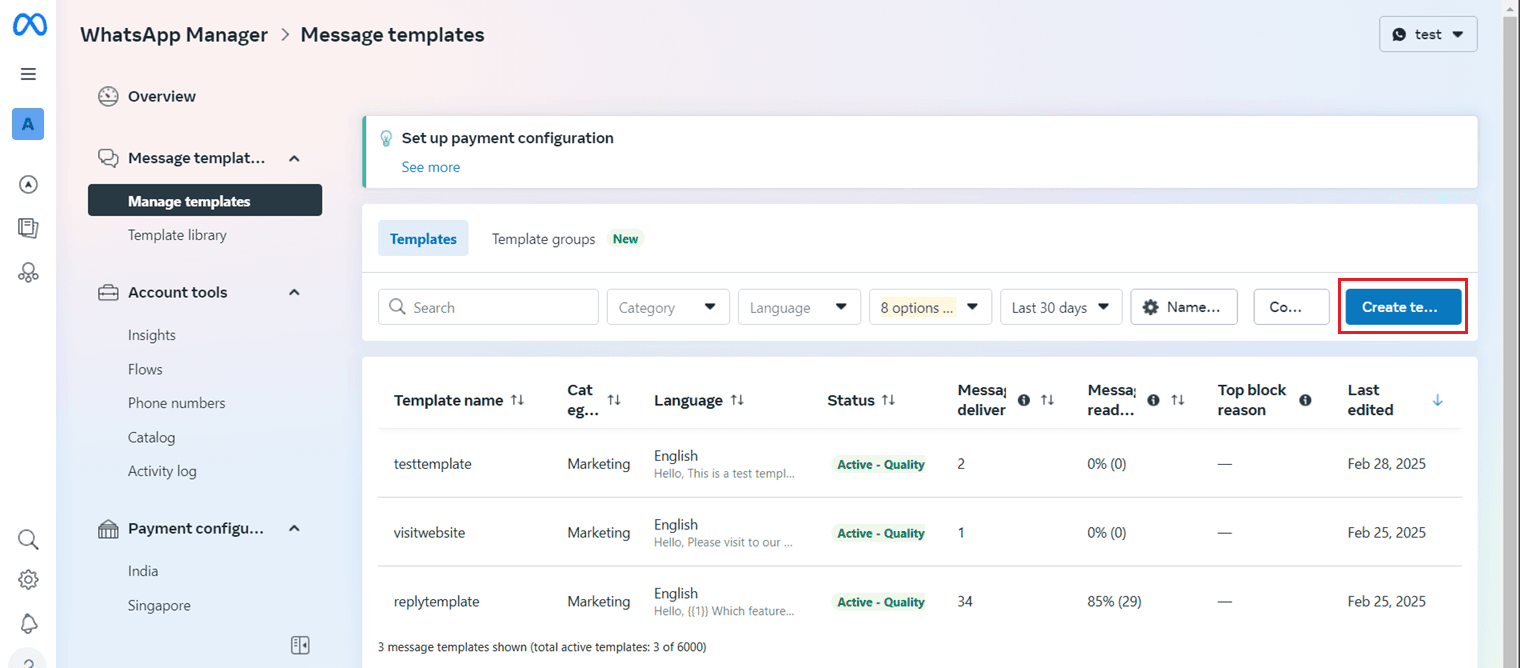
- Artificio automatically fetches and lists these templates.
Managing Contact Lists:
- You can create and manage contact lists within Artificio by clicking on create contact list button.
- Each contact list requires a name and description.
- You can add individual contacts with their name, email, phone number, and country code.
Creating and Running Campaigns:
- Artificio supports static and dynamic campaigns.
- Static Campaigns:
- Select "Static" radio button.
- Choose a contact list from the dropdown.
- Select the desired WhatsApp number.
- Select a template for your campaign.
- Click "Play" to send the messages immediately.
- Dynamic Campaigns:
- These campaigns use data from various views within Artificio (Pageview, Table view, Data Series, Form View, File View) to send personalized messages.
- You will need to map the phone number field from the data view.
- You will need to select the WhatsApp account, and the template, and map the variables.
Campaign Execution:
- Static campaigns are started by clicking the "play" button next to the campaign.
- Dynamic campaigns are started by selecting a row in the data view, clicking the WhatsApp icon, and then clicking the "play" button.
Analytics and Performance Tracking:
- Artificio provides analytics to monitor campaign performance.
- You can track metrics like total messages sent and delivery rates.