

Blog
The 3 AM Problem: Manual Invoices & Scheduling Fixes
Stop processing invoices at midnight. Learn how intelligent scheduling eliminates the manual batch bottleneck.

Blog
Stop processing invoices at midnight. Learn how intelligent scheduling eliminates the manual batch bottleneck.
It's 11:47 PM on a Tuesday. Sarah from accounting is still at her desk, laptop glowing in the dark office. She's waiting. Not for inspiration or a sudden breakthrough, just waiting for the clock to hit midnight so she can click "Process Batch" on 847 invoices that arrived throughout the day. She'll watch the progress bar crawl across her screen for the next hour and a half, occasionally refreshing to make sure nothing's stuck. By 1:30 AM, she'll finally head home, exhausted from a day that technically ended eight hours ago.
This scene plays out in finance departments, operations centers, and back offices across every industry. Teams stay late or come in early to manually trigger document processing jobs that could easily run themselves. The irony is brutal. We've automated the actual document processing, the data extraction, the validation, even the integration into business systems. But we've left the single most mundane task in human hands: pressing the "go" button.
The 3 AM problem isn't really about the specific time. It's about the gap between having automation and actually being automated. It's the difference between owning a dishwasher and still washing dishes by hand because someone needs to press start. And for businesses processing thousands of documents daily, this gap costs far more than late nights and early mornings. It costs money, accuracy, and the sanity of the people keeping your operations running.
When you ask finance teams about their biggest document processing challenges, they'll tell you about OCR accuracy, data validation errors, or integration headaches. What they won't mention right away is the 40 minutes they spend every evening manually starting batch processes. It's become so normalized that it doesn't even register as a problem anymore. It's just "how things work."
But let's do the math on how much this "normal" actually costs.
A typical mid-size company processes about 2,000 invoices per month. They batch these throughout the day and run processing jobs during off-hours to avoid system slowdowns. Someone needs to trigger each batch, monitor the initial progress to catch any immediate failures, and verify completion. That's roughly 30 minutes per batch, twice a day. The company runs these operations 22 business days per month.
30 minutes × 2 batches × 22 days = 22 hours per month, just for manual triggering and monitoring. At a fully loaded cost of $45 per hour for a finance operations specialist, that's $990 monthly or $11,880 annually. And that's for invoices alone. Add purchase orders, expense reports, contracts, and other document types, and you're looking at $30,000 to $50,000 per year in pure manual triggering costs.
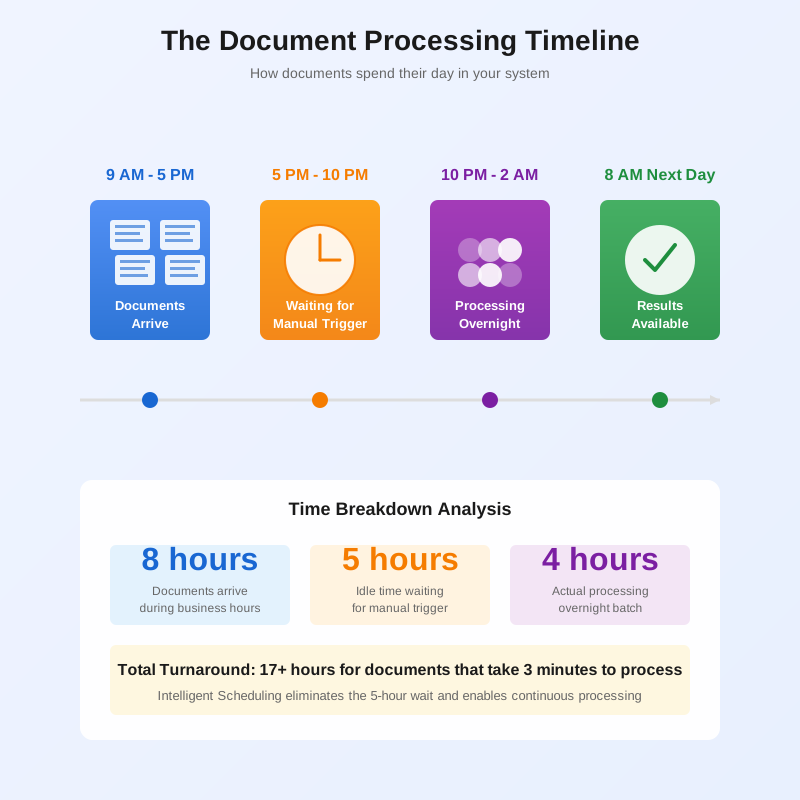
The real damage goes deeper than the salary line item. When processing runs only happen during the narrow windows when someone's available to click the button, you've created an artificial bottleneck in an otherwise automated system. Documents sit in queues for hours, sometimes days, waiting for their scheduled manual trigger. A vendor invoice submitted at 9 AM doesn't get processed until the evening batch run. The extracted data doesn't hit the ERP until the next morning. Approval workflows can't start until business hours resume. What could have been a two-hour turnaround becomes a 24-hour delay.
These delays compound across the organization. Accounts payable can't take advantage of early payment discounts because invoices don't get processed fast enough. Procurement can't track spending in real time because purchase orders sit in processing queues. Month-end close gets pushed later and later because someone needs to stay late running the final reconciliation batches.
And then there's the accuracy problem that nobody talks about. When humans manually trigger batch processes at the end of long workdays, mistakes happen. Someone processes the wrong folder. A batch gets run twice. Files get missed entirely. The evening invoice run fails at 11:30 PM, but nobody notices until 8 AM the next morning when they check the results. That's eight hours of lost processing time that needs to be made up, creating a cascading delay for the rest of the day.
The 3 AM problem exists because of a fundamental conflict in how document processing systems are designed versus how businesses actually operate.
Modern document AI platforms are powerful. They can process hundreds of documents per minute, extract data with high accuracy, validate against business rules, and push results into downstream systems. But this power comes with a price: resource consumption. Processing 800 invoices simultaneously requires significant computing resources, database connections, API calls, and network bandwidth. Run that job during peak business hours when your team is actively using the same systems, and everything slows to a crawl.
So the solution seems obvious: run the heavy processing jobs during off-hours. After 6 PM when most employees have logged off. Before 6 AM when the day shift arrives. During that magical overnight window when your infrastructure sits mostly idle. It's the same logic behind running database backups and software updates at 2 AM. Use the capacity when nobody else needs it.
Except unlike backups and updates that can be fully automated, document processing batches still require human judgment. Which documents are ready to process? Should this batch include the invoices that arrived after the cutoff? Did accounting finish their manual review of the flagged items? Can we safely run the integration step, or should we wait for the ERP maintenance window to complete?
These questions turn "automatic processing" into "manually triggered processing that happens to run automatically once you start it." The technology is automated. The orchestration is still manual.
Different industries have their own versions of the 3 AM problem, each with its own operational quirks.
In banking, loan document processing happens in waves. Mortgage applications flood in throughout the day. Underwriters review and flag issues. By evening, there's a stack of documents ready for processing: income verifications, bank statements, credit reports, property appraisals. Someone needs to trigger the batch job that extracts all this data, validates it against lending criteria, and updates the loan origination system. Run it too early and you miss the documents that came in during the late afternoon. Run it during business hours and you bog down the systems that underwriters need for real-time decisioning. So it runs at 10 PM, manually triggered by whoever pulled the short straw that evening.
Insurance claims departments face a similar pattern. Claims arrive continuously. Adjusters work cases during the day. By close of business, there are hundreds of supporting documents waiting to be processed: repair estimates, medical bills, police reports, photos of damage. The processing job needs to run after hours to avoid impacting the claims management system during peak usage. But someone needs to verify that all critical documents are included in the batch before starting the job. A missed document means a delayed claim decision, which means an angry customer and a potential compliance issue.
Manufacturing and supply chain operations run into the same problem with purchase orders and shipping documents. Orders come in 24/7 from global suppliers. Shipping confirmations arrive at all hours. Customs documentation trickles in across time zones. The ERP system needs clean, processed data to maintain accurate inventory levels and production schedules. But running document processing jobs during the day interferes with the real-time transactional systems that keep the factory floor moving. So batches get processed overnight, manually triggered by operations staff working split shifts to cover the processing windows.
The pattern is universal: documents arrive continuously, processing needs to happen during low-usage periods, but human judgment is required to decide when to start the job. So companies end up with employees working odd hours just to click buttons.
There's a deeper problem hiding inside the 3 AM scenario. It's not just about inconvenient timing. It's about the fundamental approach to document processing that manual triggering encourages.
When processing requires human intervention to start, you naturally batch documents together to minimize the number of times someone needs to take action. Instead of processing invoices as they arrive, you collect them throughout the day and run one big batch in the evening. Instead of handling purchase orders individually, you accumulate them and process the stack overnight. It's more efficient for the human doing the triggering.
But it's terrible for the business consuming the processed data.
Batching creates artificial delays that have nothing to do with actual processing time. An invoice that arrives at 9 AM sits in a queue for 12 hours waiting for the evening batch to run. The processing itself takes three minutes. But from the vendor's perspective, it took 12 hours to get their invoice into your system. From accounting's perspective, they can't start the approval workflow until tomorrow morning. From cash flow management's perspective, they're looking at yesterday's data to make today's decisions.
This delay compounds when you consider that most document workflows involve multiple processing stages. Initial extraction happens in the evening batch. Validation runs in a separate overnight job. Integration with the ERP is scheduled for early morning to avoid peak transaction times. What should be a 10-minute end-to-end workflow gets stretched across 18 hours because each stage needs to be manually triggered at the optimal time for system resources.
Batching also creates capacity planning nightmares. When you process documents in large batches, you need enough infrastructure to handle the peak load of your biggest batch. If your evening run typically includes 800 invoices but occasionally hits 1,500 during month-end close, you need capacity for 1,500. That capacity sits mostly idle the rest of the time. You're paying for computing resources that are fully utilized for two hours per day and barely touched the other 22 hours.
The alternative approach, continuous processing, only makes sense when you can fully automate the orchestration. Process each document as it arrives. Run validation immediately after extraction. Push data to integrated systems in real time. This smooths out your resource usage, eliminates artificial delays, and provides up-to-the-minute data visibility. But it requires the system to make its own decisions about when to process what, without waiting for a human to give permission.
That's where intelligent scheduling comes in.
When most people hear "scheduling," they think of cron jobs and task schedulers. Set a specific time, run a script, repeat. Process invoices every day at 11 PM. Run validation checks at 2 AM. Update the ERP at 6 AM. It's automated in the sense that you don't need to manually trigger it each time. But it's dumb automation. The schedule runs whether there's work to do or not. It can't adapt to changing conditions. It doesn't optimize based on current system load or business priorities.
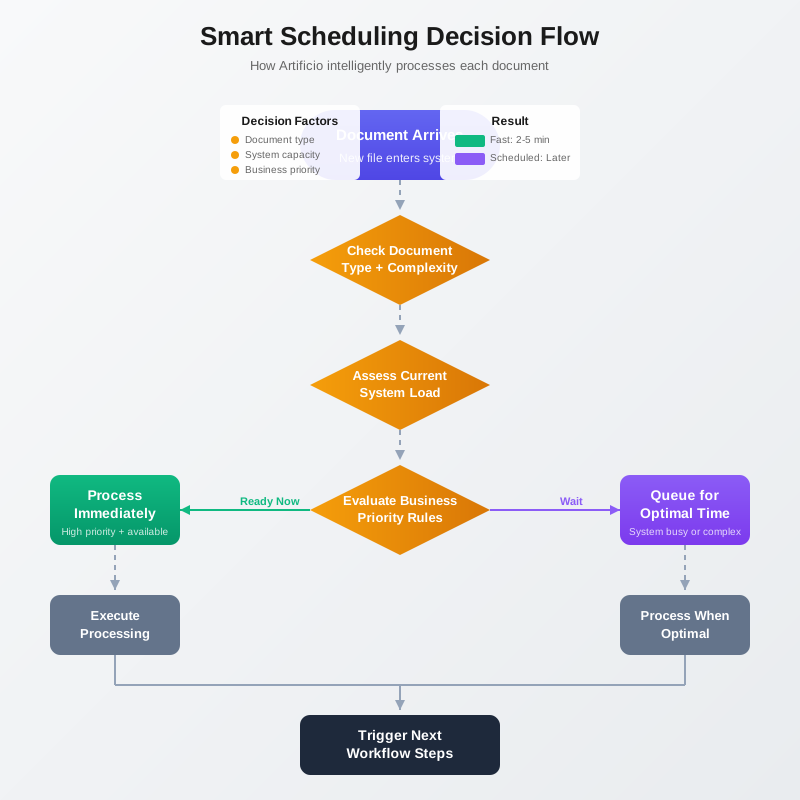
Intelligent scheduling is different. It's automation with decision-making built in. Instead of blindly following a fixed schedule, the system evaluates conditions and makes smart choices about when and how to process documents.
Here's what that looks like in practice.
A purchase order arrives in the system at 2:17 PM. An intelligent scheduler doesn't wait for the evening batch. It looks at current system load and sees that processing resources are available. It checks processing history and knows this supplier's documents typically process cleanly without exceptions. It verifies that the procurement system isn't in the middle of a high-priority transaction. Everything looks good, so it processes the document immediately. Total time from receipt to ERP integration: four minutes.
Later that day, at 4:45 PM, a complex multi-page contract arrives requiring extensive data extraction. The scheduler recognizes this document type typically requires 15 minutes of processing time and significant computing resources. It also sees that system usage is high as employees wrap up their workday activities. Instead of starting immediately and potentially slowing down other operations, it queues the document for processing at 7 PM when usage typically drops. The user receives a notification: "Your document is scheduled for processing at 7:00 PM. You'll receive results by 7:20 PM."
At 11 PM, the scheduler notices that 147 invoices have accumulated in the queue, all ready for processing. Instead of processing them one at a time, it dynamically creates an optimized batch, grouping similar document types together to improve processing efficiency. It runs the batch, but monitors progress continuously. When it detects that 12 invoices are hitting validation errors that will require human review, it immediately routes those to an exception queue and continues processing the clean documents. No wasted processing time. No delayed results waiting for problem documents to be manually resolved.
The next morning is month-end close. The scheduler knows this because it's been trained on historical patterns. It proactively allocates additional processing capacity, knowing that volume typically spikes. When the inevitable surge of last-minute invoices arrives, the system is ready. Documents get processed as fast as they come in. No bottlenecks. No emergency requests to IT for more resources. No finance team scrambling to manually trigger extra batch runs.
This is intelligent scheduling: context-aware, adaptive, and optimized for business outcomes rather than rigid timetables.
Intelligent scheduling isn't a single feature. It's a collection of capabilities working together to automate the orchestration of document workflows.
The first capability is trigger intelligence. The system needs to know when to process documents without being explicitly told. This means understanding different trigger conditions beyond simple time-based schedules.
Document arrival is an obvious trigger. A new file lands in the processing queue. But not every arrival should trigger immediate processing. A single invoice might process right away. A batch of 500 invoices might wait to accumulate a few more before running to optimize throughput. The system needs to make this judgment based on document volume, type, and current system conditions.
Dependency triggers are more sophisticated. A document can't be processed until another step completes. You can't validate extracted data until extraction finishes. You can't integrate into the ERP until validation passes. The scheduler needs to track these dependencies and automatically trigger the next step when prerequisites are met. No human needs to check if the previous job finished. The system knows and acts accordingly.
Business event triggers tie document processing to actual business activities. Month-end close starts, so invoice processing priority increases. A loan application moves to underwriting, so supporting document processing accelerates. A customer service ticket escalates, so related claim documents get expedited. The scheduler listens for these business events and adjusts processing priorities dynamically.
The second capability is load optimization. Processing documents efficiently means balancing speed against resource consumption.
An intelligent scheduler monitors system resources continuously. CPU utilization, memory availability, database connections, API rate limits, network bandwidth. When resources are abundant, processing runs at full speed. When the system is under load from other activities, document processing throttles back to avoid impacting user-facing operations. This happens automatically, without human intervention.
But optimization goes beyond resource monitoring. It includes smart batching decisions. Sometimes processing documents individually is fastest. Sometimes grouping similar documents together improves throughput. Sometimes splitting a large batch into smaller parallel jobs maximizes resource utilization. The scheduler makes these decisions based on document characteristics, current load, and historical performance data.
Parallel processing coordination is particularly important. If you have 1,000 invoices to process, should you process them sequentially, in parallel batches of 100, or fully parallel across all available workers? The answer depends on document complexity, available resources, and downstream system capacity. An intelligent scheduler figures this out dynamically and adjusts the processing strategy in real time.
The third capability is business-aware prioritization. Not all documents are equally important. Not all processing jobs can wait until the middle of the night.
Intelligent scheduling allows you to define business rules for prioritization. Invoices from preferred vendors get expedited processing. Loan documents for applications near closing date move to the front of the queue. Claims with injury reports get processed before property damage claims. Customer-facing documents take priority over internal paperwork. These rules get applied automatically without requiring manual intervention to identify priority documents.
But prioritization isn't just about following predefined rules. The system should learn from patterns. If contracts from a specific law firm always require urgent processing, the system picks up on that pattern and automatically prioritizes future contracts from that firm. If procurement always needs supplier invoices processed within four hours of receipt, the system learns that expectation and schedules accordingly.
SLA enforcement is another aspect of priority management. When a document has a processing deadline, the scheduler works backward from that deadline to determine the latest time processing can start while still meeting the commitment. Documents approaching their deadlines automatically move to high-priority status. If meeting an SLA requires pulling forward a scheduled batch or allocating additional resources, the system makes that decision automatically.
The fourth capability is continuous optimization. Intelligent scheduling gets smarter over time by learning from actual processing patterns.
The system tracks key metrics for every processing job. How long did extraction take? What was the error rate? How many documents required manual review? What was the end-to-end processing time? This data builds a historical baseline that informs future scheduling decisions.
Machine learning models identify patterns in this data. They learn that certain document types process faster at specific times of day. They discover that batches larger than 200 documents see diminishing returns in processing efficiency. They recognize that validation jobs scheduled immediately after extraction reduce overall turnaround time compared to delayed validation runs.
This learning feeds back into the scheduling logic. A document type that historically takes 12 minutes to process gets allocated appropriate time and resources. A supplier whose invoices consistently fail validation gets flagged for earlier quality checks. A processing window that historically performs well gets more aggressive utilization.
The system also learns from failures and adjusts. If batch jobs scheduled at 11 PM frequently fail due to database maintenance conflicts, future jobs automatically shift to 10 PM or midnight. If parallel processing of a specific document type causes resource contention issues, the system reverts to sequential processing for that type. This continuous adaptation means scheduling gets more efficient and reliable over time without requiring constant manual tuning.
Let's walk through what intelligent scheduling looks like in actual business scenarios, starting with the accounts payable department we opened with.
The company processes vendor invoices, employee expense reports, and supplier credit memos. Before intelligent scheduling, the workflow looked like this: documents accumulated in email inboxes and shared folders throughout the day. At 6 PM, an accounting specialist manually moved files into the processing queue, organized them by type, and triggered three separate batch jobs. The specialist stayed late to monitor initial processing, verify results, and handle any immediate failures. Final validation and ERP integration ran as scheduled jobs at 2 AM and 6 AM respectively.
After implementing intelligent scheduling, the workflow transforms completely. Vendor invoices arrive via email and automatically route to the processing system. The scheduler evaluates each invoice as it arrives. Simple, standard invoices from known vendors process immediately because the system recognizes them as low-risk, high-confidence documents. Total time from email receipt to ERP posting: six minutes.
More complex invoices get queued for batch processing during low-usage periods. But the scheduler doesn't wait for 6 PM. It monitors system load continuously and processes accumulated documents whenever resources become available. On a slow afternoon, it might process a batch at 2:30 PM. On a busy day, it waits until 7 PM. The decision is based on actual conditions, not arbitrary clock times.
Employee expense reports follow a different pattern. These typically arrive in bursts after business travel or at month-end. The scheduler recognizes these patterns and dynamically allocates processing capacity. When it detects the monthly expense report surge starting to build, it proactively creates processing capacity by deferring lower-priority document types. Critical expense reports get processed within hours instead of waiting for the next scheduled batch.
Supplier credit memos are rare but time-sensitive. Each one represents a potential payment reduction that accounts payable wants to capture quickly. The scheduler gives these documents automatic high-priority status and processes them immediately regardless of current system load. The small volume means they don't significantly impact other operations, and the business value of fast processing justifies the resource allocation.
The validation and integration stages no longer run on fixed schedules. Instead, they trigger automatically based on upstream completion. When document extraction finishes, validation starts immediately if resources are available, or queues for the next available slot if the system is busy. When validation completes, ERP integration happens in near real-time during business hours or batches overnight based on ERP system policies and transaction volume.
The accounting specialist who used to stay late triggering batches now leaves at 5:30 PM with everyone else. The processing still happens, now without human intervention. When she arrives the next morning, processed documents are waiting for review, exceptions are clearly flagged, and everything's already integrated into the ERP. She spends her time on actual accounting work instead of babysitting automated systems.
Let's look at another scenario: a mortgage lender processing loan applications.
The loan origination workflow involves dozens of document types: credit reports, income verifications, bank statements, tax returns, property appraisals, title reports. These documents arrive asynchronously as borrowers submit them and third-party services deliver results. Traditional batch processing created chaos. Documents sat in queues waiting for scheduled processing runs. Loan officers couldn't access complete information because some documents were processed while others were still pending. Underwriters made preliminary decisions based on incomplete data, then had to revisit applications when new documents finished processing.
With intelligent scheduling, each document type has its own processing logic optimized for its characteristics and importance to the loan decision.
Credit reports arrive from automated credit bureau APIs. They're standardized, consistent, and critical to every loan decision. The scheduler processes these immediately upon receipt, regardless of time of day. Total turnaround: under one minute from API response to loan origination system update. Loan officers see credit data in real-time.
Income verification documents vary widely in format: W2 forms, pay stubs, employer letters, tax returns. The scheduler groups these by type and processes them in optimized batches. Simple W2s process quickly during business hours as they arrive. Complex tax returns with multiple schedules queue for evening processing when the system can allocate more resources for the detailed extraction and validation they require.
Bank statements are particularly interesting. They're high-value documents that significantly impact loan decisions, but they're also large files that require substantial processing time. The scheduler uses a two-stage approach. Upon receipt, it runs a quick preliminary extraction to capture account balances and recent transaction summaries. This provides loan officers with essential information within minutes. The full detailed transaction analysis happens later during off-peak hours when the system can dedicate resources to processing hundreds of transaction lines without impacting user experience.
Property appraisals are time-sensitive but arrive unpredictably. The scheduler monitors the loan pipeline and knows which applications are approaching closing dates. When an appraisal arrives for a loan closing in three days, it gets priority processing. An appraisal for a loan in early stages processes during the next convenient batch window. This dynamic prioritization happens automatically based on loan status data pulled from the origination system.
The result is dramatically faster loan processing. Documents no longer wait in queues for scheduled batch runs. Data reaches loan officers and underwriters in near real-time. Applications move through the pipeline continuously instead of in fits and starts tied to batch processing schedules. The lender reduced average time-to-decision by 40% without adding staff or increasing infrastructure costs. They simply let the scheduling system orchestrate document processing intelligently instead of relying on manual triggers and rigid schedules.
Intelligent scheduling doesn't mean invisible scheduling. Business users need visibility into what the system is doing and control over how it behaves.
A proper scheduling system provides real-time monitoring dashboards that show current processing status. How many documents are in the queue? What's actively processing right now? What's scheduled for later? How long until queued documents will be processed? This visibility eliminates the anxiety of submitting documents into a black box and hoping they eventually get processed.
The dashboard should also show processing history and performance metrics. Average processing times for different document types. Success rates. Error patterns. Resource utilization trends. This data helps business users understand system performance and identify opportunities for optimization.
But monitoring alone isn't enough. Users need control mechanisms to override automated decisions when business circumstances require it.
Manual priority overrides let users bump specific documents to the front of the queue. A critical customer contract needs processing immediately? Override the schedule and process it now. An invoice deadline changed? Adjust its priority status and let the scheduler re-optimize the processing plan.
Schedule adjustments allow users to modify processing windows based on changing business needs. Maybe you need to run a large batch during business hours to meet an urgent deadline, accepting the performance impact on other users. Or maybe you need to pause scheduled processing temporarily because the downstream ERP system is undergoing maintenance. The system should accommodate these adjustments while still applying intelligent scheduling logic within the modified constraints.
Processing policies provide ongoing control over scheduling behavior. You can define rules like "always process documents from vendor X immediately" or "never process document type Y during business hours" or "complete all invoices received before 3 PM same day." The scheduler follows these policies automatically while optimizing everything else.
Emergency controls give users the ability to stop processing when something goes wrong. If you discover a problem with your validation rules that's causing widespread errors, you need to pause processing immediately, fix the issue, and resume without losing track of queued documents or requiring manual reprocessing. The scheduling system manages this gracefully.
This combination of monitoring and control gives business users confidence in automated scheduling. They're not surrendering control to an opaque algorithm. They're leveraging intelligent automation while maintaining oversight and the ability to intervene when necessary.
Moving from manual batch triggering to intelligent scheduling doesn't require ripping out existing systems and starting over. It's a gradual transition that can happen incrementally.
The first step is usually implementing time-based scheduling for existing batch jobs. Instead of someone manually clicking "process" at 10 PM every night, schedule it to run automatically at 10 PM. This eliminates the need for staff to work odd hours but doesn't yet optimize processing timing or enable continuous processing. It's basic automation, but it's a start.
The next step adds condition-based triggers. Instead of processing at 10 PM regardless of whether there's work to do, only run the job if documents are waiting in the queue. If the queue is empty, skip the run. If there are only five documents, maybe process them immediately instead of waiting. This reduces wasted processing cycles and begins to decouple processing from rigid schedules.
Volume-based optimization comes next. Instead of processing everything in one massive batch, the system starts making smart decisions about batch sizes and parallel processing. Split large batches into manageable chunks. Group similar documents together. Spread processing across available resources to maximize throughput. This improves processing efficiency and reduces completion times.
Priority-based scheduling adds business awareness. Critical documents get processed faster. Low-priority documents can wait. Processing plans optimize not just for efficiency but for business outcomes. This is where you start seeing real operational benefits beyond just automating button-clicking.
Finally, continuous processing with full intelligent scheduling transforms the workflow completely. Documents process as they arrive when appropriate. The system monitors conditions continuously and makes real-time optimization decisions. Machine learning improves scheduling over time. Business rules and priorities integrate seamlessly. This is the end state where automation truly replaces manual orchestration.
Most organizations move through these stages over several months, starting with their highest-value or most problematic document workflows and gradually expanding intelligent scheduling to other processes. The incremental approach minimizes disruption and allows teams to learn and adapt as they go.
The 3 AM problem is really a metaphor for a larger issue in business automation: the gap between automating individual tasks and automating entire workflows. We're incredibly good at the former and surprisingly bad at the latter.
We've automated data extraction from documents. We've automated validation against business rules. We've automated integration with downstream systems. But we've left the orchestration, the decision about when to do what, largely in human hands. So we end up with people working odd hours to manually trigger automated processes. The automation is incomplete.
Intelligent scheduling closes this gap. It automates the orchestration layer. It makes decisions about when to process documents, how to allocate resources, what to prioritize, and how to optimize for business outcomes. It doesn't just automate tasks. It automates workflows.
This matters because the real value of automation isn't just doing things faster or cheaper. It's enabling new ways of working that weren't possible with manual processes. When document processing requires manual triggering and batch windows, you're stuck with delayed data, rigid schedules, and artificial bottlenecks. When intelligent scheduling orchestrates everything automatically, you can move to continuous processing, real-time data availability, and dynamic optimization.
Accounts payable can move from processing invoices once per day to processing them as they arrive, enabling faster payment cycles and better cash flow management. Loan origination can shift from batch-based decisioning to continuous underwriting, reducing time-to-close and improving customer experience. Claims processing can move from overnight batch runs to same-day resolution, decreasing operational costs and increasing customer satisfaction.
These improvements don't come from processing documents faster. They come from removing the artificial delays caused by manual orchestration and fixed batch schedules. Intelligent scheduling eliminates those delays by making the orchestration layer fully automatic.
The technology to process documents intelligently has existed for years. What's been missing is the technology to schedule that processing intelligently. Now we have both. The question isn't whether intelligent scheduling is possible. It's how quickly your organization can implement it and start capturing the benefits.
Because somewhere right now, someone at your company is sitting at their desk at midnight, waiting to click a button to start a process that should have started itself hours ago. That's the 3 AM problem. And it's completely solvable.

Head IT Operations - Co Founder of Artificio
See it in your SAP environment
Bring us a document, a process, or a bottleneck. We'll show how Artificio captures, validates, and posts into SAP — then scale from there.
Security & compliance
ISO 27001:2013 certified, SOC 2 Type 2 compliant, GDPR and HIPAA ready. Every agent action is logged, auditable, and runs in isolated environments.