The lunch meeting just ended. You've got a promising new prospect's business card in one hand and the credit card receipt in the other. The conversation went well. They're interested. You'll follow up tomorrow.
Back at the office, the administrative work starts. Type the contact information into Salesforce. Every field manually entered from that tiny card: name, title, company, phone number, email address, office location. Then open the expense system. Fill out the expense report. Merchant name, date, amount, expense category, attach a photo of the receipt, write a description. Submit for approval. Two separate data entry tasks from one 45-minutes meeting.
What if both those tasks just disappeared? Not simplified. Not streamlined. Gone.
The Field Work Problem Nobody Talks About
Sales reps, consultants, and field service teams spend their days meeting clients and prospects. Each interaction creates two administrative burdens that happen after the productive work ends.
First burden: contact management. Business cards stack up on desks, stuffed into wallets, photographed with personal phones. The information needs to get into the CRM, but typing from tiny print tests everyone's patience. Miss one digit in a phone number and the follow-up call fails. Transpose two letters in an email address and the proposal never arrives.
Second burden: expense tracking. Receipts accumulate throughout the week. Some get photographed immediately. Others disappear into jacket pockets. Month-end arrives and the scramble begins. Dig through wallet photos, match receipts to credit card statements, categorize each expense, justify the amounts, submit everything before the deadline.
Both tasks pull people away from actual client work. The meeting happened days ago, but the administrative cleanup lingers. Productive time gets consumed by keyboard work that a computer should handle.
Two Photos, Zero Data Entry
The dual-capture workflow changes the equation completely. Photograph the business card. Photograph the receipt. Both process automatically while you're driving back to the office.
Your phone captures both images at the table. The business card shows prospect details across an unconventional layout with decorative fonts. The receipt displays merchant information, itemized charges, and credit card details in thermal printer text. Neither requires careful framing or perfect lighting.
Processing starts immediately. The business card image goes to Artificio's extraction system, which identifies every text element regardless of card design or layout. Name appears at the top in script font. Company name runs vertically along the left edge. Email address sits near the bottom in six-point type. Title, phone, and physical address scatter across the remaining space in three different fonts.
The system extracts all of it. Structured data emerges from visual chaos: prospect name, job title, company name, phone number, email address, physical address. Every field separated and labeled, ready for CRM import.
Simultaneously, the receipt image gets processed. Merchant name extracted from the header. Transaction date and time pulled from the timestamp. Total amount identified. Card last four digits captured. If the receipt shows itemization, those details get extracted too: number of guests, individual charges, tax breakdown, tip amount.
Within seconds, both captures finish processing. Structured contact data from the business card. Structured expense data from the receipt. Neither required manual typing. 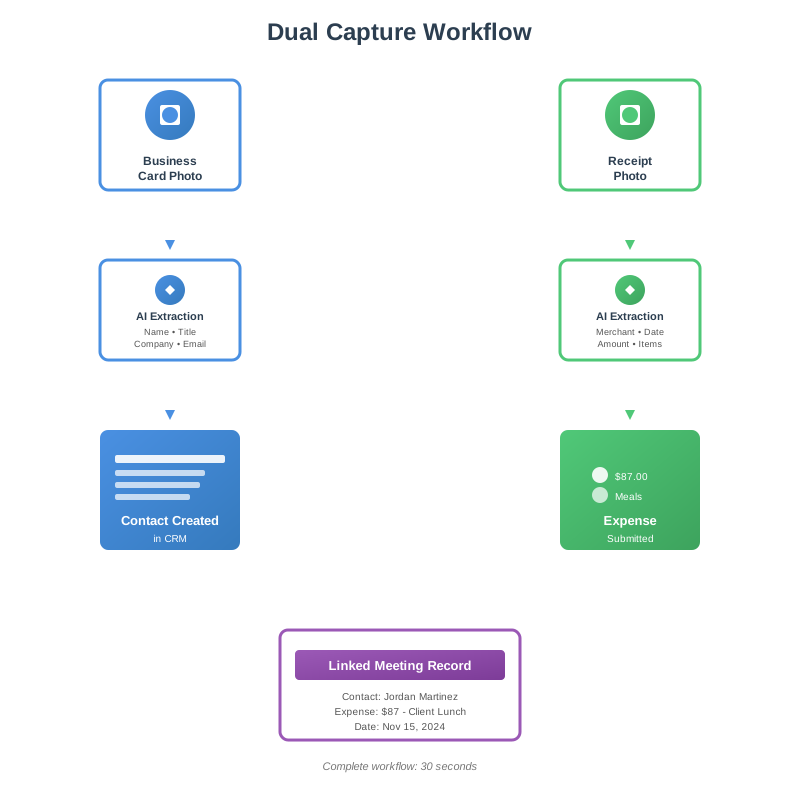
Business Card Extraction: Reading Every Layout
Business cards come in thousands of variations. Vertical layouts. Horizontal formats. Text running along edges. Logos consuming half the space. Decorative borders. Unusual fonts. Background patterns.
Traditional OCR systems choke on this variability. They expect standard document layouts with text in predictable locations. Business cards break every assumption. The result: extraction fails, or worse, mixes up fields. Email becomes phone number. Title becomes company name.
Artificio's extraction engine doesn't rely on layout assumptions. It reads the entire card, identifies every text element, then applies contextual understanding to label each piece correctly. An email address gets recognized by its format, not its position. A phone number gets identified by digit patterns and formatting, not by appearing in an expected location.
The prospect's business card from lunch had their name in large script font at the top. Company name appeared vertically along the left edge in all caps. Title sat beneath the name in smaller text. Three phone numbers appeared clustered together: office, mobile, and main company line. Email address hid near the bottom in tiny font. Physical address ran along the bottom edge split across two lines.
Every field extracted correctly. The system understood name context from capitalization and positioning. Company name got identified despite vertical orientation. All three phone numbers separated and labeled by type. Email recognized by format. Address reconstructed from split lines.
The extracted data flows directly to your CRM. The system creates a new contact record with every field populated. Source gets tagged automatically: "Meeting - Client lunch 11/15". No manual typing. No transcription errors. No delayed follow-up because contact details got lost.
Credit Card and Receipt Extraction: Reading the Expense
Receipt formats vary almost as much as business cards. Different merchants use different layouts. Some print itemized details. Others show only the total. Credit card receipts include card information and authorization codes. Cash register receipts have different structures than restaurant checks.
The extraction needs to handle all variations. Merchant name appears in different positions and fonts. Transaction dates use different formats: MM/DD/YYYY, DD/MM/YYYY, month spelled out, month abbreviated. Amounts include currency symbols, thousand separators, decimal points in different conventions.
The lunch receipt showed the restaurant name at the top in decorative font. Date appeared as "Nov 15, 2024" below that. Itemized charges listed two entrees, an appetizer, and beverages. Subtotal, tax, and suggested tip amounts displayed separately. Total appeared twice: once for the pre-tip amount, once showing the final total with tip written in. Card last four digits printed near the bottom with an authorization code.
Extraction captured everything with structure. Merchant name pulled from the header regardless of font style. Date converted to standard format. Each line item separated: menu items, prices, quantities. Tax amount extracted. Tip amount captured from the handwritten addition. Final total identified. Card details recorded.
The structured data triggers expense submission automatically. The system creates an expense entry with merchant name, transaction date, amount, and payment method pre-filled. Category gets detected automatically from merchant type. Restaurant automatically categorizes as "Meals". Uber becomes "Ground Transportation". Airport parking becomes "Travel - Parking".
Receipt image attaches to the expense record automatically. No manual photo upload. No separate attachment step. The original image preserves all details for audit purposes while the extracted data drives the workflow.
The Connected Workflow: Linking Everything Together
Business card extraction and receipt extraction don't operate in isolation. Both happened during the same client interaction. Both should connect to that shared context.
The system links them automatically. Both captures get tagged with the same date and location metadata from your phone. The business card creates a contact record. The receipt creates an expense record. Behind the scenes, they connect: expense associated with the new contact, meeting activity logged automatically, notes field populated with "Client lunch with [prospect name] at [restaurant name]".
This linking matters for several reasons. Sales managers see which prospects justify entertainment expenses. Finance teams understand expense context without manual explanations. CRM activity history shows the complete picture: meeting scheduled, meeting occurred, contact added, expense filed. All from two photos taken at the table.
The automation extends beyond simple data entry. When the expense gets submitted, approval routing happens automatically based on amount and category. Meals under $75 auto-approve. Meals over $75 route to your manager. Client entertainment over $150 requires additional justification, which the system prompts you to provide through a quick mobile notification.
Policy Enforcement Through Data Series
Every company has expense policies. Meal limits per person. Entertainment thresholds. Approved vendor lists. Per diem rates varying by location. Traditionally, these policies live in PDF documents that nobody references until expense reports get rejected.
Artificio's Data Series feature turns static policies into active validation rules. Upload your expense policy document once. The system extracts the rules and converts them into automated checks that run against every expense submission.
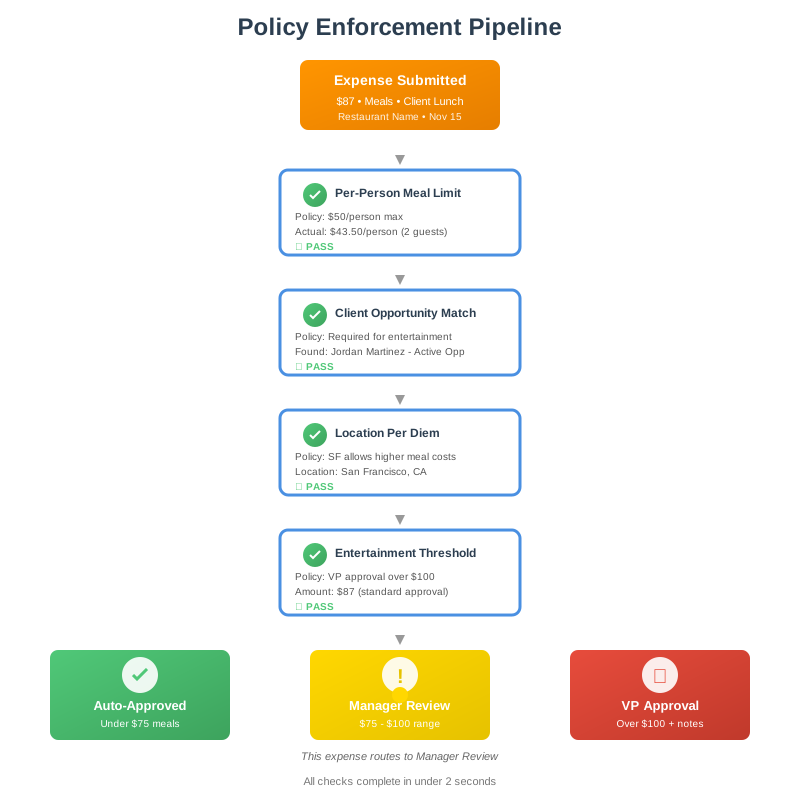
The lunch expense from earlier gets checked against multiple policy rules automatically:
Meal expense limit: policy states $50 per person for client meals. The receipt showed two entrees plus shared appetizer and drinks totaling $87. The system calculates $43.50 per person, under the limit. Check passes.
Client matching: the expense claims client entertainment category, which requires an associated opportunity in Salesforce. The system finds the newly created contact record linked to the expense. Contact associated with active opportunity in pipeline. Check passes.
Entertainment threshold: policy requires VP approval for client entertainment over $100. Total came to $87. Standard manager approval applies. Check passes.
Location-based validation: company has different limits for different cities. Your location data shows you're in San Francisco, where higher meal costs get recognized. The $87 total would trigger review in smaller markets, but passes in SF. Check passes.
Approved vendor verification: for certain expense categories like hotels and car rentals, the company maintains approved vendor lists. Restaurants don't appear on the approved list requirement, so this check doesn't apply. No restriction.
All validation happens before the expense reaches your manager's approval queue. Policy compliance gets verified automatically. Rejections for policy violations happen immediately with clear explanations, not three days later after manual review. Compliant expenses flow through quickly.
When violations occur, the system explains them clearly. "Meal expense of $63 per person exceeds $50 limit for non-client meals. Please categorize as client entertainment and link to opportunity, or reduce claimed amount to policy limit." No mysterious rejections. No buried policy references. Clear action items.
Mobile-First Reality
This entire workflow happens on your phone. Not desktop software you access back at the office. Not a web portal you log into later. Your phone, at the moment the expenses occur.
You're still at the restaurant table when both photos get taken. The business card sits next to your water glass. The receipt just arrived with the credit card. Pull out your phone. Open the app. Photograph the business card. Photograph the receipt. Put your phone away. The conversation continues.
Processing happens while you're walking to your car. By the time you start the drive back to the office, notifications arrive: "Contact added to Salesforce: Jordan Martinez, VP Operations at TechVenture Solutions" and "Expense submitted: $87.00, Restaurant Name, awaiting approval."
The mobile experience matters because field work happens in the field. You're not at a desk with a keyboard and monitor. You're in parking lots, coffee shops, client offices, airports, restaurants. The friction of "I'll handle this later" creates the backlog that leads to month-end expense scrambles and lost business cards.
Immediate capture eliminates the backlog before it forms. The work gets done at the moment of creation. No accumulation. No delayed processing. No weekend spent sorting through wallet photos trying to remember which receipt belongs to which client meeting.
The Productivity Math
Field teams average 8-12 client meetings per week. Each meeting generates contact data and expense data. Traditional processing takes about 15 minutes per meeting: 7 minutes to enter contact information, 8 minutes to process the expense report.
Ten meetings per week equals 150 minutes of administrative work. Two and a half hours spent on data entry instead of client development. Multiply by four weeks: 10 hours monthly consumed by typing information that cameras already captured.
The dual-capture workflow reduces those 15 minutes to roughly 30 seconds. Time to pull out phone and photograph two items. The remaining work happens automatically. The time saving compounds: 10 meetings weekly × 14.5 minutes saved per meeting = 145 minutes weekly. Almost 10 hours reclaimed every month.
But time savings tell only part of the story. The bigger impact comes from timing and accuracy.
Timing: contacts get added to CRM within minutes of the meeting ending. Follow-up happens while the conversation remains fresh. The prospect receives your email that afternoon instead of three days later after you finally typed in their business card details. Speed creates momentum.
Accuracy: extraction eliminates transcription errors. Phone numbers don't get mistyped. Email addresses don't get transposed. Company names don't get abbreviated incorrectly. Expense amounts match receipts exactly. Categories get assigned consistently according to merchant type rather than whatever you remember the expense being when you finally process it two weeks later.
Compliance: expenses get submitted promptly instead of accumulating. Month-end doesn't become a scramble to photograph old receipts and reconstruct what each charge was for. Policy violations get caught immediately when they can be corrected, not after the fact when the transaction is long past.
Beyond Individual Productivity
The workflow benefits extend beyond individual time savings. Organizations gain visibility and structure that wasn't previously possible.
Sales operations teams see complete meeting records automatically: who met with whom, when, where, what was discussed (from meeting notes), what expenses occurred. Pipeline reviews become more thorough when every client interaction gets documented without relying on manual logging.
Finance teams get real-time expense data instead of month-end batch submissions. Cash flow forecasting improves. Budget tracking happens continuously. Anomaly detection catches unusual patterns immediately instead of during quarterly audits.
Compliance teams have complete audit trails. Every expense links to source documents (receipt images), contact records (who was involved), and meeting context (purpose of expense). Documentation exists by default rather than requiring manual assembly when audits arrive.
The automation creates data consistency that manual processes can't achieve. Contact information gets structured identically every time. Expense categories follow uniform rules. Policy compliance gets checked systematically. Manual processes introduce variation. Automated extraction eliminates it.
The Implementation Path
Getting started with dual-capture automation doesn't require massive integration projects or months of configuration. The foundation exists in Artificio's extraction platform.
Business card extraction is a standard document type. Point your camera at a card, extraction returns structured contact data. Feed that data to your CRM through API connections or integration platforms like Zapier. Contact creation happens automatically.
Credit card and receipt extraction works similarly. Photograph the receipt, extraction returns merchant details, amounts, dates, itemization. Feed that data to your expense system. Expense entry creation happens automatically.
Data Series for policy enforcement requires uploading your expense policy document once. The system extracts the rules: limits by category, approval thresholds, location-based variations, approved vendor lists. Those rules become validation logic applied to every expense automatically.
The workflow orchestration connects the pieces. When a business card gets extracted, create contact in CRM and tag with current date/location. When a receipt gets extracted from the same time/location, create expense and link to that contact. Route for approval based on detected category and amount.
Mobile access uses Artificio's API from your existing mobile app, or through a lightweight wrapper that handles camera capture and display results. No complex native development required.
Most organizations start with a pilot group. Choose a team that generates frequent expenses and manages many client contacts. Sales teams work well. Field service teams fit the pattern. Professional services consultants match the use case.
Run the pilot for 30-60 days. Measure time saved, accuracy improvements, expense submission timing, contact data quality. Compare against previous manual processes. The data typically shows clear ROI within the first month.
After validation, expand to other teams. The infrastructure scales easily because it's just API calls and data routing. Adding users doesn't require new deployments or additional configuration. The policies and extraction models apply uniformly across the organization.
What Changes When Administrative Work Disappears
Teams operating with dual-capture automation describe a different relationship with their work. The constant background awareness of administrative debt goes away. No mental note to "type in those business cards when I get back to the office." No accumulating stack of receipts needing processing before month-end.
The work gets done at the point of creation. Meeting ends, phone comes out, two photos taken, work complete. The cognitive load of deferred tasks disappears.
That mental space opens up for more valuable thinking. Follow-up planning happens while driving back from the meeting instead of getting displaced by administrative tasks. Client strategy discussions in team meetings focus on opportunities and relationships rather than spending 10 minutes reviewing who still hasn't submitted their expenses.
New habits form quickly. Sales reps photograph business cards immediately because they know it's faster than typing later and they won't lose the information. Field service teams capture receipts at the transaction moment because it's easier than reconstructing expenses from credit card statements at month-end.
The system becomes the path of least resistance. Manual data entry feels laborious after you've experienced instant capture and automatic processing. Going back seems unnecessary.
Organizations discover use cases beyond the initial implementation. Photographing vendor invoices for AP processing. Capturing event badges for attendee records. Recording whiteboard notes from planning sessions. The pattern extends: visual capture, automatic extraction, structured data, workflow automation.
The fundamental shift is treating cameras as data input devices rather than just documentation tools. Your phone's camera becomes a scanner that understands what it's reading and takes appropriate action. No human in the loop for routine data transfer. Just capture, process, route.
That capability changes what's possible in field operations. Administrative barriers that previously limited mobile productivity disappear. The office desk loses its monopoly on data entry. Work gets processed wherever it happens.
The expense report that builds itself isn't really about expense reports. It's about eliminating the gap between when work happens and when systems know about it. Dual capture makes that gap disappear for two of the most common administrative tasks in field operations.
Meeting happened. Contact captured. Expense filed. All from two photos taken at the table.



