

Blog
Automated Expense Processing from Photo to Accounting System
Automate expense reports instantly! Snap a photo, and the system reads, validates, and enters it into QuickBooks. Cut costs and eliminate manual data entry.

Blog
Automate expense reports instantly! Snap a photo, and the system reads, validates, and enters it into QuickBooks. Cut costs and eliminate manual data entry.
Your sales rep finishes a client dinner, pulls out their phone, and snaps a photo of the receipt. That's it. That's all they do.
By the time they get to the office the next morning, that receipt has been read, categorized, validated against company policy, and entered into QuickBooks as a complete expense entry. No expense report. No data entry. No back-and-forth with finance about missing information. No logging into a portal to fill out forms.
This isn't a fantasy about some future technology. It's what automated expense processing looks like right now. And it changes how companies think about one of the most universally hated tasks in business.
Let's be honest about something. Expense reports are a terrible use of human time. Everyone knows it. The employee who has to fill them out knows it. The manager who has to approve them knows it. The finance person who has to process them definitely knows it.
Think about what actually happens with a typical business expense. Someone buys something for work purposes. They keep the receipt, assuming they don't lose it. Days or weeks later, they sit down to do their expense report. They dig through their wallet or email for receipts. They manually type information from each receipt into a form. They try to remember what category each expense belongs to. They submit the report and wait.
Then someone in finance reviews it. They check that all required fields are filled in. They verify the amounts look reasonable. They make sure the categories are correct. They might send it back for corrections. Eventually, they manually enter the approved expenses into the accounting system.
For a single receipt, this process might involve 15-20 minutes of total human effort across multiple people. Multiply that by hundreds or thousands of receipts per month, and you're looking at a significant chunk of payroll going toward data entry that adds zero value to the business.
The math gets worse when you factor in errors. Manual data entry has error rates somewhere between 1% and 5%. Those errors create downstream problems in financial reporting, tax filings, and audit trails. Fixing them costs even more time. 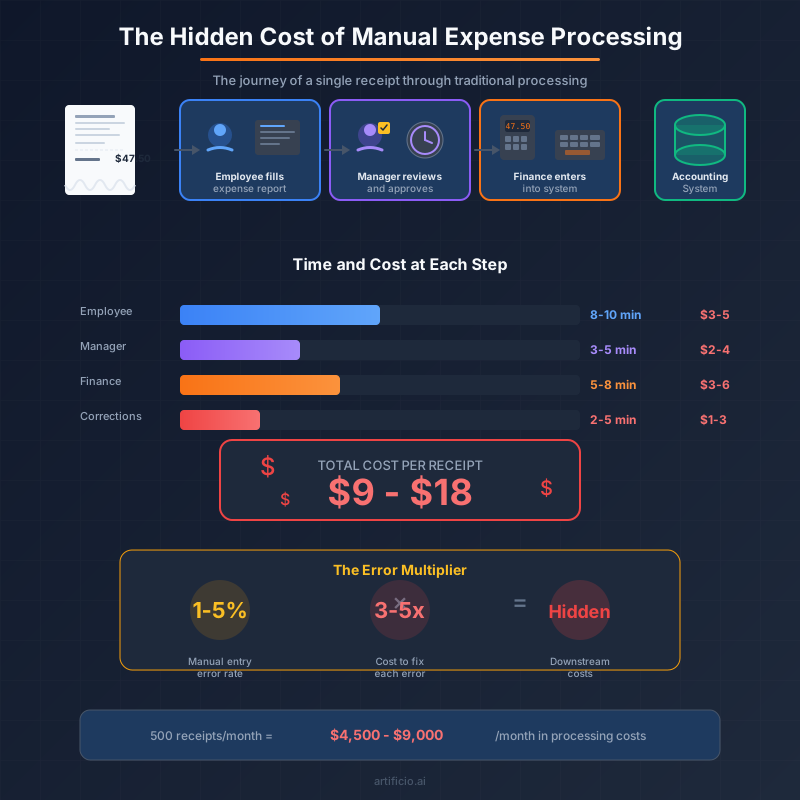
Here's the new workflow. Employee takes a photo of a receipt. Everything else happens automatically.
The system reads the receipt image and extracts all the relevant information. Vendor name, date, total amount, line items, tax, tip if applicable. This happens in seconds, not minutes, and it works whether the receipt is crisp and clean or crumpled and faded.
Once the data is extracted, validation rules kick in. Does the amount fall within policy limits? Are all required fields present? Does the expense category make sense for this vendor? Is this a duplicate of something already submitted? The system checks all of this automatically and flags anything that needs human attention.
For expenses that pass validation, the workflow continues without stopping. The system creates an expense entry in QuickBooks with all the relevant details already populated. The receipt image gets attached for documentation. Categories get assigned based on vendor and expense type. The entry appears in your accounting system ready for the next financial close.
Expenses that fail validation get routed appropriately. Over the limit? Goes to a manager for approval. Missing information? The employee gets a notification asking them to provide what's needed. Potential duplicate? Gets flagged for review before processing.
The whole thing runs without anyone in finance touching routine submissions. Their time gets freed up for exceptions, analysis, and actual financial work instead of data entry.
This works because of three capabilities working together seamlessly.
First, there's intelligent document extraction. A pre-trained receipt extractor understands how to read receipts without any setup or configuration. It knows where to find the total, how to identify line items, how to parse dates in different formats, and how to handle the variations you see across different types of receipts. Restaurant receipts look different from office supply receipts look different from gas station receipts. The extractor handles all of them.
The extraction piece is genuinely impressive when you dig into it. Receipts are messy documents. They're often photographed at angles, in poor lighting, with wrinkles and folds. The text might be faded or partially cut off. Different merchants use completely different formats and layouts. A system that can reliably extract accurate data from this chaos has to be pretty sophisticated.
Second, there's policy validation. This is where you encode your company's expense rules into the system. What's the maximum amount for meals? What categories require receipts over a certain threshold? What vendors are approved for certain expense types? These rules get checked automatically against every submission.
Validation catches problems before they become problems. An expense that would have been rejected three weeks later during month-end close gets flagged immediately. The employee can fix it while they still remember what the expense was for. Finance doesn't waste time reviewing submissions that obviously don't comply with policy.
Third, there's direct integration with your accounting system. The system doesn't just extract data and present it for someone to manually transfer. It creates the actual expense entries in QuickBooks, complete with proper categorization, attached documentation, and all the metadata you need for reporting and compliance.
This integration is what completes the automation. Without it, you've just moved the data entry from the employee to someone else. With it, the data entry disappears entirely for routine expenses. 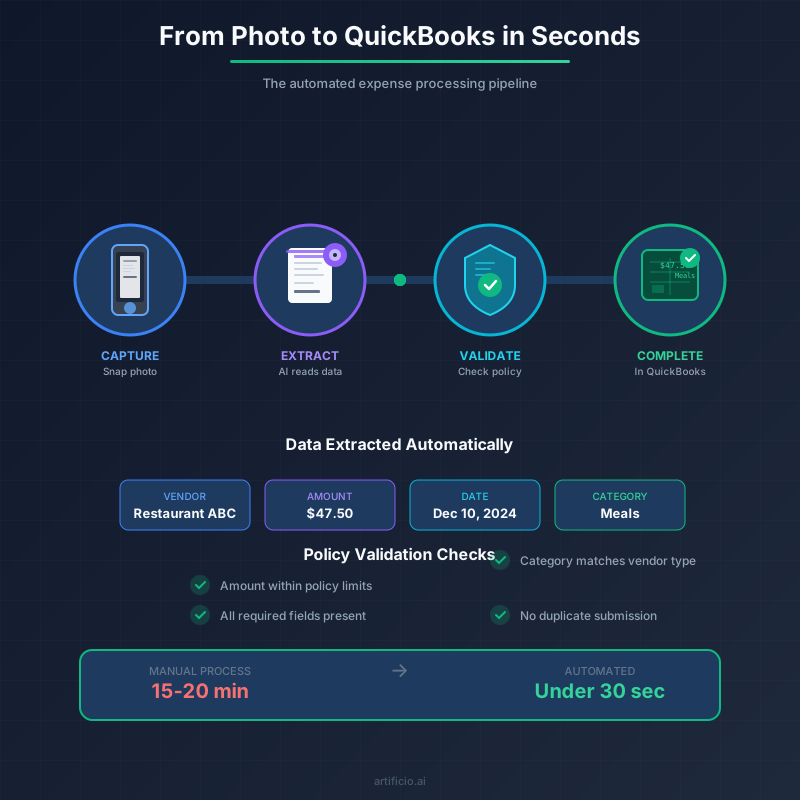
Let's talk numbers, because the business case here is straightforward.
Processing an expense receipt manually costs somewhere between $5 and $15 in labor, depending on your fully-loaded employee costs and how efficient your current process is. That includes the employee time to fill out the report, the manager time to approve it, and the finance time to process and enter it.
Automated processing costs pennies per receipt. The math works even if you're only processing a handful of expenses per month. It works dramatically better at scale.
A company processing 500 expense receipts per month might spend $2,500 to $7,500 monthly on manual processing. Automation drops that to maybe $50. That's $30,000 to $90,000 per year in savings on a process that nobody enjoys anyway.
But the real savings are harder to quantify. How much is it worth to close your books faster because you're not waiting for expense reports to trickle in? How much value comes from having real-time visibility into expenses instead of finding out about spending patterns weeks after the fact? What's the cost of the errors that don't happen because data isn't being manually entered?
There's also an employee experience angle. People genuinely hate doing expense reports. It's a task that feels pointless because, on some level, it is pointless. The information exists on the receipt. Asking humans to manually transcribe it into another system is busywork. Eliminating that busywork improves how people feel about their jobs in a small but real way.
One of the best things about automated expense processing is that you don't need a massive implementation project to get started.
The receipt extractor works out of the box. It's pre-trained on receipts already, so there's no configuration period where you're teaching the system what receipts look like. You can start extracting data from receipt photos immediately.
Setting up validation rules takes a few hours at most. You probably already have expense policies written down somewhere. Translating those policies into validation rules is straightforward. Maximum amounts, required fields, category restrictions. These are simple conditions to configure.
The QuickBooks integration connects your Artificio workflow to your existing accounting system. Once connected, expense entries flow directly into QuickBooks without manual intervention.
You can start small. Pick one expense category or one department and run it through the automated workflow. See how it performs. Adjust your validation rules based on what you learn. Then expand to more categories and more departments as you get comfortable.
This phased approach reduces risk while delivering value quickly. You're not betting the whole expense process on a new system. You're testing it, proving it works, and expanding from there.
A common concern is that automation eliminates the need for finance involvement in expenses. That's not quite right. What it eliminates is finance involvement in routine data entry. That's a very different thing.
Finance teams still review exception reports. They still investigate unusual patterns. They still handle the complex expenses that don't fit neatly into automated rules. They still analyze spending trends and work with departments on budget management.
What they stop doing is typing numbers from receipts into spreadsheets. They stop chasing employees for missing information on straightforward submissions. They stop manually checking that expense amounts match receipt totals.
This shift lets finance focus on actual financial work. Analysis instead of data entry. Strategy instead of processing. The skills you hired finance people for instead of the clerical tasks that anyone could do but nobody wants to.
For finance leaders worried about losing control, automated systems actually provide more control, not less. Every expense gets validated against the same rules consistently. Nothing slips through because someone was rushing before a deadline. The audit trail is complete and automatic. Reporting is real-time instead of lagging weeks behind actual spending.
Modern expense processing has to start with mobile because that's where expenses happen. Receipts don't materialize at someone's desk during business hours. They happen at restaurants and airports and conferences and client sites.
The workflow that starts with a phone photo fits how people actually work. There's no "I'll do my expense report when I get back to the office" delay. There's no stack of receipts accumulating in a wallet. There's no trying to remember two weeks later what a faded receipt was for.
Photo, done. The rest happens automatically.
This immediacy improves data quality too. A photo taken immediately after a purchase captures a clear image of a fresh receipt. A photo taken three weeks later captures a crumpled wad that's been through the laundry. The faster expenses enter the system, the better the source data.
If you're still processing expenses manually, you're spending real money on a process that delivers no value. The technology to automate this exists and works reliably. The implementation is measured in days, not months. The ROI is positive almost immediately.
The question isn't whether automated expense processing makes sense. The math is too clear for that. The question is how long you want to keep paying people to do work that machines handle better.
Every receipt that goes through manual processing costs you money that could stay in your pocket. Every expense report that sits in someone's to-do list represents delayed data that should be in your accounting system. Every data entry error creates cleanup work that shouldn't exist.
The receipt that pays for itself isn't a metaphor. It's a description of what happens when processing costs drop from dollars to pennies. That's the reality of automated expense processing, and it's available right now.

Head IT Operations - Co Founder of Artificio
See it in your SAP environment
Bring us a document, a process, or a bottleneck. We'll show how Artificio captures, validates, and posts into SAP — then scale from there.
Security & compliance
ISO 27001:2013 certified, SOC 2 Type 2 compliant, GDPR and HIPAA ready. Every agent action is logged, auditable, and runs in isolated environments.