Picture the scene. It is 2009. Your company just migrated everything off the server room into Google Drive or SharePoint. Folders are organised. Permissions are set. Someone creates a naming convention document. There is genuine optimism.
Now picture the same shared drive today.
A folder called "FINAL_v3_USE_THIS_ONE." A subfolder inside a subfolder inside a subfolder, three levels deep, with a name that made sense to whoever created it in 2017 but means nothing now. A document titled "contracts" sitting next to another document titled "contracts_2" with no indication of which one is current. Seventeen versions of the same invoice template. A folder called "Old Stuff" that nobody will delete because nobody knows what is in it.
The cloud drive did not solve the filing cabinet problem. It moved the filing cabinet to the internet and gave it a shareable link.
This matters enormously for any organisation handling large volumes of documents. The operational cost of navigating these digital labyrinths adds up fast. More importantly, the core issue, which is that documents are stored but never truly understood, is exactly the same as it was when the cabinets were made of metal.
The Filing Cabinet Metaphor Never Left
When Dropbox launched in 2007, its pitch was simple: your files, everywhere. Google Drive and SharePoint followed similar logic. Files live in folders. Folders live inside folders. You navigate them with your eyes and your memory.
This is folder-based thinking, and it is the same cognitive model that existed before computers. The physical filing cabinet gave way to the digital folder, which gave way to the cloud folder, but the underlying metaphor stayed identical. You are still manually categorising, manually naming, and manually retrieving documents based on where a human decided to put them.
The problems that plagued paper filing systems came along for the ride. Inconsistent naming. Duplicate documents. No way to know if a file is current without opening it. No searchable understanding of what the document actually contains. No automatic connection between related documents across different folders.
Cloud storage added collaboration features and removed the need for a physical cabinet. But the fundamental interaction model, which is a human decides where a document lives and another human has to remember where that was, did not change at all.
For small teams with manageable document volumes, this is tolerable. For any organisation processing thousands of documents per month, invoices, contracts, purchase orders, compliance records, applications, it becomes a serious operational drag. People spend real time hunting for files. Processes stall waiting for documents that exist somewhere in the drive but cannot be quickly located. Errors happen because someone worked from the wrong version of a document.
The shared drive, for all its accessibility advantages over the physical cabinet, is still fundamentally a place where documents go to wait passively for humans to do something with them.
What the Folder Paradigm Actually Costs
The costs are rarely calculated directly, which is why they persist. Nobody line-items "time spent navigating shared drive" in an operational budget, but the hours accumulate.
Consider a mid-sized accounts payable team processing supplier invoices. Each invoice arrives by email or as a scan, gets saved to a shared folder, and then someone manually checks it against a purchase order, validates the line items, routes it for approval, and files it again after payment. The folder is involved at every step, as a staging area, an archive, a handoff mechanism. It is a passive container being conscripted into an active process it was never designed to support.
Or consider a legal team managing contracts. Dozens of new agreements per month, each with its own renewal dates, payment terms, and counterparty obligations. These live in folders sorted by year or by client. Finding a specific clause in a specific contract means knowing which folder it is in, opening it, and searching manually. Surfacing all contracts that expire in the next 90 days means either opening every single one or hoping someone remembered to maintain a separate spreadsheet tracker.
The folder paradigm has no awareness of document content. It knows where a file is. It does not know what the file says, what it relates to, when it expires, whether it is consistent with other documents, or what should happen next. That intelligence lives entirely in the heads of the people managing the drive, and those people leave, forget things, and make mistakes.
This is the gap that matters. Not where documents are stored, but whether the system around them understands them. 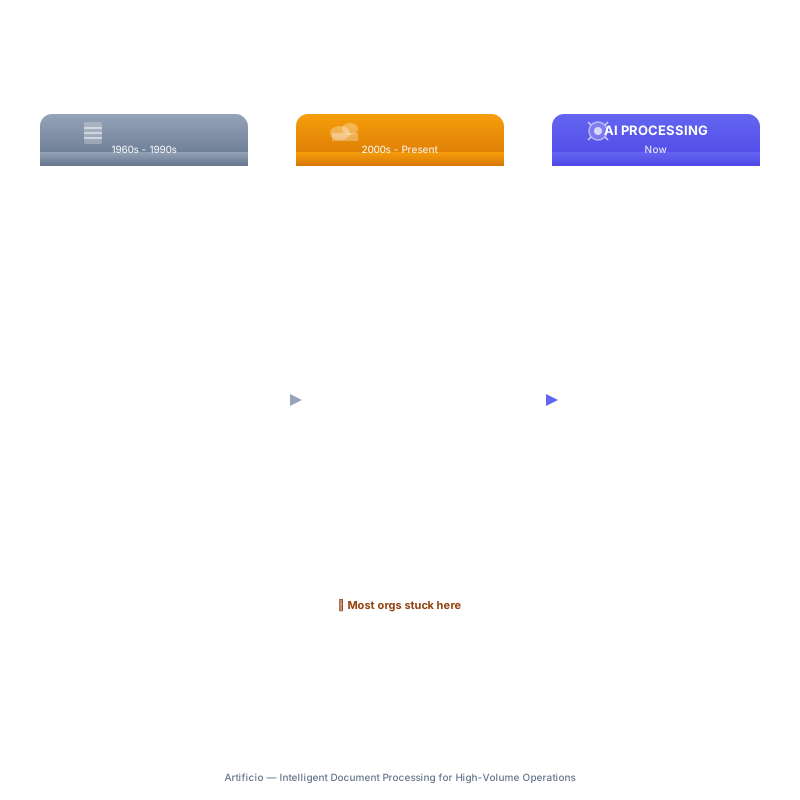
The Documents Know More Than the Folder Does
Here is the thing about a supplier invoice. It contains a vendor name, an invoice number, a date, line items, quantities, unit prices, a total, payment terms, and a reference to a purchase order. Every one of those data points is machine-readable. Every one of them could be extracted, validated, and acted on automatically.
The same is true for a mortgage application. A clinical trial report. A customs declaration. A fund subscription document. A lease agreement. These documents are not just files to be stored. They are structured data presented in document form, and modern AI systems can read, understand, and act on that data without a human navigating a folder tree to retrieve them first.
This is the shift that moves document management from a storage problem to an intelligence problem.
Intelligent document processing does not ask where you filed something. It reads what the document says, understands its type and content, extracts the relevant data, validates it against other sources, and routes it into the right workflow automatically. The folder becomes irrelevant because the system knows what every document is and what needs to happen with it.
The distinction matters most at scale. When you are processing hundreds of invoices per week, the difference between a system that stores them and a system that reads them is the difference between a manual process and an automated one. Between a team of people doing repetitive data entry and a team of people handling exceptions and edge cases that genuinely require human judgment.
Artificio's approach removes traditional OCR from the equation entirely, using AI agents to read and understand documents the way a trained human processor would, interpreting context, handling variation in document layouts, and extracting meaning rather than just characters.
What Replaces the Folder
Replacing the shared drive does not mean getting rid of document storage. It means adding an intelligent layer that sits between the document and the workflow.
When a document enters an AI-powered processing system, several things happen automatically that would otherwise require human navigation of a folder tree. The document is classified by type. Relevant data is extracted based on that type. The extracted data is validated, either against a database, against other documents, or against predefined rules. The document is then routed to the right process or decision point without anyone having to open a folder.
For an accounts payable team, this means invoices go from email attachment to payment queue automatically, with the data already matched against purchase orders and flagged for exceptions only when human review is genuinely needed. Nobody has to open a folder. Nobody has to manually key the invoice number, vendor name, or line items into an ERP system. The document processes itself.
For a mortgage lender, income documents from self-employed applicants, which are notoriously complex and variable, can be read and analysed automatically against Fannie Mae guidelines. The system extracts the right figures, applies the right calculations, and produces an income assessment. The processor reviews the output rather than building it from scratch.
For a university admissions team, applicant documents from hundreds of different international institutions, each with different formats and different conventions, can be verified automatically. The system checks for completeness, flags discrepancies, and validates credentials without a human hunting through a drive to find the right comparison document.
This is not a better filing cabinet. It is a fundamentally different relationship between an organisation and its documents.
The Integration Problem the Folder Was Always Papering Over
One reason shared drives became so embedded is that they served as the integration layer between systems that did not talk to each other. The workflow was: document arrives, lands in folder, human opens folder, human reads document, human enters data into system. The folder was the handoff point.
AI document processing collapses that handoff. Documents flow directly from intake to destination system with structured data already extracted. An invoice arrives and the data goes directly to the ERP. A contract arrives and the key terms go directly to the contract management system. A compliance document arrives and the relevant fields go directly to the compliance register.
The folder was always a workaround, a place to park documents while humans performed the data transfer that automated systems should have been doing all along. Removing it does not create a gap. It removes a bottleneck.
This is also where modern AI platforms differentiate from legacy document management systems, which often automated the filing part (saving documents to structured repositories) without automating the reading part. A document management system that auto-files based on metadata still requires humans to have set up that metadata and still requires humans to extract the data content for downstream use.
The real replacement for the shared drive is a system that reads documents on arrival, extracts structured data, and pushes that data where it needs to go without a folder serving as an intermediary. 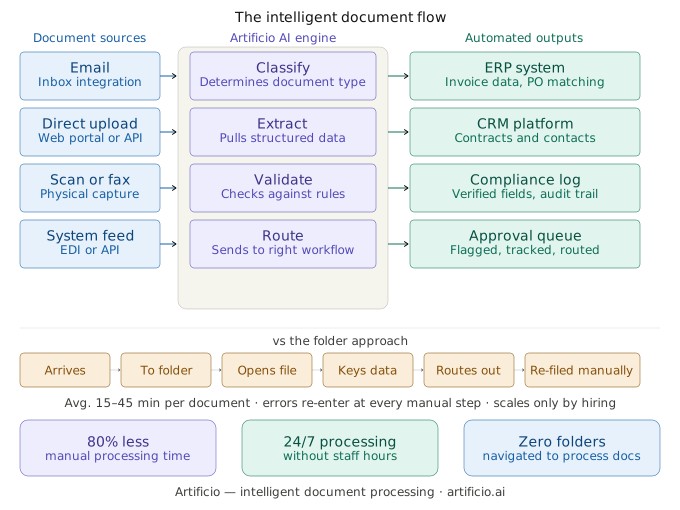
The Compliance Dimension Nobody Talks About
There is another angle that does not get enough attention in conversations about shared drives, and that is compliance exposure.
When sensitive documents, financial records, identity documents, health information, legal agreements, live in shared folders, the audit trail is thin. You can see who last modified a file. You can check version history. But you cannot easily answer the question of who accessed what, when, and as part of which process. You cannot demonstrate that a document was handled in accordance with a defined procedure. You cannot prove that validation steps happened before a decision was made.
Regulators increasingly want to see that data was handled through defined, auditable workflows, not just that it was stored in the right folder. GDPR, for instance, requires demonstrable data handling controls, not just storage policies. For financial services firms under FCA or SEC oversight, the evidence of process matters as much as the outcome. For healthcare organisations working with patient data, HIPAA requires detailed access controls and audit logs that a shared folder simply cannot provide.
Intelligent document processing platforms generate audit trails as a byproduct of how they work. Every document that enters the system, every extraction that runs, every validation that fires, every routing decision that happens, all of it is logged with timestamps and outcomes. The compliance evidence builds automatically, without anyone manually maintaining a record of what was done. That is a meaningful risk reduction alongside the operational efficiency gains.
Why This Is Happening Now
The timing is not coincidental. Several things converged to make intelligent document processing practical at scale in a way it was not five or even three years ago.
Large language models changed what is possible when reading documents. Earlier approaches relied heavily on template matching, which meant the system had to be trained on each specific document format before it could extract data reliably. A new invoice layout from a new supplier would break the extraction. AI agents that understand document context can handle variation far better. A self-employed income calculation that spans multiple schedules in a tax return does not need a pre-built template. The agent reads the document the way a human would and finds the right figures.
Cloud-native deployment models made these capabilities accessible without enterprise-scale IT projects. Platforms like Artificio can connect to existing email systems, storage layers, and business applications through standard integrations, without requiring organisations to rip out their existing infrastructure. The AI layer plugs in where the folder handoff was happening and replaces just that part of the process.
The volume of digital documents continues to grow faster than the workforce available to process them. An organisation that could get by with manual processing at 500 invoices per month hits a wall at 5,000. AI processing scales without adding headcount proportionally.
The Transition in Practice
Organisations do not need to eliminate their shared drives on day one. The practical path is narrower than that.
Identify the highest-volume, most repetitive document processes first. Supplier invoice processing. Applicant document verification. Claims intake. Income document analysis. These are the places where documents follow predictable patterns, where the data extraction work is well-defined, and where the volume makes automation genuinely valuable.
Deploy an AI processing layer for those specific document types and workflows. Measure the time saved, the error rate reduction, and the throughput improvement. Use that data to build the case for broader deployment.
The shared drive does not disappear overnight. In many organisations it continues to serve a purpose for documents that do not fit neatly into automated workflows, internal drafts, reference materials, archived records. But it stops being the default destination for every incoming document. The high-volume operational documents go into a system that reads them, not a folder that stores them.
That is the transition that is happening in forward-looking operations teams right now. Not a wholesale replacement of cloud storage, but a fundamental rethinking of what document intake looks like for the processes where volume and accuracy actually matter.
The Cabinet Is Still There. It Just Should Not Be Running Your Operations.
The shared drive will be with us for a long time. It is useful for many things. Collaboration on drafts, storage of reference materials, sharing files between team members who need the same document at different times. These are legitimate use cases and cloud storage handles them well.
The problem was never storage. The problem was that storage became the default model for every document, including the ones that needed to be read, understood, and acted on automatically. The filing cabinet metaphor, digital or physical, does not accommodate the intelligence that modern document volumes require.
AI document processing does not replace storage. It replaces the assumption that storage is enough. Documents that carry structured data, invoices, contracts, applications, compliance records, identity documents, income statements, should not sit in a folder waiting for a human to open them. They should enter a system that reads them, extracts what matters, validates the data, and routes the work.
The organisations figuring this out now are not doing it for technology's sake. They are doing it because the folder is a bottleneck, and bottlenecks have costs. The shared drive was never the destination. It was the waiting room.
The waiting room is closing.