

Blog
Beyond the Shared Drive: Automating Document Workflows
Stop losing hours to manual triage. See how replacing shared drives with AI-powered document processing eliminates errors, cuts costs, and scales operations.
Blog
Stop losing hours to manual triage. See how replacing shared drives with AI-powered document processing eliminates errors, cuts costs, and scales operations.
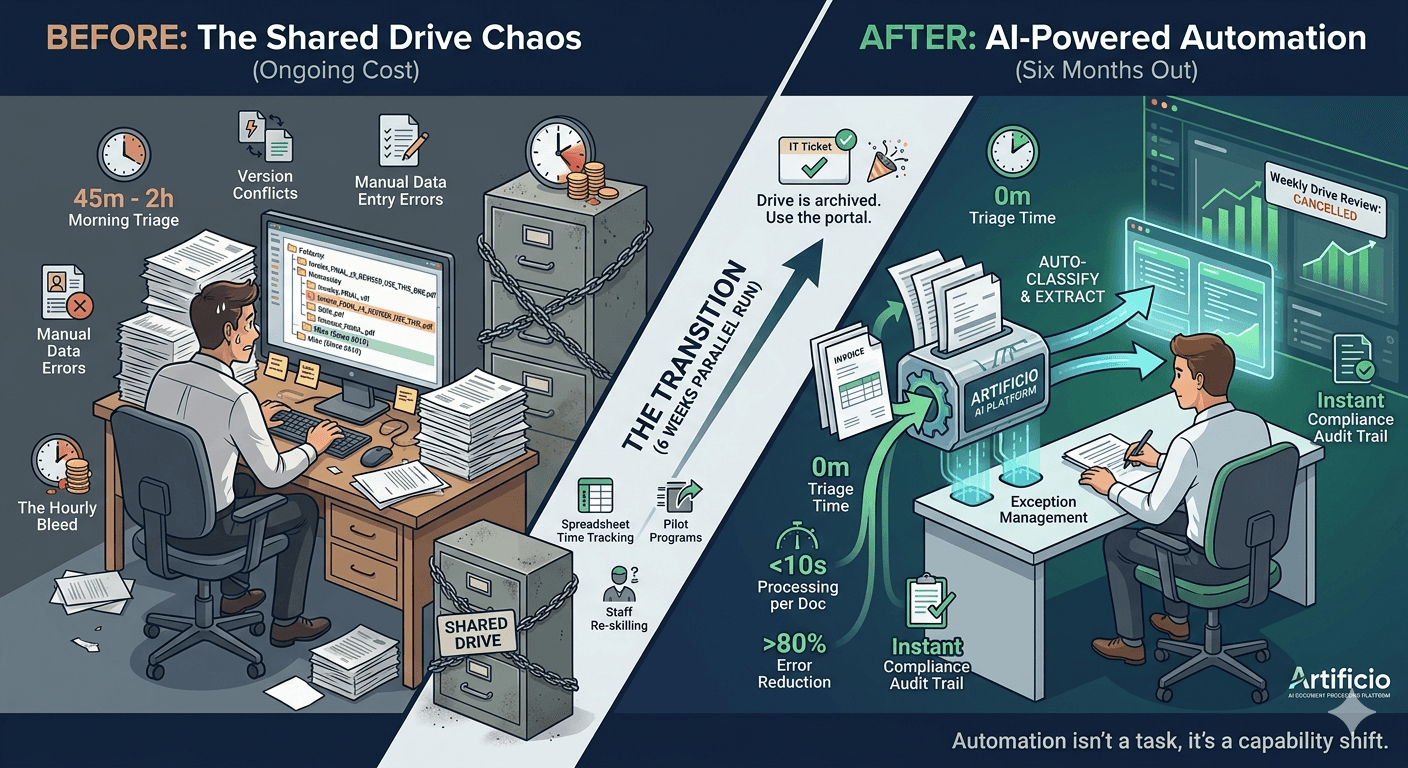
It wasn't a ceremony. No countdown, no all-hands meeting, no champagne. Just an IT ticket closed on a Tuesday afternoon, a folder permissions update, and a Slack message from the operations lead: "Drive is archived. Use the portal."
That was it. After fourteen months of planning, piloting, debating edge cases, and reassuring the people who said "what if the system goes down," the shared drive officially stopped being the center of the company's document universe.
Six months later, no one has asked to turn it back on.
The shared drive had been a lifeline once. In the early days it made sense: drop a file in a folder, let someone pick it up, move it along. Not elegant, but functional. For a lean team processing a few hundred documents a month, "functional" was enough.
Then volume grew. The team grew. Clients grew. And what started as a tidy hierarchy of "Incoming / In Review / Approved / Archive" turned into something that people quietly dreaded opening. Files named "Invoice_FINAL_v3_REVISED_USE THIS ONE.pdf" sat next to files named "Invoice_FINAL_v2_DO NOT USE.pdf" with no clear way to know which was which without opening both. Folders nested inside folders that nobody could explain. And then there was the catch-all folder called "Misc" that had been quietly expanding since 2019 and that nobody had the authority, time, or courage to sort through.
The real cost wasn't the storage fees. It was the hourly bleed.
Every morning, someone's first task was triage. Open the drive, figure out what had come in overnight, determine who it belonged to, rename it into something searchable, and drop it in the right subfolder. On a slow day, that took forty-five minutes. On a busy day, it could stretch past two hours, and that was before anyone had actually processed a single document.
Then came the handoff confusion. Was this invoice ready for approval or still pending a signature? Did the revised contract replace the one already in the system, or was it a separate amendment? Three people would open the same file on the same morning because there was no reliable way to know what anyone else was doing with it. Version conflicts. Duplicate entries. The same document processed twice by two different people because communication had broken down somewhere between the folder and the inbox.
And the errors. Not from carelessness, but from the sheer cognitive weight of managing so much ambiguity. When a person has to manually read a document, interpret what it is, decide where it goes, and key its data into another system, mistakes happen. They happen even to careful, experienced people. A misread policy number. A transposed date. A missed page because the scan came in sideways and nobody caught it.
The team knew all of this. They'd known it for a while. But familiarity made it invisible, the way a constant background noise stops registering until someone finally turns it off.
The decision to pursue full automation didn't come from a visionary memo or a top-down mandate. It came from a spreadsheet.
Someone on the ops team had started tracking their own time. Not formally, just a rough log: time spent sorting the drive, time spent chasing document status, time spent correcting errors caught downstream. When they added it up across the whole team for a single month, the number was enough to make leadership stop the meeting they were already running.
They weren't just losing hours to manual work. They were losing hours to rework caused by manual work. The two compounded each other.
The proposal on the table wasn't to add more structure to the shared drive, or to hire someone to manage it better, or to build a smarter folder naming convention. It was to replace the entire intake-to-output pipeline with an AI-powered document processing system and retire the drive completely.
That second word, "completely," was where the resistance lived.
Some pushback was practical: what about documents that didn't fit a template? What about exceptions? What about client-submitted files in strange formats? Some resistance was psychological: the shared drive was familiar. People knew how to use it. It was tangible in a way a software pipeline wasn't. You could see documents sitting in a folder. The visibility was reassuring even when the underlying process was a mess.
The ops team addressed each concern methodically over the next few months. Pilot programs on the highest-volume document types. Exception handling workflows built into the new system before go-live. A parallel period where both the drive and the portal ran simultaneously so staff could verify the automated output against their own manual work. That parallel period lasted six weeks. By week four, the team had stopped double-checking. The automated output was cleaner than what they'd been producing manually.

The new system doesn't use a folder. There's no "Incoming" queue that a human has to monitor. Documents arrive through multiple channels (email, client portal, API feeds) and are ingested automatically the moment they land.
From there, the AI classifies each document without being told what to look for. An invoice looks different from a contract. A completed application looks different from a supporting ID document. The system identifies document type, extracts the structured data fields relevant to that type, and routes the document to the appropriate workflow, all before anyone on the team has touched it.
What used to take a person forty-five minutes to triage now takes the system seconds per document.
But the more significant change isn't speed. It's consistency.
A person doing triage at 9am on a Monday is not the same person doing triage at 4pm on a Friday before a long weekend. Attention varies. Energy varies. The automated system doesn't have a Monday morning or a Friday afternoon. It applies the same logic to every document, every time, regardless of volume or timing.
That consistency has downstream effects that the team is still measuring. Exception rates dropped. Documents that had previously been flagged as incomplete or incorrectly filed, because someone had dropped them in the wrong folder or missed a required field, now land in the exception queue only when there's a genuine problem with the document itself, not with the handling of it.
The system also maintains a full audit trail automatically. Every document, every classification decision, every data extraction and every workflow step is logged with timestamps. Compliance reviews that used to require manual reconstruction of what happened and when, pulling email threads and version histories to piece together a sequence of events, now take minutes instead of days.
Going in, leadership expected the transition to be the hard part. People resist change, especially operational change that touches daily habits.
What actually happened was quieter. The parallel-run period turned out to be the natural adaptation window the team needed. Staff used it to see the new system work, to raise the edge cases they'd been worried about, and to watch those edge cases get handled correctly. By the time the shared drive was archived, most people had already mentally moved on from it.
The ones who had the hardest time weren't the skeptics. They were the people who had built real expertise around managing the shared drive, whose institutional knowledge included things like which clients always sent documents in the wrong format and needed a manual rename, or which subfolders were named inconsistently because of a reorganization two years ago that nobody had fully finished. That knowledge was genuinely valuable. The transition meant finding new ways to apply it.
That expertise didn't disappear. It got redirected. The people who had been the most skilled at managing document chaos became the people best positioned to monitor automated exception queues, build out new workflow templates for document types the system hadn't seen before, and train new staff on what to look for when something didn't go as expected. The work shifted from reactive sorting to proactive quality management.
The team is smaller now on the intake side. But it's doing more sophisticated work, and the people doing it find it less draining.
The numbers tell part of the story. Daily triage time: gone. Average document classification time fell from several minutes per document to under ten seconds. Error rates in downstream systems (the data entry mistakes, the misfiled records, the duplicates) dropped by more than 80 percent within the first two months and have continued to fall as the system processes more volume and improves on low-confidence document types.
The audit trail has already proven its value in two separate compliance reviews that would previously have taken the team several days of manual reconstruction each. Both were completed in a morning.
Client-side, the difference shows up in turnaround time. Documents submitted through the portal or by email now enter the processing workflow immediately, not when someone gets to the drive. That compression has reduced the gap between document submission and processing completion from days to hours in most cases, and from hours to minutes for document types the system handles with highest confidence.

But the number that matters most to the team isn't on any dashboard. It's the absence of a particular kind of meeting. They used to have a standing weekly "drive review" where someone would walk through the shared folders, flag anything stuck or misrouted, and assign cleanup tasks. That meeting was cancelled three weeks into the new system and hasn't been rescheduled.
Nobody's missed it.
There's a subtler shift happening that goes beyond the operational metrics. When document processing was a manual, labor-intensive task, it was treated like one: something to be budgeted, scheduled, and staffed around. Volume spikes required overtime or backlog. End-of-quarter surges created crunch periods. New document types required retraining and updated procedures.
With a fully automated pipeline, the relationship with document volume changes. More volume doesn't require proportionally more people. A new document type requires a workflow template, not a hiring cycle. End-of-quarter isn't a crunch, it's just a period of higher throughput.
That shift in relationship opens up capacity that didn't exist before. The team can take on document types they'd previously turned away because they lacked the bandwidth. They can commit to faster turnaround times with clients because the system doesn't get behind. They can think about what else they could be processing, rather than just how to keep up with what they already have.
The shared drive retirement didn't just automate a task. It changed what the operations team is capable of, and more importantly, what they're able to think about pursuing.
Most teams that still rely on shared drives for document intake know, on some level, that it's not going to scale. The question isn't usually whether to automate, it's when, how disruptive the transition will be, and whether the system will actually handle the complexity of their specific documents.
The honest answer, based on this team's experience, is that the transition is less disruptive than maintaining the status quo. The disruption of switching to automated processing is a one-time cost. The disruption of running on a shared drive, the triage time, the errors, the version confusion, the compliance exposure, is ongoing and compounds every month.
The day they turned off the drive was a Tuesday. Quiet, undramatic, already mostly forgotten.
What's not forgotten is the morning after, when the first batch of overnight documents had already been classified, extracted, and routed by the time anyone sat down at their desk. Nobody had to open a folder. Nobody had to rename a file.
The work had already started. It just didn't need them to start it.
Artificio's AI-powered document processing platform handles classification, extraction, and workflow routing across mortgage, insurance, legal, healthcare, logistics, and finance operations. If your team is still running document intake through shared folders and manual handoffs, we'd be glad to show you what a fully automated pipeline looks like for your specific document types.

Head IT Operations - Co Founder of Artificio
See it in your SAP environment
Bring us a document, a process, or a bottleneck. We'll show how Artificio captures, validates, and posts into SAP — then scale from there.
Security & compliance
ISO 27001:2013 certified, SOC 2 Type 2 compliant, GDPR and HIPAA ready. Every agent action is logged, auditable, and runs in isolated environments.