Your company has 10 years of contracts sitting in a folder somewhere. Maybe it's a shared drive. Maybe it's a filing cabinet that got scanned "for safekeeping" five years ago. Either way, someone in legal just asked: "What are our standard payment terms with vendors in Europe?"
That question currently means one of two things. Either someone spends hours clicking through PDFs and squinting at scanned pages, or the question simply doesn't get answered. Most of the time, it's the second option. Nobody bothers asking because the cost of finding out is too high.
This is the document graveyard problem. Every organization has one. Contracts, policies, standard operating procedures, vendor agreements, compliance documentation. All technically "available." All practically inaccessible. The information exists, but it might as well not.
Here's what's changed: you can now turn those dead archives into queryable knowledge in minutes. No data team required. No six-month IT project. No model training or complex integrations. Just upload your documents and start asking questions.
The Hidden Cost of Inaccessible Documents
Before we get into how this works, let's be honest about the problem most organizations pretend doesn't exist.
Think about what happens when institutional knowledge lives in documents nobody can search. New employees can't find answers to basic questions about company policies. Legal can't quickly verify what terms were agreed to in past contracts. Finance can't reference how similar situations were handled in previous audits. Operations can't pull up equipment specifications without calling the one person who "might remember where that manual is."
The real cost isn't the occasional hour spent searching. It's all the questions that never get asked. The decisions made without context because finding that context would take too long. The wheel getting reinvented because nobody knew it had already been invented three years ago and documented in a PDF sitting on the shared drive.
Companies invest heavily in creating documentation. Contracts get negotiated carefully. Policies get reviewed by committees. SOPs get written and rewritten until they're comprehensive. Then all that work gets filed away and effectively disappears. 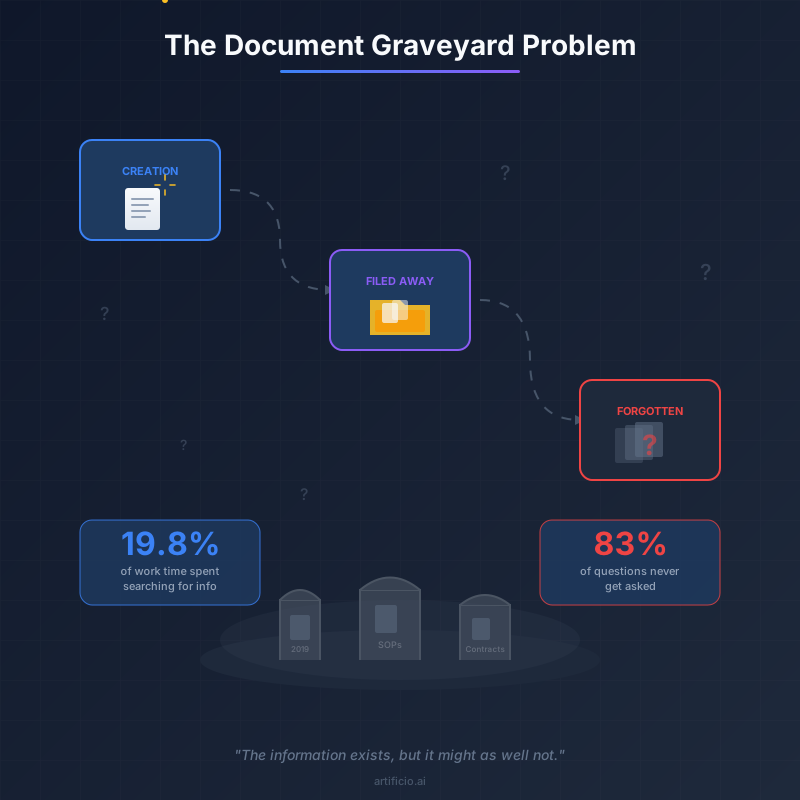
What a Document Q&A System Actually Does
A document chatbot isn't magic, but it feels pretty close when you first use it.
The basic idea is simple. You upload documents to a system that can understand them. Not just read the text, but actually understand what the documents mean and how concepts relate to each other. Then you ask questions in plain English and get answers drawn from your actual documents.
Want to know your standard payment terms for European vendors? Ask the question. The system searches across all your uploaded contracts, finds the relevant sections, and gives you an answer with citations pointing to the specific documents and pages where that information lives.
This works because of something called semantic search. Traditional search engines look for keyword matches. If you search for "payment terms Europe," you'll find documents that contain those exact words. Semantic search understands meaning instead. It knows that "Net 30 invoicing for EU-based suppliers" is relevant to your question even if it doesn't contain the words "payment terms" or "Europe."
The difference matters more than you might think. Contract language is notoriously inconsistent. One document might say "payment terms," another might say "invoice schedule," and a third might describe the same concept as "accounts payable conditions." Keyword search treats these as completely different things. Semantic search recognizes they're all talking about the same concept.
Building Your System Without Technical Resources
Here's where document chatbots differ from most enterprise AI projects. You don't need a data team. You don't need machine learning engineers. You don't need to spend months on implementation.
The process looks like this: upload your documents, wait for them to be processed, start asking questions. That's genuinely it.
When you upload documents, the system handles all the complicated stuff automatically. Scanned PDFs get processed with optical character recognition to extract the text. The content gets broken into chunks that can be searched effectively. Those chunks get converted into a format the AI can work with for semantic search. All of this happens in the background while you do something else.
Multi-document upload means you can work at scale from the start. Don't upload one contract at a time. Upload your entire archive. The system can handle hundreds or thousands of documents, and the more you upload, the more valuable it becomes. A question like "what are our standard payment terms" becomes meaningful when you can search across every contract you've signed rather than just the few you remembered to include.
The lack of setup complexity matters for another reason too. It means you can start getting value immediately instead of waiting for a project to finish. Upload yesterday's contracts today, start asking questions tomorrow. No deployment timeline, no integration meetings, no user acceptance testing cycles.
Semantic Search: Finding Answers That Keyword Search Misses
Let's dig deeper into why semantic search changes everything for document Q&A.
Imagine you're trying to answer this question: "What are our obligations if a supplier fails to deliver on time?" In your contract archive, the relevant clause might be titled "Force Majeure and Delivery Delays" in one document, "Supplier Performance Standards" in another, and "Remedies for Non-Compliance" in a third.
A keyword search for "supplier fails to deliver" might miss all three. The words just don't match. But semantic search understands that all of these sections address the same underlying concept, even when the language differs completely.
This becomes especially powerful when you're dealing with documents created by different people over many years. Legal teams change. Outside counsel rotate. Terminology evolves. Contract templates get updated. A decade of documents might use ten different ways to describe the same provisions.
Semantic search handles this gracefully because it works at the level of meaning rather than words. It doesn't care that your 2015 contracts say "indemnification" while your 2023 contracts say "hold harmless." It understands these are the same concept and returns relevant results from both. 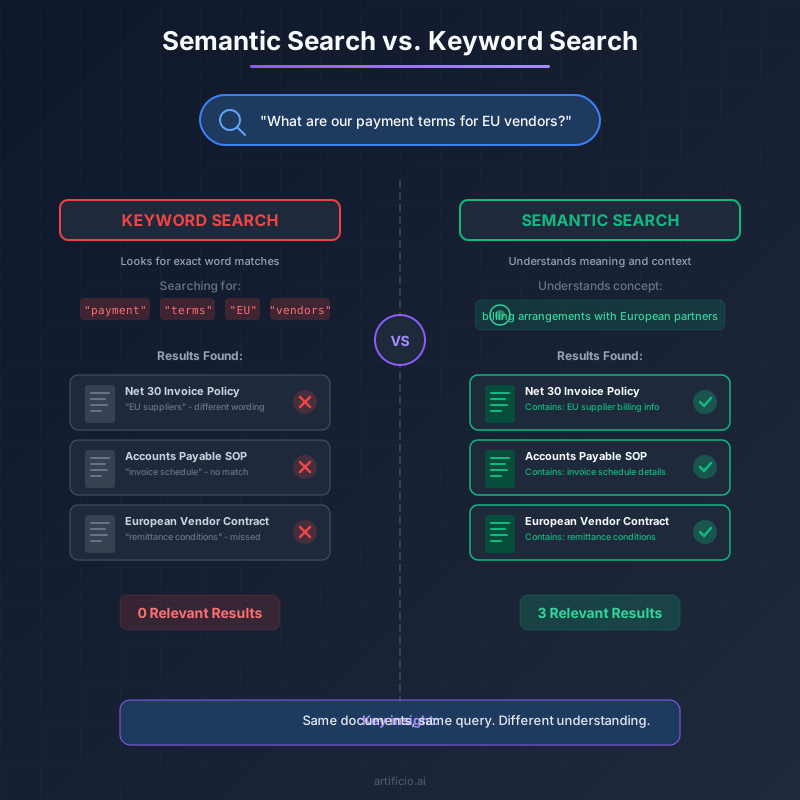
Making It Practical with Saved Prompts
Once you start using a document chatbot, you'll notice something. The same types of questions come up repeatedly.
Legal might frequently ask about termination clauses or liability limitations. HR might regularly check policy details around specific situations. Finance might often need to verify terms from past agreements. These aren't one-time questions. They're patterns of inquiry that repeat across different documents and different situations.
Saved prompts turn these recurring questions into one-click answers. Instead of typing "What are the termination provisions in this agreement and what notice period is required?" every time, you save that prompt once and apply it to any document instantly.
This matters for a few reasons. First, it saves time on repetitive work. But more importantly, it ensures consistency. When everyone uses the same saved prompt to check termination clauses, you get comparable answers across documents. That makes it possible to actually analyze patterns in your agreements rather than just answering one-off questions.
Think of saved prompts as building a library of institutional questions. Over time, you develop a collection of prompts that reflect how your organization actually thinks about its documents. New team members can use these prompts to quickly get up to speed on how to query the archive effectively.
Real Examples Across Different Teams
The document graveyard problem exists in every department. Here's what solving it looks like in practice.
Legal teams query contract archives to answer questions during negotiations. "What precedent do we have for agreeing to unlimited liability?" becomes answerable in seconds rather than hours. Before a negotiation, they can quickly survey how similar deals were structured in the past.
HR departments search policy documents to handle employee questions accurately. When someone asks about a specific leave situation, HR can query across all relevant policies rather than hoping they remember which document covers that scenario.
Finance groups ask questions across years of audit documentation. "How did we handle revenue recognition for long-term contracts in the 2021 audit?" doesn't require digging through binders. They can trace the evolution of accounting treatments over time.
Operations teams search equipment manuals and maintenance records. When a machine fails, they can ask "What troubleshooting steps are recommended for this error code?" and get answers from documentation that nobody had time to read thoroughly.
Compliance functions query regulatory filings and policy documents to ensure consistency. "What did we say about this risk factor in previous disclosures?" becomes a question you can actually answer quickly.
Sales teams reference past proposals and statements of work. When building a new proposal, they can ask "How did we scope similar projects for companies in this industry?" and pull relevant language from successful past deals.
The pattern is the same across all of these. Information that was technically accessible but practically unavailable becomes instantly queryable.
Getting Started Without Overcomplicating It
The temptation with any new technology is to plan a massive rollout. Don't do that here.
Start small. Pick one document collection that causes regular frustration. Maybe it's your contract archive. Maybe it's your policy repository. Maybe it's the shared drive where SOPs go to die. Upload those documents and start asking questions.
You'll learn quickly what works and what doesn't. You'll discover which questions the system handles well and which need refinement. You'll figure out how to phrase prompts effectively and which saved prompts would help your team most.
Then expand. Add more documents. Bring in more users. Build out your saved prompt library. The system scales naturally because there's no complex configuration to update as you grow.
The organizations that get the most value from document chatbots are the ones that treat it as an ongoing practice rather than a one-time project. They continuously add documents, refine their prompts, and expand the scope of what they're able to query.
Why This Matters Now
ChatGPT showed everyone that AI can answer questions. But most companies still haven't connected that capability to their own document repositories. They'll use ChatGPT to draft an email, but they won't think to ask AI about their own contracts and policies.
This represents a genuine opportunity. Generic chatbots can't access your private documents. Generic document storage can't answer questions. The intersection of these capabilities is where the real value lives. A system that understands your specific documents and can answer questions about them changes how your organization relates to its own institutional knowledge.
The technology exists today to make institutional knowledge accessible. The barrier to entry is lower than it's ever been. You don't need specialized skills or dedicated resources to get started. You don't need to train custom models or map document fields. The system works out of the box with whatever documents you have.
Every organization has documents that contain valuable information nobody can find. Contracts that define relationships with every vendor and customer. Policies that govern how work gets done. Records that provide context for decisions that happened years ago.
That information shouldn't be locked away in document graveyards. It should be answerable. And now, it can be.
The question isn't whether document Q&A technology works. It does. The question is how long you'll wait before turning your scanned chaos into a searchable archive.