Here's something nobody tells you about AI chatbots: they're great at talking, but terrible at remembering what they're talking about.
You've seen it happen. Someone builds a sleek chatbot for customer support. It looks amazing in the demo. But the moment a customer asks "What does our contract say about refunds?" the bot falls apart. It doesn't have access to that contract. It can't read your internal docs. It just generates generic responses that sound confident but mean nothing.
This gap between what chatbots can say and what they actually know is costing businesses real money. A manufacturing company I worked with spent $180,000 building a support chatbot that could answer questions about their product manuals. The problem? The bot couldn't actually access the manuals. Every answer was a hallucination dressed up as helpful advice. They shut it down after three months when customers started filing complaints about incorrect technical guidance.
The real issue isn't the chatbot itself. It's that most AI assistants are built without any connection to your actual documents. They're flying blind, making educated guesses instead of pulling real answers from your knowledge base.
That changes when you make your chatbot document-aware.
What Makes a Chatbot "Document-Aware"?
Think about how you answer questions at work. When someone asks you something complex, you don't just rely on memory. You pull up the relevant file, scan for the answer, and respond based on what you actually see in that document.
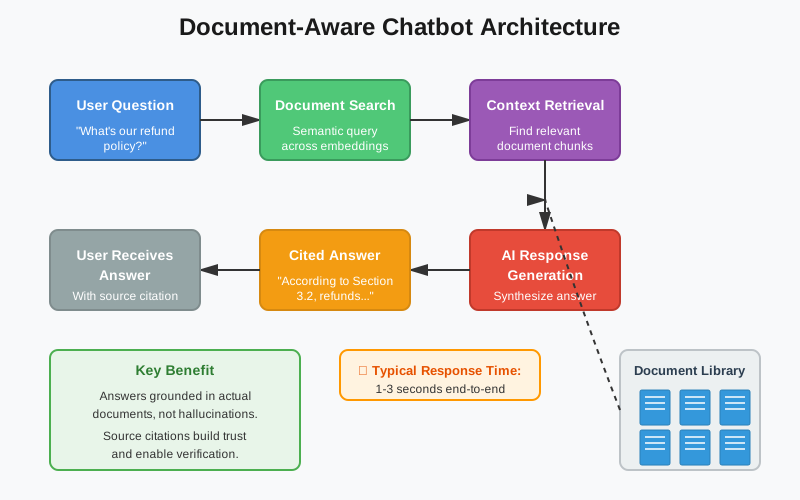
Document-aware chatbots work the same way. They can query your uploaded files, retrieve relevant sections, and ground their answers in actual source material. Instead of hallucinating responses, they're reading from your documents and citing their sources.
The technical term for this is "retrieval-augmented generation" or RAG. But forget the jargon for a moment. The concept is simple: before the AI generates an answer, it searches through your documents to find relevant context. Then it uses that context to craft a response.
Here's what that looks like in practice. Let's say you run a legal firm and upload 50 client contracts to your chatbot. A paralegal asks: "Which contracts have automatic renewal clauses?"
A regular chatbot would guess. It might say something like "Many contracts include renewal clauses, typically found in Section 7 or 8." Generic. Useless.
A document-aware chatbot searches through all 50 contracts, identifies the ones with renewal language, and responds: "I found automatic renewal clauses in 12 contracts: Johnson LLC (Section 4.2), Martinez Industries (Section 6.1)..." It even provides excerpts showing exactly where each clause appears.
That's the difference between talking and actually knowing.
The Business Pain Point: When Generic Chatbots Meet Real Workflows
Let me tell you about Sarah. She's the operations manager at a mid-size insurance company. Her team processes hundreds of policy questions every day. Most questions follow patterns: "What's our deductible for water damage?" "Does this policy cover earthquake damage?" "What's the claims process for auto accidents?"
Sarah thought an AI chatbot could handle 60-70% of these questions. Free up her team. Reduce response times. She was right about the potential, but the first chatbot they built couldn't access their policy documents. Every answer was generic insurance advice that didn't match their actual policies.
Within two weeks, they had a crisis. The chatbot told a customer their policy covered flood damage. It didn't. The customer filed a claim based on the bot's answer. Sarah's company had to honor it, even though the policy explicitly excluded floods. Cost: $43,000.
That's when Sarah's team realized the fundamental problem. You can't have a chatbot answering policy questions if it can't read your policies.
The fix wasn't building a better chatbot. It was giving the existing chatbot access to the documents it needed to reference.
The Architecture: How Document-Aware Chatbots Actually Work
Building a document-aware chatbot isn't as complex as you might think. The architecture breaks down into four key components:
When you upload a document, the system doesn't just store it as a PDF sitting in a folder. It breaks the document into smaller chunks (usually paragraphs or sections), then converts each chunk into a mathematical representation called an embedding.
Think of embeddings as coordinates on a map. Documents about similar topics end up near each other in this mathematical space. A paragraph about insurance deductibles and a paragraph about premium calculations might be close together because they're both about insurance finances.
This matters because it enables semantic search. When someone asks "How do I file a claim?" the system doesn't just look for those exact words. It searches for chunks that are conceptually related to claims, filing processes, and procedures. That's why the chatbot can find relevant answers even when the document uses different terminology.
2. Real-Time Semantic Search
When a user asks a question, here's what happens in those first 200 milliseconds:
The question gets converted into its own embedding. The system then searches through all your document embeddings to find the closest matches. It's not doing keyword matching. It's finding chunks that are semantically similar to what the user is asking about.
Let's say someone asks: "What happens if I miss a payment?" The system might retrieve chunks about payment schedules, grace periods, late fees, and account suspension policies. All conceptually related, even if none of them contain the exact phrase "miss a payment."
This retrieval typically pulls 3-10 relevant chunks from your documents. These become the context that grounds the AI's response.
3. Context-Aware Response Generation
Now the magic happens. The AI receives both the user's question and the retrieved document chunks. Its job is to synthesize an answer based specifically on that retrieved context.
This is where you see the difference between document-aware and generic chatbots. The AI isn't generating answers from its training data. It's reading from your documents and formulating responses based on what it finds there.
Better systems will also cite their sources. "According to Section 3.2 of your service agreement..." or "Based on the Q3 2024 policy updates..." This citation isn't just nice to have. It's crucial for trust and verification.
4. Conversation Memory and State Management
Here's where many chatbot implementations fall apart. They forget what they just said.
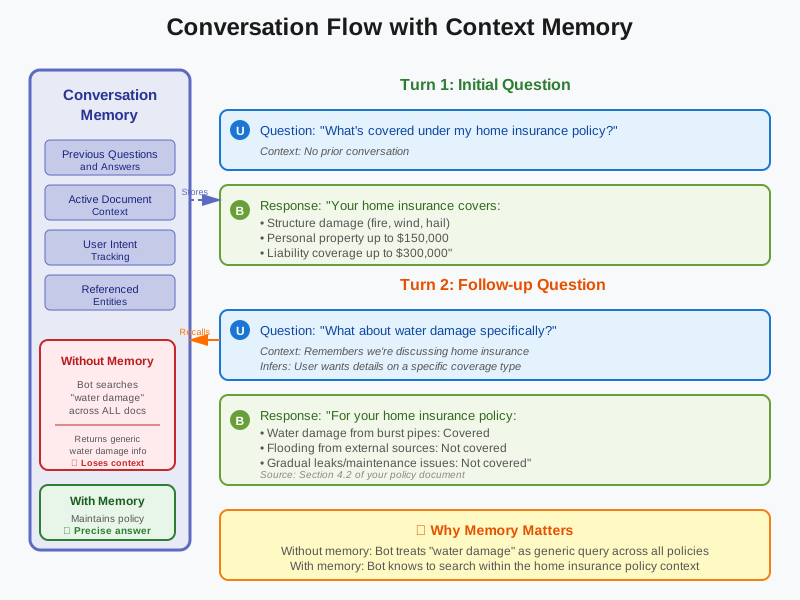
You ask: "What's covered under my home insurance policy?" The bot responds with details about coverage. Then you ask: "What about water damage specifically?"
A stateless chatbot treats this as a completely new question. It doesn't remember you were just talking about home insurance. So it might give you a generic answer about water damage across all policy types.
A stateful, document-aware chatbot maintains conversation history. It knows the context of your questions. When you ask about water damage, it remembers you're asking specifically about your home insurance policy. It searches within that narrower context and gives you a precise answer.
This state management extends to document context too. If you've been discussing a specific contract for the last five exchanges, the bot should prioritize that document in its searches, rather than treating every question as brand new.
The Technical Implementation: Making It Real
Let's get practical. If you're building this yourself, here's what the stack typically looks like:
Document Storage and Embeddings: Most production systems use vector databases like Pinecone, Weaviate, or Qdrant. These databases are optimized for storing and searching embeddings. You can also use simpler solutions like storing embeddings in PostgreSQL with the pgvector extension.
Embedding Models: OpenAI's text-embedding-ada-002 is popular and cost-effective. For higher quality or specific domains, consider models like Cohere's embed-english-v3.0 or open-source options like Sentence-BERT.
LLM for Generation: GPT-4, Claude, or other large language models handle the actual response generation. The key is sending them both the user's question and the retrieved context, with clear instructions to base answers on the provided context.
Real-Time Streaming: Users expect chatbot responses to appear gradually, not all at once after a long delay. Server-Sent Events (SSE) is the standard for streaming responses from your backend to the frontend as they're generated.
Frontend Framework: React works well for building the chat interface. You need components for message display, input handling, file uploads, and conversation history. The UI should clearly distinguish between user messages, bot responses, and cited sources.
Here's what the flow looks like in code terms:
- User uploads a document
- Your backend chunks the document and generates embeddings
- Embeddings get stored in your vector database with metadata (document name, chunk position, etc.)
- User asks a question
- Question gets embedded
- Vector database returns the most similar chunks
- Your system sends the question + retrieved chunks to the LLM
- LLM generates a response based on that context
- Response streams back to the user via SSE
- Conversation history gets stored for future context
The entire cycle typically takes 1-3 seconds, depending on document size and LLM response time.
Real-World Use Cases: Where This Makes Business Sense
Customer Support Knowledge Bases: This is the obvious one. Any company with extensive documentation (user manuals, FAQs, policy documents, troubleshooting guides) can deploy a document-aware chatbot to handle tier-1 support questions. The bot searches through your knowledge base and provides accurate answers with citations.
A SaaS company I consulted for implemented this and reduced their support ticket volume by 47% in the first month. The chatbot handled questions about features, integrations, and common issues by pulling directly from their documentation. Support agents shifted their time to complex cases that actually needed human judgment.
Internal HR and Policy Systems: Large organizations have hundreds of policies scattered across different documents. Benefits enrollment, PTO policies, expense reimbursement procedures, compliance requirements. Most employees can't find this information when they need it.
A document-aware HR chatbot gives employees instant access. "How many PTO days do I have?" "What's the policy for remote work?" "How do I submit an expense report?" The bot searches through all HR documents and provides exact policy details.
One enterprise client reported that HR inquiries to their shared services team dropped by 62% after deploying this. That's not just efficiency, it's thousands of hours of HR time redirected to strategic work instead of answering the same policy questions repeatedly.
Legal Contract Analysis: Law firms and corporate legal teams manage thousands of contracts. Finding specific clauses across multiple agreements is tedious manual work.
A document-aware chatbot can query your entire contract database. "Which vendor contracts are up for renewal this quarter?" "Show me all non-compete clauses across our employment agreements." "What are our termination rights in the Johnson contract?"
The bot doesn't just find documents. It identifies relevant sections, extracts key terms, and can even compare clauses across multiple contracts.
Medical Records and Clinical Decision Support: Healthcare organizations deal with enormous volumes of patient records, medical literature, and clinical guidelines. A document-aware chatbot can help clinicians quickly find relevant information without digging through hundreds of pages of documentation.
A hospital system built a chatbot that could query their clinical protocol library. When treating a patient with multiple conditions, doctors could ask: "What's our protocol for diabetes management in patients with kidney disease?" The bot would pull the relevant sections from their 2,000+ page protocol manual in seconds.
Performance Optimization: Making It Fast and Reliable
Speed matters in chat interfaces. Users expect responses in seconds, not minutes. Here's how to keep your document-aware chatbot fast:
Chunk Size Optimization: Smaller chunks mean faster retrieval but might miss context. Larger chunks preserve context but slow down search and might dilute relevance. Most systems find the sweet spot around 500-1000 tokens per chunk with 100-200 token overlap between chunks.
Embedding Quality vs. Speed: Better embedding models produce more accurate semantic search but take longer to process. For production systems, pre-compute embeddings for all documents during upload. Only compute embeddings for user questions in real-time.
Response Streaming: Never wait for the entire LLM response before showing anything to users. Stream tokens as they're generated. This makes the experience feel faster even if the total time is the same.
Caching: If multiple users ask similar questions, cache the retrieved chunks and even the responses. A simple cache layer can reduce costs and latency by 40-60% in environments where questions follow patterns.
Document Pre-Processing: Don't just throw raw PDFs at your embedding model. Clean the text first. Remove headers, footers, page numbers. Extract tables into structured format. Better input quality leads to better embedding quality and more accurate retrieval.
The Future: Where Document-Aware Chatbots Are Heading
We're seeing three major trends in document-aware AI assistants:
Multimodal Understanding: Current systems mostly work with text. Next-generation systems will understand images, diagrams, charts, and tables within documents. A chatbot that can "read" a flowchart in your process documentation or extract data from a financial table significantly expands what's possible.
Cross-Document Reasoning: Right now, most chatbots search within documents but don't connect insights across them. Imagine asking: "Which of our contracts conflict with the new compliance requirements?" The bot would need to understand both your contracts and the compliance documents, then identify conflicts. We're getting close to this level of reasoning.
Adaptive Context Windows: Today's chatbots retrieve a fixed number of chunks for context. Future systems will dynamically adjust based on question complexity. Simple questions might only need one or two chunks. Complex questions might require pulling context from 20+ different sections across multiple documents.
The big unlock will be when document-aware chatbots can not just retrieve and cite, but actually reason across your entire document library. That's when they'll move from being search tools to genuine knowledge assistants.
Building Your Own: Getting Started
If you're ready to build a document-aware chatbot, start small. Don't try to upload your entire knowledge base on day one.
Pick one specific use case with clear value. Maybe it's answering questions about a single product manual. Or querying your standard operating procedures. Something with defined boundaries where you can measure success.
Build the core components: document upload, embedding generation, semantic search, and basic response generation. Get that working reliably first. Don't worry about advanced features like conversation memory or citation formatting yet.
Test with real users early. They'll quickly tell you where the chatbot is useful and where it falls short. Most failures come from bad document quality (unclear writing, inconsistent terminology) or retrieval issues (bot pulls wrong context), not the LLM itself.
Then iterate. Add conversation memory once users are asking follow-up questions. Implement source citations when people need to verify answers. Expand to multiple documents when the single-document version proves valuable.
The technology is mature enough now that building a functional document-aware chatbot is a weeks-long project, not months. The hard part isn't the tech. It's defining what success looks like for your specific use case and making sure your documents are organized well enough for semantic search to work.
The Bottom Line
Generic chatbots are impressive demos. Document-aware chatbots are production tools.
The difference comes down to this: can your chatbot actually access the information it needs to answer questions accurately? If not, you're building expensive automation that will fail when it meets real user questions.
Adding document awareness isn't just about preventing hallucinations. It's about turning your chatbot from a conversational interface into a genuine knowledge assistant. One that can query your documentation, cite its sources, and give your team instant access to information that would otherwise require manual searching through hundreds of files.
The companies winning with AI assistants aren't the ones with the fanciest conversational flows. They're the ones that connected their chatbots to their actual knowledge base. That connection, between what the AI says and what your documents actually contain, is what makes the difference between a chatbot that sounds smart and one that actually helps.
If you're building AI assistants for your business, make them document-aware from the start. Your users (and your support team) will thank you.