Organizations across various sectors process thousands of PDF forms daily insurance claims, loan applications, medical intake forms, and government documentation. The manual completion of these forms consumes significant human resources, introduces errors, and creates processing bottlenecks. Traditional automation approaches often fail when confronted with the diversity of form layouts, variation in supporting documents, and need for contextual understanding.
This article presents a comprehensive framework for implementing an AI agent-based system that automates PDF form completion, reducing processing time by up to 85% while maintaining or improving accuracy rates. By leveraging recent advances in form parsing, retrieval-augmented generation (RAG), and human-in-the-loop feedback mechanisms, organizations can transform their document processing workflows.
The Challenge of PDF Form Automation
PDF forms remain ubiquitous in business and government despite the push toward fully digital interfaces. Their persistence stems from several factors:
- Legacy systems requiring standardized document formats
- Regulatory requirements for specific documentation structures
- Cross-platform compatibility and preservation of document formatting
- Integration with existing physical and digital workflows
Traditional approaches to form automation typically rely on template matching, optical character recognition (OCR), and rule-based extraction. These methods encounter significant limitations when handling:
- Variations in form layout and structure
- Handwritten information in supporting documents
- Context-dependent fields requiring inference
- Ambiguous instructions or requirements
- Documents containing multiple languages or specialized terminology
Modern natural language processing techniques, particularly large language models (LLMs) with multimodal capabilities, offer promising solutions to these challenges. However, implementing effective PDF form automation requires more than simply connecting a form to an LLM. It demands a carefully orchestrated system of specialized agents, each handling distinct aspects of the document processing pipeline.
Agentic Workflow Architecture
The effectiveness of an automated form completion system depends on its architectural design. Our implementation utilizes a multi-agent approach, where specialized components work together through well-defined interfaces.
System Overview
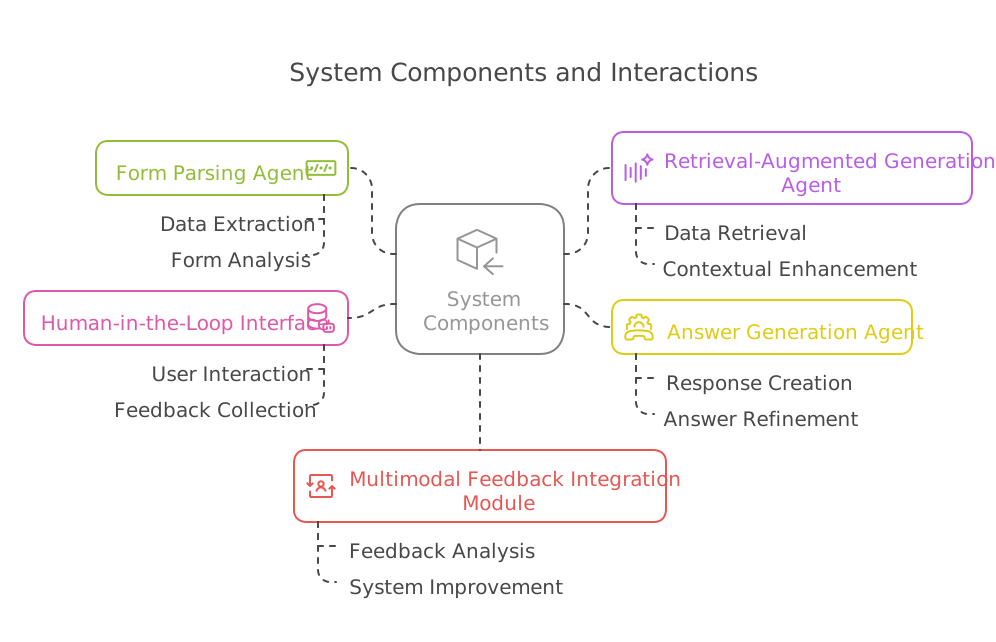
At its core, the system comprises five primary components:
- Form Parsing Agent
- Retrieval-Augmented Generation (RAG) Agent
- Answer Generation Agent
- Human-in-the-Loop (HITL) Interface
- Multimodal Feedback Integration Module
These components interact through a coordinated workflow, with each agent addressing specific challenges in the form completion process.
1. Form Parsing Agent
The form parsing agent serves as the system's foundation, responsible for:
- Converting the PDF form into a structured representation
- Identifying form fields, their types, and relationships
- Transforming form requirements into natural language questions
- Extracting constraints and validation rules
Technical Implementation
Modern PDF parsing requires handling both the document's visual structure and underlying logical structure. Our implementation combines multiple approaches:
PDF Structure Analysis
The form parsing begins with extracting the PDF's technical structure, including:
- Form fields (text fields, checkboxes, radio buttons, dropdown menus)
- Field attributes (required status, validation rules, character limits)
- Field groupings and relationships
- Page layout and positioning
This extraction utilizes PDF specification libraries that access the document's internal representation rather than merely its visual appearance.
Visual Element Recognition
Not all forms contain properly defined form fields in their technical structure. Many forms are created as static documents, with boxes and lines indicating where information should be entered. For these cases, the system employs computer vision techniques to:
- Detect visual form elements (boxes, lines, tables)
- Recognize text labels and instructions associated with these elements
- Identify implied form fields based on visual cues
Natural Language Question Generation
The critical innovation in our approach is converting form fields into natural language questions. This transformation bridges the gap between structured form data and the contextual understanding capabilities of modern LLMs.
For example, a form field labeled "DOB" with formatting constraints is converted to "What is the applicant's date of birth? Please provide it in MM/DD/YYYY format."
This question generation process considers:
- Field context within the larger document
- Field relationship to other fields
- Implicit knowledge required to complete the field
- Formatting and validation requirements
By generating natural language questions, the system enables downstream retrieval and generation components to better understand the information requirements.
Implementation Considerations
Several technical considerations affect the form parsing agent's effectiveness:
- PDF Version Compatibility: The system must handle various PDF specifications, from legacy PDF 1.4 to modern PDF 2.0 documents.
- Security Features: Many forms contain security features that prevent modification. The parser must respect these constraints while still extracting structural information.
- Embedded JavaScript: Some interactive PDF forms contain JavaScript for validation and dynamic behavior. The system should analyze these scripts to understand field constraints.
- Digital Signatures: Forms requiring digital signatures present special challenges for automation and require specific handling.
The output of the form parsing agent is a structured representation of the form, with each field transformed into a natural language question along with its metadata (field type, location, constraints).
2. Retrieval-Augmented Generation (RAG) Agent
The RAG agent addresses a fundamental challenge in form automation: finding relevant information scattered across multiple source documents. These documents may include previous applications, identification records, financial statements, medical records, or other supporting materials.
Vector Store Implementation
At the core of the RAG agent is a vector database that enables semantic search across document collections. The implementation involves:
Document Processing Pipeline
- Document Ingestion: Supporting documents undergo preprocessing, including:
- OCR for documents containing handwritten or non-machine-readable text
- Layout analysis to distinguish between tables, paragraphs, and other structural elements
- Language detection for multilingual documents
- Entity extraction to identify key information (names, dates, monetary amounts)
- Chunking Strategy: Documents are divided into semantically meaningful segments based on:
- Natural divisions (paragraphs, sections)
- Topical coherence
- Information density
- Structure type (tabular data versus narrative text)
- Embedding Generation: Each document chunk is converted into a high-dimensional vector representation that captures its semantic meaning. These embeddings are created using models specifically fine-tuned for document understanding.
- Metadata Annotation: Each chunk receives metadata annotations, including:
- Source document identifier
- Page and position within source
- Confidence scores for extracted information
- Document type and classification
- Creation and processing timestamps
Query Processing
When the system receives a natural language question from the form parsing agent, the RAG component:
- Converts the question into a vector representation using the same embedding model
- Searches the vector store for semantically similar document chunks
- Applies filtering based on metadata (document type, recency, source reliability)
- Ranks results based on relevance, confidence, and information completeness
Context Assembly
The retrieved information is then assembled into a coherent context for the answer generation agent. This context includes:
- The most relevant document chunks
- Confidence scores and source attributions
- Potentially conflicting information from different sources
- Related information that may provide additional context
Advanced RAG Techniques
Our implementation incorporates several advanced RAG techniques that improve retrieval quality:
- Hypothetical Document Embeddings (HyDE): Generating synthetic ideal documents before retrieval to improve query formulation
- Self-querying: The system generates multiple query variations to improve retrieval coverage
- Query Decomposition: Complex questions are broken down into simpler sub-questions
- Re-ranking: Initial search results undergo secondary ranking based on additional criteria
The RAG agent's effectiveness depends heavily on the quality of document ingestion and embedding models. Regular retraining and fine-tuning of these models on domain-specific data significantly improves performance.
3. Answer Generation Agent
The answer generation agent transforms retrieved information into accurate, properly formatted responses for each form field. This agent represents the system's decision-making core, responsible for:
- Synthesizing information from multiple sources
- Resolving conflicts between different documents
- Inferring missing information when appropriate
- Conforming to field format and validation requirements
- Ensuring consistency across related fields
LLM Orchestration
The generation agent employs a carefully prompted LLM with:
Prompt Engineering
The system constructs detailed prompts containing:
- The natural language question generated from the form field
- Retrieved context from supporting documents
- Field constraints and formatting requirements
- Instructions for handling uncertainty or missing information
- Examples of correct responses for similar fields (few-shot learning)
Reasoning Steps
The LLM is instructed to follow a step-by-step reasoning process:
- Analyze the question and identify key information requirements
- Evaluate the relevance and reliability of each piece of retrieved context
- Identify conflicts or inconsistencies between sources
- Apply domain knowledge to resolve ambiguities
- Format the response according to field requirements
- Verify the response against constraints
Confidence Scoring
Each generated answer includes a confidence score reflecting:
- Completeness of supporting information
- Consistency across sources
- Conformance to expected patterns
- Presence of potentially conflicting information
These confidence scores help prioritize fields for human review.
Field Interdependencies
Forms often contain interdependent fields where the value of one field affects others. The answer generation agent maintains a graph of field relationships and ensures consistency across related fields. For example, if a birthdate is filled in one section, age calculations in another section will remain consistent.
4. Human-in-the-Loop (HITL) Interface
While automation significantly reduces manual effort, human judgment remains essential for:
- Reviewing low-confidence predictions
- Handling edge cases
- Validating sensitive information
- Providing feedback to improve system performance
The HITL interface serves as the bridge between automated processing and human expertise.
Interface Design
The human review interface presents:
Prioritized Review Queue
Forms enter the review queue prioritized by:
- Overall form completion confidence
- Presence of critical fields with low confidence
- Business priority or deadline requirements
- Complexity level based on required human judgment
Contextual Field Display
For each field requiring review, the interface shows:
- The field question and system-generated answer
- Confidence score with visual indicator
- Supporting information used to generate the answer
- Alternative possible values with their confidence scores
- Links to source documents for verification
Efficient Interaction Paradigms
The interface supports multiple interaction modes:
- Quick approval/rejection of suggested answers
- Value selection from alternatives
- Direct editing with auto-formatting
- Voice input for efficiency
- Annotation with feedback or reasoning
Feedback Capture
Beyond simple corrections, the HITL interface captures structured feedback:
- Categorization of error types
- Alternative reasoning patterns
- Additional information sources
- Suggestions for system improvement
This feedback forms a critical dataset for system improvement.
5. Multimodal Feedback Integration
The system's long-term effectiveness depends on continuous learning from human feedback. The multimodal feedback integration module:
- Collects human corrections and feedback
- Identifies patterns in system errors
- Generates training examples for model improvement
- Updates retrieval strategies based on missed information
- Refines prompt templates for generation agents
Learning Mechanisms
The feedback integration employs several learning mechanisms:
Supervised Fine-tuning
Human-corrected examples are compiled into training datasets for:
- Improving question generation from form fields
- Enhancing retrieval effectiveness for specific question types
- Fine-tuning answer generation for domain-specific formats
Prompt Library Evolution
The system maintains a library of effective prompts that:
- Expands with new examples from human feedback
- Specializes by form type and domain
- Incorporates successful reasoning patterns
- Adapts to changing document types
Retrieval Strategy Optimization
Analysis of missed information drives improvements in:
- Chunking strategies for different document types
- Embedding models for domain-specific terminology
- Query reformulation techniques
- Context assembly methods
Active Learning
The system identifies high-value opportunities for human feedback by:
- Detecting novel form types or fields
- Identifying edge cases with high uncertainty
- Recognizing patterns of consistent errors
- Proactively requesting feedback on representative examples
This continuous improvement cycle ensures the system becomes more effective over time, requiring progressively less human intervention.
Implementation Process
Implementing an effective PDF form automation system requires careful planning and execution. This section outlines a practical implementation process based on our experience deploying such systems in enterprise environments.
Phase 1: Foundation Development
The initial implementation phase focuses on establishing the technical foundation:
Infrastructure Setup
- Vector database deployment with appropriate scaling capabilities
- Compute resources for model inference (GPU/TPU allocation)
- Document storage and processing pipeline
- Secure API interfaces for system components
Core Agent Development
- Form parsing module with support for common form types
- Basic RAG pipeline with document ingestion workflows
- Initial answer generation with conservative confidence thresholds
- Minimal HITL interface for validation
Limited Deployment
- Selection of 2-3 form types for initial implementation
- Carefully curated document sets for initial testing
- High human oversight during initial processing
- Detailed performance metrics collection
This foundation phase typically requires 2-3 months, depending on organizational complexity and existing infrastructure.
Phase 2: Capability Expansion
The second phase focuses on expanding capabilities and improving performance:
Enhanced Parsing Capabilities
- Support for additional form types and structures
- Improved visual element recognition
- Better handling of complex validation rules
- More sophisticated question generation
Advanced RAG Techniques
- Implementation of query decomposition
- Addition of hypothetical document embeddings
- Development of self-querying capabilities
- Enhanced context assembly logic
Improved Generation
- More sophisticated prompt engineering
- Implementation of chain-of-thought reasoning
- Better handling of field interdependencies
- More accurate confidence estimation
Enhanced HITL Interface
- Development of efficient review workflows
- Addition of multimodal input options
- More detailed feedback collection
- Integration with existing business systems
This capability expansion phase typically spans 3-4 months and results in a system capable of handling most common form types with reasonable accuracy.
The final implementation phase focuses on scaling the system and integrating it into broader business processes:
Enterprise Integration
- Connection to document management systems
- Integration with business process automation tools
- Implementation of robust security and compliance features
- Development of administrative interfaces and dashboards
Performance Optimization
- Caching strategies for common queries
- Batch processing capabilities for high-volume scenarios
- Resource allocation optimization
- Latency reduction techniques
Continuous Learning Implementation
- Establishment of feedback collection pipelines
- Development of model retraining workflows
- Implementation of automated evaluation metrics
- Creation of monitoring and alerting systems
Organizational Adoption
- Training programs for system users
- Process redesign to maximize automation benefits
- Change management initiatives
- ROI tracking and optimization
This scale and integration phase typically requires 4-6 months and results in a fully operational system integrated into organizational workflows.
Measuring Success: Key Performance Indicators
Evaluating the effectiveness of PDF form automation requires a multifaceted approach to measurement. We recommend tracking the following key performance indicators:
Efficiency Metrics
- Processing Time Reduction: Average time from form receipt to completion
- Human Effort Reduction: Person-hours required per completed form
- Throughput Improvement: Total forms processed per time period
- Queue Reduction: Backlog size and aging metrics
Quality Metrics
- Field Accuracy Rate: Percentage of fields correctly completed without human intervention
- Form Rejection Rate: Percentage of forms rejected in downstream processes
- Error Detection Rate: Percentage of system errors caught before submission
- Confidence Score Calibration: Correlation between confidence scores and actual accuracy
User Experience Metrics
- Human Reviewer Satisfaction: Feedback from staff using the HITL interface
- Review Efficiency: Average time spent reviewing each form
- Learning Curve: Time required for new users to reach proficiency
- Feature Utilization: Usage patterns of system capabilities
Business Impact Metrics
- Cost Savings: Reduction in processing costs per form
- Revenue Impact: Changes in revenue related to improved processing
- Compliance Improvements: Reduction in compliance-related issues
- Customer Satisfaction: Improvements in end-user experience with form submission
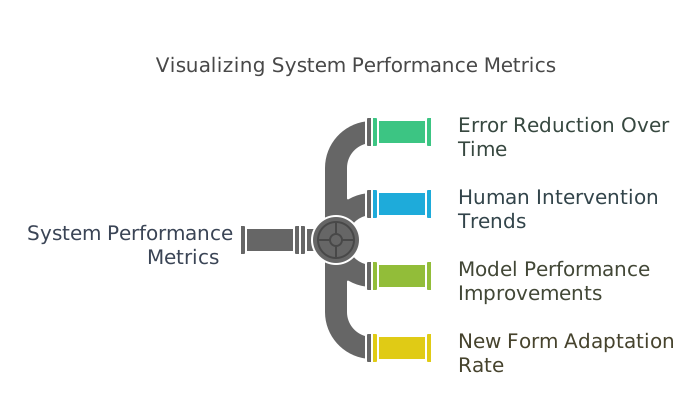
Learning and Improvement Metrics
- Error Reduction Over Time: Trend in error rates by form and field type
- Human Intervention Trends: Changes in the rate of required human review
- Model Performance Improvements: Gains from system learning
- New Form Adaptation Rate: Time required to effectively process new form types
Regular measurement and analysis of these KPIs enable continuous optimization of the system and clear demonstration of business value.
To illustrate the practical benefits of automated PDF form processing, consider this case study from a mid-sized insurance provider handling approximately 15,000 claims monthly.
Initial State
Before implementing AI-based form automation:
- Average claim processing time: 27 hours
- Staff required: 42 full-time employees
- Error rate: 8.3% requiring rework
- Customer satisfaction score: 72/100
- Processing cost per claim: $42
The company struggled with seasonal volume fluctuations and experienced significant backlogs during peak periods.
Implementation Process
The company followed the phased implementation approach:
- Foundation (3 months): Deployed basic system handling standard medical claims
- Capability Expansion (4 months): Added support for all claim types and improved accuracy
- Scale and Integration (5 months): Integrated with existing claims management system
Throughout implementation, the company maintained comprehensive performance metrics and invested in staff training for the new review interface.
Results After 12 Months
Following full implementation:
- Average claim processing time: 4.2 hours (84% reduction)
- Staff required: 16 full-time employees (62% reduction)
- Error rate: 2.1% requiring rework (75% improvement)
- Customer satisfaction score: 89/100 (17 point improvement)
- Processing cost per claim: $12 (71% reduction)
Additionally, the company experienced:
- Elimination of processing backlogs, even during peak periods
- Ability to handle 30% volume increase without additional staffing
- Improved compliance with regulatory requirements
- More consistent decision-making across similar claims
The system achieved ROI within 7 months of initial deployment, with annual savings exceeding $5.4 million.
Critical Success Factors
Several factors contributed to this successful implementation:
- Phased Approach: Starting with high-volume, standardized forms before tackling complex variants
- Staff Involvement: Early engagement of processing staff in system design and testing
- Data Advantage: Extensive library of historical claims providing training examples
- Integration Focus: Seamless connection with existing workflow systems
- Continuous Improvement: Dedicated team analyzing performance and implementing enhancements
This case demonstrates the transformative potential of AI-based form automation when properly implemented.
Future Directions
While current PDF form automation capabilities represent a significant advancement over traditional approaches, several emerging technologies promise to further enhance these systems.
Multimodal Understanding
Next-generation systems will incorporate improved capabilities for:
- Processing handwritten supporting documents with higher accuracy
- Understanding mixed text-image documents (e.g., charts, diagrams)
- Incorporating audio and video evidence in claims processing
- Supporting real-time document capture from mobile devices
Advanced Reasoning Capabilities
Enhancements in LLM capabilities will enable:
- More sophisticated inference from incomplete information
- Better handling of ambiguous or contradictory evidence
- Improved detection of potential fraud or errors
- Explanation of reasoning in human-understandable terms
Process Autonomy
Systems will progress toward greater autonomy through:
- Learning optimal escalation patterns for human review
- Dynamically adjusting confidence thresholds based on performance
- Automatically identifying improvement opportunities
- Self-monitoring for performance degradation
Integration Expansion
Form automation will extend beyond individual forms to:
- Coordinating information across multiple related forms
- Integrating with broader business process automation
- Supporting end-to-end customer journeys
- Enabling continuous form redesign based on usage patterns
As these technologies mature, the boundary between form completion and intelligent decision-making will continue to blur, creating opportunities for more comprehensive automation of knowledge work.
Conclusion
PDF form automation using AI agents represents a practical, immediate opportunity for organizations to achieve significant efficiency gains while improving accuracy and user experience. By implementing a multi-agent architecture incorporating form parsing, retrieval-augmented generation, answer generation, human-in-the-loop feedback, and continuous learning, organizations can transform document-intensive processes.
The technical approach outlined in this article provides a blueprint for implementation, while the phased deployment strategy offers a practical path forward for organizations of all sizes. As with any AI system, success depends not only on technical excellence but also on thoughtful integration with existing workflows and ongoing attention to performance metrics.
Organizations embracing this approach can expect not only immediate productivity gains but also the establishment of a foundation for increasingly sophisticated document intelligence capabilities in the future.



