

Blog
Document Workflow Automation ROI Calculator
Revolutionize your business! Cut document processing costs by 60-80% & see ROI in months. Unlock hidden savings!

Blog
Revolutionize your business! Cut document processing costs by 60-80% & see ROI in months. Unlock hidden savings!
Every business leader asks the same question when considering new technology: "What's the return on investment?" When it comes to document workflow automation, the answer might surprise you. Companies implementing intelligent document processing solutions typically see cost reductions of 60-80% within the first year, with some organizations saving millions of dollars annually on document-related processes.
The numbers are staggering. Manual document processing costs businesses an average of $15-25 per document when you factor in labor, errors, delays, and compliance issues. For a mid-sized company processing 10,000 documents monthly, that translates to $150,000-$250,000 in monthly costs alone. Document workflow automation can slash these expenses while dramatically improving accuracy and speed.
But raw statistics only tell part of the story. The real transformation happens when you eliminate the hidden costs that drain your resources daily: employees spending hours on data entry instead of strategic work, costly errors that damage customer relationships, compliance failures that result in hefty fines, and bottlenecks that slow your entire operation to a crawl.
This comprehensive guide will help you understand the true cost of manual document processing, calculate your potential savings from automation, and build a compelling business case for implementing intelligent document processing in your organization. We'll provide you with practical tools, real-world examples, and industry-specific insights to measure your document automation ROI accurately.
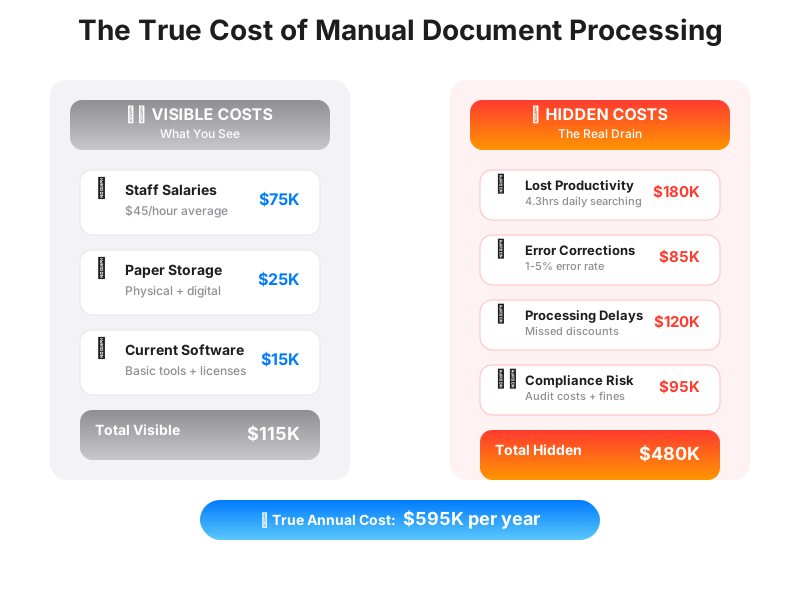
Most organizations vastly underestimate the true cost of their manual document processing operations. While you might calculate the obvious expenses like staff salaries and paper costs, the hidden expenses often dwarf these visible line items. Understanding these concealed costs is crucial for accurately calculating your automation ROI.
The average knowledge worker spends 2.5 hours daily searching for information and another 1.8 hours on document-related tasks. That's nearly half their workday consumed by activities that could be automated. For an employee earning $75,000 annually, this represents approximately $37,500 in lost productivity each year. Multiply this across your entire workforce, and the numbers become eye-opening.
Error costs represent another massive drain on resources. Manual data entry has an error rate of 1-5%, depending on document complexity and operator fatigue. Each error requires time to identify, investigate, and correct. More damaging are the errors that go undetected, leading to incorrect invoices, missed compliance deadlines, or flawed business decisions based on inaccurate data. Research shows that poor data quality costs organizations an average of $12.9 million annually.
Processing delays create their own financial burden. Manual workflows often involve multiple handoffs, approval cycles, and potential bottlenecks when key personnel are unavailable. These delays impact cash flow, customer satisfaction, and operational efficiency. In accounts payable, for example, delayed invoice processing can result in missed early payment discounts that typically range from 1-3% of invoice value. For a company with $10 million in annual vendor payments, missing these discounts costs $100,000-$300,000 yearly.
Compliance and audit costs add another layer of expense. Manual processes make it difficult to maintain consistent documentation, create audit trails, and ensure regulatory compliance. Organizations often need additional staff during audit periods, and compliance failures can result in significant fines. The average cost of a compliance failure ranges from $4 million to $14.8 million, depending on the industry and severity of the violation.
Storage and document management costs might seem minimal, but they accumulate quickly. Physical document storage requires office space, filing systems, and climate control. Digital storage of unstructured documents creates its own challenges, with organizations spending heavily on storage infrastructure and document retrieval systems. The average enterprise spends $20,000-$30,000 annually per terabyte of managed storage.
The financial impact of document workflow automation extends far beyond simple cost reduction. Organizations implementing comprehensive automation solutions report transformational changes in their operational efficiency, accuracy, and employee satisfaction. Let's examine the concrete numbers behind these improvements.
Direct labor cost savings represent the most immediate and measurable benefit. Automation can reduce document processing time by 75-90%, depending on the complexity of the workflow. A typical accounts payable process that previously required 45 minutes per invoice can be reduced to 5-10 minutes with intelligent automation. For a company processing 1,000 invoices monthly, this time reduction saves approximately 600 hours of labor per month. At an average hourly rate of $35 for accounts payable staff, this translates to $21,000 in monthly savings, or $252,000 annually.
Error reduction delivers substantial financial benefits that compound over time. Automated document processing typically achieves 95-99% accuracy rates, compared to the 95-99% accuracy of manual processing (though human accuracy often drops significantly with fatigue or high-volume processing). This improvement eliminates the costs associated with error correction, which can range from $25-$100 per error depending on complexity. More importantly, it prevents the downstream costs of decisions made on incorrect data.
Processing speed improvements create multiple value streams. Faster document processing accelerates cash flow, improves customer response times, and enables more agile business operations. Organizations report invoice processing times dropping from weeks to days, contract approvals accelerating from months to weeks, and customer onboarding processes completing in hours rather than days. These speed improvements translate directly to improved customer satisfaction scores and competitive advantages.
The compound effect of these improvements often surprises organizations. When Acme Manufacturing implemented Artificio's document automation platform, they initially projected $300,000 in annual savings based on labor cost reduction alone. After 18 months of operation, their actual savings exceeded $750,000 when they factored in error reduction, faster customer onboarding, improved compliance, and the ability to handle 40% more business volume without additional staff.
Operational scalability represents another significant value driver. Manual processes require proportional increases in staff as business volume grows. Automated systems can handle substantial volume increases with minimal additional investment. This scalability becomes particularly valuable during peak seasons, business expansions, or economic recovery periods when hiring qualified staff quickly becomes challenging and expensive.
Employee satisfaction and retention improvements, while harder to quantify, deliver measurable financial benefits. Document automation eliminates repetitive, mind-numbing tasks, allowing employees to focus on higher-value activities. Organizations report improved job satisfaction scores, reduced turnover rates, and increased employee engagement. Given that replacing a knowledge worker costs 50-200% of their annual salary, retention improvements can save hundreds of thousands of dollars annually.
Customer satisfaction improvements create long-term financial value through increased retention and referrals. Faster, more accurate document processing translates directly to better customer experiences. Companies report reduced customer service inquiries, faster resolution times, and improved Net Promoter Scores after implementing document automation. Research shows that increasing customer retention rates by just 5% can increase profits by 25-95%.
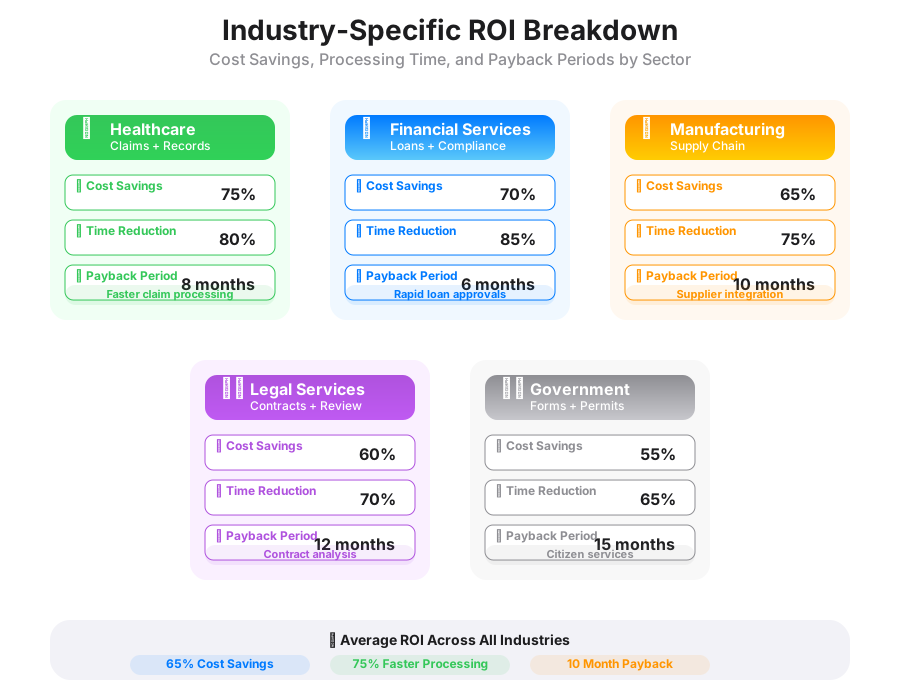
Different industries face unique document processing challenges and opportunities, resulting in varying ROI profiles for automation investments. Understanding your industry's specific pain points and typical savings helps create more accurate projections and stronger business cases for automation initiatives.
Healthcare organizations process enormous volumes of patient records, insurance claims, billing documents, and regulatory filings. Manual processing of medical claims alone costs an average of $6.50 per claim, while automated processing reduces this to approximately $1.50 per claim. For a mid-sized hospital processing 50,000 claims monthly, this represents savings of $250,000 per month, or $3 million annually. Beyond direct cost savings, healthcare automation improves patient safety by reducing medical errors, accelerates insurance reimbursements, and ensures better compliance with HIPAA and other regulatory requirements.
The complexity of healthcare documents makes automation particularly valuable. Medical records contain structured data (patient demographics, billing codes) and unstructured information (physician notes, test results). Intelligent document processing can extract and validate this information automatically, reducing processing time from hours to minutes while improving accuracy significantly. One regional health system reported that implementing document automation reduced their claims denial rate from 12% to 3%, representing additional revenue recovery of $2.8 million annually.
Financial services organizations handle vast quantities of loan applications, account opening documents, compliance reports, and transaction records. The heavily regulated nature of this industry makes accuracy and audit trails critical. Document automation in financial services typically delivers ROI within 6-12 months, with ongoing savings of 40-70% on document processing costs.
Loan processing represents a particularly compelling use case. Manual underwriting processes can take weeks and require multiple specialists to review documents, verify information, and make approval decisions. Automated systems can complete initial document review and data extraction in minutes, allowing underwriters to focus on risk assessment and customer interaction. A regional bank implementing loan processing automation reduced their average approval time from 14 days to 3 days while maintaining the same approval criteria and risk standards. This improvement allowed them to process 60% more loan applications with the same staff, directly contributing to revenue growth.
Manufacturing and logistics companies deal with purchase orders, invoices, shipping documents, and quality control reports. The fast-paced nature of these industries makes processing speed critical, while the complexity of global supply chains demands accuracy and compliance with multiple regulatory frameworks. Document automation in manufacturing typically focuses on supplier onboarding, invoice processing, and quality documentation.
A automotive parts manufacturer processing 2,000 supplier invoices monthly reduced their processing costs from $18 per invoice to $4 per invoice through automation. Beyond the direct savings of $28,000 monthly, they achieved significant improvements in supplier relationships by reducing payment cycles from 45 days to 15 days, often qualifying for early payment discounts that saved an additional $50,000 annually.
Legal firms and corporate legal departments process contracts, compliance documents, litigation materials, and regulatory filings. The billable hour model in legal services makes efficiency improvements directly translatable to revenue increases. Document automation allows legal professionals to focus on high-value analysis and client interaction rather than document review and data extraction.
A corporate legal department handling 500 contracts monthly reduced their contract review time from 4 hours per contract to 45 minutes by implementing intelligent document processing. This improvement allowed them to handle 40% more contracts without additional staff while improving contract compliance monitoring. The time savings enabled attorneys to take on more strategic projects, directly contributing to business growth initiatives.
Government agencies and educational institutions face unique challenges with limited budgets, high document volumes, and strict compliance requirements. These organizations often achieve substantial ROI through document automation, though the benefits may be measured in service improvements and citizen satisfaction rather than pure profit metrics.
Calculating your potential document automation ROI requires understanding your current costs, processing volumes, and specific pain points. This practical calculator framework helps you estimate your savings potential and build a compelling business case for automation investment.
Start by establishing your baseline document processing costs. Identify the types of documents you process regularly (invoices, contracts, forms, reports) and estimate monthly volumes for each category. For each document type, calculate the current processing cost by considering direct labor time, average hourly wages, error correction time, and any technology costs associated with current processing methods.
A typical calculation might look like this: If your accounts payable team processes 800 invoices monthly, with an average processing time of 20 minutes per invoice at a fully-loaded hourly cost of $45, your monthly labor cost alone is $12,000. Add error correction costs (estimated at $50 per error for 5% error rate), storage and retrieval costs, and management oversight, and your total monthly cost approaches $15,000, or $180,000 annually.
Document complexity significantly impacts processing costs and automation savings potential. Simple forms with structured data (like standard purchase orders) might currently cost $5-8 to process manually but only $1-2 with automation. Complex documents with mixed structured and unstructured content (like legal contracts) might cost $25-50 to process manually but only $8-12 with intelligent automation.
Processing volume fluctuations affect ROI calculations and should be factored into your projections. Many organizations experience seasonal variations, growth trends, or cyclical changes that impact document volumes. Automation provides particular value during peak periods when hiring temporary staff becomes expensive and training time is limited. A retail organization might process 2,000 invoices monthly during normal periods but 8,000 invoices during holiday seasons. Automation allows them to handle peak volumes without proportional staff increases.
Error rates and correction costs vary significantly by document type and processing complexity. Simple data entry might have error rates of 1-2%, while complex document interpretation could have error rates of 5-10% with manual processing. Each error typically costs $25-100 to identify and correct, not including downstream impacts of incorrect data. Automation typically reduces error rates to 0.1-0.5%, representing substantial cost savings.
Calculate your potential savings by comparing current costs to projected automation costs. Automation typically reduces processing time by 75-90%, eliminates most error correction costs, and scales efficiently with volume increases. A realistic automation cost might include software licensing ($2-5 per document processed), implementation costs (typically $50,000-200,000 depending on complexity), and ongoing maintenance (10-15% of licensing costs annually).
Your ROI calculation should include both hard savings (direct cost reductions) and soft benefits (improved customer satisfaction, faster processing, better compliance). While soft benefits are harder to quantify, they often represent the largest long-term value from automation investments.
Payback period calculations help justify automation investments and set realistic expectations. Most document automation projects achieve payback within 12-18 months, with ongoing annual savings of 40-70% compared to manual processing costs. Organizations with high document volumes, complex processing requirements, or significant error rates often achieve payback in 6-12 months.
Consider implementation and change management costs in your ROI calculations. While modern no-code automation platforms like Artificio significantly reduce implementation complexity, you'll still need to account for staff training, process redesign, and potential temporary productivity reductions during transition periods. These costs typically represent 20-30% of first-year savings but disappear after successful implementation.
Risk factors should also be included in your analysis. Consider what happens if document volumes increase significantly, if compliance requirements change, if key processing staff leave the organization, or if your current manual processes fail during peak periods. Automation provides insurance against these risks while delivering measurable cost savings.
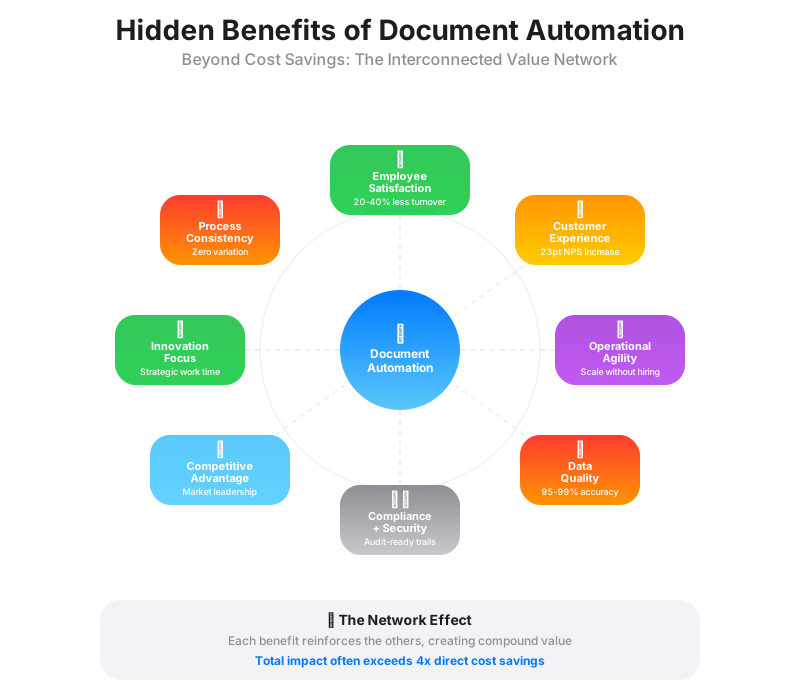
While direct cost savings provide the most compelling justification for document automation investments, the indirect benefits often deliver greater long-term value. These hidden advantages compound over time and create sustainable competitive advantages that extend far beyond simple cost reduction.
Employee satisfaction and engagement improvements represent one of the most significant but undervalued benefits of document automation. Workers consistently report higher job satisfaction when freed from repetitive, manual tasks. Document processing roles often involve mind-numbing data entry, filing, and routine verification tasks that contribute little to career development or job fulfillment. Automation eliminates these tasks, allowing employees to focus on analysis, customer interaction, and strategic activities that provide greater job satisfaction and career growth opportunities.
The impact on employee retention can be substantial. Organizations implementing comprehensive document automation report 20-40% reductions in turnover rates for roles previously focused on manual document processing. Given that replacing a knowledge worker costs 50-200% of their annual salary, retention improvements can save hundreds of thousands of dollars annually while maintaining institutional knowledge and customer relationships.
Customer experience improvements create long-term competitive advantages that are difficult for competitors to replicate. Faster document processing translates directly to quicker customer onboarding, faster loan approvals, more responsive customer service, and more accurate billing. These improvements enhance customer satisfaction scores and increase customer lifetime value through improved retention and increased business volume.
A telecommunications company implementing document automation for customer service requests reduced average resolution time from 3.2 days to 0.8 days. This improvement increased their Net Promoter Score by 23 points and reduced customer churn by 15%. The revenue impact of improved customer retention exceeded their automation investment by a factor of four within 18 months.
Operational agility and scalability benefits become particularly valuable during periods of business change. Manual processes require proportional increases in staff as volumes grow, making rapid scaling expensive and risky. Automated systems can handle substantial volume increases with minimal additional investment, enabling organizations to capitalize on growth opportunities quickly.
This scalability proved invaluable during the COVID-19 pandemic when many organizations needed to process dramatically different document volumes while working with reduced or remote staff. Companies with robust document automation maintained operational efficiency while competitors struggled with manual processes that couldn't adapt to changed circumstances.
Data quality and business intelligence improvements enable better decision-making across the organization. Manual document processing often results in inconsistent data entry, missing information, and errors that compromise business analytics. Automated systems ensure consistent data capture, validation, and integration with business systems, providing more reliable information for strategic decision-making.
The improvement in data quality enables advanced analytics and business intelligence initiatives that would be impossible with manual processes. Organizations can identify trends, optimize operations, and predict future needs based on consistent, accurate data extracted from their document processes.
Compliance and risk management benefits provide substantial value in regulated industries. Automated systems create consistent audit trails, ensure standard processing procedures, and reduce the risk of compliance failures. The cost of regulatory violations can be substantial, with fines ranging from hundreds of thousands to millions of dollars depending on the industry and severity of the violation.
Document automation also improves security by reducing the number of people handling sensitive documents, creating access controls and audit trails, and eliminating risks associated with physical document storage and transportation. These security improvements become increasingly valuable as data privacy regulations become more stringent and penalties more severe.
Competitive positioning advantages emerge as organizations become more responsive, accurate, and efficient than competitors relying on manual processes. The ability to process documents faster, more accurately, and at lower cost enables more competitive pricing, better customer service, and more agile business operations.
Creating a compelling business case for document automation requires more than just cost calculations. You need to address stakeholder concerns, demonstrate clear value propositions, and present a realistic implementation plan that minimizes risk while maximizing benefits. Successful business cases combine quantitative analysis with qualitative benefits and address the specific priorities of different organizational stakeholders.
Start your business case by clearly defining the problem you're solving. Quantify current pain points with specific examples and costs. Instead of stating "our document processing is slow and expensive," provide concrete evidence: "Our accounts payable team processes 1,200 invoices monthly, requiring 30 minutes per invoice and resulting in processing costs of $27,000 monthly. Error rates of 4% require an additional $6,000 monthly in correction costs, and processing delays average 12 days, causing us to miss $15,000 annually in early payment discounts."
Address different stakeholder perspectives in your business case. Finance executives care about ROI, payback periods, and cost reduction. Operations managers focus on efficiency improvements, error reduction, and scalability. IT leaders want to understand integration requirements, security implications, and maintenance needs. HR professionals are concerned about employee impact and change management. Your business case should speak to each of these perspectives with relevant metrics and benefits.
Present multiple scenarios in your analysis to demonstrate robustness and address risk concerns. Include conservative, realistic, and optimistic projections based on different assumptions about processing volumes, error rates, and implementation success. This approach shows that automation delivers value even under pessimistic assumptions while highlighting the upside potential under favorable conditions.
Risk mitigation strategies should be explicitly addressed in your business case. Common concerns include implementation complexity, employee resistance, technology integration challenges, and potential disruption to current operations. Modern no-code automation platforms like Artificio address many of these concerns by enabling rapid implementation, requiring minimal technical expertise, and allowing gradual rollout that minimizes operational disruption.
Implementation timeline and milestones help stakeholders understand what to expect and when benefits will begin accruing. Most document automation projects can be implemented in phases, allowing organizations to realize early wins while building confidence for larger implementations. A typical timeline might include a 30-day pilot project, 60-day initial implementation, and 90-day full rollout, with measurable benefits beginning within the first 30 days.
Training and change management requirements should be realistic and budgeted appropriately. While modern automation platforms are designed for ease of use, successful implementations require proper training and change management to ensure adoption and maximize benefits. Budget approximately 10-15% of implementation costs for training and change management activities.
Success metrics and measurement approaches demonstrate accountability and provide frameworks for ongoing optimization. Define specific, measurable goals for cost reduction, processing time improvement, error rate reduction, and other relevant metrics. Establish baseline measurements before implementation and regular reporting schedules to track progress against goals.
Consider starting with a pilot project to demonstrate value and build organizational confidence. Pilots allow you to test assumptions, refine processes, and demonstrate concrete results before committing to larger investments. Choose pilot projects with high visibility, clear success metrics, and significant pain points that automation can address quickly.
Present your business case with confidence but acknowledge limitations and risks honestly. Stakeholders appreciate realistic assessments that address potential challenges while demonstrating clear value propositions. Your goal is to build trust and confidence in the automation initiative while setting realistic expectations for implementation and results.
Implementing document workflow automation doesn't have to be complex or risky. Artificio's no-code platform enables organizations to automate document processes quickly and efficiently, with typical implementations delivering measurable results within 30 days. Our approach focuses on rapid value delivery while building sustainable, scalable automation solutions.
The first step in your automation journey involves identifying the best initial use cases for automation. Look for document processes with high volumes, repetitive tasks, and clear pain points. Ideal candidates include invoice processing, contract review, form processing, and customer onboarding documents. These processes typically have well-defined inputs and outputs, making them perfect for automation.
Artificio's AI agents work together to handle different aspects of your document lifecycle. Our Document Classification agent automatically identifies document types and routes them to appropriate processing workflows. The Key-Pair Extractor agent identifies and extracts specific data points from documents, while the AI Data Validator ensures accuracy and completeness. The Data Integrator agent seamlessly connects extracted information with your existing business systems.
Implementation begins with a comprehensive assessment of your current document processes. Our team works with you to map existing workflows, identify automation opportunities, and design optimal solutions. This assessment typically takes 1-2 weeks and results in a detailed implementation plan with specific timelines, success metrics, and expected benefits.
The configuration phase leverages Artificio's no-code platform to build your automation workflows without requiring programming expertise. Our drag-and-drop interface allows business users to define document processing rules, validation criteria, and integration requirements. Most basic workflows can be configured in days rather than weeks, enabling rapid deployment and quick wins.
Testing and validation ensure that your automation workflows perform as expected before full deployment. We provide comprehensive testing environments and support to validate accuracy, performance, and integration functionality. This phase typically takes 1-2 weeks and includes user acceptance testing to ensure the solution meets your specific requirements.
Deployment can be gradual or comprehensive, depending on your preferences and risk tolerance. Many organizations prefer phased deployments that begin with a subset of documents or processes, allowing them to validate results and build confidence before expanding automation to additional areas. This approach minimizes risk while demonstrating value quickly.
Training and support ensure successful adoption and ongoing optimization. Artificio provides comprehensive training programs for end users, administrators, and power users. Our support team remains available to address questions, optimize performance, and help you expand automation to additional use cases as your comfort and expertise grow.
Ongoing optimization maximizes the value of your automation investment. As you gain experience with automated processes, you'll identify additional opportunities for improvement, expansion, and integration. Artificio's platform grows with your needs, supporting increasingly complex workflows and broader automation initiatives.
Success measurement and reporting provide visibility into automation performance and ROI realization. Our platform includes comprehensive analytics and reporting capabilities that track processing volumes, accuracy rates, cost savings, and other key metrics. Regular reporting helps you demonstrate value to stakeholders and identify opportunities for further optimization.
The investment in document automation pays for itself quickly while providing long-term competitive advantages. Organizations typically see positive ROI within 6-12 months, with ongoing annual savings of 40-70% compared to manual processing costs. More importantly, automation enables organizational agility, improved customer experiences, and sustainable growth that extends far beyond simple cost reduction.
Conclusion: Transform Your Business with Document Automation
Document workflow automation represents one of the most impactful investments organizations can make in 2025. With typical cost savings of 60-80% and payback periods of 6-18 months, automation delivers compelling financial returns while enabling operational improvements that create lasting competitive advantages.
The question isn't whether document automation will benefit your organization, but rather how quickly you can implement it and begin realizing the benefits. Every day you delay automation, you're continuing to pay the hidden costs of manual processing while missing opportunities to improve customer experiences, enhance employee satisfaction, and position your organization for growth.
Start your automation journey today with a free ROI assessment. Artificio's team can help you calculate your specific savings potential, identify the best initial use cases, and develop an implementation plan that minimizes risk while maximizing value. Contact us to schedule your consultation and take the first step toward transforming your document processes.
The future belongs to organizations that embrace automation and leverage technology to create more efficient, accurate, and agile operations. Don't let manual document processing hold your organization back when powerful, accessible automation solutions are available today. Your competitors are already exploring these opportunities. Make sure you're not left behind.

Head IT Operations - Co Founder of Artificio
See it in your SAP environment
Bring us a document, a process, or a bottleneck. We'll show how Artificio captures, validates, and posts into SAP — then scale from there.
Security & compliance
ISO 27001:2013 certified, SOC 2 Type 2 compliant, GDPR and HIPAA ready. Every agent action is logged, auditable, and runs in isolated environments.