

Blog
3-Document Test: Do You Really Need Document AI?
Don't spend $50K before you're ready! Use the 15-min 3-Document Test to honestly assess if your business needs document AI now.

Blog
Don't spend $50K before you're ready! Use the 15-min 3-Document Test to honestly assess if your business needs document AI now.
Last Tuesday, I sat across from an operations director who was convinced her company needed document AI. She'd read all the case studies, seen the demos, and had budget approval for a six-figure implementation. Twenty minutes into our conversation, I told her something most vendors wouldn't: "You're not ready yet."
She looked stunned. Here was a vendor turning down business. But here's the thing: implementing document AI before you're ready is like hiring a full-time employee before you have enough work to keep them busy. You'll spend money, create overhead, and end up more frustrated than when you started.
The problem is that nobody in the document AI industry wants to talk about readiness. Every vendor wants to sell you their solution right now. Every case study shows companies processing millions of documents. Every demo makes it look effortless. But the reality? Most businesses waste significant money on document AI because they never stopped to ask a simple question: does my business actually need this yet?
That's why I created the 3-Document Test. It's a fifteen-minute framework that will tell you, with brutal honesty, whether document AI makes sense for your business right now. Not in theory. Not based on what you hope to grow into. Right now.
Before we dive into the test, you need to understand why so many companies make expensive mistakes with document AI. The pattern is depressingly consistent.
A manager attends a conference and sees an impressive demo. AI extracts data from an invoice in seconds. Perfect accuracy. No human intervention. Magic. They return to the office energized and start the vendor evaluation process. Three months and countless meetings later, they've signed a contract. Six months after that, the system sits barely used while the team continues processing documents manually because "the AI doesn't understand our specific documents" or "it's actually faster to just do it ourselves."
The disconnect happens because nobody asks the most important question: what problem are we actually solving? Too many businesses approach document AI like it's a magic wand that will fix all their document problems. It's not. It's a very specific tool that solves very specific problems really well. But only if you have those specific problems.
Think about it this way. You wouldn't buy industrial manufacturing equipment for a business that makes ten units per month. The equipment works great, but you don't have the volume to justify it. The same logic applies to document AI. Just because the technology is impressive doesn't mean your business needs it yet.
The 3-Document Test cuts through all the sales pitches and forces you to look at your actual documents, your actual volumes, and your actual pain points. It's designed to be completed in about fifteen minutes, and it will give you a clear answer: invest now, wait and grow, or don't bother.
Here's how it works. You're going to identify three specific documents from your business and run them through a scoring system. Not hypothetical documents. Not documents you might process someday. Real documents that crossed your desk this week. The three documents represent three different aspects of document processing readiness: volume, complexity, and value.
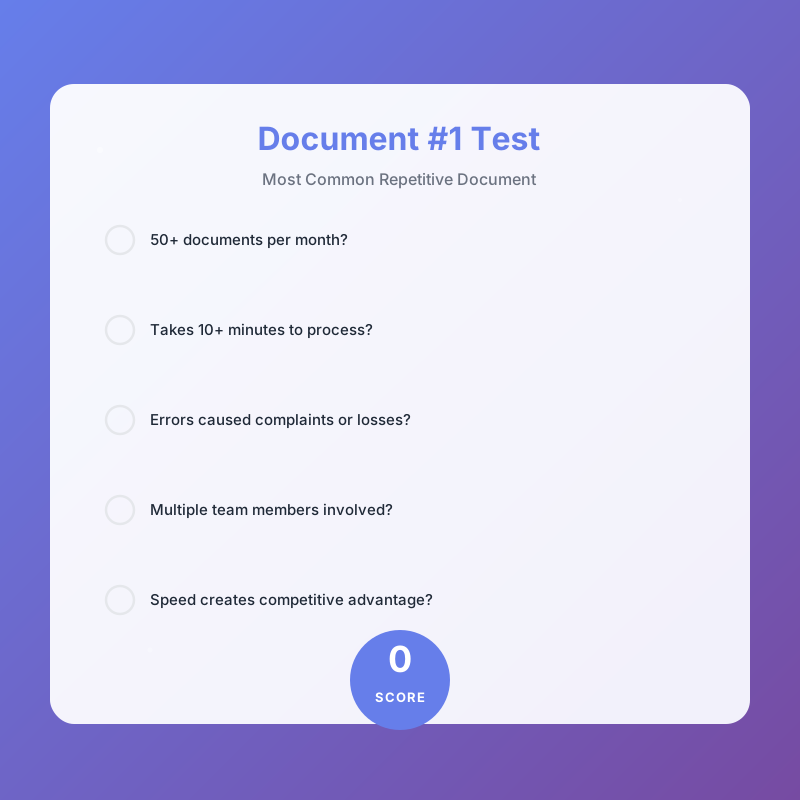
This is the document you process most frequently. For many businesses, it's invoices. For others, it might be application forms, contracts, shipping documents, or customer intake forms. The key characteristic is repetition. You see this document type over and over, day after day.
Go pull an actual example right now. I'll wait. Got it? Good. Now look at it and ask yourself these five questions. Be honest. Nobody's watching, and lying to yourself only wastes your own money.
Question 1: Do you process at least 50 of these documents per month? If you're only seeing 20 or 30, document AI is overkill. The setup time and cost won't pay for itself. You need consistent volume to justify automation.
Question 2: Does processing this document manually take more than 10 minutes? If your team can zip through these in 5 minutes each, automation might actually slow things down once you factor in system checks and exception handling. You need meaningful time savings to make this worthwhile.
Question 3: Have errors in processing this document caused customer complaints or cost you money? This is critical. Perfect accuracy is great, but if mistakes don't really matter, why automate? Document AI makes sense when errors have consequences.
Question 4: Do multiple team members touch this document during processing? If one person handles everything start to finish, automation often creates more complexity than it solves. You need handoffs and coordination problems that automation can eliminate.
Question 5: Would processing these documents 24 hours faster give you a competitive advantage? Speed only matters if it matters to your customers or your business operations. If nobody cares whether these take 2 days or 2 hours, speed isn't a driver for automation.
For Document #1, give yourself one point for each "yes" answer. Write down your score. We'll come back to it.
Now we're looking at the opposite end of the spectrum. Think about a document that breaks all your normal processing rules. Maybe it's a vendor who sends invoices in a weird format. Maybe it's a contract type that shows up occasionally and requires special handling. Maybe it's damaged documents that are barely legible. Whatever it is, this is the document that makes your team groan when it shows up.
Pull an example if you have one. If not, think back to the last time someone on your team said something like "great, we got another one of these." That's your Document #2.
Same drill. Five questions, brutal honesty.
Question 1: Does this type of exception document show up at least 5 times per month? Exceptions that are truly rare don't justify automation. You need consistent pain to warrant a solution. If this only happens once a quarter, just handle it manually.
Question 2: Does processing this exception require more than 30 minutes per document? Exception handling is expensive because it breaks workflow. If these documents eat significant time, they're costing you more than the obvious processing time. They're disrupting your team's entire day.
Question 3: Do you currently route these to your most experienced team member? That's a red flag. If only one person can handle these exceptions, you've got a knowledge bottleneck. What happens when that person is sick or leaves? Automation can capture and standardize this expertise.
Question 4: Have you delayed processing these exceptions because your team was too busy with normal documents? When exceptions pile up, bad things happen. Customers get frustrated. Deadlines get missed. If exceptions regularly sit in a queue waiting for attention, you need better tools.
Question 5: Would you pay $50 per document to have someone else handle these perfectly? Think about that number. If exception processing is so painful that you'd happily pay someone $50 to make it go away, automation that costs pennies per document is a no-brainer.
Score Document #2. One point per "yes" answer.
This is where we get strategic. Document #3 isn't necessarily the most common or the most annoying. It's the most important. This is a document where fast, accurate processing directly impacts revenue, customer satisfaction, or competitive positioning.
For a mortgage company, this might be loan applications. For an insurance agency, it could be claims forms. For a logistics company, perhaps customs documents. The key is that these documents directly drive business outcomes. When you process these faster and more accurately, good things happen to your bottom line.
You know which document this is. You think about it during strategy meetings. Your executives ask about it. Customers call asking about status. This is Document #3.
Five final questions.
Question 1: Does processing this document type generate or save your company more than $500 per document in value? This could be direct revenue, cost savings, or prevented losses. If the document drives significant financial value, improving its processing is a strategic investment, not just an efficiency play.
Question 2: Do customers or partners ask about the status of this document during processing? When people are calling for updates, it means the document matters. It means delays are visible and damaging. Anything that triggers customer contact is expensive because it consumes service resources and erodes satisfaction.
Question 3: Could processing this document 75% faster help you close more deals or serve more customers? Speed to yes matters in competitive markets. If you could approve more loans, process more claims, or onboard more customers just by processing these documents faster, that's revenue on the table.
Question 4: Does this document require data from external sources like databases or third-party services? Complex documents that need validation against multiple systems are perfect automation candidates. The coordination overhead alone justifies the investment, and automation eliminates the risk of checking the wrong database or missing a validation step.
Question 5: Would perfect accuracy on this document type eliminate a source of customer complaints or compliance risk? Some documents matter because mistakes are catastrophic. If errors lead to regulatory fines, customer churn, or legal exposure, accuracy isn't just nice to have. It's essential. Automation that drives near-perfect accuracy pays for itself through risk reduction alone.
Score Document #3. You know the drill.
Add up your scores from all three documents. You've got a number between 0 and 15. This number is about to tell you exactly what to do next. Don't round up. Don't give yourself partial credit. Don't fudge the numbers because you really want document AI to make sense. The whole point of this exercise is honesty.
Here's what your score means, and more importantly, what you should do about it.
If you scored in this range, document AI would be a waste of money right now. Your document volumes are too low, your processes are too fast, or your pain points aren't severe enough to justify the investment. This isn't a criticism of your business. It's just reality.
Think about it this way. If you're only processing 30 invoices per month and each one takes 8 minutes, that's 240 minutes of work monthly. That's four hours. Even if document AI cut that time in half, you're saving two hours per month. At a $50 hourly rate, that's $100 in monthly savings. Most document AI solutions cost more than that, especially when you factor in setup, training, and maintenance.
What should you do instead? Focus on growth and manual process optimization. Get really good at your current manual processes. Create templates, checklists, and standardized procedures. Hire someone part-time if volume increases. Set a reminder to retake this test in 6 months. If your scores have increased, reevaluate. If they haven't, keep focusing on your core business.
One more thing: don't let a vendor convince you that you need to "get ahead of growth" by implementing document AI now. That's sales talk. When your volume justifies automation, you'll know it. You'll feel the pain every single day. Until then, invest your money in activities that directly grow your business.
This is the sweet spot. You've got enough pain to justify exploration but not so much pain that you're in crisis mode. Companies in this range are ideal candidates for starting small with document AI. Not a full implementation. A pilot.
Here's what that looks like. Pick your highest-scoring document from the test. Just one. Find a document AI platform that offers a trial or a pay-as-you-go plan. Process 100 documents through it. Track everything: how long setup took, how accurate the extraction was, how many exceptions you hit, what your team thought of the experience, and what the actual cost per document was.
After 100 documents, you'll know whether this makes sense. You'll have real data about accuracy rates. You'll understand what kinds of exceptions still need human review. You'll know whether your team actually uses the system or routes around it. This is how smart companies approach document AI. They test before they invest.
If the pilot works, scale gradually. Add a second document type. Increase volume. Integrate with other systems. If the pilot doesn't work, you've learned something valuable for the cost of a few hundred documents. That's much better than signing a multi-year contract based on a demo.
Companies in this scoring range often see the biggest percentage improvements from document AI because they're automating processes that are painful but still manageable manually. You're not drowning in documents yet, so you can thoughtfully implement automation. You have time to get it right.

A score in this range means document AI should have been implemented months ago. You're processing significant volume with painful manual effort, and it's costing you real money every single month. The good news is that you'll see ROI quickly. The bad news is that every month you delay is money lost.
Do the math with me. Let's say you're processing 200 documents per month at 15 minutes each. That's 3,000 minutes monthly, or 50 hours. At a $30 hourly rate, that's $1,500 in labor costs just for data entry. Document AI that costs $0.50 per document would run you $100 per month. Even accounting for setup costs and ongoing management, you'd break even in three months and save over $15,000 annually after that.
But here's what really happens at this score level. The cost isn't just the obvious processing time. It's the opportunity cost of what your team could be doing instead. It's the errors that slip through when people are rushing. It's the bottlenecks that form when one person is out sick. It's the customer frustration when processing takes three days instead of three hours.
If you're in this range, stop reading this blog and start evaluating platforms today. Not next quarter. Not after you finish other projects. Today. Create a shortlist of three document AI platforms that serve your industry. Schedule demos for next week. Get pricing. Make a decision within 30 days.
One critical tip for this score range: don't overthink the vendor selection. All the major platforms are good enough to solve your problem. You're not buying a twenty-year ERP system here. You're buying a tool to extract data from documents. Pick a platform with good reviews in your industry, reasonable pricing, and solid support. Implement it. Move on. Perfectionism is expensive.
If you scored 13 or higher, document processing isn't just a problem for your business. It's potentially an existential threat. You're processing high volumes of high-value documents with significant manual effort, and the cracks are showing. Errors are happening. Customers are complaining. Your team is burned out. You might even be turning away business because you can't handle more volume.
This isn't hypothetical. I've seen companies in this situation. They're processing 1,000+ loan applications per month with teams of 8-10 people doing nothing but data entry. They're hitting 95% accuracy on manual processing, which sounds great until you realize that 5% error rate means 50 wrong applications per month. They're taking 5-7 days to process documents that their competitors handle in 24 hours.
Here's what you need to do, and I mean this seriously. Treat this like any other business emergency. Clear your calendar. Make this the top priority. Assign someone senior to own the implementation. Set an aggressive timeline. Document AI should be processing documents in your business within 90 days, not 9 months.
At this score level, you can't afford to mess around with pilots. You need production deployment. Yes, start with one document type to prove the concept and iron out integration issues, but plan for full-scale deployment within a quarter. Your business needs this yesterday.
The return on investment at this level is staggering. Companies moving from fully manual processing to AI automation at high volumes typically see 70-80% time savings, 98-99% accuracy rates, and processing time reductions from days to hours. We're talking about going from a team of ten people processing documents to a team of two people handling exceptions. That's $400,000+ in annual savings for a mid-sized operation, against implementation costs under $50,000.
But the real value isn't even the cost savings. It's the growth you can now handle. When document processing stops being a bottleneck, you can take on more customers, enter new markets, and move faster than competitors who are still drowning in manual processes. You've essentially removed a governor from your growth engine.
Let's make this actionable. You've got your score. You know what it means. Now you need a specific next step you can take in the next 24 hours.
For 0-3 Scores: Set a calendar reminder for 6 months from now to retake this test. That's it. Don't research vendors. Don't attend demos. Focus on growing your business so that 6 months from now, your scores are higher. If you want to do something productive right now, document your current manual process so that when you are ready for automation, you'll know exactly what you're automating.
For 4-7 Scores: Spend one hour today researching three document AI platforms. Don't get lost in features and pricing tables. Just find three options that serve your industry and offer trials or pilot programs. Tomorrow, sign up for a trial with the one that has the best reviews. Next week, process your first 10 documents. That's how you start. Small, concrete, fast.
For 8-12 Scores: Block 3 hours on your calendar this week for vendor demos. Email three platforms today requesting demos for next week. Prepare by gathering 20 sample documents of each type you want to automate. During the demos, don't ask theoretical questions. Show them your actual documents and ask them to process them right there in the demo. Real documents, real results. Make a vendor decision within 2 weeks.
For 13-15 Scores: This is senior leadership work now. If you're reading this and you're not a C-level executive or department head, forward this to someone who is. Schedule a meeting today with whoever controls budget and technology decisions. Show them this test and your scores. Explain that this isn't an IT project or a nice-to-have optimization. This is a business capability that you're critically missing. Get budget approval this week. Hire a consultant if you need to, but get this moving immediately.
Before we wrap up, let me address the questions that come up every single time I present this framework to a company.
Use your highest score as your decision driver. If Document #1 scored 2 points, Document #2 scored 5 points, and Document #3 scored 8 points, your total is 15 and you're in emergency territory. That high-value document is screaming for automation even if your high-volume document is manageable. Start with the document type that scored highest.
Absolutely. In fact, that's how most successful implementations start. Pick the document type with the highest individual score and automate just that. Once it's working smoothly and delivering value, add the next document type. Trying to automate everything at once is how projects fail.
Every business thinks their documents are special. Most aren't. Modern document AI handles an absurd variety of formats, layouts, and complexity levels. Don't assume your documents are too unique without testing. That said, if you're dealing with truly unusual document types like handwritten historical records or highly technical scientific documents, you might need specialized solutions. But for standard business documents like invoices, forms, contracts, and applications, complexity isn't usually a barrier.
For a pilot with one document type, you should be processing real documents within 2 weeks. For a production deployment of 2-3 document types with system integrations, plan for 60-90 days. For an enterprise-wide rollout across many departments and document types, 6-12 months is realistic. The timeline scales with scope, but starting small and proving value quickly is almost always better than planning a massive implementation.
If you're sitting at 7 or 8 points and genuinely unsure which category you fall into, round up and treat it as the higher category. The risk of waiting too long is usually greater than the risk of starting a pilot that doesn't work out. A failed pilot costs you a few hundred dollars and some time. Delaying automation when you actually need it costs you thousands of dollars every month.
Here's the thing about assessment frameworks. They only matter if you do something with the results. I've seen hundreds of companies take various readiness assessments, nod thoughtfully at the results, and then do absolutely nothing. Don't be that company.
The 3-Document Test works because it's forcing you to look at actual documents and actual pain points. It cuts through the marketing noise and the feature comparisons and the endless vendor presentations. It gives you a clear, honest answer about whether you need document AI right now.
But knowing your score isn't the finish line. It's the starting line. The test tells you whether to invest, wait, or forget about automation entirely. What you do with that information determines whether you'll still be manually processing documents a year from now or whether you'll have eliminated a major business bottleneck.
So here's my challenge to you. Take the test right now. Pull three actual documents from your business. Answer the questions honestly. Calculate your score. Then take the specific action recommended for your score range before the end of this week. Not next month. This week.
Because here's what I know after working with hundreds of businesses on document automation. The companies that move fast get better results. Not because they have bigger budgets or better technology. Because they make decisions and execute while their competitors are still "evaluating options" and "building business cases."
Document AI isn't magic. It won't solve problems you don't have. But if you've got the right problems at the right scale, it's one of the highest-ROI investments you can make. The 3-Document Test tells you if you're there yet. What you do next is up to you.
Take the test. Know your score. Act on it.
Your documents are waiting.

Head IT Operations - Co Founder of Artificio
See it in your SAP environment
Bring us a document, a process, or a bottleneck. We'll show how Artificio captures, validates, and posts into SAP — then scale from there.
Security & compliance
ISO 27001:2013 certified, SOC 2 Type 2 compliant, GDPR and HIPAA ready. Every agent action is logged, auditable, and runs in isolated environments.