

Blog
The Hidden Power Tool: How Data Series Turns Static Documents into Living Databases
The Hidden Power Tool: Data Series turns static document extraction into living databases, eliminating errors from manual re-keying & disconnected spreadsheets.

Blog
The Hidden Power Tool: Data Series turns static document extraction into living databases, eliminating errors from manual re-keying & disconnected spreadsheets.
Most document AI stories end at extraction. You process invoices, pull the data, export to CSV, and call it a win. But here's what happens next.
You open that CSV in Excel. You cross-reference vendor names against another spreadsheet. You copy approved amounts into your ERP. Someone else on your team does the same thing with yesterday's export, except they're working from a slightly different version of the vendor list. Finance asks why the numbers don't match. Nobody can trace which extraction fed which report.
This is the uncomfortable truth about document extraction: pulling data out of documents doesn't actually solve your operational problems. It just moves them somewhere else. Instead of wrestling with paper, you're now wrestling with disconnected spreadsheets, version conflicts, and manual re-keying errors. The automation chain breaks the moment your extracted data leaves the platform.
The real gap isn't extraction quality. It's what happens after extraction. And that gap costs more than most teams realize, both in direct errors and in the slow accumulation of manual work that never goes away.
Data Series is Artificio's answer to this gap. Think of it as a structured data layer that lives inside your document intelligence environment, not as an export destination, but as a persistent, connected foundation that your extraction workflows can read from and write to.
You can create a Data Series manually, import it from existing spreadsheets, or populate it automatically from document extractions. The format is familiar, rows and columns with defined field types, but the behavior is different from any spreadsheet you've used.
Here's what matters: Data Series isn't isolated storage. It connects directly to forms, PDF templates, validation rules, and automation workflows within Artificio. When you update a record in Data Series, everything that references that record sees the change immediately.
A useful analogy is this. Data Series functions like a smart database that already knows how to talk to everything else in your document processing environment. No exports, no imports, no manual syncing. The connections are built in.
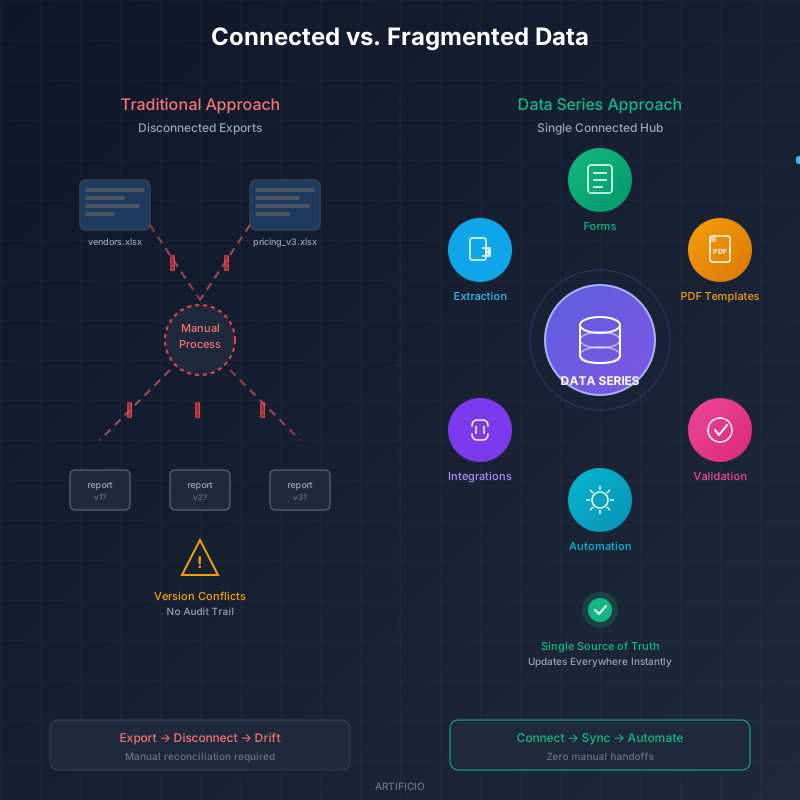
Consider a company processing hundreds of invoices monthly. Every invoice needs vendor validation, pricing verification against contracted rates, and approval routing based on spend thresholds. Without a connected data layer, this means maintaining external spreadsheets for vendor master lists and pricing tables, then manually cross-referencing extracted invoice data against those spreadsheets, then flagging discrepancies by hand.
With Data Series, you maintain your vendor master list and pricing table inside Artificio. Your invoice extraction workflow connects to these tables directly.
The mechanics work like this. You import your vendor list once from your existing spreadsheet. You connect that Data Series to your invoice extraction workflow. Now every processed invoice automatically validates the vendor name against your approved vendor list. If an invoice comes through from an unrecognized vendor, the system flags it. If the invoice pricing doesn't match contracted rates in your pricing table, the system catches that too.
You're not exporting data to check it somewhere else. The validation happens inside the extraction workflow, using data that stays current because it lives in the same environment.
When your procurement team adds a new approved vendor, they update one Data Series record. Every subsequent invoice from that vendor processes cleanly without anyone touching the extraction workflow configuration.
Healthcare organizations deal with this problem constantly. Processing insurance documents requires verifying member IDs, checking coverage dates, and catching expired policies before they create downstream billing problems.
Data Series can hold your member database. When insurance documents flow through extraction, the system validates extracted member IDs against Data Series in real time. A member ID that doesn't exist in your database gets flagged for human review instead of passing through silently and causing problems three weeks later when claims get rejected.
The validation rules in Artificio can reference Data Series fields directly. This enables conditional logic that actually reflects how your business works. If an extracted claim amount exceeds the value stored in your coverage limits table, route it to supervisor review. If a member's coverage end date in Data Series is before the service date on the document, flag it as a potential expired policy.
These aren't abstract validation concepts. They're specific business rules that execute automatically because your reference data and your extraction workflows share the same environment. The exceptions that need human attention surface immediately. The documents that match your rules process straight through.
A logistics company processes order documents all day. Each processed order needs to generate shipping documents formatted to carrier specifications and customer communications personalized to buyer preferences. Without a connected data layer, this means extraction provides the order details, then someone looks up customer preferences in a CRM, then someone else applies the right shipping template manually.
Data Series changes this sequence completely. Your Data Series stores customer preferences, carrier-specific shipping rules, and template mappings. When an order document gets processed, extraction pulls the order details. Data Series provides the customer's preferred communication format, their shipping carrier requirements, and their contact information. The system generates a correctly formatted shipping PDF and triggers a personalized email automatically.
No one copies data between systems. No one looks up customer preferences manually. The extraction triggers the downstream outputs because all the reference data needed to make decisions lives in the same environment as the extraction itself. 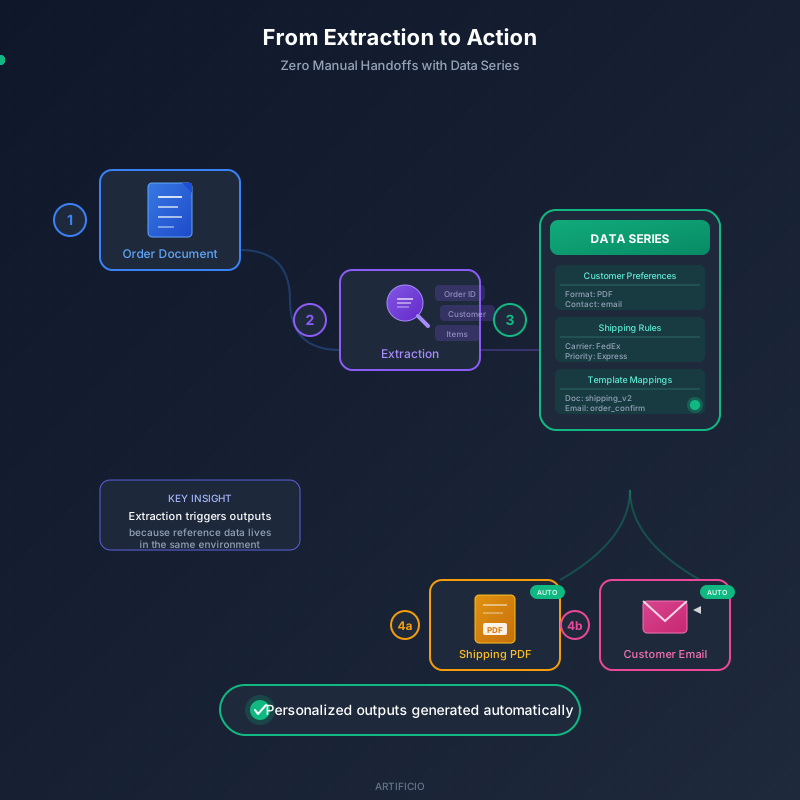
Every time you export extracted data to Excel, you break connections. The spreadsheet becomes a snapshot, frozen at the moment of export. If someone updates a vendor address after your export, your spreadsheet doesn't know. If you make corrections in the spreadsheet, those corrections don't flow back to inform future extractions.
Data Series maintains a single source of truth that updates everywhere simultaneously. When you correct a vendor address in Data Series, every form referencing that vendor shows the correct address. Every PDF template pulling that vendor's information gets the update. Every validation rule checking against that vendor works with current data.
This compounds over time. The more workflows you connect to Data Series, the more value those connections create. Your first Data Series might support one extraction workflow. Six months later, that same Data Series feeds five workflows, three PDF templates, and your exception handling rules. Updates propagate everywhere instantly because nothing ever left the platform.
Organizations that treat their document intelligence platform as a connected ecosystem, rather than an extraction utility, see their automation mature faster and break less often.
If you're ready to try this, start small. Pick one reference table that supports an existing extraction workflow. Vendor lists, product catalogs, and customer records all work well as first candidates.
Data Series supports XLS and CSV import, so migrating from your current spreadsheets takes minutes rather than days. Get the basics working first. Connect your reference table to one extraction workflow and validate that the connections work as expected.
Once that foundation is solid, explore formula support for calculated fields and validation rules that enforce business logic automatically. The platform grows with your needs, and every addition builds on what you've already connected.

Head IT Operations - Co Founder of Artificio
See it in your SAP environment
Bring us a document, a process, or a bottleneck. We'll show how Artificio captures, validates, and posts into SAP — then scale from there.
Security & compliance
ISO 27001:2013 certified, SOC 2 Type 2 compliant, GDPR and HIPAA ready. Every agent action is logged, auditable, and runs in isolated environments.