

Blog
The ERP Black Hole: Fixing the Extraction-Integration Gap
34% of invoice data fails to reach QuickBooks. Artificio's agent closes the gap, transforming data for flawless sync.

Blog
34% of invoice data fails to reach QuickBooks. Artificio's agent closes the gap, transforming data for flawless sync.
Your document processing system just extracted 500 invoices perfectly this month. Vendor names captured with precision. Invoice numbers pulled accurately. Line items parsed without error. Payment amounts identified correctly. The AI is hitting 99.2% accuracy on every field you care about. You're watching the dashboard light up green with successful extractions, feeling that warm satisfaction of automation working exactly as promised.
But here's what the dashboard doesn't show you. Right now, 170 of those perfectly extracted invoices are sitting in a CSV file on someone's desktop. They're waiting for someone in accounting to manually map the fields, upload them to QuickBooks, and then spend the next two hours fixing the 23 format mismatch errors that always appear. The extraction worked beautifully. The integration didn't happen at all.
This is the ERP Black Hole, the invisible gap between data extraction and data integration where perfectly processed documents go to die. It's the reason companies invest six figures in document AI only to discover they've just automated the easy part. The hard part, the part that actually saves time and prevents errors, still happens manually. And most businesses don't even realize they have this problem until they're three months into their automation journey, wondering why they're still doing so much manual work.
When businesses evaluate document AI solutions, they focus almost entirely on extraction accuracy. Can the AI correctly pull vendor names from invoices? Does it handle multiple date formats? Will it work with our existing document templates? These are important questions, but they miss the bigger picture. Extraction accuracy is useless if the extracted data never makes it into your business systems.
Most people imagine document automation as a smooth, continuous flow. An invoice arrives by email, AI extracts all the relevant data, and that data instantly appears in QuickBooks ready for approval. One seamless process from document to database. The reality looks completely different. An invoice arrives and gets processed by your Document Classification agent. The system correctly identifies it as a vendor invoice rather than a receipt or statement. Check. The Key-Value Extractor agent pulls the vendor name, invoice number, date, line items, and total amount. The extraction is flawless. Check. The Data Validator agent confirms the numbers add up and the date format makes sense. Everything validates perfectly. Check.
Then the data sits in your document AI platform's database. It's extracted, validated, and ready to use. But it's not in QuickBooks yet. Someone needs to export that data, usually to a CSV file. Someone else needs to open that CSV and manually map each field to the corresponding QuickBooks field. Is the "Invoice Date" column supposed to go into "TxnDate" or "Date"? Does "Vendor Name" map to "Vendor" or do you need to look up the vendor ID first? After the mapping is done, someone uploads the file. QuickBooks immediately flags 23 errors because the date format doesn't match what it expects. The currency symbols need to be stripped out. Three vendor names don't exactly match what's in the system. Someone spends the next two hours fixing these issues one by one.
This happens every single time. The AI performs brilliantly, achieving the accuracy rates you paid for, but you're still burning hours on manual data entry. The Black Hole isn't swallowing your documents. It's swallowing your time and your return on investment.
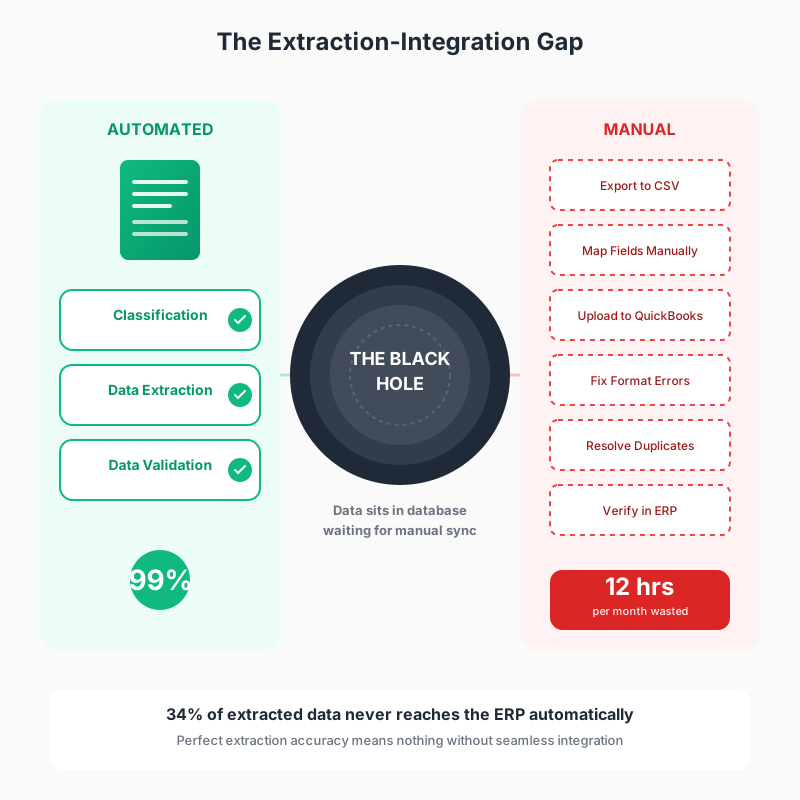
The gap exists because extraction and integration are fundamentally different problems requiring different solutions. Extraction is about understanding what information appears in a document. Integration is about transforming that information into the exact format and structure another system needs, then moving it there reliably. When your Document Classification agent identifies an invoice, it's solving a pattern recognition problem. When you're trying to get that invoice's data into QuickBooks, you're solving a data transformation, entity resolution, error handling, and workflow orchestration problem. These aren't the same challenge wearing different hats. They're entirely separate capabilities that happen to need each other.
The specific technical challenges multiply faster than most teams anticipate. Field name mismatches aren't just annoying, they're structural. Your document AI calls the invoice date "invoice_date" because that's a sensible field name. QuickBooks calls it "TxnDate" because that's what Intuit decided 20 years ago when they built their database schema. Your AI extracts vendor names as text strings. QuickBooks needs vendor reference IDs that link to existing vendor records in its database. The date format your AI outputs looks like "2025-10-17" in ISO standard format. QuickBooks wants "10/17/2025" in MM/DD/YYYY format. Your AI correctly identifies a line item cost as "$12.50" with a dollar sign and decimal. QuickBooks needs the raw number 12.50 with no symbols and specific decimal precision.
These aren't edge cases. They're the fundamental reality of connecting any two business systems that were built independently. Every single field needs transformation logic, and that logic needs to be reliable enough to run hundreds or thousands of times without human oversight. When you're doing this manually, you're handling these transformations in your head. You see "$12.50" and you know to remove the dollar sign before entering it. You understand that "Acme Corp" in the invoice probably refers to "Acme Corporation" in your vendor list. Your brain does entity resolution, format transformation, and error checking simultaneously. Automating that cognitive work requires explicit systems.
Business logic adds another layer of complexity. When should you create a new vendor record versus using an existing one? What happens if the invoice total doesn't match the sum of the line items? Should invoices over a certain amount require additional approval before being entered? These rules aren't bugs, they're features of your actual business processes. They need to be encoded somewhere between extraction and integration. Otherwise your automated system will happily create 15 duplicate vendor records, enter invoices with mismatched totals, and bypass approval workflows that exist for good reasons.
Error handling might be the most underestimated challenge. When you're manually entering data, errors are immediately visible and you fix them on the spot. You try to create an invoice with a duplicate invoice number and QuickBooks gives you an error message. You look up the original invoice, realize it was already entered last week, and move on. When you're automating this process, what should the system do when it encounters that duplicate invoice number error? Retry with a modified number? Skip this invoice and flag it for review? Check if the existing invoice has identical data and mark this as a duplicate? Alert someone immediately or collect all errors into a daily summary? Each of these decisions needs to be made explicitly and programmed into the integration logic.
This is why 34% of extracted data never makes it into ERP systems automatically. It's not because the extraction failed. It's because companies solve the extraction problem and then discover they've only addressed half of the automation challenge.
Artificio's Data Integrator agent exists specifically to close this gap. It's not another extraction tool or a validation layer. It's a specialized agent designed to handle everything that needs to happen between "data successfully extracted" and "data successfully integrated into your business systems." Think of it as the translation layer and traffic controller between your document AI and your ERP, handling all the messy transformation, resolution, and routing logic that would otherwise require manual intervention.
The Field Mapping Engine sits at the core of the Data Integrator. This isn't a simple CSV column matcher. It's an intelligent transformation system that understands the structural differences between how data appears in documents and how it needs to appear in various business systems. When an invoice shows a vendor name as "Acme Corp," the mapping engine doesn't just copy that text into a QuickBooks vendor field. It knows QuickBooks needs a vendor reference ID, so it queries the QuickBooks vendor database looking for matches. If it finds "Acme Corporation" with 95% similarity, it uses that vendor's ID. If no match exists above the similarity threshold, it can either create a new vendor record automatically or flag the invoice for manual vendor assignment depending on your business rules.
The date handling alone demonstrates the complexity this agent manages invisibly. Your documents might contain dates in dozens of formats. "October 17, 2025" appears on one invoice. "10/17/25" shows up on another. "2025-10-17" comes from a system-generated invoice. "17-Oct-2025" arrives from an international supplier. The Key-Value Extractor handles reading these various formats, but they all need to become exactly "10/17/2025" when they enter QuickBooks. The Data Integrator applies the specific transformation rules your target system requires, converting formats automatically and consistently across hundreds of invoices without requiring any manual reformatting.
Currency and number handling gets equally sophisticated. Extracted amounts might appear as "$1,234.56" or "USD 1,234.56" or "1234.56 dollars" depending on the document's formatting. Some systems use commas as thousands separators. Others use periods. Some documents show three decimal places. Others show two or none. The Data Integrator normalizes all of this into the exact numeric format and precision your ERP expects. It strips currency symbols, handles decimal separators correctly based on locale, rounds to appropriate precision, and validates that the numbers are actually valid numbers before attempting integration.
Entity Resolution goes far beyond simple field mapping. It's the agent's ability to understand that different pieces of text might refer to the same underlying business entity. When invoices arrive from the same supplier using slight variations of their company name, the Data Integrator recognizes these as the same entity. "ABC Industries," "ABC Industries Inc," "ABC Industries, Inc." and "A.B.C. Industries" might all resolve to the same vendor record. The agent uses fuzzy matching algorithms combined with business logic to make these decisions reliably. It can check multiple fields simultaneously, using address and tax ID in addition to name to confirm vendor identity. This prevents the proliferation of duplicate vendor records that plague manually maintained systems.
The agent handles line item complexity with particular sophistication. A single invoice might contain 20 line items, each needing to be transformed and integrated correctly. Each line needs its product code matched against your inventory system. Each quantity needs validation against reasonable ranges. Each unit price needs to be compared against your price lists. The subtotals need to be validated. The tax calculations need to be verified. The Data Integrator processes all of this in parallel, applies your specific business rules about price variance thresholds and quantity limits, and flags only the exceptions that genuinely need human review.
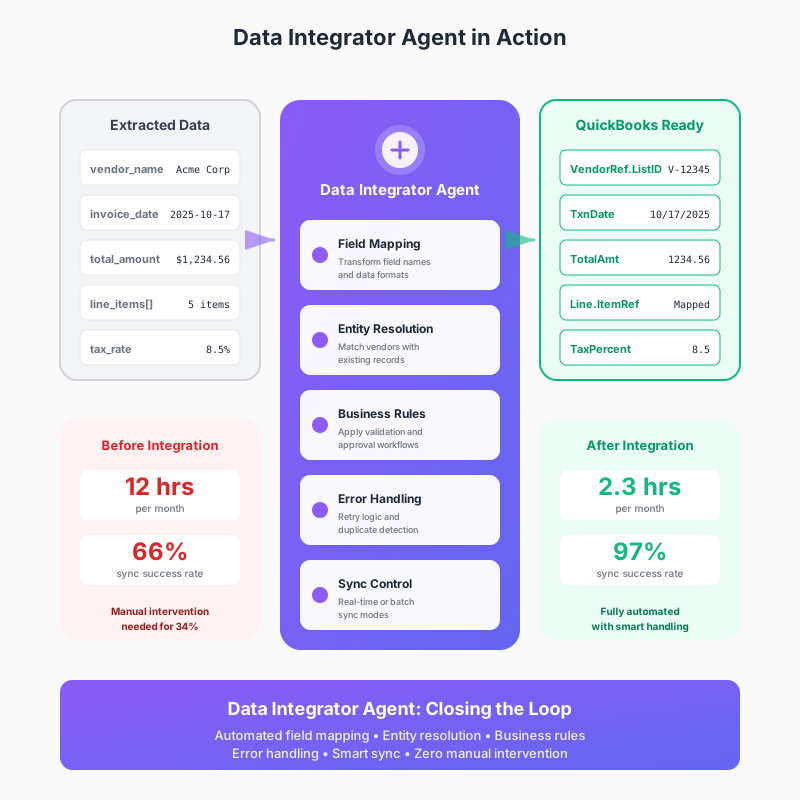
Sync Modes give you control over when and how integration happens. Real-time sync pushes each invoice to QuickBooks immediately after validation completes. This works well for operations that need instant visibility into payables. Batch mode collects invoices over a specified period and syncs them all at once. This reduces API calls and works better when you have high volumes. Scheduled sync runs at specific times each day, letting you process documents continuously but only hit your ERP during off-peak hours. Manual trigger mode gives you complete control, letting you review everything before approving the sync. Each mode handles errors and retries differently, and you can use different modes for different document types or based on amount thresholds.
Error Handling and Retry Logic might be the Data Integrator's most valuable capability because errors are inevitable. Your QuickBooks database is actively used by multiple people. Occasionally someone will manually enter an invoice that's also coming through the automated system. When the Data Integrator tries to create that invoice and gets a "duplicate transaction ID" error, it doesn't just fail. It checks whether the existing invoice matches the data being integrated. If the amounts and dates match, it marks this as an already-synced invoice and moves on. If they differ, it flags a discrepancy for human review. If the check reveals the existing invoice was entered incorrectly, it can even update the existing record rather than creating a duplicate.
Network issues and API rate limits get handled gracefully. If QuickBooks API is temporarily unavailable, the Data Integrator doesn't lose the data or flood your team with error alerts. It queues the integration request and retries with exponential backoff. First retry after 30 seconds. Second retry after 2 minutes. Third after 5 minutes. Between retries it continues processing other invoices. Your operations team might never even know there was a brief connectivity issue because everything synced successfully by the time they checked.
Transformation Rules let you encode complex business logic that would be nearly impossible to maintain manually. Consider how line items on an invoice need to be processed. The document shows "Widget A - 5 units @ $12.50 each." The Data Integrator needs to look up your internal product code for Widget A, verify you actually sell that product, check if $12.50 is within your acceptable price range for that product, confirm 5 units is a reasonable quantity, calculate the line total, and integrate all of this into QuickBooks using the correct ItemRef and account codes. If the price is 10% above your standard price, it can flag for approval. If the product code doesn't exist, it can create a new inventory item or flag for review. If the quantity exceeds normal order sizes, it can require confirmation. All of these rules are configurable without coding, just business logic defined in the Data Integrator interface.
Understanding what the Data Integrator does theoretically helps, but seeing the actual configuration process makes it concrete. Let's walk through setting up invoice synchronization between Artificio and QuickBooks, the specific steps and decisions involved, so you understand exactly what implementing this looks like in practice.
The first step is connecting Artificio to your QuickBooks account. This uses OAuth authentication, the same secure connection method you use when linking other applications to QuickBooks. You initiate the connection from your Artificio dashboard, which redirects you to QuickBooks where you log in with your existing credentials. QuickBooks shows you exactly what permissions Artificio is requesting. For invoice sync, you'll typically grant read and write access to invoices, vendors, and chart of accounts. You approve these permissions and get redirected back to Artificio where the connection confirms successful. The entire process takes about two minutes and you never share your QuickBooks password with Artificio.
Field mapping comes next and this is where you define how data flows from Artificio's extracted fields into QuickBooks. The Data Integrator shows you a visual mapping interface with Artificio fields on the left and QuickBooks fields on the right. Some mappings are straightforward. "Invoice Number" from Artificio clearly maps to "DocNumber" in QuickBooks. You create that connection with a simple drag and drop. "Invoice Date" maps to "TxnDate" with the date format transformation we discussed earlier. The system applies that transformation automatically based on knowing QuickBooks date requirements.
Vendor mapping requires more sophistication and this is where you see the Data Integrator's intelligence in action. Artificio extracts vendor names as text strings. QuickBooks requires VendorRef IDs. In the mapping interface, you specify that when Artificio extracts a vendor name, the Data Integrator should query QuickBooks vendor list for matches. You set the similarity threshold at 90%, meaning names that are 90% similar will be considered matches. You decide what happens when no match is found. Option one is to automatically create new vendor records using the name and address extracted from the invoice. Option two is to flag these invoices for manual vendor assignment. Most companies start with option two during testing and switch to option one once they're confident in the extraction accuracy.
Line item mapping gets intricate because each invoice contains multiple line items and each line item has multiple fields. You map the product description to QuickBooks ItemRef, but this requires product lookup logic. The Data Integrator needs to know how to search your QuickBooks item list. Do you match by exact product name? By SKU if available? By category? You configure these matching rules. Quantity mapping seems simple until you realize QuickBooks expects just the numeric quantity while your invoices might say "5 units" or "5 ea" or "Qty: 5." The Data Integrator includes built-in parsers that extract numbers from these text variations. Unit price has similar challenges. The transformation extracts the numeric value, strips currency symbols, and ensures proper decimal formatting.
Business rules configuration is where you encode your company's specific policies and workflows into the integration logic. You might specify that any invoice over $5,000 requires approval before sync. The Data Integrator will extract and validate these invoices but hold them in a pending queue until someone with approval authority reviews and releases them. You might set price variance thresholds. If a line item's price is more than 15% different from your standard price for that item, flag it for review before syncing. These aren't system limitations, they're intentional controls you're building into the automated workflow.
Duplicate detection needs careful configuration. You decide what makes an invoice a duplicate. Same invoice number from same vendor? Same amount and date? The Data Integrator can check all of these factors. When it finds a potential duplicate, you specify the action. Skip and log? Update the existing invoice with new data? Create anyway with modified invoice number? Flag for manual review? Each option is valid in different scenarios. During initial implementation, most companies choose to flag duplicates for review. Once they trust the system's judgment, they often switch to automatic skip and log.
Sync schedule configuration determines when invoices flow to QuickBooks. Real-time sync means each invoice pushes immediately after passing validation. This gives you instant visibility but generates more API calls. Batch sync collects invoices and pushes them in groups. You might configure batches of 50 invoices every hour. This reduces API load but means invoices don't appear in QuickBooks instantly. Scheduled sync runs at specific times. You might configure daily sync at 6 PM after your team finishes processing documents for the day. The choice depends on your operational needs and QuickBooks API limits.
Error notification setup ensures your team knows when intervention is needed. You configure where error alerts go. Email to your accounting team? Slack message to a specific channel? Push notification in the Artificio dashboard? You also configure what counts as an error worth alerting about. Connection failures get immediate alerts. Duplicate invoices might just get logged for weekly review. Price variances might trigger approval workflows rather than error alerts. The distinction between errors, warnings, and routine processing matters, and you configure each separately.
Testing is the final configuration step and it's critical. You don't want to discover issues after syncing 500 real invoices. Most companies start by processing 10 to 20 historical invoices that have already been manually entered into QuickBooks. This lets you compare the Data Integrator's output against known correct data. You review each synced invoice in QuickBooks, checking that vendors mapped correctly, amounts transferred accurately, line items populated properly, and dates formatted correctly. You look for any discrepancies between the automated sync and the manual entry. When you find differences, you adjust your mapping rules and business logic, then test again. This iterative testing process usually takes a few hours but saves countless hours of cleanup later.
The difference between having extraction without integration versus having both becomes stark when you look at actual operational metrics. Consider a mid-size distribution company processing 500 vendor invoices monthly. Before implementing the Data Integrator agent, their workflow looked like this. The document AI extracted invoice data in about 2 hours of processing time, which was genuinely impressive compared to manual data entry. But then someone needed to export those 500 records to CSV. That took 15 minutes of actual work but often happened a day or two after extraction because the person responsible had other priorities. Opening the CSV and mapping fields to QuickBooks import format took another hour, mostly spent looking up vendor IDs and reformatting dates. The QuickBooks import itself ran for 20 minutes and inevitably generated 40 to 60 error messages. Resolving those errors, one at a time, consumed 4 hours. Finding the correct vendor IDs for mismatched names. Reformatting dates that didn't parse correctly. Splitting invoices that exceeded QuickBooks line item limits. Handling duplicates that the system flagged.
Total time from extraction to data living in QuickBooks was about 12 hours of human effort spread across multiple people and several days. The extraction accuracy was great, hitting 99.2% on field-level data. But the sync success rate, meaning invoices that made it into QuickBooks without requiring manual intervention, sat at 66%. One third of their perfectly extracted invoices still needed someone to manually fix something before they entered the system. The finance team celebrated the 2-hour extraction time but complained they were still spending 12 hours on invoice processing. The ROI calculation that justified buying document AI assumed those 12 hours would drop dramatically. Instead, they'd just shifted where the time got spent.
After implementing the Data Integrator agent, the same 500 invoices follow a completely different path. Extraction still takes about 2 hours, but now integration happens automatically during that same processing window. The Data Integrator maps fields in real time as each invoice validates. It queries QuickBooks for vendor matches, applies date transformations, normalizes currency formatting, and handles line item complexity without any CSV export step. The sync happens continuously in batch mode, pushing groups of 50 invoices every 30 minutes. Most invoices enter QuickBooks within an hour of being processed. A handful get flagged for review, maybe 15 out of 500, because they exceed approval thresholds or have unusual price variances that business rules say need human eyes.
Total time from extraction to data living in QuickBooks is now 2.3 hours, and most of that is the extraction itself. The human effort required drops to 20 minutes reviewing the flagged exceptions. The sync success rate jumps to 97%, meaning 485 invoices out of 500 integrate automatically with zero human intervention. The 3% that need attention are legitimate edge cases, not format mismatches or missing vendor IDs. The finance team gets their invoices in QuickBooks the same day they arrive, usually within hours. Month-end closing happens faster because the data is already in the system. The ROI calculation finally makes sense because they're saving 9.7 hours of actual human work every month.
The financial impact extends beyond just labor savings. Late payment penalties drop because invoices enter the system faster. The company caught early payment discounts they were missing before because invoices sat in processing limbo past the discount window. Vendor relationships improved because payments processed more reliably. The accounting team's job satisfaction increased noticeably because they stopped spending hours on tedious error fixing and started spending time on actual accounting work. One team member mentioned that for the first time in years, they felt like they were doing their actual job instead of being a human data formatter.
While QuickBooks serves as our primary example because it's widely used, the Data Integrator agent's capabilities extend to virtually any business system with an API or structured data import. The principles remain the same regardless of the target system. Field mapping, entity resolution, business rules, error handling, and sync control work identically whether you're pushing data to QuickBooks, NetSuite, SAP, Oracle, or a custom internal system.
Major accounting platforms all have specific quirks the Data Integrator handles. Xero uses a different authentication method than QuickBooks but requires similar field transformations. NetSuite has more complex object relationships, with invoices linking to sales orders, customers, items, and multiple subsidiary entities. The Data Integrator manages these relationships, ensuring data integrates in the correct order and maintains referential integrity. Sage requires specific account code formatting that differs from other systems. The agent applies these system-specific rules automatically once you've configured the connection.
ERP systems present their own integration challenges. SAP has notoriously complex data models with dozens of tables and relationships for a single business document. The Data Integrator can push invoice data to SAP's BAPI interfaces, handling the specific transaction codes and field requirements SAP demands. Oracle E-Business Suite needs invoices entered through specific APIs with particular validation logic. Microsoft Dynamics has multiple versions with different integration approaches. The Data Integrator supports these variations, letting you specify which version you're using and applying the appropriate integration logic.
Database integrations offer maximum flexibility for custom systems. If your company built its own order management system or uses an industry-specific platform without standard APIs, the Data Integrator can write directly to PostgreSQL, MySQL, SQL Server, or other databases. You define the table schema, specify the field mappings, and set up any necessary foreign key relationships. The agent handles the SQL generation, transaction management, and error handling. You can even configure complex multi-table inserts where a single invoice needs data written to invoice headers, line items, tax tables, and audit logs simultaneously.
Custom REST APIs work when your target system exposes web services. Many modern SaaS applications provide API endpoints for data integration. The Data Integrator can authenticate using OAuth, API keys, or other methods, then POST invoice data in JSON or XML format according to the API specification. It handles rate limiting, retries failed requests, and parses API responses to confirm successful integration. If your API returns specific error codes for different failure types, the agent can take different actions based on those codes.
File-based integration remains necessary in some scenarios. Legacy systems might not have APIs but can import CSV or XML files from a specific network location. The Data Integrator can generate these files on a schedule, format them exactly as the target system requires, and write them to network shares or SFTP servers. It can even trigger the target system's import process if that system supports scheduled imports or file watchers. This approach works well for systems that are difficult to modify or where real-time integration isn't necessary.
Different business processes call for different integration approaches. The Data Integrator supports multiple patterns that combine its capabilities in ways that match real-world workflows. Understanding these patterns helps you design integrations that fit your specific operational needs rather than forcing your processes to match the tool's limitations.
The Invoice to Accounting pattern is the most common and the one we've explored in detail. Invoices get extracted, validated, and automatically synced to your accounting system. But the pattern often includes additional steps. After successful sync, the Data Integrator can trigger approval workflows based on invoice amounts. Invoices under $1,000 might auto-approve. Invoices between $1,000 and $5,000 go to department managers. Anything over $5,000 requires executive approval. The agent can send WhatsApp notifications to approvers with direct links to review and approve in QuickBooks. Once approved, it updates the invoice status and sends payment confirmations via email. This entire workflow runs automatically without anyone manually moving data between systems.
The Purchase Order to Multiple Systems pattern shows the agent's ability to coordinate data across several platforms simultaneously. When a purchase order gets extracted from an email attachment, the Data Integrator doesn't just push it to one place. It syncs the line items to your inventory management system so stock levels update for incoming goods. It pushes the financial data to your ERP for budget tracking and accounts payable preparation. It creates tracking records in your CRM if the PO relates to a customer order, maintaining the link between customer requests and supplier fulfillment. It generates receiving documents in your warehouse management system so the loading dock knows what shipments to expect. All of this happens in parallel, and the Data Integrator ensures consistency across systems. If the inventory sync fails but the ERP sync succeeds, it rolls back the ERP transaction and alerts your team to the inconsistency rather than leaving your systems out of sync.
The Contract to Document and Data pattern demonstrates integration that goes beyond just database records. When legal contracts get processed, the extracted data needs to live in multiple places in multiple formats. The Data Integrator stores the original PDF in SharePoint or your document management system with proper metadata tags for searchability. It syncs key contract terms like renewal dates, payment schedules, and SLA commitments to your CRM so sales and account management teams can access them. It creates calendar events in your organization's shared calendar for renewal reminders 90 days before expiration. It populates fields in your contract management system that track obligations and deliverables. Each piece of data goes to the right place in the right format, all triggered by extracting one contract document.
The Batch Processing with Approval pattern works well for operations that need human oversight before data hits production systems. Documents get extracted and validated throughout the day. The Data Integrator collects them in a review queue instead of syncing immediately. At 5 PM, it sends a summary email to your finance manager showing all invoices processed that day with total amounts, any flagged exceptions, and a link to approve the batch. The manager reviews the summary, checks the exceptions, and clicks approve. The Data Integrator then syncs everything to QuickBooks overnight, ensuring your production system only gets data that's been reviewed. This pattern gives you automation benefits while maintaining human oversight over what actually enters your financial system.
The Exception-Only Manual Review pattern maximizes automation by only involving humans when truly necessary. The Data Integrator processes invoices continuously, syncing most of them automatically based on confidence scores and business rules. Only documents that fail specific criteria get flagged for manual review. Maybe the vendor name extracted at 85% confidence instead of the 95% threshold you set. Maybe the invoice amount is 30% higher than previous invoices from this vendor. Maybe it's a new vendor that doesn't exist in your system yet. These exceptions route to a human reviewer who resolves the issue and either approves the sync or rejects the document. Everything else flows through automatically. Teams using this pattern often see 95% to 98% automation rates, with humans only touching the genuinely unusual documents that need judgment calls.
Even with sophisticated automation, issues occasionally arise. Understanding common problems and their solutions helps you maintain smooth operations and resolve issues quickly when they occur. Most integration problems fall into a few categories, each with straightforward fixes once you recognize the pattern.
Vendor matching failures happen when the Data Integrator can't confidently link an extracted vendor name to an existing vendor in your ERP. You start seeing invoices flagged because vendor names don't match. The first thing to check is your similarity threshold. If it's set too high, say 98%, slight variations like "ABC Corp" versus "ABC Corporation" won't match even though they clearly refer to the same vendor. Lowering the threshold to 90% or even 85% often resolves this. The second fix is enabling automatic vendor creation for trusted document sources. If invoices always come from your procurement system and you trust that data, let the Data Integrator create new vendors automatically when no match exists. This eliminates the manual approval step while maintaining accuracy.
Date format problems show up as errors during sync or invoices appearing in QuickBooks with wrong dates. The issue usually traces to locale settings or format detection. Check that your Data Integrator date transformation matches your QuickBooks locale. If QuickBooks expects MM/DD/YYYY but your transformation outputs DD/MM/YYYY, dates will parse incorrectly or fail entirely. The fix involves adjusting the transformation rule in your field mapping. The Data Integrator lets you preview transformations on sample data, so you can test the date format change before applying it to production. For international invoices with varying date formats, you might need multiple transformation rules that apply based on vendor country or document source.
Duplicate detection false positives occur when the Data Integrator flags invoices as duplicates that actually aren't. This happens when your duplicate criteria are too broad. If you're checking only vendor name and amount, invoices for the same vendor with coincidentally identical amounts will flag as duplicates even if they're for different services or periods. The fix is making your duplicate criteria more specific. Add invoice date to the check, or include invoice number, or combine multiple fields. You can also adjust the time window for duplicate checking. Instead of checking against all historical invoices, only check the last 90 days. This reduces false positives while still catching genuine duplicates.
Sync performance issues manifest as the Data Integrator taking longer to process batches or falling behind on real-time sync. The usual culprit is API rate limiting from your ERP. QuickBooks, for example, limits API calls per minute. If you're trying to sync 200 invoices instantly, you'll hit the rate limit and operations will slow as the system waits between API calls. The fix is switching from real-time to batch mode and configuring appropriate batch sizes. Instead of syncing each invoice immediately, collect 50 invoices and sync them every 30 minutes. This stays well under API limits while providing reasonably current data. For systems with generous API limits, you can increase batch size to improve throughput.
Field validation errors happen when extracted data doesn't meet your ERP's validation rules. Maybe QuickBooks expects tax rates as decimals between 0 and 1, but your invoices show percentages like "8.5%". The extraction captures "8.5%" correctly, but QuickBooks rejects it. The fix involves adding transformation rules that convert percentages to decimals. The Data Integrator can parse "8.5%" into 0.085 automatically. Similar issues arise with currency symbols, negative number formats, and text fields that exceed maximum lengths. Each needs a specific transformation rule, but once configured, these rules apply consistently to all future documents.
Understanding the actual return on investment from implementing the Data Integrator agent helps set realistic expectations and build proper business cases. The financial impact goes beyond just labor cost savings, though those are significant. Consider a company processing 500 invoices monthly. If manual integration after extraction takes 12 hours at a blended rate of $50 per hour, that's $600 monthly or $7,200 annually in direct labor costs. Implementing the Data Integrator reduces this to about 20 minutes monthly for exception handling, saving roughly $575 monthly or $6,900 annually in labor.
But labor is only part of the calculation. Late payment penalties add up quickly when invoice processing lags. If missing early payment discounts costs an average of $100 per month because invoices don't enter the system quickly enough, that's $1,200 annually. If late fees occur twice yearly at $500 each because processing bottlenecks delayed payments, add $1,000. Vendor relationships improve when payments process reliably, sometimes resulting in better terms or priority service. This is harder to quantify but has real value. Employee satisfaction increases when people spend time on meaningful work instead of tedious error fixing, reducing turnover costs.
The implementation cost varies based on your existing Artificio setup. If you're already using Artificio for document extraction, adding the Data Integrator agent is primarily a configuration effort. Most implementations take between 20 and 40 hours of combined time from your team and Artificio support. This includes initial configuration, testing, refinement based on test results, and final deployment. At $150 per hour for implementation support, budget $3,000 to $6,000 for setup. The Data Integrator agent itself is typically included in Artificio's enterprise plans, so incremental software costs are minimal.
Payback period for most companies runs between 6 and 9 months. Using our example numbers, you save about $8,000 annually after spending $5,000 on implementation. Simple payback happens in 7.5 months. But the real value accrues over years. That $8,000 annual savings continues indefinitely. Over five years, you save $40,000 in direct costs while spending $5,000 once for implementation. The ROI is 700%. This calculation ignores soft benefits like faster month-end close, better data accuracy, and improved employee satisfaction, all of which have measurable impacts even if they're harder to quantify precisely.
For companies processing higher volumes, the numbers scale proportionally. Processing 2,000 invoices monthly instead of 500 might mean 48 hours of manual integration work without the Data Integrator. At $50 per hour, that's $2,400 monthly or $28,800 annually just in labor costs. Add missed discounts and late fees proportional to volume, and annual waste easily reaches $35,000 to $40,000. Implementation costs remain roughly the same because configuration complexity doesn't scale linearly with volume. Your payback period drops to 2 or 3 months. The five-year ROI jumps into four-figure percentages.
The cost of not implementing automation also deserves consideration. Every month without the Data Integrator, you're spending money on manual work that could be automated. If you delay implementation by six months, that's another $4,000 to $20,000 in direct costs depending on your volume, plus all the indirect costs of errors, delays, and employee frustration. The opportunity cost of delayed implementation often exceeds the implementation cost itself.
While we've focused on invoices because they're universally relevant and the integration challenges are clear, the Data Integrator agent handles many other document types with similar effectiveness. The principles of field mapping, entity resolution, business rules, and error handling apply across different document categories. Each type has its own integration quirks, but the fundamental automation approach remains consistent.
Purchase orders present interesting challenges because they often need to flow to multiple systems simultaneously. When a PO comes in, your procurement system needs the order details. Your inventory system needs to update expected stock levels. Your accounting system needs to reserve budget. Your receiving department needs advance notice of incoming shipments. The Data Integrator can orchestrate all these integrations from a single extracted PO. It maps the relevant fields to each system, applying system-specific transformations, and ensures consistency across all destinations. If a PO gets updated or cancelled, the agent can push those changes to all connected systems automatically.
Contracts require particularly sophisticated handling because contract data has both structured and unstructured components. Payment schedules are structured data that map cleanly to fields in your contract management system. But contractual obligations, termination clauses, and service level agreements often exist as text that needs to be stored and searchable but doesn't fit neatly into database fields. The Data Integrator handles both. It pushes structured data like parties, dates, and amounts to your CRM or contract management system. It stores the full contract text with appropriate metadata tagging. It can even extract specific clauses and store them as separate searchable entities if your business processes require that level of detail.
Receipts and expense reports benefit from integration that connects document processing to reimbursement workflows. When employees submit expense receipts through Artificio, the Data Integrator can push extracted amounts, categories, and merchant information directly to your expense management system. It can check expenses against company policies automatically, flagging items that exceed limits or fall into restricted categories. Approved expenses flow to accounting for reimbursement processing. The original receipt images get attached to the expense records for audit purposes. The entire workflow from receipt capture to reimbursement happens with minimal manual steps.
Packing lists and bills of lading are logistics documents that need to integrate with warehouse management, shipping systems, and customer communication platforms. The Data Integrator extracts shipment details and pushes them to your WMS so the receiving team knows what's arriving. It updates order status in your e-commerce platform so customers see accurate delivery information. It can trigger automated shipping notifications via email or SMS when goods leave the warehouse. For international shipments, it populates customs documentation with the required data fields, ensuring compliance while eliminating manual customs form preparation.
Medical claims and healthcare documents represent a specialized but valuable use case. Claims need to integrate with practice management systems, billing platforms, and clearinghouses that submit claims to insurers. The Data Integrator maps patient information, procedure codes, diagnosis codes, and charges to the appropriate system fields. It validates that codes are current and correctly paired according to medical billing rules. It can check patient eligibility before submitting claims, reducing rejections. Successfully submitted claims get tracked automatically, with status updates flowing back to the practice management system so staff know when to expect payment.
Not every organization needs the Data Integrator agent immediately, and understanding when implementation makes sense helps you time your investment appropriately. Several factors indicate you're ready to move beyond extraction-only document AI and into full extraction-plus-integration automation.
Volume is the most obvious indicator. If you're processing fewer than 50 documents monthly, manual integration might not be painful enough to justify automation. The time spent on manual steps is annoying but manageable. Once you cross 100 documents monthly, the time investment becomes significant. At 500 documents monthly, manual integration is consuming serious resources that could be redirected to higher-value work. At 1,000 plus documents monthly, manual integration is actively limiting your operational capacity and probably creating bottlenecks during peak periods.
Error rates matter as much as volume. If your manual integration process maintains high accuracy with few errors, the labor cost might be your only concern. But if you're regularly dealing with data entry mistakes, duplicate records, format mismatches, and sync failures, the Data Integrator provides immediate value regardless of volume. A single duplicate vendor record can create months of accounting headaches. Mismatched invoices that don't reconcile properly can delay month-end close by days. If you're spending more time fixing integration errors than doing the initial integration, automation will transform your operation.
Growth trajectory influences the timing decision. If your document volume is flat and likely to remain stable, you can base the decision purely on current pain points. But if you're growing, your manual integration capacity will become a bottleneck sooner than you expect. The person who handles 200 invoices monthly now will struggle when volume hits 400 in six months. Implementing the Data Integrator before you hit capacity prevents the crisis of scrambling to automate while already overwhelmed. Many companies wish they'd automated sooner because implementation during a capacity crisis is more stressful than implementing proactively.
System compatibility affects implementation complexity. If you're using major platforms like QuickBooks, Xero, NetSuite, or SAP, the Data Integrator has pre-built connectors that make configuration straightforward. Implementation takes weeks, not months. If you're using custom systems or legacy platforms without modern APIs, implementation requires more custom development work. This doesn't mean automation isn't worthwhile, but it affects your timeline and cost estimates. Evaluate your systems before committing to a timeline.
Team bandwidth for implementation matters more than people expect. Even with Artificio handling most of the technical work, you need team members who can define business rules, test configurations, and validate results. If your finance and operations teams are completely underwater with current workload, finding time for implementation meetings and testing becomes difficult. The best implementations happen when you can dedicate a project lead who has authority to make decisions, time to attend setup sessions, and bandwidth to coordinate testing. Without that, implementation drags on or happens poorly.
The final consideration is strategic alignment. If your organization is committed to digital transformation and sees document automation as part of a broader operational improvement initiative, the Data Integrator fits naturally into that vision. If leadership views document AI as a point solution to solve one specific problem, integration might not be a priority yet. Understanding where document automation fits in your overall technology strategy helps you make decisions that align with organizational direction rather than implementing features that won't get used.
If you've decided the Data Integrator makes sense for your operation, starting with a well-scoped first project sets you up for success. The key is choosing an integration that delivers clear value without overwhelming your team with complexity. Most successful first projects share common characteristics.
Pick a single document type for your first integration. Invoices work well because the workflow is clear, stakeholders understand the process, and success metrics are obvious. Resist the temptation to automate everything at once. Starting with vendor invoices and planning to add purchase orders and contracts later works better than trying to implement all three simultaneously. You learn the system, identify issues, and refine your approach on the first document type. Subsequent integrations go much faster because you understand how the pieces fit together.
Choose a target system you know well. If your team lives in QuickBooks and understands its quirks, integrate there first. Don't start with your least familiar system even if it needs automation more urgently. Building confidence with a system you know lets you recognize when integration behavior is correct versus when something needs adjustment. Once you've mastered one integration, applying those lessons to other systems becomes straightforward.
Set realistic success criteria for your pilot. You won't achieve 100% automation immediately. Targeting 80% to 85% automation on your first implementation is reasonable. That means 8 out of 10 invoices sync automatically, with 2 flagged for review. As you refine business rules and improve entity resolution, automation rates climb toward 95%. But starting with an 80% target lets you declare victory and build momentum while continuing to optimize.
Plan for a testing period before going fully live. Process historical documents that you've already manually entered into your target system. This gives you a comparison baseline to validate that automation produces the same results as manual entry. Run parallel processing for the first few weeks, where documents flow through both automated and manual paths. Compare results and adjust configuration as needed. Once confidence is high, cut over fully to automated processing.
Involve stakeholders from the beginning. Your accounting team needs to understand how automated integration affects their workflow. They might need to adjust their routines around when they review pending approvals or how they spot-check synced transactions. Getting their input during configuration ensures the automated workflow fits their needs rather than forcing them to adapt to an implementation that doesn't match how they actually work.
Document your configuration decisions and business rules. Six months after implementation, you'll want to adjust something and you'll need to remember why you set it up the way you did. A simple document explaining field mappings, business rules, error handling logic, and sync schedules helps immensely when you're troubleshooting issues or training new team members. This documentation doesn't need to be elaborate, but it should capture the reasoning behind key decisions.
The Data Integrator agent represents current best practices in automated document integration, but the technology continues to evolve. Understanding where integration automation is heading helps you make decisions that remain relevant as capabilities advance. Several trends are reshaping how document data flows between systems.
Machine learning is making entity resolution more accurate over time. Current entity resolution uses fuzzy matching algorithms with static rules. Emerging approaches apply machine learning models that improve from feedback. When a human confirms that "ABC Corp" matches "ABC Corporation Inc," the system learns from that decision. Over time, it makes increasingly accurate matching decisions without human intervention. This self-improving entity resolution will push automation rates from 95% toward 99%, with the system handling vendor variations that currently require human judgment.
Natural language understanding is enabling more sophisticated business rule interpretation. Today you configure business rules explicitly, specifying thresholds and actions in the system interface. Future versions will let you describe rules in plain language and the system interprets them correctly. Instead of configuring "if amount greater than 5000 then require approval," you'll say "large invoices need executive approval" and the system determines what "large" means based on your historical approval patterns. This makes configuration accessible to non-technical users and lets business owners directly control automation logic.
Cross-system intelligence will enable the Data Integrator to learn optimal workflows by observing how data actually flows through your business. If it notices that invoices from certain vendors always get reviewed by specific people, it can suggest routing rules. If it sees that purchase orders for particular product categories consistently trigger inventory adjustments, it can propose automatic inventory updates. The system moves from executing configured workflows to suggesting workflow improvements based on observed patterns.
Predictive integration will anticipate data needs before documents arrive. If the system knows you typically receive vendor invoices between the 25th and 30th of each month, it can proactively verify vendor records are up to date before those invoices arrive. If a purchase order indicates goods arriving next Tuesday, the system can prepare receiving documents in advance. This proactive approach prevents integration issues before they occur rather than handling them after the fact.
Multi-modal document understanding will let the Data Integrator work with data from sources beyond traditional documents. Voice recordings of procurement discussions could feed into PO generation. Photographs of received goods could trigger packing list validation. Email conversations about contract terms could inform contract integration. The integration agent becomes a hub for all business information flowing into your systems, regardless of the original format.
The ERP Black Hole exists because most organizations solve only half the document automation problem. They invest in extraction technology that reads documents with impressive accuracy. They measure success by extraction rates and field-level precision. They celebrate hitting 99% accuracy on vendor name extraction. But then 34% of that perfectly extracted data sits in a CSV file waiting for manual intervention.
The real automation opportunity isn't in extraction alone. It's in closing the loop from document arrival to data integrated into business systems where it drives actual operations. The Data Integrator agent transforms document AI from a data extraction tool into an end-to-end automation platform. It handles the messy reality of connecting different systems with different requirements. It manages entity resolution when vendor names don't match exactly. It applies business rules that encode your company's specific workflows. It handles errors gracefully and retries intelligently. It turns 66% automatic sync rates into 97% automatic sync rates.
Companies that implement full extraction-plus-integration automation see returns that justify the investment quickly. Labor costs drop by 80% or more. Processing times collapse from days to hours. Error rates fall because automated systems don't make transcription mistakes. Employee satisfaction improves because people spend time on meaningful work instead of tedious data formatting. Month-end close happens faster because data is already in the system. The financial benefits compound over time as document volumes grow without requiring proportional increases in staff.
The technology is mature and proven. Thousands of companies already use integrated document automation to process millions of documents monthly. Implementation doesn't require massive IT projects or business process upheaval. Most organizations go live with their first integration in weeks. The systems work alongside your existing platforms rather than requiring you to rip out and replace infrastructure you've invested in over years.
The question isn't whether to close the ERP Black Hole. The question is when. Every month you spend on manual integration is a month of lost productivity and missed savings. Every invoice that gets extracted perfectly but sits waiting for manual upload is an opportunity wasted. The Data Integrator agent exists specifically to solve this problem. The technology works. The ROI is clear. The only thing missing is the decision to implement it.
Your documents are already being extracted with impressive accuracy. Now make that accuracy matter by ensuring the data actually reaches the systems where your business uses it. Close the loop. Eliminate the Black Hole. Let your document AI investment deliver the full return it's capable of providing. The extraction is working. It's time to make the integration work too.

Head IT Operations - Co Founder of Artificio
See it in your SAP environment
Bring us a document, a process, or a bottleneck. We'll show how Artificio captures, validates, and posts into SAP — then scale from there.
Security & compliance
ISO 27001:2013 certified, SOC 2 Type 2 compliant, GDPR and HIPAA ready. Every agent action is logged, auditable, and runs in isolated environments.