

Blog
The $28,500 Burnout Tax: Stop Manual Document Processing
Manual document processing costs $28,500 per employee and burns out 56% of staff. Learn the 3-step recovery plan.

Blog
Manual document processing costs $28,500 per employee and burns out 56% of staff. Learn the 3-step recovery plan.
While you're measuring document processing accuracy and throughput, your best employees are quietly planning their exit. Not because of salary. Not because of culture. But because you're asking humans to do robot work, and it's costing you $28,500 per employee, every single year.
That's not a typo. Recent research shows manual data entry and document processing extract an average of $28,500 annually from each employee stuck in these workflows. But here's what keeps executives awake at night: the financial hit is just the visible part of the iceberg. Below the surface, something far more dangerous is happening. Your talented employees are burning out, and they're doing it silently.
Walk into any accounts payable department, any claims processing team, any operations center where documents flow, and you'll find the same scene playing out. Smart, capable professionals spending their days copying information from PDFs into spreadsheets. Cross-checking invoice numbers against purchase orders. Manually entering claim details from scanned forms. Hunting through email attachments for the one piece of information they need.
These aren't incompetent employees making rookie mistakes. They're experienced professionals who know your business inside and out. But they're being asked to perform tasks that make their expertise irrelevant. A recent survey of 500 professionals across operations, finance, administration, IT, and customer support revealed something startling: 56% of employees experience burnout specifically from repetitive document tasks.
Think about that number. More than half of your document processing team is burning out. Not from working too many hours. Not from unreasonable deadlines. They're burning out from the soul-crushing monotony of doing the same mindless task over and over again. They wake up knowing that today will be exactly like yesterday, copying data from one system to another while their actual skills gather dust.
The psychological research on this is crystal clear. When you take intelligent, capable people and give them repetitive, low-skill work, you don't just waste their potential. You actively damage their mental health. The human brain isn't designed for endless repetition without variation or creativity. It's designed to solve problems, spot patterns, make decisions. When you deny people those opportunities, burnout isn't just possible, it's inevitable.
One operations manager at a mid-sized manufacturing company described it perfectly: "We hired people who could analyze supply chain bottlenecks and optimize vendor relationships. Instead, they spend six hours a day manually entering purchase order data. We can see the light dying in their eyes, but we keep telling ourselves we'll fix it next quarter"
Next quarter never comes. The document backlog keeps growing. The same talented employees who joined with enthusiasm and fresh ideas find themselves trapped in an endless loop of data entry. And one day, they stop complaining. They stop suggesting improvements. They just go quiet and start updating their resumes.
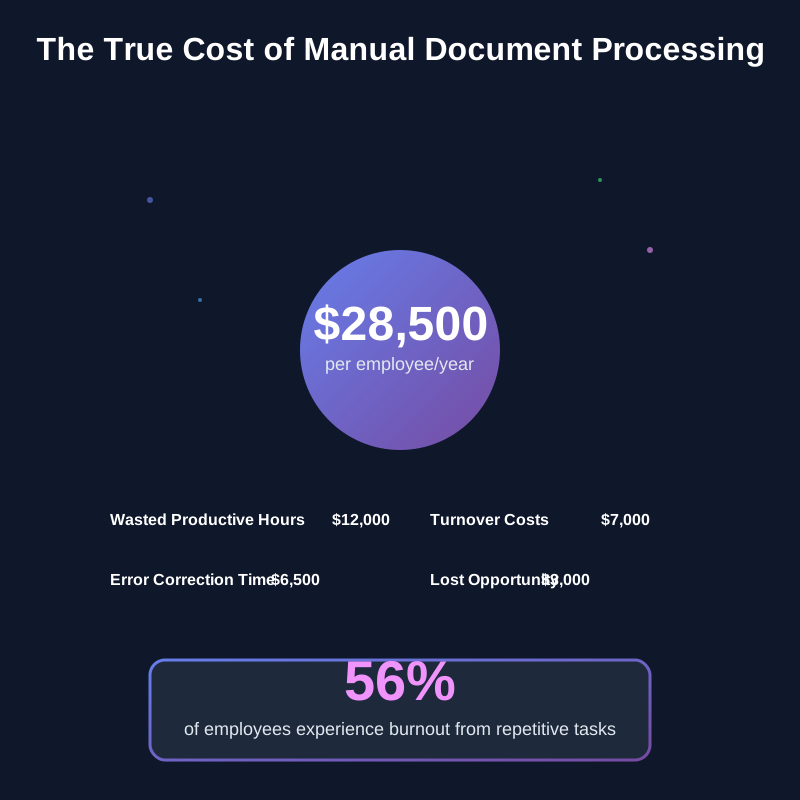
The $28,500 figure breaks down in ways that should alarm any business leader. Direct labor costs eat up the biggest chunk. When someone earning $50-90 per hour (common for finance and IT roles) spends 10-20 hours per week on manual document tasks, you're paying premium rates for work that could be done by automation. But that's just the beginning.
Error correction consumes another massive portion. Humans make mistakes when doing repetitive work, especially when tired or distracted. Studies show manual data entry has error rates between 1-4%. That might sound small until you calculate it across thousands of documents. One misplaced decimal point on a financial document can trigger hours of reconciliation work. One missed field on a claim form can delay processing by days or weeks.
Then there's the opportunity cost that never shows up on a balance sheet but kills companies slowly. Every hour your skilled employees spend on document processing is an hour they're not spending on strategic work. They're not analyzing trends. Not improving processes. Not building customer relationships. Not innovating. They're just moving data from point A to point B, using their expensive education and experience to do work a script could handle.
But the real killer, the cost that compounds everything else, is turnover. When burned-out employees leave, you don't just lose their productivity. You lose institutional knowledge. You lose client relationships. You spend months recruiting and training replacements, who often leave for the same reasons once they realize what the job actually involves. The replacement cost for a mid-level professional typically runs 50-200% of their annual salary. Do that math across a team, and you're looking at catastrophic losses.
Here's the disconnect that leadership often misses. When executives think about document processing, they see it as straightforward work. Enter data, verify accuracy, move to the next document. Simple. Necessary. Nothing to complain about.
But the people doing this work see something entirely different. They see their potential being systematically wasted. They see problems they could solve if only they had time. They see inefficiencies everywhere but can't address them because they're buried under a mountain of manual tasks.
Take someone working in insurance claims processing. They might have a degree in risk management and years of experience spotting fraud patterns. They know which claim types tend to have documentation issues. They can smell a suspicious claim from a mile away. But instead of using that expertise to build better fraud detection processes or train junior staff, they spend their day typing claim amounts from PDFs into the claims management system.
The psychological term for this is "underemployment." You're technically employed, but your skills and education far exceed what your actual tasks require. And research shows underemployment affects mental health almost as severely as unemployment itself. People need to feel that their work matters, that they're using their abilities, that they're growing and contributing. When you take that away, you don't just lose productivity. You lose the person.
The signs of this toxic dynamic show up in predictable patterns. First comes the enthusiasm gap. New hires start excited, eager to contribute, full of ideas. Then they hit the reality of document processing volumes. Within weeks, the suggestions stop. The energy drains away. They realize their ideas don't matter when there's no time to implement them because documents don't process themselves.
Next comes quiet quitting, though not in the way media sensationalized it. These aren't lazy people doing the bare minimum. These are exhausted people who've realized that going above and beyond makes no difference. The document queue doesn't care how talented you are. It just keeps growing. So people stop volunteering for extra projects. They stop mentoring. They stop looking for ways to improve things. They just process their daily quota and clock out, saving their energy for job applications they submit at night.
Finally comes the exit. Sometimes it's dramatic, a resignation letter citing better opportunities. More often, it's quiet. They simply stop showing up one day, moving to a competitor who promised to actually use their skills. And here's the tragic part: they often end up in the same situation somewhere else because manual document processing is an industry-wide problem. The grass isn't greener. It's just a different shade of brown.
One finance professional, let's call her Sarah, spent three years processing invoices for a logistics company. She had a master's in accounting and previous experience optimizing payment workflows. "I kept thinking they'd eventually let me work on the things I was good at," she said. "I had ideas for reducing payment errors, improving vendor relationships, catching early payment discounts. But there was never time because the invoice queue was always overflowing. After two years, I stopped suggesting improvements. After three years, I stopped caring. Then I just stopped."
Most leaders don't see the burnout crisis coming. They miss the early warning signs because they're subtle, easy to dismiss as normal workplace friction. But if you know what to look for, the red flags are waving frantically.
This one catches people off guard. Your team isn't made up of rookies. They've been processing documents for months or years. They know the systems, understand the requirements, follow the procedures. So why are mistakes increasing?
The answer is cognitive fatigue. When people do the same task repeatedly for hours on end, their brains essentially go on autopilot. They're physically present but mentally checked out. That's when errors slip through. A transposed number here. A missed field there. Wrong category selection. These aren't signs of incompetence. They're signs of a brain protecting itself from the torture of endless repetition by disconnecting.
You'll notice this manifests in patterns. Errors tend to spike in the afternoon when mental fatigue peaks. They increase on Fridays after a full week of the same tasks. They jump dramatically during high-volume periods when people are processing even more documents than usual. If your error rates are climbing despite having experienced staff, you don't have a training problem. You have a burnout problem.
Pay attention to who's calling in sick. If your document processing team has higher absence rates than other departments, that's not coincidence. People will find any excuse to escape work that's crushing their spirit.
Monday absences are particularly telling. That "I'm not feeling well" email on Monday morning often translates to "I spent all weekend dreading another week of this, and I physically can't bring myself to do it today." These aren't people playing hooky to watch TV. They're people whose bodies are literally rebelling against returning to soul-crushing work.
You might also notice increased doctor appointments, longer lunches, more frequent breaks. These are coping mechanisms. Tiny escapes from the monotony. When people need an excuse to step away from their desk every hour, they're not being lazy. They're trying to maintain their sanity.
This is the most dangerous sign because it feels like peace. Remember the employee who always had suggestions in meetings? Who volunteered for projects? Who asked questions about strategy and process improvements? They've gone quiet.
Leaders sometimes mistake this for maturity or professionalism. "They've settled into their role," you might think. But what really happened is they've given up. They've learned that their ideas don't matter because there's no bandwidth to implement them. They've realized the organization values document throughput over innovation. So they stopped trying.
You can spot this in meetings when you ask for input and get silence. Or when you announce a new initiative and see blank stares instead of engagement. These aren't signs that your team doesn't care about the business. They're signs that your team has learned caring doesn't change anything when they're drowning in manual work.

These warning signs rarely appear in isolation. They compound. Rising errors lead to more stress, which leads to more absences, which leads to higher workloads for those who show up, which leads to more burnout, which leads to more turnover. It's a death spiral that's surprisingly hard to escape once it starts.
The cruel irony is that leadership often responds to these warning signs by doubling down on what caused them. Errors going up? Add more quality checks. Absences increasing? Implement stricter attendance policies. Engagement dropping? Schedule more team-building activities. None of this addresses the root cause: you're asking humans to do work that breaks them.
Here's the good news: this isn't an unsolvable problem. Organizations that recognize the human cost of manual document processing and take decisive action can turn things around remarkably quickly. But it requires more than buying software. It requires rethinking how you value your employees' time and mental health.
Most organizations already track the financial metrics around document processing. Processing time per document. Error rates. Costs per transaction. But they miss the human metrics that ultimately drive everything else.
Start by actually talking to the people doing the work. Not in a formal survey where they'll tell you what they think you want to hear. In real conversations where they feel safe being honest. Ask them what parts of their job drain them most. What tasks feel meaningless. What skills they have that aren't being used. What improvements they'd suggest if they had time to implement them.
You'll probably be shocked by what you learn. That quiet employee in the corner who just processes documents all day? They have ideas for reducing errors by 30%. The person who seems disengaged in meetings? They've been thinking about workflow optimization for months but gave up suggesting it because nobody has time to listen.
Document the real human cost. Calculate how many hours per week your team spends on pure data entry versus strategic work. Track how many good employees you've lost in the past year. Survey current employees about their stress levels, job satisfaction, and whether they see a future with your organization. Get the full picture of what manual document processing is actually costing you in human terms.
This step makes most leaders uncomfortable because the numbers are ugly. But you can't fix a problem you won't acknowledge. The human cost is real, it's massive, and it's destroying your organization from the inside. Face it honestly.
Here's where most automation projects go wrong. Companies buy document processing software and announce it like a gift: "Good news everyone, we got new technology to help you!" Then they're surprised when employees resist, complain about the learning curve, or subtly sabotage implementation.
The problem isn't the technology. It's that nobody asked the employees what they actually need. Nobody involved them in the decision. Nobody explained how this makes their jobs better versus just faster.
Real automation that employees embrace starts with involving them from the beginning. Ask your team what parts of document processing they'd love to never do again. Not what management thinks should be automated, but what the people doing the work want automated. You'll get clear, specific answers: "I hate manually matching invoices to purchase orders." "I wish I didn't have to type the same customer information into three different systems." "Can we please stop printing documents just to scan them into another system?"
Then, and this is critical, show them how automation gives them time back for meaningful work. Don't sell it as "process more documents faster." Sell it as "spend your days solving real problems instead of copying data." Talk about how they'll finally have time to implement those improvements they've been suggesting for months. Explain how automation lets them use their actual skills instead of their typing ability.
The best automation implementations include clear plans for what people will do with their reclaimed time. One insurance company automated their claims data entry and simultaneously created a new fraud analysis team. Same employees, different work. Another manufacturer automated purchase order processing and moved those employees into supplier relationship management, where they could finally use their negotiation and analysis skills.
When employees see automation as liberation rather than replacement, adoption soars. They become champions of the technology because it gives them back their careers. They help refine the processes because they're invested in success. They stay with your organization because you've demonstrated that you value them as thinking humans, not data-entry machines.
This is where the real transformation happens. You've freed up hundreds or thousands of hours previously spent on manual document processing. Now what?
The wrong answer is "process even more documents." The right answer is "finally do all the strategic work we've been putting off because nobody had time."
Think about all the projects that never got started because your team was too busy processing documents. The process improvements that stayed on wish lists. The customer relationship building that got deprioritized. The training programs that never materialized. The analysis that could have spotted problems early. This is your opportunity to finally tackle those things.
Create new roles or expand existing ones to take advantage of your employees' actual capabilities. That person who was processing invoices all day? They might be brilliant at vendor relationship management. The claims processor who's been burned out for months? Maybe they're your next fraud detection specialist. The operations coordinator buried in manual data entry? They could be orchestrating process improvements that save millions.
One financial services company provides a powerful example. After automating their document intake processes, they didn't lay anyone off or ask people to process more volume. Instead, they created a "customer experience team" staffed by the same people who used to do manual data entry. These employees now focus on proactive customer communication, problem resolution before complaints arise, and identifying patterns that indicate customer satisfaction issues. Customer retention increased by 18% in six months. Employee satisfaction scores doubled. Same people, same headcount, completely different outcomes.
Another organization took a different approach. They used the time reclaimed from automation to implement a "20% innovation time" policy for their operations team. Every person who previously spent full days on document processing now spends one day per week on improvement projects of their choosing. The ROI has been staggering. Employees have identified and implemented dozens of cost-saving measures, process improvements, and customer service enhancements that management would never have thought of. And they're doing it because they finally have time to think.
The key is making this transition explicit and intentional. Don't just automate and assume people will figure out how to use their time. That creates anxiety and purposelessness, which can be almost as demoralizing as the manual work was. Instead, work with each employee to redefine their role around higher-value activities that use their skills and challenge their minds.
Some organizations worry: "What if we automate the work and realize we don't need as many people?" That's the wrong question. The right question is: "What valuable work have we been neglecting because our people were stuck processing documents?" The answer is always substantial. You need those people. You just need them doing work that actually matters.
Let's talk about the business case everyone ignores when evaluating document automation. The spreadsheets always show processing time reduction, error rate improvement, cost per transaction decline. All important metrics. But they miss the biggest ROI of all: keeping your best people.
Calculate the real cost of turnover in your organization. Not just the recruiting and training costs, though those are substantial. Include the lost productivity during the three to six months it takes a new employee to reach full competence. Factor in the institutional knowledge that walks out the door with every departure. Consider the customer relationships that suffer when experienced people leave. Add up the morale impact on remaining employees who watch good colleagues exit.
Now multiply that by your annual turnover rate in document-heavy roles. The number should terrify you.
One healthcare organization did this calculation and discovered that employee turnover in their claims processing department was costing them $3.2 million annually. Not the salary costs. Just the turnover costs. When they implemented intelligent automation and redeployed staff to more meaningful work, turnover in that department dropped from 34% to 9% in one year. The automation ROI from improved retention alone paid for the technology in eight months. Everything else was gravy.
But the benefits go deeper than just retention numbers. When you solve the document processing burnout crisis, you transform your entire organizational culture. Employees see that you value their mental health and professional development. They see that you're willing to invest in making their jobs better, not just more efficient. They see opportunities for growth and meaningful work. That changes everything.
Engagement scores increase. People start volunteering for projects again. Innovation picks up because employees have mental bandwidth to think creatively. Customer satisfaction improves because your team actually has time to focus on customer needs. Recruiting gets easier because your reputation as a good place to work spreads.
One manufacturing company leader described the transformation: "Six months after we automated document processing and moved our operations team into strategic roles, I walked through the office and actually heard laughter. People were collaborating on projects. Having intense discussions about solving real problems. Someone had decorated their desk because they were planning to stay. We'd forgotten what an engaged workplace felt like."
You're at a decision point, whether you realize it or not. The document processing work in your organization isn't going to decrease. If anything, it's accelerating. More regulations mean more compliance documents. More customers mean more forms and claims and invoices. More complexity means more paperwork to track it all.
You can keep asking humans to shoulder this burden. Keep pretending that asking intelligent, capable people to do mind-numbing repetitive work is sustainable. Keep losing your best employees and wondering why you can't retain talent. Keep paying the $28,500 per employee annual tax while watching 56% of your team burn out.
Or you can acknowledge that we've reached a turning point. That intelligent automation isn't a luxury anymore, it's a necessity for maintaining a human workplace. That treating document automation as an employee wellbeing investment rather than just an efficiency play is what separates organizations that thrive from those that merely survive.
The technology exists. The business case is proven. The implementation pathways are well established. The only question is whether leadership is ready to stop measuring success purely in documents processed per hour and start measuring it in employees who actually want to come to work.
Your best employees aren't leaving because of money. They're leaving because you're breaking them one document at a time. The good news? You can stop. You can give them back their careers, their mental health, their sense of purpose. You can transform document processing from a soul-crushing burden into something that happens quietly in the background while humans do human work.
The $28,500 burnout tax is optional. The 56% burnout rate is optional. The quiet exodus of talented people is optional. What's not optional is making a choice. Keep grinding people down with manual work, or liberate them through automation and watch what they can really do.
The organizations that figure this out first will have an enormous advantage. Not just in efficiency or cost savings, though those will come. They'll have the advantage of employees who want to stay, who bring their full capabilities to work, who innovate and improve because they have time to think.
Your competitors are making this choice right now. Some will choose to keep asking humans to do robot work. Others will choose to let robots do robot work so humans can do human work. Which choice your organization makes will determine whether your best employees are still working for you a year from now or updating their LinkedIn profiles tonight.
The only question left is: what are you waiting for?

Head IT Operations - Co Founder of Artificio
See it in your SAP environment
Bring us a document, a process, or a bottleneck. We'll show how Artificio captures, validates, and posts into SAP — then scale from there.
Security & compliance
ISO 27001:2013 certified, SOC 2 Type 2 compliant, GDPR and HIPAA ready. Every agent action is logged, auditable, and runs in isolated environments.