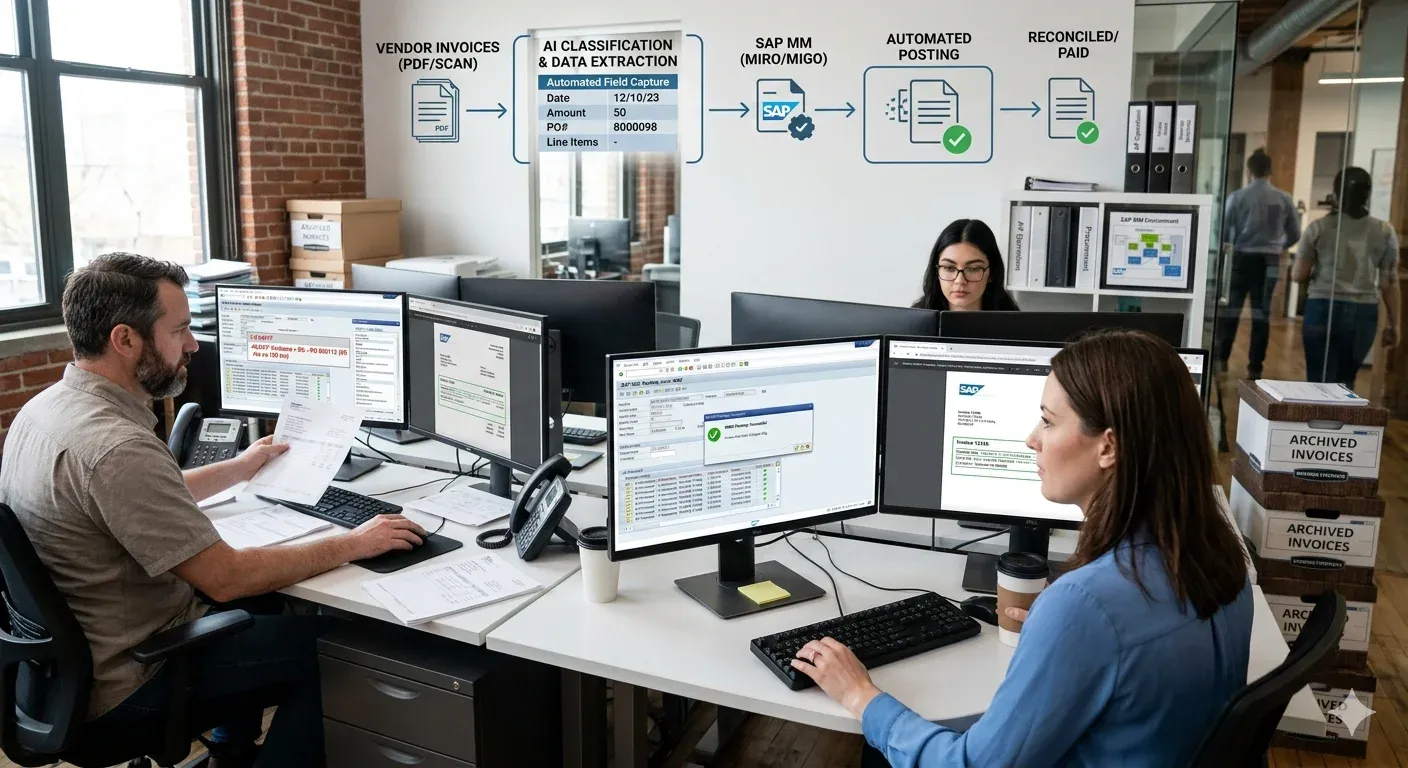
The accounts payable team at a mid-sized manufacturer receives 400 vendor invoices a week. Their SAP MM environment is solid. Workflows are configured. MIRO is set up correctly. But three people spend most of their working day opening PDFs, reading line items, typing numbers into fields, cross-referencing purchase orders, and hitting post.
They are not doing anything wrong. The system just was not built to read documents. It was built to store and process data that humans put into it.
That gap, between an unstructured document arriving and clean data landing in SAP, is where most of the cost, error, and delay in procurement operations actually lives. And it is the gap that AI document processing closes.
This post walks through exactly what that looks like for purchase orders, goods receipts, and material documents, and why MIRO processing without manual keying changes the economics of AP operations entirely.
The Document Problem SAP MM Does Not Solve
SAP MM is extraordinarily capable once data is inside it. Three-way matching, GR/IR reconciliation, payment runs, reporting, all of it works well when the underlying data is accurate and timely. The problem is getting it there.
Purchase orders come from suppliers as PDFs, sometimes well-formatted, sometimes scanned, sometimes in formats that differ between every vendor in your network. Goods receipts arrive as delivery notes, packing slips, and warehouse confirmation documents. Invoices for MIRO processing land as email attachments with varying layouts, line item structures, and tax presentations depending on the vendor's country and billing system.
Every one of these documents contains information that already exists somewhere in your procurement process. The PO number is on the invoice because it was on the order. The quantities match what was ordered and received. The prices reflect what was agreed. But none of that structure is legible to SAP without a human translating it.
Traditional OCR was supposed to solve this. It did not, not really. OCR reads characters. It does not understand that "Qty: 5 pcs" and "Quantity 5.000 PC" mean the same thing in the context of a line item match against an SAP material number. It does not know that a line item description of "stainless coupling 1/2 inch BSP" should map to material number 4700123 in your master data. And it breaks entirely when a document is slightly rotated, has a non-standard font, or comes from a vendor who changed their invoice template.
AI document processing works differently. It understands documents.
How AI Handles Documents Before They Enter SAP
The right mental model is a pre-processing layer that sits upstream of SAP MM. Documents arrive, they go through AI processing, and structured data comes out the other side ready for automated posting. SAP never sees the original document in its raw form. It receives clean, validated, structured data. 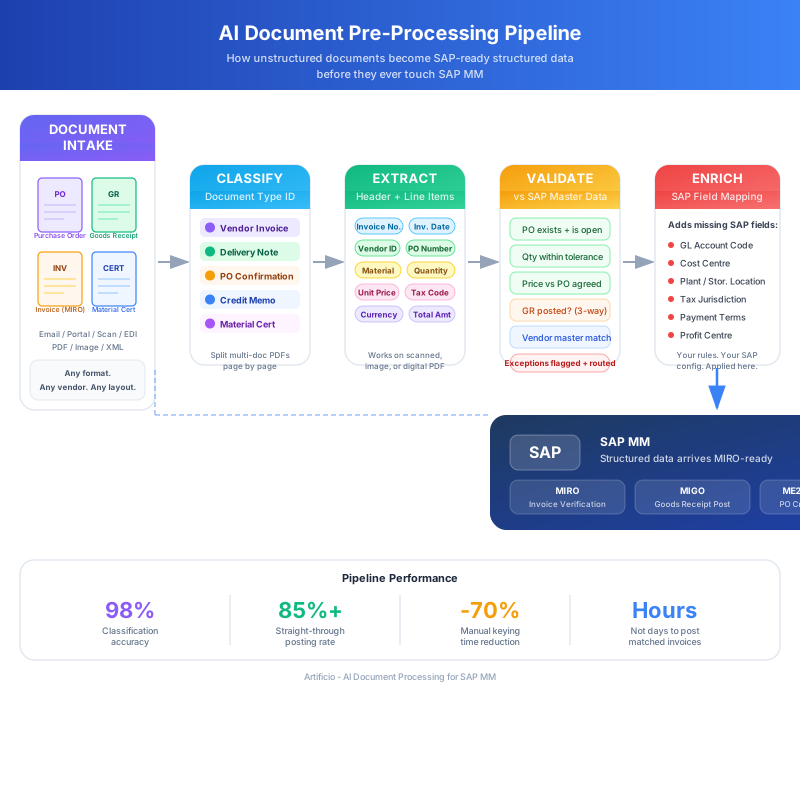
The first thing the AI layer does is identify what kind of document it is dealing with. A purchase order confirmation, a delivery note, a vendor invoice, a credit memo, a material certificate. This sounds trivial but it matters enormously in practice because the extraction logic for each document type is different.
Classification happens at the document level and sometimes at the page level within multi-page documents. A 12-page delivery shipment might include a packing list, a certificate of conformance, a customs document, and three separate delivery notes. The AI splits and classifies each component before any extraction begins.
Once a document is classified, extraction pulls the fields relevant to that document type. For a vendor invoice heading into MIRO, this means header data (invoice date, invoice number, vendor ID or enough vendor identifying information to look one up, payment terms, currency, total amount) and line item data (material descriptions, quantities, unit prices, PO references, tax codes).
The extraction model does not care what the document looks like. It has seen enough variation across vendor invoice formats to handle the manufacturer in Stuttgart who puts line items in a landscape table, the UK supplier whose invoices are generated from a 2009 accounting package with a non-standard layout, and the US distributor whose PDF is actually a scanned image of a faxed copy of a printout. The underlying information is the same. The AI finds it.
For goods receipt documents, extraction pulls delivery note numbers, shipper references, material line items, quantities received, and lot numbers or batch information where present. These feed the MIGO posting or update open PO lines directly.
Validation Against SAP Master Data
Raw extraction is not enough. Before any data reaches SAP, the AI layer runs validation against your master data and open documents.
Vendor invoice data gets cross-referenced against the PO it references. Does the PO exist? Is it open? Do the line items on the invoice match what was ordered? Are quantities within tolerance? Do unit prices match what the PO was raised at, and if not, is the variance within an approved threshold or does it need routing for approval?
Material descriptions on delivery notes get matched against material master records. Where an exact match does not exist, the system uses semantic matching to find the closest candidate and flags it for confirmation rather than failing silently or posting incorrectly.
This validation step does something OCR and template-based systems cannot do: it catches problems before they enter SAP rather than after. A quantity discrepancy surfaces in the pre-processing queue, not in a three-way match exception report three weeks later.
Enrichment and SAP Field Mapping
After validation, the AI layer enriches extracted data with information that is not on the document but needs to be in SAP. Cost centre assignments. GL account codes derived from the material group or purchase order category. Plant and storage location codes. Tax jurisdiction codes for cross-border invoices.
This enrichment layer is where a lot of the customisation lives. Different organisations have different posting rules, approval hierarchies, and account determination logic. The AI layer applies your rules, not generic ones, before anything posts.
MIRO Processing Without Manual Keying
MIRO, the Logistics Invoice Verification transaction in SAP MM, is where vendor invoices get posted against purchase orders and goods receipts. It is also, in most AP departments, where a large number of person-hours disappear every week.
The traditional MIRO workflow looks something like this: AP clerk opens an invoice email, opens MIRO in SAP, enters the PO number, pulls up the PO lines, manually keys the invoice number and date, enters line item quantities and amounts, checks the tax code, verifies the totals, and posts if everything matches. If it does not match, they investigate, email the buyer or the supplier, and come back to it later.
Multiply that by hundreds of invoices. Add the context-switching, the email chains, the re-keying after catching a typo. That is the real cost.
With an AI pre-processing layer feeding SAP MM, the MIRO workflow changes completely. 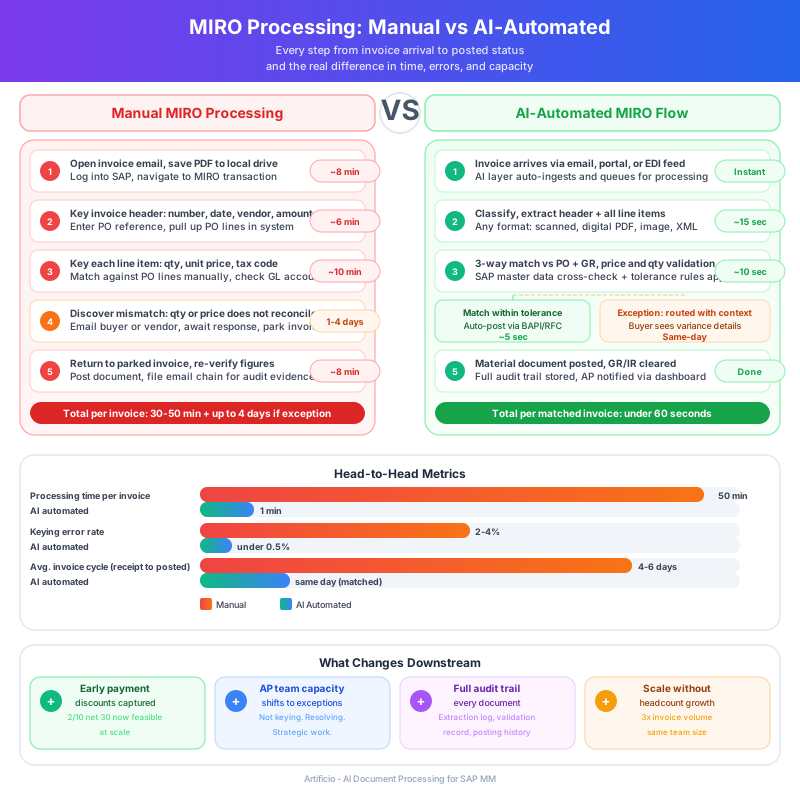
The Automated MIRO Posting Flow
When a vendor invoice arrives, the AI processing layer extracts all relevant fields, validates against the referenced PO, checks GR status, and runs the three-way match logic before any human interaction. If the invoice matches within tolerance, the system prepares a MIRO posting package and submits it via SAP BAPI or direct RFC call.
The posting happens automatically. The AP clerk never opens the invoice manually. They might see a confirmation notification or a daily processed items report, but the actual keying and posting work is gone.
For invoices that do not match cleanly, the system routes an exception with context. Not just "this invoice does not match," but "Line 3 quantity on invoice is 50 units, GR shows 45 units received, PO tolerance is 5%. Variance is 11%, outside tolerance, flagged for buyer review." The person handling the exception has everything they need to resolve it in one place.
Handling PO-Based vs Non-PO Invoices
PO-based invoices are the easier case because the PO provides a validation anchor. The AI layer uses the PO reference to pull expected quantities, prices, and GL accounts, and the match logic does most of the work.
Non-PO invoices, things like utility bills, maintenance invoices, or service charges that were not raised against a formal PO, require different handling. The AI layer identifies these during classification and routes them through an appropriate approval workflow before posting. The extraction still works the same way, pulling invoice header and line data, but the downstream logic routes to a different path in SAP, typically with an FI posting rather than a logistics invoice verification flow.
Goods Receipt Documents and MIGO Integration
On the goods receipt side, delivery notes and packing slips go through the same pre-processing pipeline before feeding MIGO postings. The AI extracts delivery note numbers, material references, quantities, and any batch or serial number data, then matches against open PO lines to identify what the delivery relates to.
Where the delivery note quantities match the expected delivery, MIGO can post automatically. Where there are discrepancies, the system creates a partial receipt record and flags the variance for the warehouse team. The key difference from manual processing is that the variance is caught and documented at receipt, not discovered during the three-way match when the invoice arrives two weeks later.
Material documents that result from the MIGO posting feed the GR/IR clearing account update, which in turn makes the MIRO three-way match cleaner. The whole cycle tightens up because every step in it is being handled with complete, accurate data rather than whatever a human managed to key in correctly on a given day.
What This Looks Like in Practice for SAP MM Teams
The operational change is significant, but it does not require replacing SAP or restructuring how procurement works. The AI layer integrates above existing SAP configuration. Your MM document types, tolerance groups, account determination, and approval workflows stay exactly as they are. What changes is how data gets into the system.
Processing volumes go up without headcount going up. An AP team that handles 400 invoices a week with three people can handle 1,200 with the same team, because the work each person does shifts from keying to exception handling. And exception rates drop over time as the AI model learns the patterns in your specific vendor base and document formats.
Cycle times compress noticeably. Invoices that took four or five days to move from receipt to posted status often get to posted within hours when the straight-through rate is high. Early payment discounts that were previously impractical to capture become accessible. Suppliers who offer 2/10 net 30 terms start actually getting paid in 10 days because the processing bottleneck is gone.
Audit trails improve too. Every document that passes through the AI layer has a complete extraction record, a validation log, and a posting history. When an auditor or a supplier query requires you to show what happened with a specific invoice, the answer is one search away.
Where Human Review Still Belongs
Automation handles the high-volume, high-consistency work. Humans handle the work that requires judgement.
Complex invoices with unusual line structures, disputed quantities where a supplier relationship needs managing, invoices from new vendors whose document formats the system has not seen before, these are all cases where the AI layer correctly identifies uncertainty and routes for human review rather than forcing a low-confidence posting.
Good AP automation is not about eliminating human involvement. It is about redirecting it. The AP staff who used to spend 70% of their time on data entry now spend 70% of their time on exceptions that actually need their expertise, supplier escalations, process improvements, and the kind of analytical work that was always too low a priority when the inbox was full of invoices to key.
The economics of SAP MM operations change when that shift happens. Not because headcount disappears, but because the team's capacity stops being limited by how fast people can type.
The integration between an AI document processing layer and SAP MM is not a weekend project, but it is also not a multi-year ERP implementation. The key components are a reliable extraction and classification layer, a validation engine that connects to your SAP master data, and a posting mechanism that uses standard SAP interfaces so nothing breaks when SAP gets upgraded.
Organisations that do this well tend to start with one document type, usually vendor invoices for MIRO because that is where the volume and the cost are highest, prove out the straight-through rate and exception handling, then extend to goods receipt documents and purchase order processing.
The pilot results tend to be clear enough that the business case for broader rollout writes itself.
SAP MM was built to run procurement operations at scale. AI document processing is what lets it actually do that, without an army of AP clerks bridging the gap between paper and system.