

Blog
Your Sage Intacct Deserves Better Than Manual Data Entry
Stop manual data entry in Sage Intacct. Artificio uses AI to automate invoice extraction, GL coding, and 3-way matching, saving your finance team hours of tedious work. Book a demo today!
Blog
Stop manual data entry in Sage Intacct. Artificio uses AI to automate invoice extraction, GL coding, and 3-way matching, saving your finance team hours of tedious work. Book a demo today!
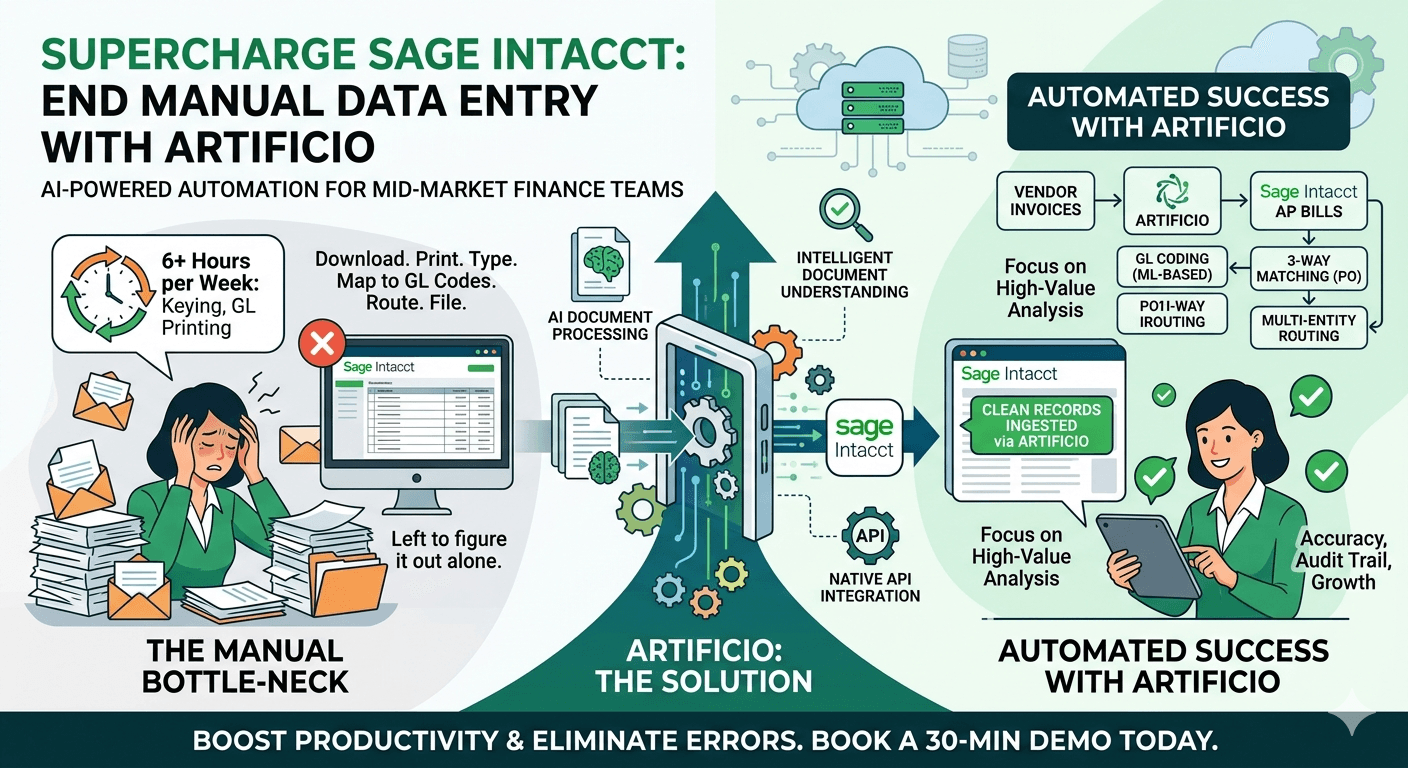
The finance team at a 200-person professional services firm spent every Tuesday the same way. Their AP coordinator would download vendor invoices from email, print them, type line items into Sage Intacct, check the GL codes against a spreadsheet, route the entry to a manager for approval, and file the paper copy in a cabinet. Forty invoices. About six hours.
When their controller mentioned this at an industry event, someone from a larger company raised an eyebrow. "Just use your ERP's AI module," they suggested. The problem: Sage Intacct does not come with a built-in document extraction engine the way some enterprise platforms do. And most of the AI document processing tools on the market are built and priced for SAP or Oracle NetSuite shops with six-figure IT budgets. The mid-market Sage Intacct user is left to figure it out alone.
That gap is exactly what Artificio closes.
Sage Intacct is genuinely excellent software. It handles multi-entity consolidation, real-time reporting, and dimensional accounting in ways that make life measurably easier for growing companies. What it does not do is read a PDF vendor invoice, extract the line items, match the vendor to your supplier list, suggest the correct GL codes, and push a clean draft transaction into your AP workflow. That work still lands on a human.
For enterprise teams running SAP or NetSuite with full implementation partners and dedicated IT staff, there is an ecosystem of expensive automation tools built to plug that gap. For the 500-person company on Sage Intacct? The options are thinner. Most automation vendors either do not support Sage Intacct's API, price their product for Fortune 1000 volumes, or require months of implementation work that mid-market finance teams simply cannot absorb.
The result is a finance team that is simultaneously running modern cloud accounting software and manually keying invoices like it is 2005. The software is not the bottleneck. The document handling is.
Artificio is an AI-powered document processing platform that sits between your incoming documents and your financial systems. It reads documents, extracts structured data, validates that data against configurable rules, and pushes clean records into downstream systems through API connections. For Sage Intacct users, that means vendor invoices, purchase orders, receipts, employee expense reports, contracts, and other financial documents get processed automatically rather than manually.
The core of what Artificio does is intelligent document understanding. This is different from basic OCR, which just converts images to text. Artificio reads documents the way a trained AP clerk would: it understands that the number after "Invoice No." is a reference field, that the table in the middle of the page is line-item data, and that the figure at the bottom right is the total amount due. It then maps those extracted fields to the exact fields in your Sage Intacct environment, including custom dimensions and department codes.
The connection to Sage Intacct runs through the platform's native API. Artificio authenticates via Sage Intacct's Web Services API and writes records directly to the appropriate modules: AP Bills, Vendor Credits, Purchase Orders, Employee Expense Reports, or other objects depending on the document type. There is no middleware database to maintain, no custom scripts to write, and no nightly batch file transfers. The integration is live and two-way, which means Artificio can also pull reference data from Sage Intacct (vendor lists, GL account codes, project IDs) to validate extracted data before it ever reaches your accounting system. 
This is the highest-volume use case for most Sage Intacct users. Vendor invoices arrive by email, through a shared AP inbox, or as uploads from a vendor portal. Artificio monitors those inboxes and queues, picks up new documents automatically, and runs each one through extraction. It pulls the vendor name and tax ID, invoice number, invoice date, due date, PO reference if one exists, and all line items including descriptions, quantities, unit prices, and amounts.
The extracted vendor name goes through a matching process against your Sage Intacct vendor master. If the name is an exact match, the vendor ID is assigned automatically. If there is a close match, the system flags it for human confirmation. If the vendor is new, it can create a draft vendor record or hold the bill for manual vendor setup, depending on your configuration.
GL coding is where Artificio's learning capability pays off significantly. The platform learns from every approved transaction. After it has seen 20 invoices from a particular vendor coded consistently to the same expense account, it starts suggesting that account automatically with a high confidence score. Over time, the suggestion becomes so reliable that auto-approval thresholds can be set for low-risk, high-frequency transactions, cutting human touch on routine invoices down to an exception-handling role.
Sage Intacct's multi-entity capabilities are one of the reasons mid-market companies choose it in the first place. Intercompany transactions, entity-specific consolidations, and shared service center billing are all native to the platform. Artificio respects that architecture. When processing documents in a multi-entity environment, it can route transactions to the correct entity based on document content (recipient address, entity code on a PO, or configured routing rules) and apply entity-specific GL codes, departments, and locations accordingly.
For shared service centers handling AP across multiple subsidiaries, this is meaningful. Instead of an AP coordinator manually switching between entity contexts in Sage Intacct to enter bills, documents route themselves to the right entity and generate correctly attributed draft transactions.
When a vendor invoice arrives that references a purchase order, Artificio extracts the PO number from the invoice and retrieves the corresponding PO from Sage Intacct. It compares line items: quantities, unit prices, and descriptions. If the invoice matches the PO within your configured tolerance (typically within a few percent on price, exact on quantity), it advances to the next stage in the workflow automatically. Discrepancies outside tolerance get flagged for human review with a side-by-side comparison showing exactly where the numbers diverge.
This is three-way matching (invoice, PO, and goods receipt) without the manual effort. For finance teams that receive hundreds of vendor invoices monthly against standing POs, the time savings compound quickly.
Employee expense reports are a different document processing challenge. The documents are inconsistent by nature: hand-written receipts, hotel folios, airline e-tickets, restaurant bills, mixed-currency transactions. Artificio handles this variability well because it does not rely on templates. It reads each document for meaning, extracts the relevant fields (merchant, date, amount, currency, expense category), and maps them to Sage Intacct's expense report structure.
For companies using Sage Intacct's Expense module, Artificio can create draft expense lines from individual receipts and attach the original document image, making the audit trail complete from day one.
One of the recurring concerns from mid-market finance teams considering document automation is the implementation burden. Enterprise software projects have a reputation for taking longer and costing more than planned, and IT resources at a 300-person company are typically stretched. Artificio's integration with Sage Intacct does not require that kind of commitment.
The connection is established through Sage Intacct's Web Services API using OAuth credentials. Artificio's setup wizard walks through the authentication process, entity configuration, and module mapping in a guided session. For a single-entity Sage Intacct setup, this part typically takes a few hours. For multi-entity environments with custom dimensions and complex approval routing, plan for a day or two of configuration work.
The more time-intensive phase is training the extraction models on your specific document types. Artificio comes with general-purpose extraction capability out of the box, but accuracy improves significantly when the models have seen examples of the vendor invoices your business actually receives. A typical onboarding process involves uploading 50-100 representative documents and reviewing the extraction results, correcting any errors, and letting the model learn from those corrections. After that initial training phase, accuracy on familiar document formats is high enough for production use.
There is no server to provision and no code to deploy. Artificio runs as a cloud service, and the Sage Intacct connector is maintained as part of the platform. When Sage Intacct updates its API, the connector updates on the Artificio side without any action required from your team.
The Sage Intacct customers who see the fastest return from Artificio integration tend to share a few characteristics. Volume is the most obvious: if your AP team processes more than 200 vendor invoices per month, the time savings from automation pay for the platform costs quickly. Below that threshold, the ROI case is softer, though the accuracy and audit trail benefits still matter.
Complexity is the second factor. Companies with multiple entities, project-based billing, complex GL structures, or strict approval workflows get disproportionate value because those are exactly the situations where manual data entry errors cost the most. A mis-coded invoice in a simple two-account structure is a small problem. A mis-coded intercompany transaction in a 10-entity consolidation is an audit comment.
Growth trajectory matters too. A company that is processing 150 invoices per month today but growing at 30% annually should be thinking about automation now, not when the AP coordinator is overwhelmed. Building the integration while volumes are manageable means the process is reliable and the team is comfortable with it before it becomes critical.
They bought software designed for a different kind of company. The enterprise document processing market is dominated by tools built for SAP, Oracle, and Microsoft Dynamics shops with dedicated implementation teams and ongoing IT support. Those tools work well for their intended audience. Mid-market Sage Intacct users are not that audience.
Artificio was built with the understanding that the finance team at a growing company does not have months to spend on implementation or budget for an expensive consulting engagement every time they need to add a document type. The Sage Intacct integration reflects that reality: it is configurable without being complex, and it delivers automation depth (multi-entity routing, GL coding suggestions, three-way matching) that mid-market teams actually need, without the enterprise price tag or the enterprise implementation overhead.
The AP coordinator who was spending every Tuesday on manual invoice entry? She now spends Tuesday reviewing exception reports, handling new vendor onboarding, and working on a cash flow analysis her controller had been asking for. The invoices still get entered. She just stopped doing it by hand.
Artificio connects with Sage Intacct, QuickBooks, and other mid-market financial platforms. If your finance team is spending significant time on manual document processing, a 30-minute demo will show you exactly what automation would look like for your document types and workflows.

Head IT Operations - Co Founder of Artificio
See it in your SAP environment
Bring us a document, a process, or a bottleneck. We'll show how Artificio captures, validates, and posts into SAP — then scale from there.
Security & compliance
ISO 27001:2013 certified, SOC 2 Type 2 compliant, GDPR and HIPAA ready. Every agent action is logged, auditable, and runs in isolated environments.