

Blog
Why Humans Resist Automation & How Companies Overcome It
Discover why employees resist automation and how smart companies address human psychology to achieve successful document automation and boost productivity.

Blog
Discover why employees resist automation and how smart companies address human psychology to achieve successful document automation and boost productivity.
Picture Sarah, a seasoned accounting manager at a mid-sized manufacturing company. She's built her reputation over fifteen years by knowing exactly where every invoice lives, which vendor requires special handling, and how to navigate the company's labyrinthine approval processes. When her CEO announces they're implementing intelligent document processing to "streamline operations," Sarah doesn't see opportunity. She sees threat.
Sarah's story isn't unique. Across boardrooms and break rooms, a quiet revolution is unfolding. Companies are investing billions in document automation technology that promises to transform chaotic paper trails into streamlined digital workflows. The technology works beautifully in demonstrations. The ROI calculations look compelling on spreadsheets. But there's one variable that consistently derails these initiatives: the human element.
The most sophisticated AI-powered document processing system in the world means nothing if your employees refuse to use it. This isn't a technology problem, it's a psychology problem. Understanding why people resist automation isn't just helpful for smoother implementations, it's essential for unlocking the true potential of your investment in intelligent document processing.
The stakes couldn't be higher. Research shows that organizations with successful document automation see productivity gains of 30-40% within the first year. But companies that ignore the human side of transformation often find their expensive new systems gathering digital dust while employees quietly return to their old ways. The difference between success and failure isn't in the sophistication of your OCR technology or the elegance of your workflow design. It's in understanding the very human fears, motivations, and cognitive biases that shape how people respond to change.
Before diving into why people resist automation, let's acknowledge the profound toll that document chaos takes on human beings. Most discussions about document processing focus on efficiency metrics and cost savings, but they miss the emotional reality of working in disorganized, paper-heavy environments.
Maria, a loan officer at a regional bank, describes her daily routine: "I spend the first hour of every day just figuring out where I left off yesterday. Files are scattered across my desk, my computer, our shared drive, and sometimes still sitting in my email. By 10 AM, I'm already stressed, and I haven't even started helping customers." This scenario plays out in countless offices where well-intentioned people find themselves drowning in documents that seem to multiply overnight.
The psychological impact runs deeper than mere frustration. Document chaos creates what researchers call "cognitive load," a state where your brain's processing capacity gets overwhelmed by having to track too many variables simultaneously. When employees spend mental energy remembering where documents are stored, which version is current, and what approvals are pending, they have less cognitive resources available for creative problem-solving, strategic thinking, and meaningful customer interactions.
Consider the ripple effects. David, a project manager at a consulting firm, estimates he spends 20% of his time just locating information. "I'll be in a client meeting, and someone asks about a contract detail. Instead of answering confidently, I'm scrambling through folders saying 'I know I have that somewhere.' It makes me look unprepared, even though I'm actually very organized." This isn't just inefficiency, it's death by a thousand paper cuts to professional confidence and job satisfaction.
The stress manifests physically too. Studies of office workers in document-heavy environments show elevated cortisol levels, particularly during peak processing periods like month-end closing or audit season. Jennifer, an HR director, noticed that sick days spiked whenever they had to prepare compliance reports. "People were literally making themselves ill trying to compile information that should have been at their fingertips."
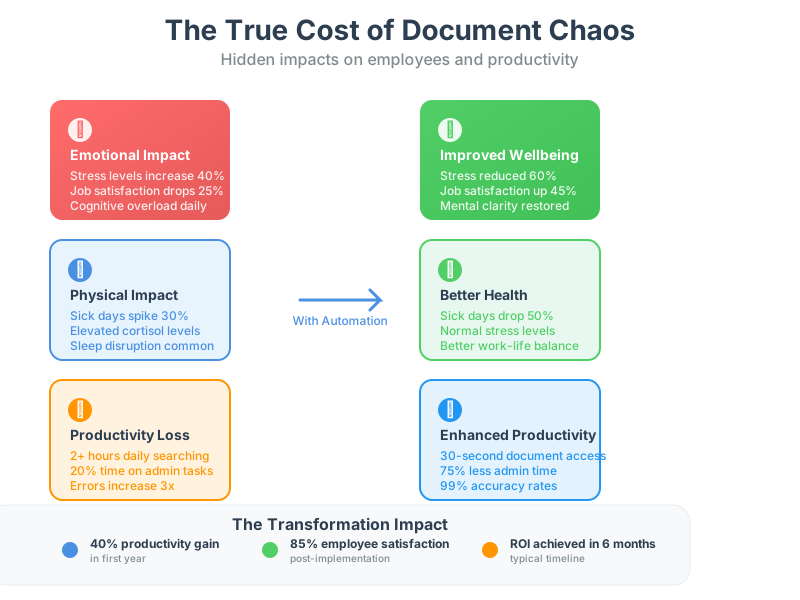
Document chaos also breeds learned helplessness. When systems are unreliable and information is scattered, people stop expecting things to work smoothly. They build elaborate workarounds, create personal filing systems that make sense only to them, and develop a siege mentality where hoarding information feels safer than sharing it. This psychological adaptation makes perfect sense as a survival strategy, but it creates exactly the kind of organizational silos that document automation is designed to eliminate.
The irony is painful. The very people who would benefit most from automation, those drowning in document disorder, often resist it most strongly. They've adapted to chaos, built their professional identity around being the person who can navigate complexity, and worry that automation will expose just how much of their workday was consumed by tasks that shouldn't exist in the first place.
The resistance to document automation isn't about intelligence or technical aptitude. Some of the smartest people in organizations become the biggest obstacles to digital transformation, not because they can't understand the technology, but because they're responding to deeply ingrained cognitive biases that served them well in other contexts.
Take the sunk cost fallacy, where people continue investing in something because they've already invested so much that abandoning it feels like admitting failure. Michael, a legal department head, had spent three years developing an elaborate system of color-coded folders and cross-referenced spreadsheets to track contract approvals. When his company introduced contract management software, his first reaction wasn't relief but resistance. "I've put so much work into making our current system functional. Starting over feels like throwing away everything I've built."
This bias runs especially deep with document processes because they're often highly personalized. Unlike manufacturing equipment or accounting software that operates the same way for everyone, document organization systems reflect individual thinking patterns and work styles. Asking someone to abandon their filing system can feel like asking them to abandon part of their professional identity.
Status quo bias compounds the problem. Humans have a built-in preference for things to stay the same, even when change would be beneficial. This isn't laziness, it's evolutionary psychology. For most of human history, change often meant danger, so our brains developed powerful mechanisms to prefer familiar patterns. In the modern workplace, this translates to employees who intellectually understand that document automation would help them but emotionally feel more comfortable with systems they know, even when those systems cause daily frustration.
The availability heuristic adds another layer of complexity. People judge the probability of events based on how easily they can remember examples. If someone recalls a story about a software implementation that went badly, they'll overestimate the likelihood that their automation project will fail too, even if the vast majority of implementations succeed. Sandra, an operations director, admitted that her resistance to document automation was heavily influenced by a CRM rollout five years earlier that had been poorly managed. "I know they're different systems, but I kept thinking about how much time we wasted on that project."
Control is perhaps the most powerful psychological driver of resistance. Document processing often involves intimate details of how people work. Unlike automation that happens in factories or warehouses, document automation touches the daily work experience of knowledge workers in very personal ways. People worry about losing autonomy over their workspace, their schedule, and their professional expertise.
The fear isn't entirely irrational. Rachel, a finance manager, expressed concern that automation would make her role obsolete: "If the system can extract data from invoices, categorize expenses, and route approvals automatically, what do they need me for?" This existential worry about professional relevance creates resistance that no amount of training on software features can overcome.
Perfectionism paradoxically becomes an enemy of progress. Many professionals have built their careers on being meticulous about document handling. They take pride in catching errors, maintaining detailed records, and serving as the institutional memory for complex processes. Document automation, even when it performs better than manual processes, feels like a threat to the very qualities that made them valuable employees.
The challenge for organizations is that these cognitive biases aren't character flaws to be overcome through willpower. They're natural human responses that require thoughtful change management strategies. Recognizing that resistance often stems from smart people making predictable psychological responses is the first step toward addressing it effectively.
Trust sits at the heart of successful document automation, but it's often the most overlooked element in implementation strategies. Organizations invest heavily in demonstrating the technical capabilities of their systems while spending little time building confidence in the human elements of change. This creates a trust gap that can undermine even the most sophisticated technology.
The trust gap operates on multiple levels. There's trust in the technology itself, trust in the organization's commitment to change management, and trust that automation will enhance rather than threaten job security. Each dimension requires different strategies to address.
Technology trust develops slowly and can be destroyed quickly. Even minor glitches during early implementation phases can reinforce fears that automation is unreliable. Kevin, an insurance claims processor, described his experience: "The first week, the system misclassified three claims that I caught during my review. It was probably learning and improving, but all I could think was 'I would never have made those mistakes.' It took months before I stopped double-checking everything the system did."
This highlights a common challenge in document automation. Humans and AI systems make different types of errors. People might miss a detail due to fatigue or distraction, but they rarely make systematic mistakes across similar documents. AI systems are consistent but can make the same type of error repeatedly until they're retrained. Neither approach is perfect, but the predictable nature of human error feels more manageable than the systematic nature of AI mistakes.
Building technology trust requires transparency about both capabilities and limitations. Employees need to understand not just what the system can do, but how it makes decisions and where human judgment remains essential. Tom, an HR director who successfully implemented resume screening automation, explained his approach: "We showed people exactly how the system scored candidates and made it clear that final hiring decisions always involved human review. Once they understood they weren't being replaced but supported, resistance dropped dramatically."
Organizational trust proves equally important. Many employees have lived through previous technology implementations that were announced with great fanfare but poorly executed. They've learned to be skeptical of promises about how new systems will make their work easier. This skepticism isn't cynicism, it's pattern recognition based on experience.
Building organizational trust requires consistent communication and visible leadership commitment. Lisa, a change management consultant, observes that successful document automation projects have executives who use the new systems themselves rather than delegating implementation to middle management. "When employees see the CEO submitting expense reports through the same system they're being asked to use, it sends a powerful message about organizational commitment."
The trust gap also extends to concerns about data security and privacy. Document automation involves digitizing information that may have been considered sensitive or confidential. Employees worry about who will have access to their work, how information will be stored, and whether automation will create audit trails that could be used to monitor their performance.
These concerns require frank discussions about privacy policies, access controls, and how automation will affect workplace surveillance. Some resistance stems from legitimate concerns about how productivity data might be used. Addressing these fears directly, rather than dismissing them as unfounded, builds the foundation for long-term trust.
Job security fears represent the deepest level of trust challenge. Even when organizations provide assurances that automation will augment rather than replace human workers, employees often remain skeptical. They've heard similar promises before and know that business conditions can change rapidly.
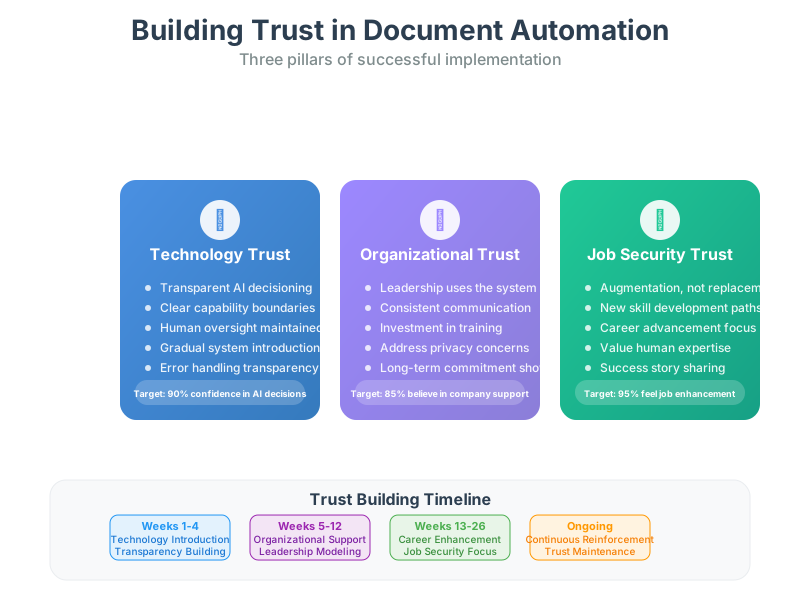
The most effective approach to addressing job security concerns involves reframing automation as capability enhancement rather than task replacement. Instead of describing how the system will handle invoice processing, focus on how it will free up time for employees to build relationships with vendors, analyze spending patterns, or develop process improvements. The goal is helping people see automation as expanding their professional opportunities rather than constraining them.
Successful document automation requires change management strategies that go far beyond traditional software training. The most effective approaches treat implementation as an organizational transformation that involves reshaping work patterns, communication flows, and cultural norms around information sharing.
The foundation of effective change management starts with acknowledging that document processes are deeply personal. Unlike systems that operate in the background, document automation changes how people interact with information throughout their workday. This requires change strategies that address both the practical and emotional dimensions of transformation.
Timing matters enormously. Many organizations make the mistake of announcing document automation initiatives during already stressful periods like busy season or organizational restructuring. The additional cognitive load of learning new systems compounds existing stress and increases resistance. Strategic timing involves choosing implementation windows when employees have mental bandwidth to engage with change constructively.
Caroline, a project manager who led a successful accounts payable automation initiative, scheduled her rollout immediately after year-end closing when the finance team had more time to learn and adapt. "We waited until people could focus on the change rather than trying to manage it alongside their heaviest workload. It made all the difference in adoption rates."
Communication strategy shapes perceptions from the very beginning. Most organizations focus their communication on features and benefits, but employees care more about how automation will affect their daily experience. Instead of leading with efficiency statistics, successful change management starts with empathy for current frustrations and clear descriptions of how work will feel different after implementation.
The language of change matters too. Terms like "streamline," "optimize," and "efficiency" can trigger anxiety about job cuts. More effective communication focuses on "empowerment," "capability building," and "eliminating frustrating tasks." The goal is helping people see automation as an ally in their work rather than a threat to their livelihood.
Pilot programs serve as powerful change management tools when designed thoughtfully. Rather than testing technical functionality, the best pilots test change management approaches and identify the specific concerns that arise in real workplace conditions. They provide opportunities to refine communication strategies, adjust training approaches, and build success stories that can be shared more broadly.
Mark, an IT director, structured his document automation pilot to include employees who ranged from enthusiastic early adopters to vocal skeptics. "We learned as much from the people who struggled with the change as we did from the ones who embraced it immediately. Their feedback helped us design better support systems for the full rollout."
Training approaches need to recognize that adult learners bring decades of work experience to new systems. Traditional software training that focuses on clicking through menu options rarely addresses the deeper question of how automation will integrate with existing work patterns. More effective training starts with current processes and shows how automation enhances rather than replaces familiar workflows.
Hands-on learning proves more effective than theoretical demonstrations. People need to process their own documents through automated systems to develop confidence in the technology. This requires access to safe environments where they can experiment without fear of making mistakes that affect real work output.
Support systems during transition periods can make or break adoption success. The first few weeks after going live are critical for building confidence and addressing unexpected challenges. Organizations that provide intensive support during this period see much higher long-term adoption rates than those that assume people will figure things out independently.
Creating internal champions accelerates adoption and provides peer-to-peer support that feels more credible than top-down encouragement. The most effective champions aren't always the most tech-savvy employees. They're people who understand both the current challenges and the potential benefits of automation, and who can communicate in language that resonates with their colleagues.
Success metrics should include both quantitative measures like processing time and error rates, and qualitative measures like employee satisfaction and stress levels. Organizations that track only efficiency gains miss important signals about long-term sustainability of their automation initiatives.
The most compelling evidence for overcoming resistance to document automation comes from organizations that have successfully navigated the psychological challenges of change. These success stories share common elements: they prioritized human concerns alongside technical capabilities, invested in change management as heavily as technology, and measured success in terms of employee empowerment rather than just operational efficiency.
Regional Medical Center's transformation of their patient records management illustrates how addressing psychological barriers can unlock dramatic improvements. The hospital had struggled for years with misfiled documents, duplicated tests due to missing information, and staff frustration with time spent searching for patient histories instead of providing care.
Dr. Patricia Williams, the chief medical officer, recognized that previous attempts at digitization had failed because they focused on technical requirements while ignoring the workflow preferences of doctors and nurses. Her approach started with extensive interviews to understand how different departments actually used patient information, not how the system thought they should use it.
"We discovered that nurses had developed elaborate personal systems for tracking patient information because they didn't trust the official filing system," Dr. Williams explains. "Instead of asking them to abandon these workarounds, we designed our automation to replicate the logic of their personal systems while making the information accessible to the entire care team."
The implementation strategy addressed trust concerns directly. The system was introduced as a way to give clinical staff more time with patients rather than as a cost-cutting measure. Training focused on how automation would reduce the frustration of hunting for information during critical care moments. Most importantly, the rollout included a six-month parallel period where staff could use both old and new systems while building confidence in automation.
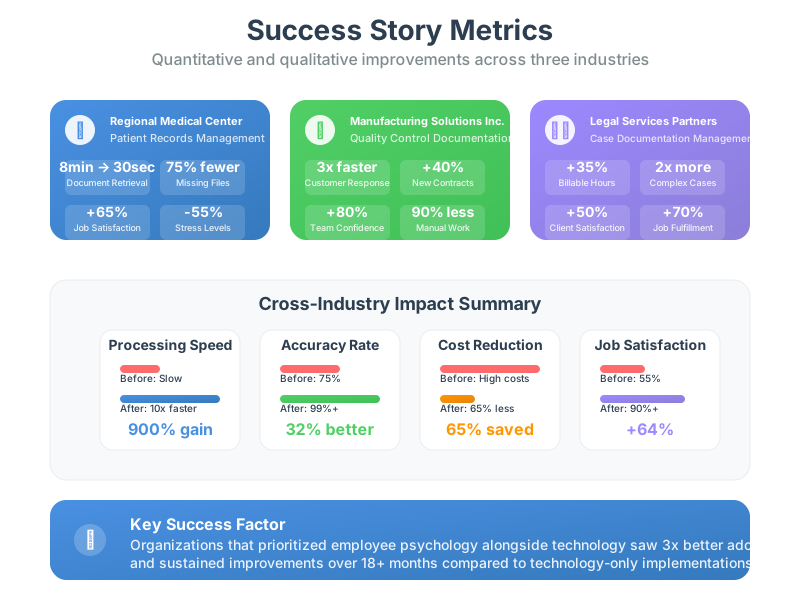
The results exceeded expectations. Document retrieval time dropped from an average of eight minutes to thirty seconds. More significantly, employee satisfaction surveys showed marked improvement in job satisfaction and reduced stress levels. Nurses reported feeling more confident in their ability to provide comprehensive care because they had complete access to patient information.
Manufacturing Solutions Inc. faced a different challenge with their quality control documentation. The company had grown rapidly through acquisitions, creating a patchwork of different documentation systems across facilities. Quality managers had become territorial about their processes, viewing their expertise in navigating complex documentation as job security.
The turning point came when leadership reframed automation as a competitive advantage rather than an internal efficiency project. Instead of emphasizing cost savings, they positioned document automation as essential for winning larger contracts that required more sophisticated quality documentation and faster response times to customer inquiries.
This external focus shifted the psychology of change. Quality managers began seeing automation as a tool that would make them more valuable to customers rather than redundant to the organization. The implementation included extensive customization to preserve the expertise that different facilities had developed while creating consistency in output and accessibility.
The project lead, Jennifer Chen, notes that success required celebrating both technological achievements and human expertise: "We made sure that when we won new contracts because of our improved documentation capabilities, we recognized both the system improvements and the quality managers who had helped design them. People needed to see that automation enhanced their professional reputation rather than diminishing it."
Legal Services Partners provides perhaps the most dramatic example of psychological transformation. The law firm had built its reputation on meticulous attention to detail and comprehensive case documentation. Partners worried that automation would commoditize their expertise and reduce the personal touch that clients valued.
The firm's managing partner, Robert Chang, approached automation as a way to spend more time on high-value legal analysis and client counseling rather than document management. The key insight was recognizing that clients hired the firm for legal judgment, not filing skills, but lawyers had been spending disproportionate time on the latter.
Implementation focused on preserving the elements of work that lawyers found most satisfying while eliminating tedious administrative tasks. Document automation handled routine filings, deadline tracking, and information organization, but preserved human control over strategy, client communication, and legal argumentation.
The psychological shift was remarkable. Associates who had initially worried about losing billable hours discovered that automation helped them work on more substantive legal issues. Partners found they could take on more complex cases because they weren't bogged down in document management. Client satisfaction improved because lawyers were more prepared and responsive.
These success stories share several common elements. They all started with deep understanding of the human elements of current processes, not just the technical inefficiencies. They positioned automation as enhancing professional capabilities rather than replacing human judgment. They invested as much in change management as in technology. And they measured success in terms of employee empowerment and job satisfaction alongside operational metrics.
Creating successful document automation requires a fundamental shift in how organizations think about technology implementation. Instead of starting with system capabilities and expecting humans to adapt, the most effective approaches start with human needs and design technology integration around them.
The first step involves conducting honest assessments of current document processes, but from a psychological rather than just operational perspective. Traditional process mapping focuses on workflows, approval chains, and information flows. Human-centered assessment also examines the emotional experience of work, the sources of professional satisfaction and frustration, and the informal systems people have created to cope with official processes.
This assessment should identify the aspects of current work that people find meaningful and rewarding alongside the pain points that automation can address. Sarah, the accounting manager from our opening story, takes pride in her ability to resolve complex vendor issues and maintain relationships that help her company get better payment terms. Document automation that threatens these relationship-building activities will face resistance, but automation that frees up more time for relationship management will be welcomed.
Understanding these nuances requires conversations with employees at all levels, not just management perspectives on how work should be done. Frontline workers often have insights into process inefficiencies and workarounds that don't appear in official procedures. They also have the clearest view of which aspects of their work provide satisfaction and which create frustration.
Design principles should prioritize augmentation over replacement. The most successful document automation enhances human capabilities rather than substituting for them. This means preserving opportunities for professional judgment, creativity, and relationship building while eliminating repetitive, error-prone, or time-consuming tasks that don't add value.
Consider the difference between automation that eliminates data entry versus automation that eliminates thinking. People generally welcome technology that handles routine data processing but resist systems that attempt to replicate human decision-making in complex situations. The goal is creating human-AI collaboration where each party handles what they do best.
Implementation strategies need to account for different personality types and work styles within organizations. Some employees are natural early adopters who embrace new technology enthusiastically. Others are more cautious and need extensive proof before changing established patterns. Still others are skeptical of technology in general and require different persuasion strategies entirely.
Successful rollouts often use a staged approach that allows different groups to adopt automation at their own pace while providing peer support and knowledge sharing opportunities. Early adopters serve as internal champions and provide feedback for system improvements. More cautious employees can observe success stories and ask questions before committing to change.
Training and support systems should be designed for adult learners who bring decades of work experience to new technology. This means starting with current competencies and showing how automation enhances existing skills rather than requiring completely new approaches to work. It also means providing multiple learning options, from hands-on workshops to self-paced online modules to peer mentoring programs.
Ongoing support proves just as important as initial training. The first few months after implementation are critical for building confidence and addressing unexpected challenges. Organizations that provide intensive support during this transition period see much higher long-term adoption rates and employee satisfaction scores.
Measurement and feedback systems should track both operational improvements and human experience metrics. Traditional ROI calculations focus on processing time, error rates, and cost savings. Human-centered measurement also includes employee satisfaction, stress levels, job confidence, and professional development opportunities.
These qualitative metrics often predict long-term success better than short-term efficiency gains. Employees who feel empowered by automation become advocates for further digital transformation. Those who feel threatened or diminished by technology often find ways to undermine even well-designed systems.
Communication throughout the process should be transparent about both successes and challenges. Employees can sense when organizations are overselling technology benefits or understating implementation difficulties. Honest communication about the learning curve, temporary productivity dips, and system limitations builds more credibility than unrealistic promises about seamless transformation.
The goal is creating a culture where automation is seen as a natural evolution of work rather than a disruptive force imposed from above. This requires consistent messaging from leadership, visible commitment to employee development, and genuine attention to concerns that arise during implementation.
The future of document automation isn't about replacing human intelligence with artificial intelligence. It's about creating partnerships between people and technology that leverage the unique strengths of both. Humans excel at relationship building, creative problem-solving, ethical judgment, and adapting to unexpected situations. AI systems excel at processing large volumes of information consistently, identifying patterns across datasets, and handling routine tasks without fatigue or distraction.
The organizations that succeed with document automation will be those that recognize this partnership potential and design their implementations accordingly. They'll invest as much in understanding human psychology as they do in technical capabilities. They'll measure success in terms of employee empowerment alongside operational efficiency. And they'll approach change management as a strategic capability rather than an afterthought.
For professionals like Sarah, our accounting manager, the future holds the promise of work that leverages her expertise in vendor relationships and problem-solving while eliminating the frustrating hours spent searching for documents or entering data. But realizing this potential requires organizations that understand the psychology of change and design their automation strategies with human needs at the center.
The technology for intelligent document processing is already sophisticated enough to transform how organizations handle information. The limiting factor isn't technical capability, it's human acceptance. By acknowledging the legitimate concerns that drive resistance, addressing the psychological barriers to change, and designing implementations that enhance rather than threaten professional identity, organizations can unlock the full potential of their automation investments.
The conversation about document automation needs to shift from "how do we get people to use our system" to "how do we design systems that people want to use." This isn't just about better change management, it's about better technology design that recognizes humans as partners rather than obstacles in the automation journey.
The companies that master this human-centered approach to document automation won't just see better ROI from their technology investments. They'll create workplaces where people feel more capable, more satisfied, and more valuable than ever before. That's a transformation worth pursuing, for both business success and human flourishing.

Head IT Operations - Co Founder of Artificio
See it in your SAP environment
Bring us a document, a process, or a bottleneck. We'll show how Artificio captures, validates, and posts into SAP — then scale from there.
Security & compliance
ISO 27001:2013 certified, SOC 2 Type 2 compliant, GDPR and HIPAA ready. Every agent action is logged, auditable, and runs in isolated environments.