

Blog
What Happens After You Click "Submit"? The Data Journey
'Submit' starts a complex 6-system data flow. Learn where your form data goes and why smart forms offer journey visibility.

Blog
'Submit' starts a complex 6-system data flow. Learn where your form data goes and why smart forms offer journey visibility.
Last Tuesday at 2:47 PM, the operations manager at a mid-sized financial services firm clicked "Submit" on a loan application form. The screen flashed green. "Form submitted successfully!" it proclaimed. She closed her laptop, satisfied that another application was moving through the pipeline.
Three days later, the applicant called. Frustrated. Confused. The loan hadn't progressed at all. When the manager investigated, she discovered something disturbing. The form data had successfully reached the CRM. That part worked perfectly. But somewhere between the CRM and the credit verification system, the data stopped moving. No error message. No alert. The workflow just silently stalled, leaving the application in limbo while the clock ticked away.
This happens thousands of times every day across organizations of every size. We've all been taught that "Submit" means done, complete, finished. Click the button, see the success message, move on with your day. But that's a lie. A well-intentioned lie, but a lie nonetheless.
When you click "Submit" on any business form, you're not ending a process. You're starting one. That form data is about to embark on a journey through multiple systems, each with its own requirements, validation rules, and potential failure points. Most organizations have no idea where their form data actually goes, how long it takes to get there, or where it fails along the way.
Let's pull back the curtain and map the real journey your form data takes after you click that innocent-looking submit button.
When business forms were simple paper documents, the journey was straightforward. You filled out the form, someone filed it, and that was that. The physical form stayed in one place. Digital forms promised to make this faster and easier. And they did, sort of. They digitized the data collection part beautifully. But they created something far more complex on the backend that most people never see.
Here's what actually happens when someone submits a typical business form. Let's use a customer onboarding form as an example, though the pattern holds true for loan applications, insurance claims, HR documents, and just about any other business form you can think of.
The moment you click submit, the form data gets written to a database. This is the only step most form builders actually handle. The data lands in a table somewhere, probably organized by submission timestamp. Success message displays. You think you're done. But the data has barely started its journey.
Your business needs this new customer information in your CRM system. So the form data needs to get exported, transformed into the right format, and pushed into your customer relationship management platform. This might happen immediately through an API call, or it might happen in a nightly batch process. Or, in many cases, someone manually enters it. At this stage, field mapping becomes critical. The form called it "Company Name" but the CRM calls it "Organization." The form collected "Business Phone" but the CRM has separate fields for area code, prefix, and line number. Every mismatch is a potential failure point.
Now the data needs to be verified. Is this a real company? Is the email address valid? Does the phone number actually work? This often involves calling third-party APIs to validate information against external databases. Each validation check can pass, fail, or return ambiguous results that require human review. The form data sits in a queue while these checks run. If any validation fails, the data needs to be flagged, routed back to the original submitter, corrected, and resubmitted, starting the journey all over again.
Your sales team doesn't just want the information the customer provided. They want additional context. What industry is this company in? How many employees do they have? What's their annual revenue? Enrichment systems pull data from business intelligence databases and append it to the customer record. This step can take anywhere from seconds to days depending on data availability and API rate limits. The form data waits patiently (or not so patiently) while this happens.
If this customer is going to buy anything, their information needs to land in your accounting and operations systems. The ERP needs to create a customer account, assign a customer number, set up billing preferences, and establish credit terms. This system probably speaks an entirely different data language than your form or CRM. More transformation. More potential failures. More waiting.
Finally, various people need to be alerted. The sales team needs to know there's a new lead. The finance team might need to approve credit terms. The compliance team might need to review certain fields. Each notification has its own logic, timing, and delivery method. Email, SMS, in-app notifications, Slack messages. The form data spawns multiple communication threads, each with its own delivery success or failure.
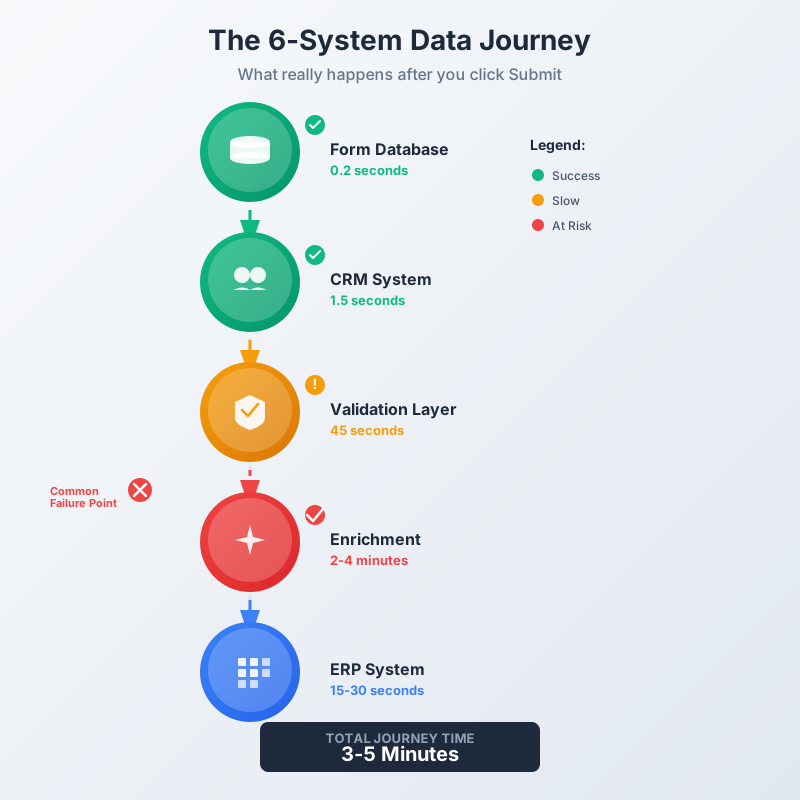
That's six distinct systems your form data needs to navigate successfully. Six opportunities for something to go wrong. Six places where data might get stuck, transformed incorrectly, or lost entirely. And that's for a relatively simple business form. Complex forms in regulated industries might touch 10 or 12 different systems before the data journey is truly complete.
The operations manager who clicked "Submit" on Tuesday didn't see any of this. She saw a success message. But success at data collection doesn't mean success at data delivery. The form succeeded. The workflow failed. And nobody knew until the customer called three days later.
The fundamental issue is one of user experience design meeting business reality. Form designers have trained us to interpret "Submit" as the end of our responsibility. Green checkmarks and success messages reinforce this perception. We're conditioned to believe that clicking submit transfers responsibility from us to the system. Our part is done.
But from a business process perspective, submission is just the starting gun. The data journey is beginning, not ending. The user's visible interaction is complete, but the system's invisible work is just getting started. This disconnect creates a dangerous gap in expectations and reality.
Think about package tracking. When you drop off a package at a shipping center, you don't assume it magically teleported to its destination. You track it. You can see when it reaches each distribution center, when it's loaded on a truck, when it's out for delivery. You have visibility into the journey. The shipping company doesn't just say "Package received successfully!" and leave you wondering if it will ever arrive.
But that's exactly what most business forms do. They celebrate successful data receipt but provide zero visibility into the actual data journey. Users are left assuming success when the data might be stuck at system three, failing validation checks nobody told them about.
This creates three serious problems for organizations.
When the form says "Success!" but the backend integration fails, nobody knows there's a problem until someone goes looking for the data and can't find it. By then, hours or days have passed. The trail is cold. Figuring out what went wrong requires detective work across multiple systems, log files, and API call records. Most organizations don't discover these failures until a customer complains, a deadline passes, or someone manually checks the destination system and realizes the data never arrived.
When a form submission enters the multi-system relay race, who owns it? The person who submitted it thinks their job is done. The form system thinks its job is done. The CRM integration assumes the data is valid because it came from a form. The validation layer expects the CRM to have done preliminary checks. Everyone assumes someone else is responsible, so nobody is actually responsible. Data can sit in a failed state for days while everyone points fingers at everyone else.
Even when integrations don't fully fail, they often partially fail in ways that corrupt the data journey. Maybe nine out of ten fields transfer correctly, but one field gets dropped or mistranslated. Maybe the data makes it through five systems successfully but stalls at the sixth. Maybe it completes the journey but takes four days instead of four hours. These silent degradations are almost impossible to spot because there's no clear failure signal. Things just get slower and messier over time, and nobody can quite put their finger on why.
Organizations have invested heavily in making forms easy to fill out. Conditional logic, field validation, auto-save, mobile optimization. The user experience of data collection has become remarkably sophisticated. But the user experience of data journey tracking has been completely neglected. Forms are optimized for the first 30 seconds (filling out the form) but ignore the next 30 hours (moving through backend systems).
This gap exists for a technical reason. Traditional form builders were designed to do one thing and do it well: collect and store form submissions. They were never designed to orchestrate multi-system workflows. That was supposed to be handled by separate integration platforms, workflow automation tools, and middleware systems. So the form builder shows you successful submissions. The integration platform shows you API calls and webhook deliveries. The workflow tool shows you step completion. But nobody shows you the complete end-to-end journey of a single form submission through all these systems.
As a result, tracking a form submission requires logging into multiple platforms, correlating timestamps across different systems, and piecing together a story from fragments scattered across various dashboards and log files. Even technical teams struggle with this. For business users, it's effectively impossible.
Here's what good journey visibility would look like. When an operations manager submits a form or checks on a submission, they should see something like this:
Instead, they see: "Form submitted successfully!" And then nothing. The form data enters a black box and hopefully emerges on the other side eventually. When it doesn't, the troubleshooting begins.
Some organizations try to solve this with status fields in their CRM or project management tools. "Application Status: Pending Credit Check" or "Onboarding Stage: Awaiting Approval." These manual status updates are better than nothing, but they're fragile. Someone has to remember to update them. They're only as current as the last person who touched the record. They don't provide real-time visibility into where data actually is in the system-to-system journey.
The solution isn't to build better integration tools. Organizations already have those. The solution is to rebuild forms with journey orchestration as a core feature, not an afterthought. Smart forms don't just collect data and hand it off to integration systems. They maintain ownership of the data throughout its entire journey and provide visibility into every step.
Here's how this works in practice. When you build a form with journey orchestration built in, you're not just designing fields and validation rules. You're designing the complete workflow. You're defining all the systems the data needs to touch, the order it needs to touch them, the validation rules at each stage, and the fallback logic when things go wrong.
The form becomes the conductor of the orchestra, not just the sheet music. It knows the data landed in the CRM. It knows the validation check returned successfully. It knows the ERP account was created. And critically, it knows when any of these steps fails or stalls. It can retry failed API calls. It can route data to manual review queues when automated checks are ambiguous. It can send alerts when something takes longer than expected.
From the user's perspective, the experience is simpler, not more complex. They still fill out a form and click submit. But now they get real visibility. They can check the status of their submission and see exactly where it is in the journey. If there's a problem, they see it clearly stated instead of having to guess or wait for someone to call them days later.
From the IT perspective, this architecture is actually simpler to maintain than the traditional fragmented approach. Instead of managing integrations across multiple platforms and trying to keep them all synchronized, everything flows through the form's orchestration engine. When you need to add a new step to the workflow, you add it to the form configuration. When you need to change the order of operations, you update the form logic. The form becomes the single source of truth for how data should flow.
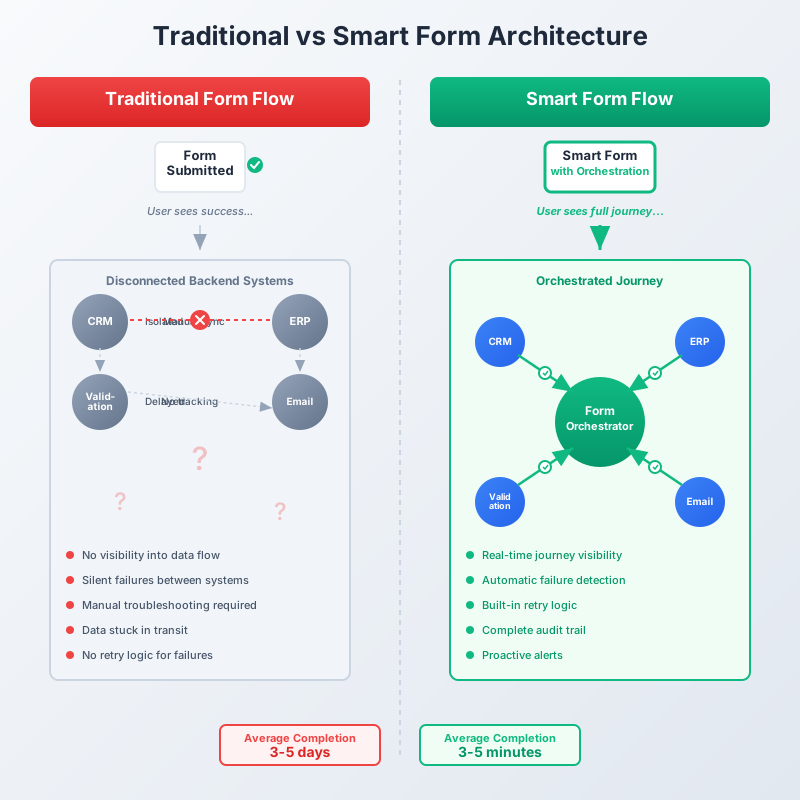
Let's look at a concrete example of how this changes the game. An insurance company handles claims through a complex form that collects incident details, policy information, and supporting documentation. In their old system, the form dumped submissions into a database, and various downstream systems pulled from that database on different schedules. The claims adjusters had no way to know if a submission was complete or stuck somewhere in the pipeline. They would often start working on a claim only to discover halfway through that some critical verification step had failed days ago.
After implementing smart forms with journey orchestration, the same submission process now provides complete transparency. When a claim comes in, the adjuster can see in real-time that the form was submitted, the policy was verified against their policy management system, the damage estimate API call succeeded, the photos were stored in their document management system, and the claim number was generated in their ERP. If any step fails, it's flagged immediately with a specific error message. The adjuster doesn't waste time working on incomplete claims. Customers don't wait days for someone to notice a problem. The system handles retries automatically for transient failures and routes persistent failures to a manual review queue.
This isn't magic. It's just form design that acknowledges the reality of modern business processes. Data doesn't stay in one place anymore. Forms shouldn't pretend it does.
When forms become responsible for journey orchestration, they take on three distinct dimensions instead of just one. Traditional forms are one-dimensional. They exist in a single moment: the moment of submission. Smart forms exist across three dimensions: submission, journey, and completion.
This is the familiar territory. Fields, validation, conditional logic, user experience optimization. Smart forms do all of this just as well as traditional forms. Nothing is lost. But this dimension is no longer the entire story.
This is where smart forms diverge from their predecessors. The journey dimension tracks the post-submission workflow. Which systems need to receive the data? In what order? With what transformations? What are the success criteria at each stage? What should happen when stages fail? How long should each stage take before it triggers an alert? The journey dimension turns the form from a data collector into a workflow orchestrator.
This is the dimension that answers the question "When is this form submission truly done?" For a loan application, completion might mean the applicant has been approved or denied, not just that the form was submitted. For a customer onboarding form, completion might mean the customer has an active account in all relevant systems and the sales team has been notified. Completion is defined by business outcomes, not just technical data delivery.
These three dimensions work together to create a complete form experience. You design the submission experience so it's easy and intuitive for users. You design the journey so the data flows reliably through all necessary systems. You define completion criteria so everyone knows when the business process has truly finished. Traditional forms only gave you one dimension. Smart forms give you all three.
This three-dimensional approach fundamentally changes how organizations think about forms. Forms stop being just data collection tools and become business process engines. The form isn't just the front door where data enters your organization. It's the conveyor belt that carries data all the way through your organization to its final destination.
One of the most dramatic improvements in smart form architecture is how notifications work. Traditional forms send one notification: "A form was submitted." That's it. Someone submitted something. Go look at it. But that notification tells you nothing about whether the submission is complete, valid, or ready to act on.
Smart forms with journey orchestration enable intelligent, staged notifications. Different people get notified at different stages based on what they actually need to know. The finance team doesn't get notified when a form is submitted. They get notified when the customer passes credit verification and is ready for account setup. The sales team doesn't get notified when someone starts filling out a form. They get notified when the form is complete, validated, and enriched with business intelligence data.
This staged notification approach eliminates noise and increases signal. People stop getting dozens of premature notifications about forms that aren't ready for their attention. They start getting timely notifications about forms that are actually ready for action. And because each notification includes context from the journey, recipients can see exactly what happened before they got involved. They're not starting from scratch. They're picking up where the automated journey left off.
Even better, smart forms can send notifications when the journey stalls. If a form submission is supposed to complete its journey in two hours but has been stuck for four hours, the system can automatically alert the right people. Operations managers don't have to manually check dashboards. They get proactive alerts when something needs attention. This turns reactive troubleshooting into proactive problem-solving.
Here's something traditional forms have no concept of: retry logic. When an API call to a backend system fails, what happens? In most form integrations, nothing. The integration records an error in a log file somewhere, and the form submission is marked as failed or incomplete. Someone eventually notices and manually fixes it. Or maybe they don't notice, and the submission just never completes.
Smart forms with journey orchestration include retry intelligence as a core feature. When a step in the journey fails, the system doesn't just give up. It analyzes the failure. Is this a transient error that's likely to succeed if tried again? The system retries automatically, with exponential backoff to avoid hammering a struggling API. Is this a persistent error that indicates bad data or system configuration? The system routes it to a manual review queue and notifies the appropriate team. Is this a critical system that's completely down? The system pauses that step for all submissions and alerts infrastructure teams.
This retry intelligence dramatically improves completion rates. Studies show that up to 40% of integration failures are transient, caused by temporary network issues, rate limiting, or momentary system unavailability. These failures have nothing to do with the form data itself. They're just bad timing. With automatic retries, these temporary failures become invisible. The system handles them. The data gets through. Users never know anything went wrong.
For the remaining 60% of failures that represent real problems, the manual review queue provides a centralized place to see and fix issues instead of having problems scattered across multiple systems and log files. Operations teams can work through a prioritized list of stuck submissions, see exactly what went wrong at which stage, fix the underlying issue, and resume the journey from that point. They don't have to start over. They don't have to re-submit. They just fix the specific problem and let the journey continue.
Compliance teams love smart forms with journey orchestration, and here's why. Traditional forms provide an audit trail for the submission itself. You can see who submitted what data and when. But they provide no audit trail for what happened after submission. Did the data make it to the ERP system? Who knows. When did it get there? Your guess is as good as mine. Was it modified along the way? Maybe. By whom? Good question.
Smart forms create a complete audit trail for the entire data journey. Every system the data touched. Every transformation that was applied. Every validation check that ran. Every retry attempt. Every manual intervention. All timestamped. All logged. All traceable. This comprehensive audit trail is invaluable for compliance, debugging, and quality assurance.
When a customer claims their form submission never went through, you don't have to guess or trust memory. You pull up the audit trail and see exactly what happened. Did the submission succeed? Yes, here's the timestamp. Did it make it to the CRM? Yes, at this time. Did the validation pass? No, actually it failed on this specific field for this specific reason. Oh, and someone manually overrode that validation failure two days later and resumed the journey. And it completed successfully after that. Here's the final completion timestamp.
This level of detail seems excessive until you need it. Then it's priceless. Regulatory audits become straightforward. Customer disputes get resolved quickly. Internal process improvements can be based on real data about where journeys actually fail instead of guesses about where they might fail. The audit trail turns troubleshooting from an art into a science.
This all sounds great in theory, but what does it actually take to implement? Organizations reading this might be thinking: "This sounds complicated. This sounds expensive. This sounds like a massive reengineering project." Fair concerns. Let's address them directly.
Smart forms with journey orchestration are more complex than traditional forms. No getting around that. You're building something more sophisticated. But here's the key insight: the complexity already exists in your organization. You already have six-system relay races happening. You already have integration points that can fail. You already have data getting stuck in transit. Smart forms don't create this complexity. They make it visible and manageable.
Think of it like this. You can have a complex workflow that's invisible, unmonitored, and fragile. Or you can have a complex workflow that's visible, monitored, and resilient. The complexity is there either way. Smart forms just bring it into the light where you can actually do something about it.
From an implementation standpoint, smart forms start simple and grow in sophistication over time. You don't have to orchestrate your entire tech stack on day one. Start with the most critical form in your organization. Map its journey. Identify the three or four systems it needs to touch. Build orchestration for those. Get that working reliably. Then expand to the next form. Then add more systems to the journey. Then implement more sophisticated retry logic. Implementation is iterative, not big-bang.
The development effort is comparable to building traditional forms plus traditional integration logic. The difference is that everything lives in one place instead of scattered across multiple tools. For development teams, this is actually simpler. One codebase to maintain. One place to look when something goes wrong. One system to monitor. The consolidated architecture offsets the increased sophistication.
We've reached a point in business software evolution where forms that just collect data are no longer sufficient. The business processes built on top of those forms have become too complex, too integrated, and too critical for "submit and pray" to be an acceptable approach. Organizations need forms that understand the full journey, not just the first step.
This isn't a far-future prediction. Smart forms with journey orchestration exist today. Companies are already using them to transform their data collection processes from fragile, opaque workflows into reliable, transparent business processes. The technology is mature. The patterns are established. The question isn't whether this approach works. The question is when your organization will adopt it.
The operations manager who clicked "Submit" on that loan application didn't need to see every technical detail of the six-system journey. But she did need to know that the journey was progressing, where it was in the process, and whether anything needed her attention. That's what smart forms deliver. Not overwhelming detail for the sake of detail, but meaningful visibility for the sake of accountability.
When you design your next form, ask yourself: What happens after someone clicks submit? Where does this data need to go? How long should that take? What can go wrong? Who needs to know when it does? If you can't answer those questions, you don't have a form strategy. You have a data collection widget attached to a hope-based integration strategy.
The submit button isn't the end of the story. It's the beginning. Design accordingly.

Head IT Operations - Co Founder of Artificio
See it in your SAP environment
Bring us a document, a process, or a bottleneck. We'll show how Artificio captures, validates, and posts into SAP — then scale from there.
Security & compliance
ISO 27001:2013 certified, SOC 2 Type 2 compliant, GDPR and HIPAA ready. Every agent action is logged, auditable, and runs in isolated environments.