

Blog
Setting Up WhatsApp Business for Automation with Artificio
Connect with customers instantly using WhatsApp Business & Artificio. Automate support, send updates, and grow your business.

Blog
Connect with customers instantly using WhatsApp Business & Artificio. Automate support, send updates, and grow your business.
In today's fast-paced business environment, customer communication has evolved far beyond traditional phone calls and emails. WhatsApp Business has emerged as a game-changing platform that allows companies to connect with their customers where they already spend most of their time. With over 2 billion users worldwide, WhatsApp provides an intimate, direct channel for businesses to engage with their audience in real-time.
The beauty of WhatsApp Business lies not just in its massive reach, but in its ability to create meaningful, personalized interactions at scale. When you combine this powerful communication tool with Artificio's automation capabilities, you unlock a whole new level of efficiency and customer engagement that can transform how your business operates.
Whether you're a small startup looking to establish your first customer service channel or an established company seeking to modernize your communication strategy, this comprehensive guide will walk you through every step of setting up WhatsApp Business and integrating it with Artificio for maximum impact.
Before diving into the setup process, it's important to understand why WhatsApp Business has become such a crucial tool for modern businesses. Unlike traditional business communication channels that often feel formal and distant, WhatsApp creates an environment where customers feel comfortable reaching out with questions, concerns, or feedback.
The platform offers a unique blend of professional functionality and personal touch. Customers can browse your catalog, make inquiries about products or services, and receive support all within a familiar messaging interface they use daily. This familiarity removes barriers to communication and often leads to higher engagement rates compared to other customer service channels.
What sets WhatsApp Business apart from the regular WhatsApp app is its suite of business-specific features. You get access to automated messaging tools, detailed analytics about message delivery and read rates, and the ability to create a comprehensive business profile that helps customers find and trust your company. These features aren't just nice-to-have additions; they're essential tools for scaling your customer communications effectively. 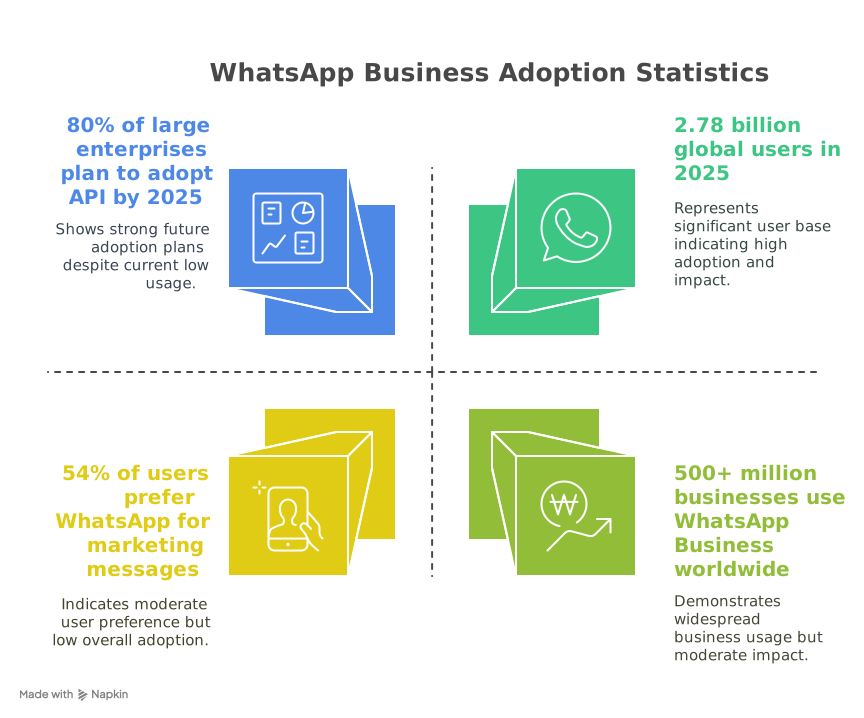
The real magic happens when you integrate WhatsApp Business with automation platforms like Artificio. This combination allows you to maintain the personal touch that customers love while automating repetitive tasks and ensuring consistent, timely responses around the clock.
Setting up WhatsApp Business might seem straightforward, but there are several important considerations and best practices that can make the difference between a basic setup and a professional, effective business communication hub.
The first step involves downloading the WhatsApp Business app, but it's worth noting that you have options here. WhatsApp offers both a standard Business app for smaller operations and WhatsApp Business API for larger enterprises with more complex needs.
For most businesses just getting started, the WhatsApp Business app available on Google Play Store and Apple App Store is the perfect choice. This free application provides all the essential business features while maintaining the simplicity and ease of use that WhatsApp is known for.
When downloading, make sure you're getting the official WhatsApp Business app, not one of the many third-party alternatives that might appear in search results. The official app will always be published by WhatsApp Inc. and will have the distinctive green WhatsApp Business logo.
Once downloaded, you'll notice the interface looks familiar if you've used regular WhatsApp before, but with additional business-focused features integrated seamlessly throughout the app. This design choice makes the transition smooth for business owners who are already comfortable with WhatsApp's personal messaging platform.
The registration process is where many businesses make their first critical decision, and it's one that can impact your professional image and compliance with WhatsApp's terms of service. The phone number you choose for your WhatsApp Business account becomes the primary identifier for your business on the platform.
WhatsApp Business accepts both mobile and landline numbers, but there are important restrictions to keep in mind. VoIP numbers and toll-free numbers aren't supported, which means you can't use services like Google Voice or typical 1-800 numbers for registration. This policy exists to prevent spam and ensure that businesses have a genuine, verifiable presence.
The best practice is to use a dedicated business phone number rather than your personal mobile number. This separation serves multiple purposes. First, it maintains a professional boundary between your personal and business communications. Second, it ensures business continuity if you ever need to transfer account management to another team member. Third, it provides better organization for tracking and analyzing business communications.
If you're a small business owner who doesn't have a separate business line yet, consider this an opportunity to establish one. Many mobile carriers offer affordable business line add-ons, and the investment pays off in terms of professional credibility and operational efficiency.
During registration, you'll need to enter your chosen business phone number and select your country code. Double-check this information carefully, as changing your business number later can be complicated and might require starting the verification process over again.
After entering your business phone number, WhatsApp will send a 6-digit verification code to confirm that you control the number. This code typically arrives via SMS within a few minutes, but if you don't receive it right away, don't panic. Network delays can sometimes cause temporary delays in message delivery.
If the SMS verification doesn't work, WhatsApp provides the option to receive the verification code via phone call. This backup method is particularly useful for landline numbers or in areas with poor SMS service. When you choose the call option, an automated system will clearly read the 6-digit code to you.
Enter the verification code exactly as received, paying attention to any potential confusion between similar-looking numbers (like 6 and 8, or 1 and 7). You typically have a limited number of attempts to enter the correct code, so take your time and double-check before submitting.
Once verified, your business phone number becomes permanently associated with your WhatsApp Business account. This verification process not only secures your account but also builds trust with customers, who can see that your business number has been confirmed by WhatsApp.
Your business profile is often the first impression customers get of your company on WhatsApp, so it's worth investing time to make it comprehensive and professional. Think of it as your digital business card that customers can access whenever they interact with your company.
Start with your business name, which should be clear, recognizable, and consistent with your branding across other platforms. Avoid using abbreviations or acronyms that customers might not understand. If your business is known by a shortened name locally, consider including both the full legal name and the common nickname in your profile description.
The business category selection helps customers understand what type of business you operate and helps WhatsApp show your business in relevant searches. Choose the category that most accurately represents your primary business activity. If your business operates in multiple categories, select the one that generates the most customer inquiries or represents your main revenue source.
Your business logo deserves special attention because it appears prominently in customer chat lists and when they view your profile. Use a high-quality, square image that looks clear even when displayed at smaller sizes. The logo should be consistent with your branding across websites, social media, and physical materials. Avoid logos with small text or intricate details that might become illegible when scaled down.
The business description field allows you to tell your story in a few sentences. Focus on what makes your business unique and what value you provide to customers. Include key information like your main products or services, what sets you apart from competitors, and any special offerings or guarantees. Keep the tone professional but approachable, matching the conversational nature of the WhatsApp platform.
Contact information beyond your WhatsApp number adds credibility and provides customers with multiple ways to reach you. Include your business address if you have a physical location that customers visit. Even if you're primarily online, having a business address (even if it's just a P.O. Box) adds legitimacy to your profile.
Business hours are crucial for setting customer expectations about when they can expect responses. Be realistic about your availability and update these hours if your schedule changes during holidays or special events. Customers appreciate knowing when you're available, and it can reduce frustration from delayed responses.
Your website URL should link to your main business website or, if you don't have one, to your most active and professional social media presence. This link gives customers a way to learn more about your business and can drive traffic to your other online properties.
Setting up WhatsApp Business correctly from the start saves you time and complications later. These best practices have been developed from real-world experience and can help you avoid common pitfalls that might hurt your business's professional image or operational efficiency.
The decision to use a dedicated business number versus your personal number might seem like a minor detail, but it has significant implications for your business's growth and professionalism. A dedicated business number creates clear boundaries between your personal and professional communications, which becomes increasingly important as your business grows.
From a practical standpoint, a dedicated number makes it easier to manage business hours and response expectations. Customers understand that messages to a business number might not receive immediate responses outside of business hours, while messages to a personal number often carry an expectation of quick replies regardless of the time.
A dedicated number also facilitates team collaboration. If you ever need to bring in customer service staff or virtual assistants to help manage customer communications, it's much easier to share access to a dedicated business line than to give others access to your personal communications.
From a compliance perspective, many industries have regulations about maintaining separate business and personal communications. A dedicated business number helps ensure you're meeting these requirements and makes it easier to maintain proper records for tax, legal, or regulatory purposes.
If budget is a concern, remember that many mobile carriers offer very affordable second line services, and the professional benefits far outweigh the small monthly cost. Some carriers even offer special business packages that include additional features useful for business communications.
An incomplete business profile sends the wrong message to potential customers. When someone discovers your business on WhatsApp and sees missing information, empty fields, or placeholder images, it raises questions about your professionalism and attention to detail.
Complete profiles also perform better in WhatsApp's search and discovery features. When customers search for businesses in your category or location, WhatsApp's algorithm favors profiles with complete, accurate information. This means a fully completed profile can actually help you reach more potential customers organically.
Take the time to fill out every available field, even if some information seems redundant with what's on your website or other profiles. Remember that customers might be viewing your WhatsApp profile on their mobile device while on the go, and they may not have easy access to your other online properties at that moment.
Regularly review and update your business profile information. Set a monthly reminder to check that hours, contact information, and descriptions are still accurate. Outdated information frustrates customers and can hurt your business's reputation. 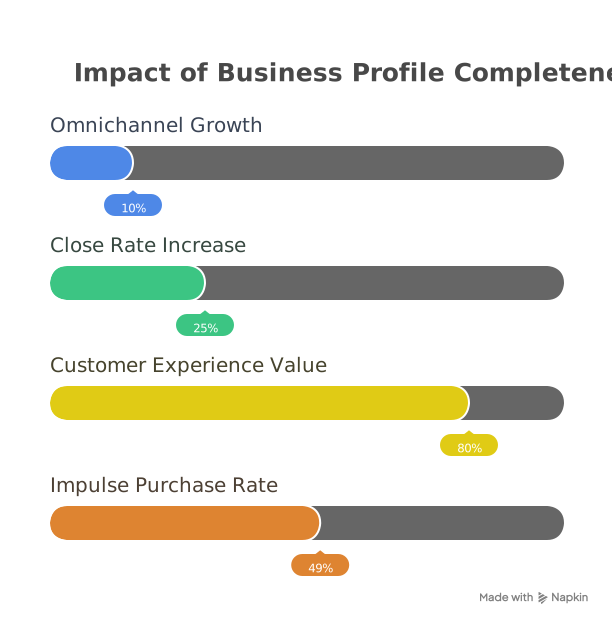
Consider including seasonal information when relevant. If your business hours change during holidays, if you offer special seasonal services, or if you have busy and slow seasons, reflecting this information in your profile helps set appropriate customer expectations.
The integration between WhatsApp Business and Artificio represents a significant leap forward in business communication efficiency. While WhatsApp Business provides the platform for customer interaction, Artificio brings intelligent automation that can handle routine tasks, route complex inquiries to the right team members, and ensure consistent service quality around the clock.
Artificio's integration with WhatsApp Business creates a seamless bridge between human customer service agents and automated systems. This hybrid approach means customers get the speed and availability of automation for simple requests while still having access to human support for complex issues.
The automation capabilities extend far beyond simple chatbots. Artificio can analyze incoming messages to understand customer intent, automatically categorize inquiries, and route them to the appropriate department or specialist. This intelligent routing ensures that customers get connected with the right person quickly, reducing resolution time and improving satisfaction.
Document sharing becomes effortless with Artificio integration. When customers need invoices, product catalogs, instruction manuals, or other documents, Artificio can automatically identify the request and send the appropriate files. This automation eliminates the need for staff to manually search for and send documents, while ensuring customers receive accurate, up-to-date information every time.
Workflow triggers represent another powerful feature of the integration. When specific events occur in your WhatsApp Business conversations, Artificio can automatically initiate processes in your other business systems. For example, when a customer places an order via WhatsApp, Artificio can automatically create a record in your CRM system, generate an invoice, and send tracking information once the order ships.
The process of connecting WhatsApp Business with Artificio is designed to be straightforward, but proper preparation makes the setup smoother and more effective. Before beginning the integration, take inventory of your current business processes and identify which routine tasks could benefit from automation.
Start by documenting your most common customer inquiries and the standard responses your team provides. This information becomes the foundation for setting up automated responses that maintain your brand voice and provide accurate information. Consider the tone and style your customers expect from your business, and ensure that automated messages align with these expectations.
The integration process typically involves connecting your WhatsApp Business account to Artificio through secure API connections. This technical setup is usually handled by Artificio's support team, but you'll need to provide certain permissions and access credentials from your WhatsApp Business account.
During setup, you'll configure automation rules that determine when Artificio takes action and when messages should be forwarded to human agents. These rules can be based on message content, customer history, time of day, or any combination of factors that make sense for your business.
Testing is a crucial part of the setup process. Before going live with automation, thoroughly test different scenarios to ensure the system responds appropriately to various types of customer inquiries. Have team members send test messages simulating different customer situations, and verify that the automation works as expected.
Every business has unique needs, and Artificio's flexibility allows you to customize the automation to match your specific requirements. The key is finding the right balance between automation efficiency and personal touch that your customers value.
Consider starting with automation for your most routine inquiries. These might include requests for business hours, location information, pricing for standard services, or availability checks. Automating these simple requests frees up your team to focus on more complex customer needs while still providing instant responses to basic questions.
Product catalog integration allows customers to browse your offerings directly within WhatsApp. Artificio can present your products in an organized, searchable format and even handle simple ordering processes. This feature is particularly valuable for retail businesses, restaurants, or service providers with standardized offerings.
Appointment scheduling automation can revolutionize how service-based businesses manage their calendars. Customers can check availability and book appointments directly through WhatsApp, with Artificio automatically updating your scheduling system and sending confirmation details. This reduces the back-and-forth communication typically required for scheduling and gives customers the convenience of booking services on their own schedule.
Payment processing integration, where legally compliant and appropriate for your business, can create a complete transaction experience within WhatsApp. Customers can inquire about products, place orders, and complete payments without leaving the conversation, creating a seamless purchasing experience.
Success with WhatsApp Business goes beyond just having the app installed and configured. The businesses that see the greatest impact are those that thoughtfully implement features and maintain consistent, professional communication practices.
Automated greetings serve as your digital receptionist, providing an immediate acknowledgment that you've received a customer's message. A well-crafted greeting message should welcome customers, briefly explain what they can expect from your service, and provide basic information about response times.
Your greeting message tone should match your overall brand personality. A law firm might use formal, professional language, while a local café could adopt a more casual, friendly approach. Regardless of style, the message should be helpful and informative rather than generic or overly promotional.
Include practical information in your greeting, such as typical response times during business hours, alternative contact methods for urgent issues, and a brief overview of how customers can use WhatsApp to interact with your business. This upfront communication sets appropriate expectations and can prevent frustration from customers who expect immediate responses.
Quick replies are pre-written responses to frequently asked questions that you can send with just a few taps. These templates save time while ensuring consistent, accurate responses to common inquiries. Develop quick replies for your most frequent customer questions, such as pricing inquiries, service availability, location directions, or return policies.
When creating quick replies, focus on completeness rather than brevity. While you want to be efficient, a slightly longer response that fully answers a customer's question prevents follow-up confusion and creates a better overall experience. Include relevant details like pricing, timeframes, or next steps the customer should take.
Organize your quick replies into logical categories and use clear, descriptive labels that make it easy for your team to find the right response quickly. Regularly review and update these templates based on changing business information or customer feedback about unclear responses.
Away messages inform customers when you're unavailable and help maintain professional communication standards even when you can't respond immediately. These messages should clearly state when you'll be back, provide alternative contact information for urgent matters, and reassure customers that their message is important to you.
Customize away messages for different situations. You might have different messages for after-hours, weekends, holidays, or temporary closures for events or maintenance. Specific information helps customers understand your availability and plan their communication accordingly.
Consider including helpful information in away messages, such as links to your FAQ page, your website's customer portal, or your business hours. This information gives customers options for finding answers to simple questions even when you're not available to respond personally.
WhatsApp verification codes are the keys to your business account, and protecting them is crucial for maintaining security and preventing unauthorized access. Never share your verification code with anyone, regardless of who they claim to be or what reason they provide.
Be aware that scammers often target businesses with social engineering attacks designed to trick you into sharing verification codes. These attacks might come via phone calls, emails, or even WhatsApp messages claiming to be from WhatsApp support or other legitimate organizations. WhatsApp will never ask you to share your verification code with them, as they already have access to your account information.
If you suspect that your verification code has been compromised, immediately contact WhatsApp support and consider changing your business phone number if necessary. Quick action can prevent unauthorized access and protect your business communications and customer information.
Implement additional security measures for your business phone number, such as enabling two-factor authentication with your mobile carrier if available. These extra layers of security make it more difficult for attackers to gain control of your phone number and, by extension, your WhatsApp Business account.
Train all team members who have access to your WhatsApp Business account about security best practices. Everyone should understand the importance of protecting verification codes, recognizing phishing attempts, and following proper procedures for accessing business communications.
Regularly review who has access to your WhatsApp Business account and remove access for former employees or team members who no longer need it. Maintaining current access controls is an essential part of business security that's often overlooked until problems arise.
Successful WhatsApp Business communication requires clear boundaries and consistent response standards. Customers should understand what types of inquiries are appropriate for WhatsApp, what response times they can expect, and how complex issues will be handled.
Develop response time standards that are realistic for your business size and resources. It's better to promise longer response times and consistently meet them than to promise quick responses that you can't deliver. Most customers prefer knowing what to expect rather than being left wondering when they'll hear back.
Use status indicators thoughtfully to communicate your availability. WhatsApp Business shows when you're online, but being online doesn't necessarily mean you're available for business conversations. Consider setting specific times when you're actively monitoring and responding to business messages, and communicate these hours to customers.
Create escalation procedures for complex issues that can't be resolved through WhatsApp messaging. Some customer service situations require phone calls, video conferences, or in-person meetings. Having clear procedures for transitioning between communication channels ensures customers get appropriate support regardless of how complex their needs become.
Build personal connections within the professional framework of business communication. Remember customer preferences, acknowledge repeat customers, and use personal touches like remembering previous conversations or special occasions. These small gestures create loyalty and differentiate your business from competitors who treat every interaction as transactional.
Document important customer conversations and decisions made through WhatsApp Business. While the platform keeps message history, important business decisions or commitments should be recorded in your main customer relationship management system for future reference and to ensure continuity if different team members interact with the same customer.
As your business becomes more comfortable with WhatsApp Business basics, several advanced features can take your customer communication to the next level. These features require more setup and management but can significantly impact customer satisfaction and operational efficiency.
WhatsApp Business catalogs allow you to showcase products directly within the messaging platform, creating a shopping experience that feels natural and convenient for customers. Setting up an effective catalog requires careful attention to product photography, descriptions, and pricing accuracy.
Product photos should be high-quality, well-lit, and show items from multiple angles when relevant. Since customers can't physically examine products before purchasing, detailed photos become crucial for building confidence in purchase decisions. Include photos of products in use, size comparisons, or detail shots that highlight important features.
Product descriptions should be concise but comprehensive, including key specifications, dimensions, materials, or other information customers typically ask about. Think about the questions customers usually have about each product and proactively address them in the description.
Pricing in your WhatsApp catalog should match pricing on your other sales channels to avoid confusion and maintain customer trust. If you offer different pricing for WhatsApp customers, clearly explain the reason for the difference and any terms or conditions that apply.
Organize catalog categories in a logical way that makes it easy for customers to find what they're looking for. Consider how customers typically shop for your products and structure categories to match their natural browsing patterns.
WhatsApp Business provides valuable analytics about message delivery, read rates, and customer engagement that can help you optimize your communication strategy. Regular review of these metrics reveals patterns and opportunities for improvement.
Message delivery rates indicate whether your messages are successfully reaching customers. Low delivery rates might suggest issues with customer phone numbers, network problems, or customers who have blocked your business number. Investigating delivery issues helps ensure your important communications reach their intended recipients.
Read rates show what percentage of delivered messages customers actually open and read. While you can't control whether customers read your messages, you can influence read rates through compelling message previews, strategic timing, and relevant content that customers find valuable.
Response rates and response times provide insights into customer engagement and your team's performance. Tracking these metrics over time helps identify trends and opportunities for improving customer service efficiency.
Customer feedback and satisfaction should be actively solicited and tracked, even though it might not be captured in WhatsApp's built-in analytics. Regular surveys, follow-up messages asking about service quality, or simple rating requests can provide valuable insights into customer perceptions of your WhatsApp Business communications.
Setting up WhatsApp Business is just the beginning of creating a more connected, responsive relationship with your customers. The platform's power lies not just in its technical capabilities, but in its ability to humanize business communications while maintaining professional efficiency.
The integration with Artificio amplifies these benefits by adding intelligent automation that scales your communication capabilities without sacrificing the personal touch that customers value. This combination positions your business to handle growing customer demands while maintaining high service quality.
Success with WhatsApp Business requires ongoing attention and optimization. Customer communication preferences evolve, new features become available, and your business needs change over time. The businesses that see the greatest long-term success are those that treat WhatsApp Business as a dynamic tool that grows and adapts with their operations.
Remember that effective customer communication is ultimately about building relationships and solving problems. While tools like WhatsApp Business and Artificio provide powerful capabilities, they're most effective when used by businesses that genuinely care about customer experience and are committed to continuous improvement.
As you implement these strategies and begin using WhatsApp Business with Artificio integration, focus on learning from every customer interaction. Pay attention to what works well, what causes confusion, and what customers ask for most frequently. This real-world feedback becomes the foundation for refining your approach and building a communication system that truly serves your business goals and customer needs.
The future of business communication is personal, immediate, and intelligent. WhatsApp Business, enhanced by Artificio's automation capabilities, gives your business the tools to participate in this future while building stronger customer relationships today. Take the time to implement these practices thoughtfully, and you'll create a communication system that becomes a genuine competitive advantage for your business.

Head IT Operations - Co Founder of Artificio
See it in your SAP environment
Bring us a document, a process, or a bottleneck. We'll show how Artificio captures, validates, and posts into SAP — then scale from there.
Security & compliance
ISO 27001:2013 certified, SOC 2 Type 2 compliant, GDPR and HIPAA ready. Every agent action is logged, auditable, and runs in isolated environments.