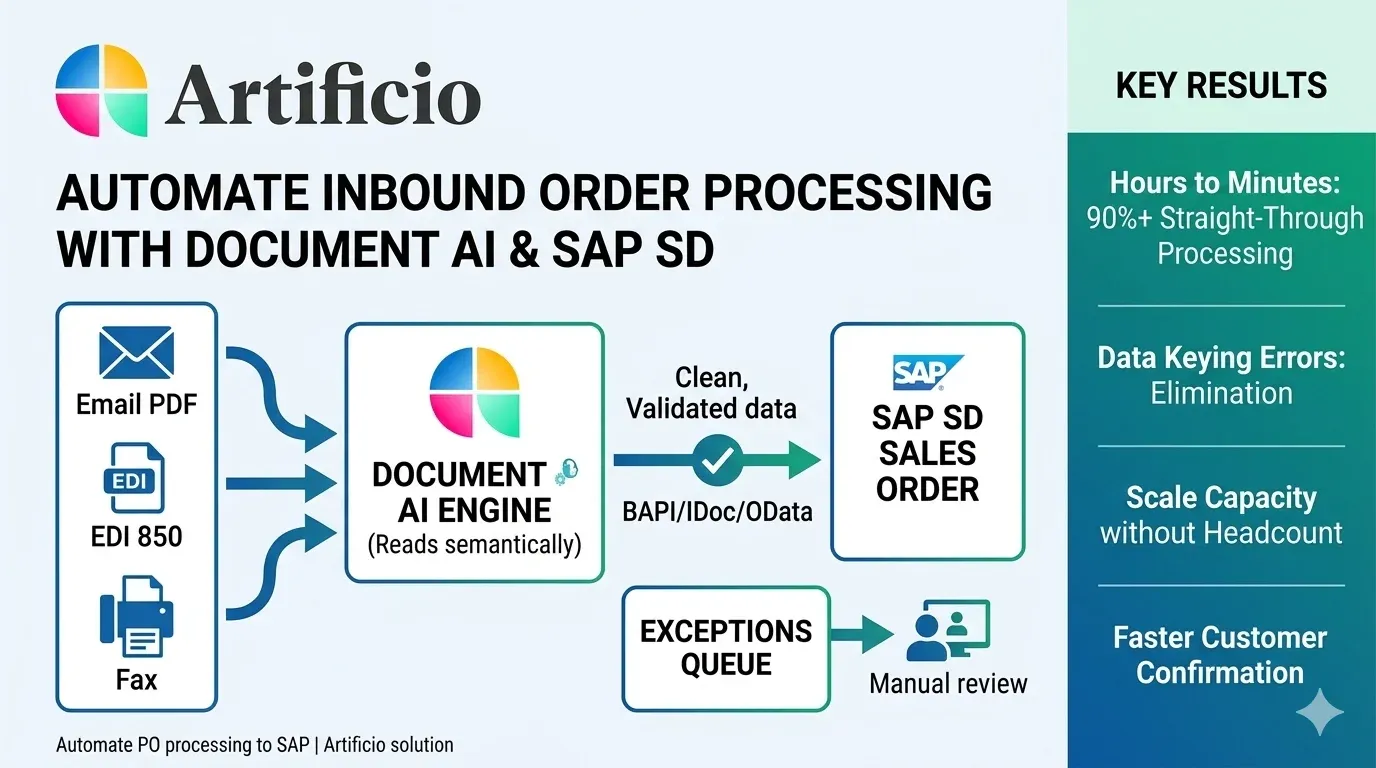
Every sales order starts the same way. A customer sends a purchase order, and somewhere between the customer hitting send and the order appearing in SAP SD, a human being has to get involved. They open an email, download a PDF, read a fax, or decode an EDI transaction, then key the data into SAP. That manual step is where errors creep in, where order cycles stretch from hours to days, and where your customer service team gets buried in a job that feels increasingly disconnected from actually serving customers.
The challenge gets harder when you look at the volume. Enterprise manufacturers, distributors, and wholesalers process thousands of POs a month. Those orders arrive through every channel imaginable: email attachments in PDF format, EDI 850 transactions, fax-to-email conversions, and occasionally scanned paper documents from customers who have not moved on from 1997. Each format requires different handling. Each customer has their own PO layout. And SAP SD needs clean, structured data before it creates a sales order.
This is the inbound problem that document AI solves.
The Real Cost of Manual Order Entry
Most organisations underestimate what manual order processing actually costs. The obvious number is labour: a data entry clerk spending six minutes per order, multiplied across thousands of orders a month, adds up quickly. But that is only the start.
Rush orders and peak periods create backlogs. Orders that arrive at 4pm on a Friday sit until Monday. Errors made during keying require rework. Your SAP team has to reconcile what the customer sent against what got entered. Customer service fields calls asking why an order has not been confirmed. Expediting requests pile up because nobody knows the order is in the system yet.
The less obvious costs hit revenue. When order processing slows down, so does fulfilment. Customers who cannot get fast, accurate confirmation shift volume to competitors who can. B2B buyers increasingly expect the same responsiveness they get from consumer e-commerce. Manual entry simply cannot keep pace.
There is also the talent dimension. Experienced logistics and supply chain people spend large parts of their day on data entry rather than the analysis and decision-making that actually requires their skills. It is hard to retain good people in roles where the majority of the work is copying numbers from a PDF into SAP.
Document AI is not traditional OCR with a rules engine bolted on. Legacy approaches to automating document intake relied on template matching: you told the system exactly where on page one the PO number lives, and it read that position. The moment a customer changed their PO format, the extraction broke.
Modern document AI uses large language models trained on document understanding. The system reads a purchase order the way a person would: it understands context, recognises that "ship-to address" and "delivery address" mean the same thing, handles multi-line item descriptions, and copes with variations in layout without being reprogrammed. It does not need templates. It learns from documents, and its accuracy improves over time as it processes more of your specific customers' formats.
For SAP SD integration, this matters because your customer base has heterogeneous PO formats. A global manufacturer might send structured EDI. A mid-market distributor sends PDFs generated from their ERP system. A smaller customer sends a Word document saved as PDF. A legacy customer still faxes. Each of these needs to produce the same structured output: the fields SAP SD needs to create a sales order, including sold-to party, ship-to party, PO number, requested delivery date, line items with material numbers, quantities, and prices.

Handling Each Channel
The four main PO channels each bring their own processing requirements.
Email and PDF are the dominant channel for most organisations. A customer emails a PO, usually as a PDF attachment. The document AI agent monitors the incoming mailbox, detects the attachment, classifies it as a purchase order, and begins extraction. It identifies header data: PO number, order date, buyer contact, payment terms, requested delivery date. It then works through the line items, extracting material numbers, descriptions, quantities, and prices. Where the customer's material number differs from your SAP material number, the system applies a cross-reference lookup to map them. The extracted data goes through validation checks before being written to SAP SD as a sales order.
The sophistication here is in handling variation. Some customers include their own terms and conditions on page three. Some use landscape orientation. Some embed tables as images rather than selectable text. Document AI handles these variations because it reads documents semantically, not positionally.
EDI (Electronic Data Interchange) transactions in X12 850 format are already structured, so they do not require the same extraction logic. The challenge with EDI is mapping: the transaction segments need to map correctly to SAP IDoc or BAPI formats, and any differences in code lists, date formats, or segment qualifiers need to be resolved before SAP can process the order. Document AI platforms that handle EDI typically provide transformation logic that sits between the raw 850 transaction and the SAP interface, applying customer-specific mapping rules and handling exceptions without manual intervention.
Fax has not disappeared from B2B commerce, particularly in industries like food service, healthcare supply, and industrial distribution. Fax-to-email gateways convert incoming faxes to image files, and document AI processes those images through optical character recognition combined with document understanding. The result is the same structured output as any other channel. The image quality is lower than a native PDF, so confidence scoring becomes important: the system flags extractions where confidence falls below threshold for human review rather than writing uncertain data to SAP.
Customer portals and web forms represent a growing fourth channel. Larger customers often require their suppliers to accept orders through their own procurement portals, which may deliver orders as EDI, XML, or structured data exports. Document AI platforms handle these through configurable connectors that accept different structured formats and normalise them to the SAP input format.
Extracting data accurately is necessary but not sufficient. Before anything reaches SAP SD, the data needs to pass validation checks that would otherwise create downstream problems.
Material number validation confirms that every line item maps to a valid SAP material. Where customers use their own part numbers, the cross-reference table does the translation. Items that cannot be matched get flagged for review rather than passed through as errors.
Price validation compares the extracted line item prices against SAP SD pricing conditions. Where a customer has submitted prices that differ from your agreed pricing by more than a configured tolerance, the system flags the discrepancy. This catches pricing disputes early, before the order is confirmed and fulfilment starts.
Quantity and unit-of-measure checks ensure that what the customer ordered is expressed in units that SAP SD recognises for that material. A customer ordering 24 units of something you sell in cases of 12 needs the quantity converted, not rejected.
Delivery date feasibility checking can push the extracted requested delivery date against available-to-promise logic in SAP before confirming the order. This avoids the situation where an order gets created in SAP with a delivery date that cannot be met, only for the customer service team to have to call the customer and renegotiate.
Customer account validation confirms the sold-to party matches an active SAP customer account and that the ship-to address corresponds to a valid ship-to record. New customers or new ship-to locations trigger an exception workflow rather than failing silently. 
Exception Handling: Where Humans Add Value
Full automation does not mean zero human involvement. It means that humans only get involved when a document genuinely needs their attention, rather than as a routine part of processing every single order.
A well-designed document AI system has clear exception routing. Documents that pass all validation checks go straight to SAP with no human touch. Documents where extraction confidence is low, or where a validation check fails, route to an exceptions queue. The person reviewing the exception sees the original document alongside the extracted data, with the problem clearly flagged. They make a decision on that specific issue and approve the order to proceed.
The ratio of straight-through processing to exceptions is a key performance metric. Best-in-class implementations achieve 85 to 95 percent straight-through rates, meaning the majority of orders process without any human involvement. The exception queue contains only genuine edge cases, not a sample of every order.
Over time, patterns in the exceptions queue inform continuous improvement. If a particular customer's PO format consistently produces low-confidence extractions on a specific field, the system can be retrained on more examples of that format. If a certain validation rule generates false positives, the tolerance can be adjusted. The system gets better as it processes more volume.
Getting extracted, validated data into SAP SD happens through standard SAP integration interfaces. The two most common approaches are IDocs and BAPI calls.
IDocs (Intermediate Documents) are SAP's native asynchronous document format. ORDERS05 is the standard IDoc type for inbound sales orders. An IDoc-based integration posts the extracted order data to the SAP inbound queue, where SAP processes it and creates the sales order. This approach works well for high-volume processing and is robust to temporary SAP unavailability.
BAPI (Business Application Programming Interface) calls, specifically BAPI_SALESORDER_CREATEFROMDAT2, provide synchronous order creation with immediate confirmation. This approach allows the document AI system to receive the SAP sales order number and include it in the acknowledgement back to the customer.
For organisations running SAP S/4HANA, OData APIs provide a modern alternative that aligns with SAP's cloud and integration strategy. The document AI platform makes a REST call to the SAP OData service, which creates the sales order and returns structured confirmation data.
Regardless of the interface used, the integration layer needs to handle SAP system errors gracefully. If SAP rejects an order due to a missing customer account or a blocked material, the document AI system should capture that rejection, route it to the exceptions queue with the error detail, and hold the original document for review. Silent failures are worse than errors.
Results Organisations Actually See
The case for automating inbound order processing is not theoretical. Organisations that have replaced manual order entry with document AI consistently report similar outcomes.
Order processing time drops from hours to minutes. An order that previously needed a data entry person to open, read, key, and confirm now processes in under two minutes from receipt to SAP sales order creation. For customers placing urgent orders, that speed translates directly into competitive advantage.
Error rates fall substantially. Manual keying errors on quantities, part numbers, and prices are the primary source of order corrections, credits, and disputes. When a machine reads and validates the data, those keying errors disappear. What remains are genuine data quality issues in the customer's PO, which the exception handling process addresses.
Capacity scales without headcount. A team that previously processed 500 orders a day at maximum capacity can process 5,000 orders a day with the same people, because those people are now reviewing exceptions rather than processing every order. This is particularly valuable during seasonal peaks and business growth phases.
Customer experience improves. Fast, accurate order confirmation gives buyers confidence that their order is in the system and being fulfilled. Fewer errors mean fewer correction calls and credits. Customers who buy from companies with efficient order processing tend to consolidate more of their spend with those suppliers.
The Multi-Format Reality
One aspect worth addressing directly: no supplier has a single-channel customer base. The reality of operating in B2B markets is that you have large enterprise customers sending EDI, mid-market customers sending PDF by email, long-standing customers who fax, and newer customers using procurement portals. Any automation solution that only handles one channel leaves the rest of your order volume on the table.
This is where document AI platforms with multi-channel intake genuinely earn their keep. A unified processing layer that accepts all four channels, applies the same extraction and validation logic, and writes to SAP through the same integration interface gives you one system to manage rather than four. Exceptions flow into a single queue. Reporting covers your complete order volume. Improvements to the extraction model benefit all channels simultaneously.
The consolidation effect is also operationally significant. Your team trains on one system. Your IT department supports one integration. Your auditors review one process. Sprawling point solutions for each channel create complexity that negates much of the automation benefit.
Getting Started: What Matters at Implementation
Organisations that get the most from inbound order automation typically approach implementation in a structured way rather than trying to automate everything from day one.
Starting with high-volume, low-complexity customers gives the system a strong base of training examples and demonstrates value quickly. Customers who send clean PDFs of well-structured POs are good candidates for initial deployment. Once straight-through processing rates are high for those customers, you extend to more complex formats.
Mapping exercises before go-live matter more than most organisations expect. Understanding which customer part numbers map to which SAP material numbers, which customers have non-standard unit-of-measure conventions, and which have contracted pricing that differs from list price prevents validation failures from overwhelming the exceptions queue at launch.
Integration testing with SAP should include error scenarios, not just happy path. What happens when SAP is in maintenance downtime? What happens when a material is blocked? What happens when a new customer submits an order before their SAP account is fully set up? Getting those flows right before launch prevents operational disruption.
The Broader Opportunity
Automating inbound PO processing sits within a larger shift in how SAP-centric operations handle document-driven workflows. The same document AI capabilities that handle customer POs can handle inbound delivery notes, vendor invoices, freight documents, and quality certificates. Each of these feeds different SAP modules but involves the same core challenge: extracting structured data from unstructured documents and writing it to SAP without manual intervention.
Organisations that build the capability for inbound sales order automation typically find that the model, the integration patterns, and the operational discipline they develop apply directly to these adjacent use cases. The investment in getting one document type right creates a foundation for automating the others.
For SAP SD specifically, removing the manual step from inbound PO processing changes the economics of order management. Your team's time shifts from data entry to customer relationship management, exception resolution, and the kind of proactive communication that actually builds business. The orders process themselves. The people handle the things that actually need people.
That is what document AI does for the inbound side of sales order processing. Not a reduction in the quality of order management, but an improvement in it, because the right work gets done by the right kind of intelligence.