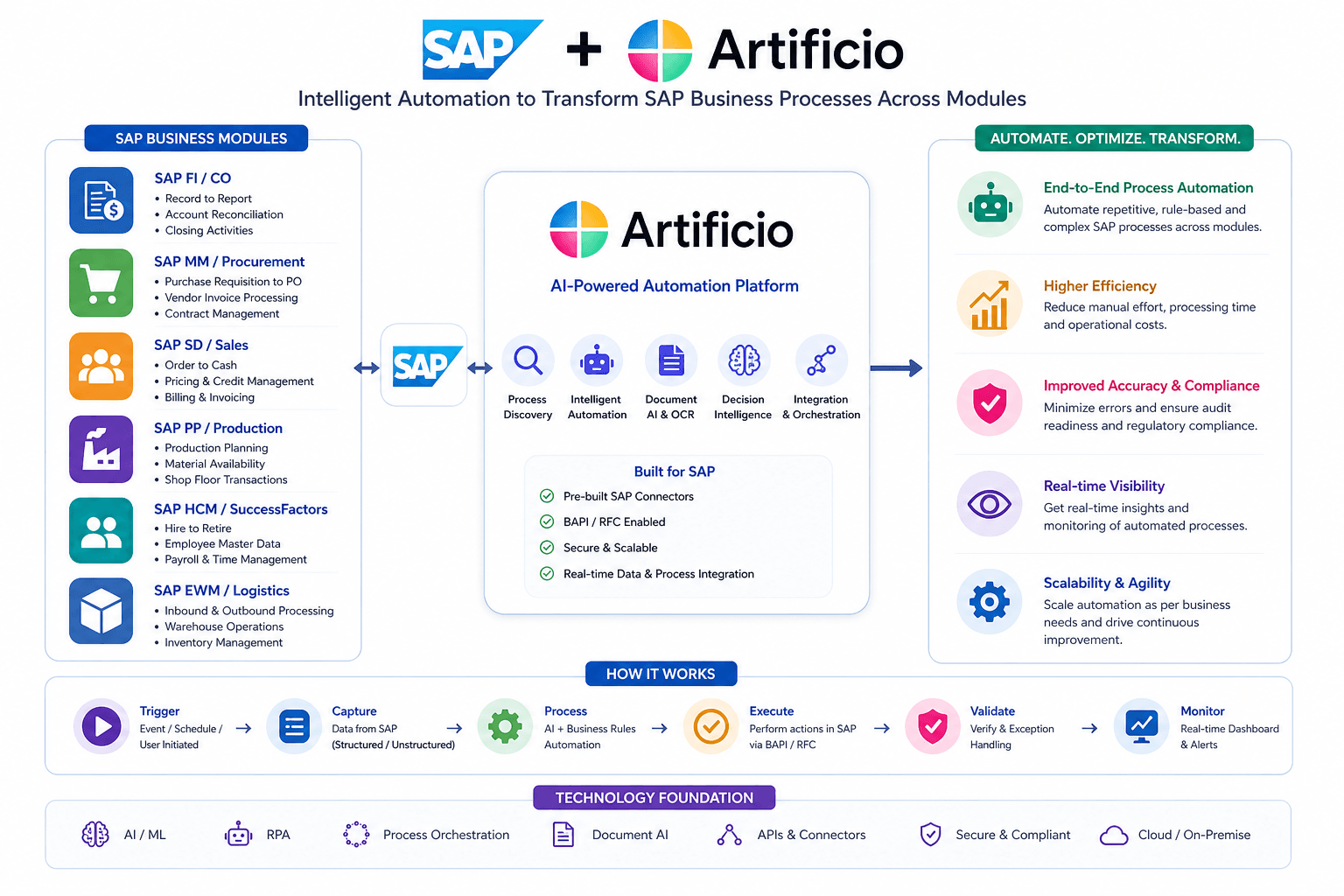
How AI-Powered Automation Is Transforming Every SAP Module: The Complete Guide for SAP Customers
“AI-Powered SAP Automation with Artificio: Invoices, Sales Orders, Warehouse Operations, QM, PP & More”
Discover how Artificio’ s AI platform automates every SAP module — AP invoices, sales orders, material master, QM inspections, vendor onboarding, production tracking, and RF warehouse management — without custom ABAP or middleware. Real ROI. Real results.
Introduction: The Hidden Cost of Manual SAP Processes
SAP is the operational backbone of thousands of enterprises worldwide. It manages financial, procurement, sales, production, quality, and warehouse operations with unmatched depth and reliability. Yet despite this power, most SAP customers share a common frustration: the data going into SAP is still largely manual.
Accounts payable teams key in invoice data from PDFs. Sales teams retype customer purchase orders into SAP sales transactions. Quality teams manually transfer inspection results from vendor certificates. Warehouse workers confirm goods receipts on paper and re-enter them into SAP terminals. Shop floor operators fill in paper time sheets that someone else keys into production order confirmations at the end of the shift.
The irony is striking. Companies spend millions implementing SAP to gain operational control — then spend millions more in labor costs manually feeding data into the very system designed to eliminate inefficiency.
The average enterprise processing 5,000 invoices per month spends between $180,000 and $840,000 per year on manual invoice processing alone. That is before counting the cost of manual sales order entry, quality data capture, production confirmations, and warehouse transactions.
Artificio is an AI-powered intelligent automation platform built specifically to eliminate this gap. It connects to SAP via native OData services — no custom ABAP development, no middleware, no SAP enhancements required — and automates the full data intake journey across every major SAP module.
This article covers every capability Artificio brings to SAP customers, from accounts payable automation to shop floor labor tracking to RF-based warehouse management, and explains how enterprises can achieve 3x to 8x ROI in Year 1 while dramatically reducing manual effort across their operations.
Chapter 1: The SAP Data Problem No One Talks About
Before diving into specific capabilities, it is worth understanding the scale of the problem.
SAP ECC and S/4HANA are transactional systems. They are designed to store, process, and report on business data. But they are not designed to capture that data autonomously. Data entry into SAP has always been a human activity — a person reads a document, interprets its contents, and types the relevant fields into the correct SAP transaction.
This worked in an era when document volumes were manageable and labor was inexpensive. Neither condition holds today.
The Scale of the Problem
A typical mid-size enterprise with $300 to $500 million in revenue processes:
- 5,000 to 10,000 vendor invoices per month
- 500 to 2,000 customer purchase orders per month
- 100 to 500 quality inspection documents per month
- 500 to 2,000 production order confirmations per day
- Thousands of warehouse transactions daily across goods receipts, goods issues, and stock transfers
- Dozens of new vendor and customer onboarding requests per month
- Hundreds of new material master creation requests per year
Each of these transactions requires a human to read a document or fill in a form, interpret business data, validate it against SAP master data, and post it to the correct SAP transaction. The cumulative cost in labor hours, errors, delays, and exception handling runs into hundreds of thousands of dollars annually — for each process area independently.
Why Traditional OCR Is Not Enough
Many SAP customers have attempted to address parts of this problem with optical character recognition (OCR) technology. Traditional OCR tools can extract text from documents, but they stop there. They cannot:
- Understand the context of extracted data
- Match extracted values against SAP master data (vendor IDs, material numbers, customer codes)
- Apply business rules and validation logic
- Handle exceptions and missing data intelligently
- Post validated data directly to SAP without manual intervention
The result is a semi-automated process that still requires significant human review, correction, and re-keying. The promise of automation is delivered only partially, and the ROI is disappointing.
Artificio takes a fundamentally different approach. It combines AI-based document understanding with a native SAP OData integration layer, a workflow automation engine, and real-time master data validation — creating a truly end-to-end automation capability across every SAP module.
Accounts payable invoice processing is the most universally painful manual SAP process. Every enterprise has it. Every enterprise knows it costs too much. And yet most enterprises are still doing it the same way they did it fifteen years ago.
The Current State of AP Processing
A typical AP team receives invoices via email, postal mail, vendor portals, and FTP. These invoices arrive in dozens of formats — structured PDFs, scanned paper documents, spreadsheets, and even image files. Each invoice needs to be:
- Received and sorted by type and vendor
- Extracted — header data, line items, tax details, payment terms
- Validated against vendor master data in SAP
- Matched against the relevant purchase order and goods receipt
- Checked for duplicates
- Routed for approval if required
- Posted to SAP as an MM or FI document
- Filed and archived
With traditional OCR, steps 2 through 8 still require significant human intervention. With Artificio, the entire sequence is automated end-to-end.
How Artificio Automates AP Invoice Processing
Intelligent Document Ingestion Artificio receives invoices from any channel — email, direct upload, shared URLs, or FTP. Documents are immediately classified by type: invoice, credit note, expense receipt, bill of lading, and so on. This classification step alone eliminates hours of manual sorting per month.
AI-Based Data Extraction Unlike traditional OCR which reads text character by character, Artificio's AI understands document structure. It identifies and extracts header information (invoice number, date, vendor name, total amount, tax details, payment terms) and line item detail (description, quantity, unit price, line total, material reference) regardless of the invoice layout or format. Handwritten fields, poor scan quality, and non-standard layouts are handled intelligently rather than causing failures.
Intelligent Vendor Matching This is where Artificio goes significantly beyond traditional extraction tools. The vendor name on an invoice rarely matches the SAP vendor master exactly. Abbreviations, spelling variations, trading name versus legal name — these discrepancies cause traditional systems to fail and humans to intervene. Artificio's AI matches invoice vendor information against the SAP vendor master using fuzzy matching, phonetic similarity, and historical confirmation data, resolving vendor IDs automatically in the vast majority of cases.
Three-Way PO and GR Matching For PO-based invoices, Artificio retrieves the relevant purchase order and goods receipt from SAP via OData in real time and validates the invoice against both. Quantity, price, unit of measure, and tax rate are compared. Discrepancies are flagged immediately and routed to the appropriate person for resolution rather than silently passing incorrect data through to SAP.
Duplicate Invoice Detection Duplicate invoices are a significant source of financial leakage in AP operations. Artificio detects duplicates using multi-factor logic — invoice number, vendor, amount, purchase order reference, and date — catching duplicates that simple invoice-number-only checks would miss.
Missing Data and Auto Communication When mandatory fields are missing from an invoice — tax identification, invoice number, delivery details — Artificio automatically generates and sends an email to the vendor requesting the missing information. This eliminates the manual back-and-forth that consumes significant AP team time.
Direct SAP Posting via OData Validated invoices are posted directly to SAP via OData services — no manual re-keying, no batch upload files, no middleware. The SAP document number is captured and returned to Artificio, creating a complete audit trail from original document to posted transaction.
The ROI of AP Automation
For an enterprise processing 5,000 to 10,000 invoices per month at a current manual processing cost of $3 to $7 per invoice, the annual cost is $180,000 to $840,000. Artificio's platform reduces this to $48,000 to $95,000 per year — a net annual saving of $128,000 to $745,000. Break-even is typically achieved within one to two months of go-live.
Chapter 3: Sales Order Automation — From Customer PO to SAP SD in Minutes
While invoice automation addresses the payables side of the business, sales order automation tackles the equally painful receivables side. Every time a customer sends a purchase order, someone on the sales or order management team has to read it, validate it, and create a sales order in SAP. At 500 to 2,000 customer POs per month, this is a significant operational burden.
The Complexity of Customer PO Processing
Unlike vendor invoices — which broadly follow a standard format — customer purchase orders come in as many formats as there are customers. Large customers send EDI transactions. Mid-size customers send PDFs. Some send Excel spreadsheets. A few still fax paper documents. Each customer uses their own product codes, their own description language, their own pricing references, and their own address formats.
The validation requirements are equally complex. Before a sales order can be created in SAP, the order entry team must:
- Identify the correct SAP customer (sold-to party) from the customer name and address
- Identify the correct ship-to party — which may be different from the sold-to party
- Map the customer's product codes to SAP material numbers
- Validate the ordered price against the SAP quotation or price list
- Check the customer's credit limit in SAP FD32
- Verify there are no duplicate orders for the same PO number
- Create the sales order in SAP SD with all correct partner functions, pricing conditions, and delivery details
With a large customer base — say 2,500 active customers and 10,000 active materials — this manual validation process is extraordinarily time-consuming and error-prone.
Multi-Format Document Intake Artificio accepts customer POs in any format — PDF (which typically accounts for 90% of volume), plain text files, and Excel spreadsheets. Documents arrive via email, customer portal upload, or direct file transfer.
AI Extraction of Order Data The AI extracts all relevant order data from the customer PO regardless of format: PO number, order date, requested delivery date, ship-to address, line items with customer material codes, quantities, and unit prices.
Master Data Matching with Local Cache Here is a capability that distinguishes Artificio from generic document processing tools. Rather than calling SAP for every master data lookup during processing — which is slow and creates SAP load — Artificio maintains a local synchronized copy of SAP master data: all 10,000 active materials, all 2,500 active customers including their sold-to and ship-to relationships, and all active quotations and price lists.
When processing a customer PO, Artificio first attempts an exact match against this local master data cache. Customer name matches to SAP customer number. Customer material code matches to SAP material number. This exact match approach handles the majority of transactions instantly.
For cases where no exact match is found, Artificio presents intelligent recommendations — the top three to five closest matches ranked by similarity score — for a user to review and confirm. Each confirmed match is stored and becomes an exact match for all future transactions, so the system progressively becomes more autonomous over time.
Quote Price and Quantity Validation The extracted order price and quantity are validated against the relevant SAP quotation. Price discrepancies above the defined tolerance trigger an exception for review. This prevents orders being accepted at incorrect prices — a significant source of revenue leakage in manual order entry operations.
Credit Limit Check Before posting the sales order, Artificio checks the customer's credit status in SAP. Orders that would exceed the credit limit are flagged and routed for credit controller review rather than being blocked silently in SAP after posting.
SAP SD Sales Order Creation Validated orders are posted directly to SAP SD via OData — creating the sales order with all correct partner functions, item data, pricing conditions, and delivery scheduling. The SAP sales order number is returned and an order acknowledgement can be automatically sent to the customer.
Chapter 4: Vendor and Customer Onboarding — Automating Master Data Creation
New vendor and customer onboarding is one of the most universally slow processes in SAP environments. The typical vendor onboarding takes two to four weeks. Customer onboarding takes one to two weeks. During this time, no business can be transacted — purchase orders cannot be raised, sales orders cannot be created.
The delay is not caused by SAP. It is caused by the manual process of collecting documents, chasing approvals, and finally entering master data into SAP transactions XK01 (vendor master) and XD01 (customer master).
Vendor Onboarding Automation
Artificio replaces the email-and-spreadsheet vendor onboarding process with a structured digital workflow:
A new vendor receives a branded onboarding portal link. They upload their required documents — business registration, tax certificates (W-9 or W-8BEN), bank account details, insurance certificates, diversity certifications — and complete a structured data entry form covering payment terms, contact information, and purchasing categories.
Artificio's AI extracts data from uploaded documents automatically — reading the tax ID from the W-9, extracting bank routing numbers from voided checks, pulling company registration numbers from certificates. Extracted data is pre-populated into the vendor master template for review.
The workflow routes the completed vendor record through the required approval chain — procurement, finance, compliance — with each approver seeing only what they need to review. Compliance checks including sanctions screening and duplicate vendor detection run automatically in the background.
Once all approvals are obtained, Artificio posts the vendor master directly to SAP XK01 via OData, creating all required organizational views — general data, company code data, purchasing organization data — in a single automated step. Vendor onboarding time drops from weeks to days.
Customer Onboarding Automation
The customer onboarding workflow follows the same pattern. New customers complete a structured onboarding form, upload their business registration and tax documents, and provide billing and shipping address details.
Artificio validates the submitted data, routes it through the credit approval workflow, and — upon approval — creates the customer master in SAP XD01 with all partner functions (sold-to, ship-to, bill-to, payer), sales area assignments, and payment terms. The customer is live in SAP and ready to transact within hours rather than weeks.
New material creation in SAP is a surprisingly painful process in most organizations. A material master in SAP has multiple views — basic data, purchasing, MRP, sales, plant data, accounting, quality — each owned by a different department with different data requirements. Coordinating the collection of all this data through email chains and spreadsheets typically takes five to fifteen business days per material.
During this time, purchase orders cannot be raised for the new material, production orders cannot be created, and sales orders cannot reference it. The new product bottleneck has real revenue impact.
Artificio replaces this process with a structured multi-step workflow. A material creation request is initiated — by procurement, by R&D, by a product manager — and Artificio's workflow engine automatically routes the request to each relevant department in the correct sequence. Each department completes only their relevant views: MRP provides planning parameters, purchasing provides vendor and lead time information, accounting provides valuation data, quality provides inspection settings.
Validation rules ensure that mandatory fields are completed and that data values are consistent before the record proceeds to the next step. When all views are complete and approved, Artificio posts the full material master to SAP MM01 via OData in a single transaction — all views, all organizational levels, all at once.
Material creation time drops from one to two weeks to one to two days. The data quality improves because every field is validated before it reaches SAP rather than after. And the full audit trail of who provided what data and when is maintained automatically.
In manufacturing and process industries, vendor quality management is a critical and labor-intensive process. Every inbound delivery of raw materials or components comes with a Certificate of Analysis — a document from the vendor certifying that the batch meets the required quality specifications. These CoAs must be reviewed, results recorded in SAP QM, and usage decisions made before the material can be released for production.
The Manual CoA Process
In most SAP QM environments, the quality team receives CoAs by email, prints them, manually reads the test results, opens the relevant SAP inspection lot in QA32, and manually keys each result value against each inspection characteristic. For a complex chemical or pharmaceutical product, a single CoA may have fifty or more test parameters. Multiply this by hundreds of deliveries per month and the manual effort is enormous.
Errors in data entry can lead to incorrect usage decisions — accepting out-of-specification material or rejecting conforming material. Both errors have significant consequences.
How Artificio Automates QM Inspection Recording
Artificio receives CoA documents via email or upload and applies AI extraction to identify the batch number, material reference, and all test parameters with their actual values and units of measure.
The batch number is matched to the corresponding SAP inspection lot in QA32. Each extracted test result is mapped to the correct inspection characteristic in the SAP inspection plan. Actual values are compared against the specified tolerance ranges in SAP — values outside tolerance are immediately flagged.
Conforming results are recorded to the SAP inspection lot automatically via OData. Non-conforming results trigger a non-conformance workflow in Artificio — routing the exception to the quality manager for review and disposition, with all relevant data (the CoA, the extracted values, the SAP specification limits) presented in a single view.
The quality manager makes the usage decision — accept, reject, or hold — within Artificio, which posts the decision back to SAP QM. The material is released or blocked in SAP inventory accordingly.
CoA processing time drops from hours of manual effort to minutes of automated processing, with human review required only for genuine exceptions.
Chapter 7: Production Labor Tracking — Real-Time Shop Floor Visibility in SAP PP
Production order confirmation — recording what was produced, by whom, for how long, against which operation — is one of the highest-frequency manual data entry tasks in manufacturing SAP environments. In a typical plant running 500 to 2,000 operation confirmations per day, this represents an enormous volume of manual SAP transactions.
The Traditional Approach and Its Failures
Most plants still rely on paper time sheets or simple spreadsheets to capture labor data on the shop floor. This data is then entered into SAP CO11N transactions — either by the workers themselves at SAP terminals or by a data entry clerk at the end of the shift. The result is:
- Delayed data — SAP production order statuses are hours behind reality
- Inaccurate data — time entry from memory is unreliable
- No real-time visibility — supervisors cannot see what is happening on the floor without walking it
- Labor cost overruns discovered too late — by the time variances appear in SAP, the order is already complete
How Artificio Transforms Shop Floor Operations
Fetching Operations from SAP When a production order is released in SAP, Artificio automatically fetches all operations via OData — operation number, work center, planned quantity, standard time, and scheduled dates. This data is immediately available to operators in the Artificio shop floor interface.
Check-In / Check-Out Time Tracking Operators access Artificio on a phone, tablet, or browser at the work station. They select their production order and operation, and tap Check In. The clock starts. When the operation is complete or they need to step away, they tap Check Out. Time is recorded precisely — no rounding, no recollection from memory.
Multiple operators can be simultaneously checked in to the same operation, and their individual time contributions are tracked separately. Partial confirmations across shifts are handled automatically — the system accumulates time across multiple check-in/check-out cycles and posts the correct running total to SAP.
Quantity Confirmation When checking out, operators enter the quantity produced — yield quantity and scrap quantity with scrap reason code. This data is included in the SAP CO11N confirmation posting.
Quality Notification Creation If an operator encounters a quality issue during production — a defective tool, a process problem, a non-conforming component — they can raise a SAP Quality Notification directly from the shop floor interface. A simple form captures the problem description, defect type, affected quantity, and any photo evidence. Artificio posts the QN to SAP QM01 via OData immediately, and the notification is routed to the quality supervisor for action. No paper forms, no end-of-shift reporting — issues are captured and escalated in real time.
Real-Time SAP CO11N Posting Confirmed time and quantity data is posted to SAP CO11N via OData immediately — not at the end of the shift, not in a batch. SAP production order statuses reflect actual shop floor reality at all times.
The Supervisor Dashboard
The most powerful element of the Artificio shop floor module is the supervisor dashboard — a real-time view of every active production order, every operation, and its status against plan.
The dashboard fetches planned operation times from SAP routing (CA03) and compares them against actual accumulated time from Artificio's check-in/out data. Each operation is flagged green, amber, or red:
- Green — on track, actual time and quantity pace within planned parameters
- Amber — at risk, approaching planned time with quantity behind pace
- Red — late, planned time exceeded or quantity significantly behind
Late operations are sorted to the top of the supervisor view automatically. The supervisor can see at a glance which orders need attention, drill down to see which operators are assigned, and take corrective action — reassigning resources, adjusting schedules — before the problem becomes a missed delivery.
This real-time production intelligence capability — which SAP delivers only through expensive add-ons like SAP MII or SAP ME — is built into Artificio's shop floor module as standard.
Chapter 8: RF Warehouse Management — Replacing Paper and Terminals with Mobile Devices
Warehouse operations are among the most transaction-intensive environments in an SAP landscape. Goods receipts, goods issues, stock transfers, and inventory counts generate thousands of SAP transactions daily. Yet many SAP WM implementations still rely on paper-based processes or aging SAP GUI terminals that are slow, inflexible, and difficult to use on a moving warehouse floor.
The Warehouse Technology Gap
Traditional SAP WM RF implementations use proprietary Dynpro-based screen frameworks that are difficult to customize and produce interfaces poorly suited to modern mobile devices. The result is warehouse workers using awkward interfaces that slow them down and increase error rates.
Artificio provides a complete mobile-first warehouse execution interface — designed specifically for touch-screen phones and tablets — that connects to SAP WM via OData and handles all major warehouse transactions.
Goods Receipt (MIGO/GR)
When a delivery arrives, the warehouse worker opens Artificio on their phone or tablet and selects Goods Receipt. They scan the supplier delivery note barcode or enter the purchase order number. Artificio fetches the open PO lines from SAP instantly via OData — showing the expected materials, quantities, and storage locations.
The worker scans each material barcode, confirms the received quantity, and assigns the storage location or bin. Any discrepancy between ordered and received quantity is flagged for review. When confirmed, Artificio posts the goods receipt to SAP MIGO via OData, returning the material document number. The entire process takes a fraction of the time of manual GR entry.
Goods Issue (GI for Production and Shipping)
For outbound transactions — issuing materials to production orders or posting goods issues for customer deliveries — the worker scans the production order or outbound delivery. Artificio fetches the required components or delivery lines from SAP and guides the worker through the pick and confirm process. Goods issues are posted to SAP in real time.
Transfer Orders and Internal Stock Movements
Internal stock movements — moving materials between storage locations or bins — are handled through a simple three-scan process: scan source location, scan material, scan destination location, confirm quantity. Artificio creates and confirms the transfer order in SAP WM automatically.
Physical Inventory and Stock Counts
Stock count documents are pushed from SAP to Artificio. Workers scan bin by bin, entering actual counts against each material. Blind count mode — where the system quantity is hidden to avoid bias — is supported. Counted results are posted back to SAP, and discrepancies flagged for recount or write-off approval.
Barcode Scanning on Mobile Devices
A key design consideration in Artificio's warehouse module is barcode scanning. Rather than requiring proprietary hardware scanners, Artificio uses the mobile device camera for barcode and QR code scanning. Standard barcodes including Code128, EAN-13, QR Code, and DataMatrix are supported natively. This eliminates the need for expensive ruggedized scanner hardware and allows any modern smartphone or tablet to serve as a warehouse terminal.
Chapter 9: The Technical Architecture — Why OData Makes All This Possible
A question that sophisticated SAP customers always ask is: how does this work technically, and what impact does it have on our SAP system?
The answer is rooted in SAP's OData framework — the standard API layer that SAP has built into both ECC and S/4HANA for external system integration.
What Is SAP OData?
OData (Open Data Protocol) is a RESTful API standard that SAP has implemented across its product portfolio. In SAP ECC, OData services are exposed via the SAP Gateway. In SAP S/4HANA, OData V4 services are available natively alongside the A2X API framework.
OData services allow external systems to read and write SAP data using standard HTTP requests and JSON or XML payloads — without requiring SAP GUI access, without RFC connections, and without custom ABAP development for standard business transactions.
Standard SAP OData services exist for virtually every major business transaction: purchase order reading, goods movement posting, sales order creation, production order confirmation, inspection lot management, warehouse task creation, and master data reading and creation.
Artificio's integration layer is built entirely on standard SAP OData services. No custom ABAP development is required. No SAP enhancements or modifications are needed. No middleware platform sits between Artificio and SAP.
This approach has several important implications:
Speed of implementation — because no custom SAP development is required, Artificio can be connected to a customer's SAP system in days rather than months. The POC phase typically completes in two to three weeks, with production go-live achievable within eight to twelve weeks from project start.
Clean core compliance — for SAP S/4HANA customers pursuing a clean core strategy, Artificio's OData-only integration approach is fully compliant. No modifications to SAP standard code means no upgrade risk and no technical debt.
SAP version flexibility — the same Artificio platform connects to SAP ECC 6.0, SAP S/4HANA on-premise, and SAP S/4HANA Cloud via BTP API Management. Customers planning a migration from ECC to S/4HANA can implement Artificio on ECC today and migrate the integration layer as part of their S/4HANA project.
Reliability and maintainability — standard OData services are maintained and updated by SAP as part of their standard support packages. There is no custom code to break during upgrades.
SAP BTP Integration
For customers using SAP Business Technology Platform, Artificio supports connectivity via BTP API Management. This approach uses OAuth 2.0 authentication and routes all integration traffic through the BTP API Management layer, providing additional security, monitoring, and governance capabilities. BTP connectivity typically requires less IT setup effort than direct ECC Gateway connectivity and is the recommended path for S/4HANA customers.
Chapter 10: Implementation Approach — From POC to Production in Weeks
One of the most common concerns SAP customers have about new automation platforms is implementation risk and timeline. Enterprise software projects have a well-deserved reputation for running over time and over budget.
Artificio's implementation approach is designed to minimize this risk through a structured phased methodology that delivers value at each stage.
Phase 1 — Discovery (Week 1)
The discovery phase establishes the technical and business foundation for the implementation. Key activities include SAP integration validation — confirming which OData services are active and accessible — business requirements documentation, invoice and document sample collection, and definition of validation rules and business logic.
At the end of discovery, both parties have a clear picture of the implementation scope, the SAP data landscape, and the expected automation rates achievable given the customer's document mix and master data quality.
Phase 2 — Proof of Concept (Weeks 2 to 3)
The POC phase is Artificio's commitment to demonstrating value before any significant investment is made. Using a sample of the customer's actual documents and their SAP sandbox/DEV/QA environment, Artificio processes 100 to 500 real transactions end-to-end — from document intake through to SAP posting.
The POC produces concrete, measurable results: extraction accuracy rates by document type, touchless processing rates, SAP posting success rates, and exception handling volumes. These results become the baseline for the production SLA commitments.
The POC is provided at no charge(certain conditions applied). The customer pays nothing until the production system is live and successfully processing transactions.
Phase 3 — Pilot (Weeks 3 to 6)
The pilot expands the scope to the full production document volume, running Artificio in parallel with the existing process. This parallel run validates performance at scale, identifies edge cases, and allows the AI model to tune against the full range of document formats and data scenarios.
Phase 4 — Production Rollout (Weeks 6 to 12)
Full production deployment, with the existing manual process retired progressively as confidence in Artificio's automation rates builds. Go-live support, hypercare, and SLA monitoring are active from day one of production.
Chapter 11: Security, Compliance, and Data Governance
Enterprise SAP customers have stringent requirements around data security, compliance, and governance. Artificio is built to meet these requirements at every level.
Authentication and Access Control
Artificio supports Single Sign-On via OAuth 2.0 and SAML 2.0, integrating with corporate identity providers including Azure Active Directory, Okta, and SAP Identity Authentication Service. Role-based access control ensures that users can only access the documents, workflows, and data relevant to their function.
Data Security
All data in transit between Artificio and SAP is encrypted using TLS 1.2 or higher. Data at rest is encrypted using AES-256 encryption. Document storage uses enterprise-grade cloud infrastructure with geographic redundancy and point-in-time recovery.
Compliance
Artificio's platform is certified against ISO 27001 (information security management), SOC 2 Type II (security, availability, and confidentiality), and GDPR (for European personal data processing requirements). Audit trails for every document processed, every validation performed, every workflow step completed, and every SAP transaction posted are maintained and available for regulatory review.
Platform Availability
Artificio provides a 99% to 99.5% platform uptime SLA with a four-hour response time for critical issues. Performance monitoring, automated alerting, and a dedicated customer success team ensure that any issues are identified and resolved before they impact business operations.
Chapter 12: The Business Case — Why SAP Customers Choose Artificio
Across all the process areas described in this article, the business case for Artificio rests on three pillars: cost reduction, error elimination, and speed improvement.
Cost Reduction
Manual data entry is expensive. When you factor in the fully loaded cost of AP clerks, order entry teams, quality data entry staff, production data entry, and warehouse admin, the total cost of manual SAP data entry in a mid-size enterprise easily exceeds $500,000 per year. Artificio reduces this cost by 70% to 90% across all process areas combined.
Error Elimination
Manual data entry errors in SAP have downstream consequences that multiply their cost. An incorrect vendor on an invoice leads to a wrong payment. An incorrect material code on a sales order leads to a wrong shipment. An incorrect inspection result leads to a wrong usage decision. Artificio's validation-first approach catches errors before they reach SAP, dramatically reducing the volume and cost of SAP error correction and downstream rework.
Speed Improvement
Manual SAP processes operate on human timescales — invoices processed in days, sales orders created in hours, vendor onboarding completed in weeks. Artificio operates on machine timescales — invoices processed in minutes, sales orders created in seconds, vendor onboarding completed in hours. This speed improvement has direct customer experience and cash flow implications.
The Competitive Advantage
In a market where competitors are investing heavily in digital transformation, the enterprises that automate their SAP data intake fastest will gain a structural advantage — lower operational costs, faster customer responsiveness, and higher data quality for decision-making. Artificio provides this advantage at a price point that delivers ROI in months, not years.
Conclusion: One Platform. Every SAP Module. Zero Custom ABAP.
The scope of what Artificio automates across a SAP landscape is unprecedented for a single platform at this price point:
- Accounts Payable — invoice extraction, PO matching, vendor resolution, SAP FI/MM posting
- Order Management — customer PO processing, quote validation, SAP SD sales order creation
- Vendor Onboarding — document collection, compliance checks, SAP XK01 master creation
- Customer Onboarding — structured workflows, credit approval, SAP XD01 master creation
- Material Master — multi-view data collection, approval routing, SAP MM01 creation
- Quality Management — CoA extraction, inspection lot matching, SAP QM result recording
- Production — operation tracking, labor confirmation, supervisor dashboard, SAP PP CO11N
- Warehouse — mobile RF screens, GR/GI/transfers/counts, SAP WM posting
All of this is delivered through native SAP OData integration — no custom ABAP, no middleware, no SAP modifications. Implementation is measured in weeks. ROI is measured in months.
For SAP customers who are tired of paying for the world's most powerful enterprise system and then paying again for the human labor to feed it manually — Artificio is the answer.
Artificio Products Inc. is an AI-powered intelligent automation platform headquartered in Irvine, California. Artificio specializes in SAP integration via OData, enabling enterprises to automate document processing, master data management, and transactional workflows across all major SAP modules without custom development.
Contact: contactus@artificio.ai
Address: 2102 Business Centre Drive, Irvine, CA 92612
Website: artificio.ai
Ready to see Artificio in action? Request a proof of concept — we process your real documents against your SAP sandbox at zero cost. You pay nothing until it works*.
Frequently Asked Questions
Does Artificio require custom ABAP development in SAP?
No. Artificio connects to SAP exclusively via standard OData services available in SAP ECC and S/4HANA. No custom ABAP programs, no SAP enhancements, no modifications to SAP standard code are required. This makes Artificio fully compliant with SAP's clean core principles and eliminates any risk to your SAP upgrade path.
How long does it take to go live with Artificio?
For a single module such as AP invoice automation, production go-live is typically achievable in eight to twelve weeks from project start — including a two-week POC phase, a four-week pilot, and a two-week production rollout. For multiple modules implemented simultaneously, timelines extend proportionally but benefit from shared integration and setup work.
What SAP versions does Artificio support?
Artificio supports SAP ECC 6.0, SAP S/4HANA on-premise, and SAP S/4HANA Cloud via SAP BTP API Management. The platform adapts to the API layer available in each environment — OData V2 for ECC Gateway, OData V4 and A2X for S/4HANA.
What touchless rates can we expect?
Touchless rates depend on several factors including document quality, master data hygiene, and PO coverage rates. Artificio commits to contractual touchless rate SLAs — typically 60% at Day 30, 75% at Day 60, 85% at Day 90, and 90% ongoing for eligible invoice types. These are among the most aggressive contractual commitments in the market — most competitors do not offer touchless rate SLAs at all.
Is Artificio available as an on-premise deployment?
Yes. For customers with data sovereignty requirements or security policies that prohibit cloud-based document processing, Artificio is available as an on-premise deployment running on the customer's own infrastructure. On-premise deployments are licensed on an annual platform fee basis rather than per-transaction.
How does Artificio handle document storage and retrieval?
Artificio stores all processed documents in a secure cloud document repository. The first 100 GB of storage is included at no charge. Additional storage is priced at $100 per 100 GB per year (Contact sales team for latest price). Processed documents are accessible via secure URL — which can be embedded in SAP document headers, allowing SAP users to click and view the original source document directly from SAP transactions such as VA03, ME23N, FB03 or MIRO.
What happens to invoices or documents that cannot be processed automatically?
Documents that cannot be processed with sufficient confidence — due to poor scan quality, missing mandatory fields, or unresolvable master data matches — are routed to an exception status in Artificio. The relevant user receives a notification, reviews the document in Artificio's interface, makes the necessary corrections, and releases the document for SAP posting. All exception handling activity is logged in the audit trail.
How is Artificio priced?
Artificio is priced on a per-transaction basis for cloud deployments, AI model configuration, validation rule setup, and end-to-end unit testing. For on-premise deployments, annual platform license fees apply per module. Volume discounts are available for commitments exceeding 100,000 transactions per year.
Can Artificio integrate with systems other than SAP?
Yes. While Artificio's primary focus is SAP integration via OData, the platform's workflow and integration engine supports connections to other enterprise systems including Oracle, Microsoft Dynamics, Salesforce, and any system exposing a REST API. Multi-ERP environments can be served from a single Artificio deployment.
What support and SLA commitments does Artificio offer?
Artificio provides a 99.5% platform SLA with a four-hour response time for critical production issues. Enterprise customers receive a dedicated Customer Success Manager, quarterly business reviews, and access to Artificio’ s technical support team. For Annual maintenance and support contact sales team at Artificio.
Glossary of SAP Terms Referenced in This Article
CO11N — SAP transaction for production order operation confirmation. Used to record labor time, quantities produced, and scrap against specific operations within a production order.
EWM/WM — Extended Warehouse Management. SAP's advanced warehouse management module offering greater functionality than standard WM for complex warehouse environments.
FD32 — SAP transaction for customer credit master maintenance. Used to view and manage customer credit limits.
GI / GR — Goods Issue and Goods Receipt. SAP inventory management transactions for recording the movement of materials out of and into stock.
MIGO — SAP's central goods movement transaction. Used for goods receipts, goods issues, stock transfers, and other inventory movements.
MM01 — SAP transaction for creating material master records. The central record for all materials managed in SAP.
OData — Open Data Protocol. A RESTful API standard implemented by SAP for external system integration. Allows reading and writing of SAP data via standard HTTP requests without RFC connections or custom ABAP.
QA32 — SAP transaction for recording results to inspection lots in the Quality Management module.
QM01 — SAP transaction for creating quality notifications. Used to record defects, complaints, and non-conformances.
VA01 — SAP transaction for creating sales orders in the Sales and Distribution module.
VL02N — SAP transaction for changing outbound deliveries. Used in goods issue processing for customer shipments.
WM — Warehouse Management. SAP's standard warehouse management module for managing stock at storage location and bin level.
XD01 — SAP transaction for creating customer master records in the Sales and Distribution module.
XK01 — SAP transaction for creating vendor master records in the Materials Management module.