

Blog
How to Automate SAP QM Inspection Results Recording Using AI Agents
Discover how AI agents automate SAP QM inspection results recording, extract supplier COAs, validate inspection characteristics, and reduce manual QE51N work.
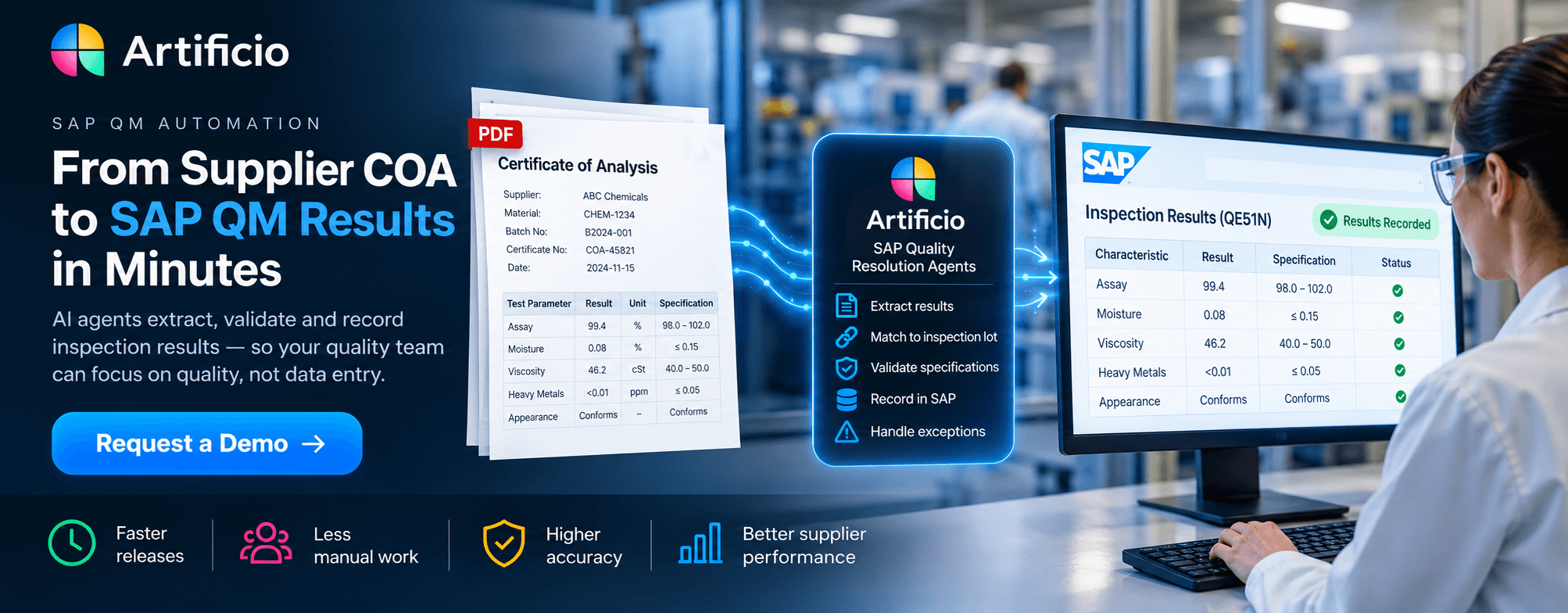
Blog
Discover how AI agents automate SAP QM inspection results recording, extract supplier COAs, validate inspection characteristics, and reduce manual QE51N work.
Your supplier has delivered the material. The Certificate of Analysis is in someone's inbox. Production is waiting. So why is the material still stuck in Quality Inspection?
For many manufacturers running SAP ECC or SAP S/4HANA, the answer is surprisingly familiar.
A quality technician opens a supplier Certificate of Analysis (COA), searches for the inspection lot in SAP, identifies the correct inspection characteristics, checks specifications, enters the test results, and completes the recording process.
Then the technician repeats the same steps for the next certificate.
And the next.
Meanwhile, production planners are asking when the material will be available.
Your SAP system may already have the inspection specifications, purchase order, material master, batch information, and inspection lot. Your supplier has already provided the test results. Yet someone still has to manually connect the two.
This is exactly the kind of repetitive, rules-driven work that AI agents can help automate.
But there is a crucial difference between extracting numbers from a PDF and safely recording quality results in SAP.
The real opportunity is not just eliminating data entry. It is connecting supplier quality evidence to SAP QM, resolving exceptions, and helping manufacturers make material available for production sooner—without compromising quality controls.
SAP Quality Management provides established functionality for inspection planning, inspection lot processing, results recording, defects, and usage decisions.
Transactions such as QE51N and QA32 allow quality teams to record and manage inspection results.
So why do manufacturers still spend time entering data manually?
Because the information often arrives outside SAP.
A supplier might email a five-page PDF containing:
SAP, meanwhile, contains its own inspection characteristics, specification limits, units of measure, inspection methods, and recording requirements.
The two systems do not automatically understand each other simply because the data exists.
For example, a supplier COA might contain:
Parameter: Water Content
Result: 0.08%
Test Method: Karl Fischer
Supplier Specification: Maximum 0.20%
But the SAP inspection lot might contain:
Inspection Characteristic: Moisture
Upper Specification Limit: 0.15%
Unit: %
Recording Requirement: Quantitative result
The supplier's result is within its printed specification, but the applicable SAP inspection-lot limit is tighter.
A basic OCR tool could extract 0.08%.
A document AI tool might identify the parameter as Water Content.
A proper SAP QM automation solution must also determine which inspection characteristic the result belongs to, verify the correct specification, evaluate the result, and record it according to SAP's inspection rules.
That is where SAP-aware AI agents become valuable.
SAP QM inspection results recording automation is the process of capturing inspection data from external documents or laboratory systems, matching it to the correct SAP inspection lot and characteristics, validating it against applicable requirements, and recording the results through supported SAP interfaces.
AI agents can assist with document understanding, classification, extraction, characteristic matching, and exception coordination.
Deterministic rules and SAP validation should control the actual quality decisions.
A complete process follows this sequence:
Supplier COA → AI Extraction → SAP Inspection Lot Matching → MIC Matching → Specification Validation → Quality Review When Required → SAP Results Recording → Usage Decision Workflow
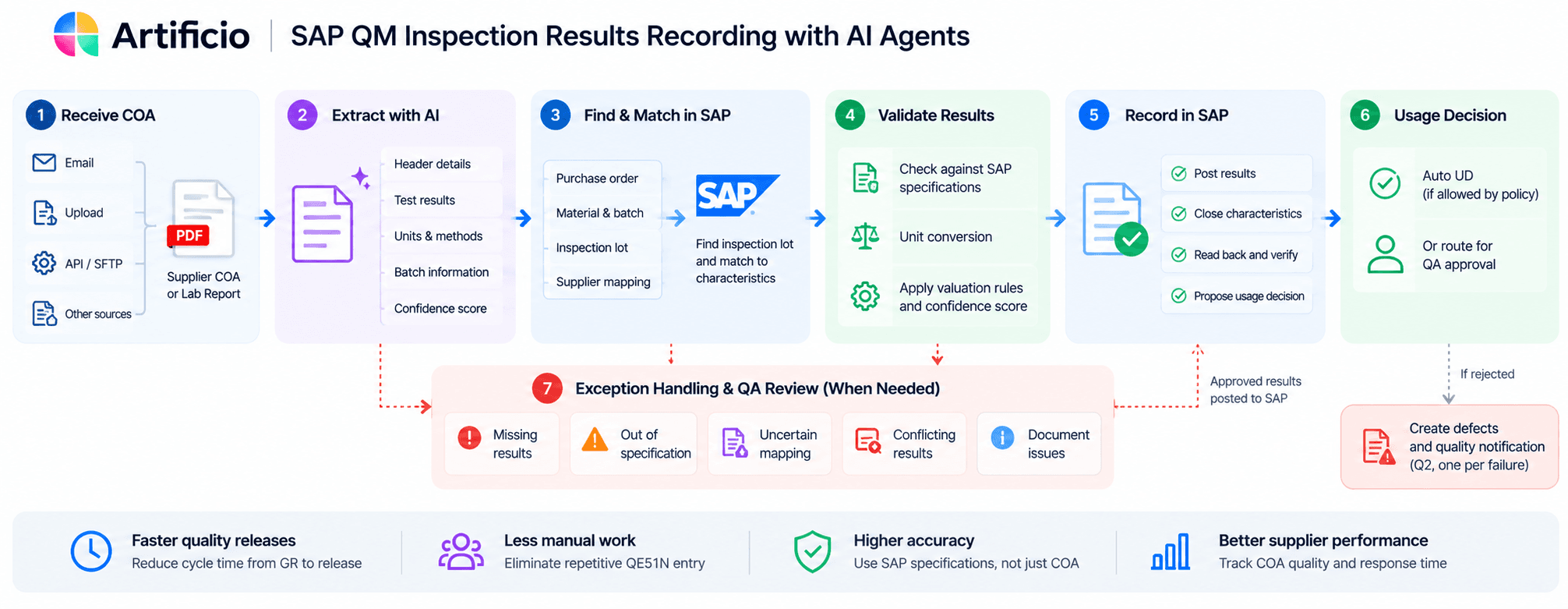
This distinction matters.
AI should not invent missing results, silently change specifications, or independently release nonconforming material.
The goal is to automate repeatable work while keeping QA in control of quality decisions.
Certificates arrive through monitored email inboxes, document uploads, APIs, or connected folders.
Instead of requiring a technician to open each attachment, an AI ingestion agent identifies the document type and prepares it for processing.
A multi-page PDF may contain several certificates, different batches, or additional laboratory reports.
The system must identify the correct certificate boundaries and preserve the original document as evidence.
An AI extraction agent reads the COA and identifies both header information and test results.
For example:
| COA Parameter | Reported Result | Unit |
|---|---|---|
| Assay | 99.4 | % |
| Moisture | 0.08 | % |
| Viscosity | 46.2 | cSt |
| Appearance | Conforms | — |
| Heavy Metals | <0.01 | ppm |
The original values must be preserved.
A result such as <0.01 is not the same as an exact measured value of 0.01 or zero. The appropriate treatment depends on approved quality rules and SAP recording requirements.
The same applies to “Not Detected,” ranges, repeated measurements, and qualitative results.
The agent connects the certificate to SAP using available identifiers such as:
If the certificate arrives before goods receipt, the workflow can retain it until the corresponding inspection lot exists.
If multiple lots could match, the system must request human confirmation instead of guessing.
This is particularly important for split deliveries and suppliers that issue one COA for several shipments.
This is one of the most challenging parts of COA automation.
A supplier might call a parameter “Water Content,” while SAP uses “Moisture.”
Another supplier might use “Loss on Drying,” which is not necessarily an equivalent test.
Matching therefore needs more than similar words.
It must consider the material, supplier, plant, inspection method, method revision, unit of measure, and the applicable SAP master inspection characteristic.
Artificio's design combines controlled characteristic mappings with AI-assisted matching.
When the mapping is uncertain, the workflow routes it to a QM reviewer. Approved mappings can be reused under defined validity and change-control rules.
The applicable SAP inspection-lot specifications—not merely the limits printed on the supplier COA—must govern evaluation.
For example:
| Characteristic | COA Result | SAP Requirement | Evaluation |
|---|---|---|---|
| Assay | 99.4% | 98.0–102.0% | Within limits |
| Moisture | 0.08% | Max 0.15% | Within limits |
| Viscosity | 46.2 cSt | 40.0–50.0 cSt | Within limits |
| Heavy Metals | <0.01 ppm | Max 0.05 ppm | Requires approved reporting-limit handling |
These are illustrative values.
The automation must also respect SAP sampling procedures, recording types, valuation modes, characteristic control indicators, and required tests.
A result that appears within specification does not automatically mean that an inspection characteristic can be closed.
For eligible inspection lots and characteristics, validated results can be sent through supported SAP interfaces.
The process must check existing SAP results, prevent duplicate postings, respect concurrent changes, and read the posted results back from SAP.
SAP's own recorded valuation and status remain authoritative.
For customers using SAP ECC or different S/4HANA releases, the available integration services and supported write operations must be verified for the specific system.
The objective is to reduce repetitive QE51N-style manual entry without bypassing the controls SAP QM already enforces.
Not every COA should be processed without review.
Consider these situations:
Missing test: The supplier omitted a mandatory inspection parameter.
Out-of-spec result: A measured value exceeds the SAP inspection-lot specification.
Incorrect batch: The certificate references a different supplier batch.
Conflicting result: An internal laboratory result differs from the supplier COA.
Uncertain mapping: The AI cannot confidently match the supplier's test to an SAP characteristic.
Instead of asking QA to review every certificate, a controlled workflow can focus attention on these exceptions.
The reviewer sees the original document alongside the SAP requirements, corrects or confirms the data, and approves the next action.
Results recording and usage decisions are related, but they are not the same transaction.
Completing inspection results does not automatically authorize unrestricted stock release.
An SAP-aware automation solution must check the applicable quality policy, inspection completion, required approvals, open deviations, certificate requirements, and current SAP status.
Where customer configuration and verified SAP capabilities permit, an accepted lot may proceed through an authorized automatic usage-decision workflow.
Other lots remain subject to QA approval.
The principle is simple: automate the administrative work, not the accountability for material quality.
Imagine a manufacturer receiving a critical component at 8:00 AM.
The supplier has delivered the material, but the COA is missing one test result.
The inspection lot remains incomplete.
Production needs the component that afternoon.
The QA team sends an email to procurement. Procurement contacts the supplier. The supplier responds several hours later. Meanwhile, the production planner is checking material availability in SAP.
Traditional COA automation may tell QA that the document is incomplete.
A more advanced quality-resolution workflow can go further.
It can identify the missing test, request the corrected COA, track the supplier's promised response, show the inspection lot's release blockers, and highlight production requirements potentially affected by the quality hold.
That is the difference between document processing and quality resolution.
The quality team still determines whether the material meets requirements. But the coordination needed to reach that decision can become much faster and more transparent.
Artificio is designed to bring document intelligence, SAP QM validation, human approvals, and supplier collaboration into a connected workflow.
Rather than treating a supplier certificate as an isolated PDF, Artificio's SAP Quality Resolution Agents architecture connects the certificate to the underlying SAP quality process.
Its defined capabilities include:
1. COA Extraction and Inspection Results Recording Agent
Extracts supplier test results, matches them to SAP inspection characteristics, applies configured validation rules, and supports controlled results posting.
2. Quality Release Readiness Agent
Identifies missing results, pending reviews, unresolved supplier issues, and other blockers preventing completion of the quality process.
3. Supplier Quality Resolution Agent
Coordinates requests for missing or corrected certificates, retest information, and supporting evidence using supplier-facing workflows.
4. Quality Hold Impact Agent
Connects inspection delays to relevant material requirements and production risks so teams can prioritize the most operationally significant issues.
5. QM Master Data Health Agent
Identifies missing or inconsistent inspection characteristics, plans, units, methods, and other configuration dependencies that interfere with automation.
6. Supplier Quality Intelligence Agent
Analyzes certificate completeness, corrections, nonconformance patterns, and supplier response performance to support supplier quality improvement.
Together, these capabilities form a broader approach to SAP QM automation.
Availability of individual modules, SAP integrations, and automatic posting functions should be confirmed during the Artificio discovery and demonstration process.
SAP QM already provides robust inspection and quality-management capabilities. SAP also offers document-processing capabilities for incoming quality certificates in supported S/4HANA environments.
The question is not whether SAP can manage inspection lots.
It can.
The question is how much work remains between receiving supplier quality evidence and completing the quality process.
| Capability | SAP QM / Related SAP Tools | Artificio's Intended Added Value |
|---|---|---|
| Inspection lots and specifications | Core SAP QM functionality | Uses live SAP inspection data |
| Results recording | Standard SAP QM functionality | Automates eligible document-to-result workflows |
| Incoming certificate processing | Available in supported SAP configurations | Extends toward test-level matching and recording |
| Supplier COA exception handling | Depends on deployed workflows and integrations | Coordinates missing and corrected COAs |
| Quality hold impact | Can be analyzed using SAP data | Connects QM blockers with production risk |
| Review and audit evidence | SAP and configured workflows provide controls | Consolidates source evidence, AI extraction and approval history |
Artificio is not intended to replace SAP QM as the system of record.
It is intended to automate the work surrounding SAP QM and help users act on quality information faster.
Consider a manufacturer processing 30,000 supplier certificates or inspection lots annually.
Assume each currently requires 12 minutes of manual results-recording work.
That represents:
30,000 × 12 minutes = 6,000 hours annually.
At an illustrative fully loaded labor cost of $45 per hour, the gross labor capacity is worth $270,000 per year.
If automation eliminates 80% of that manual effort, the potential capacity benefit is:
4,800 hours, equivalent to $216,000 annually.
This is a hypothetical model, not an Artificio customer result or guaranteed saving. Actual benefits depend on document complexity, inspection rules, review rates, implementation costs, and whether labor time can be redeployed.
And labor efficiency is only one potential benefit.
Manufacturers should also measure:
For some plants, avoiding even a small number of production disruptions could be more valuable than eliminating manual entry alone.
Before choosing a vendor, ask these questions.
1. Can the solution record inspection results in our actual SAP release?
A successful document extraction demo is not proof of SAP posting compatibility. Ask for a live demonstration against your ECC or S/4HANA environment.
2. Does it validate against SAP specifications or only the COA?
The system should use the applicable SAP inspection-lot requirements, including characteristic controls and supported valuation logic.
3. What happens when the AI is uncertain or a result is out of specification?
A credible solution should explain the uncertainty, preserve source evidence, and involve the correct QA reviewer.
4. Can it handle our real supplier documents?
Test multi-page COAs, inconsistent terminology, split deliveries, qualitative tests, revised certificates, and different units of measure.
5. Can it show a measurable business outcome?
A pilot should establish a baseline for manual processing time, exception frequency, accuracy, QA effort, and time to release.
If a vendor cannot answer these questions, its solution may be closer to generic document extraction than operational SAP QM automation.
A practical pilot does not need to begin with every material, supplier, and inspection type.
Start with one plant and a representative set of supplier COAs.
Select materials with reasonably stable inspection requirements and meaningful document volume.
Then evaluate the complete workflow:
A pilot should include difficult certificates and negative test cases, not just clean examples.
The goal is to establish where automation is safe, where QA review remains necessary, and whether the financial case justifies deployment.
SAP QM is designed to help manufacturers control quality.
But when experienced quality professionals spend hours transferring measurements from supplier PDFs into inspection lots, their expertise is being used for administrative work.
AI agents create an opportunity to change that.
They can read the documents, connect the evidence to SAP, identify exceptions, and coordinate the next action.
QA remains responsible for the quality decision.
The outcome Artificio is working toward is not simply faster data entry. It is a faster, more transparent path from supplier quality evidence to production-ready material.
Are your quality technicians still manually entering supplier COA results into QE51N?
Are materials sitting in Quality Inspection while teams chase missing certificates, correct test results, or wait for approvals?
Artificio can help you assess where AI-driven automation fits your SAP QM process and what measurable benefits a pilot could deliver.
Request an Artificio SAP QM Automation Demo
Visit Artificio to discuss your SAP environment, supplier COA volumes, and quality-inspection workflow.
Bring a few representative supplier COAs and examples of your SAP inspection requirements.
We'll use them to evaluate the automation opportunity, identify integration dependencies, and outline a practical pilot.
Stop treating supplier certificates as paperwork. Start turning them into actionable quality intelligence.
Yes, for suitable inspection characteristics and supported SAP interfaces, AI-assisted workflows can extract external results, match them to SAP inspection lots, validate them using deterministic rules, and automate authorized posting. Sampling, valuation, approvals, and release-specific SAP capabilities must be respected.
The underlying results-recording business process can be automated through supported integration interfaces. The preferred approach is not to simulate keystrokes in QE51N, but to use verified SAP APIs or appropriately implemented integration services.
Yes. Document AI can extract quantitative and qualitative test results, units, methods, batch references, and certificate metadata. Extraction alone does not guarantee that a result is correctly matched to SAP or safe to post.
Artificio's SAP QM solution specification targets ECC 6.0 and S/4HANA on-premise or private-cloud environments. Actual compatibility, required integration components, and supported write operations must be verified for each customer's SAP release.
Automatic usage decisions are possible only where the customer's quality policy, authorization controls, inspection status, and supported SAP interfaces permit them. Out-of-specification material and unresolved quality exceptions require appropriate human-controlled disposition.
A basic OCR tool reads text. Artificio's proposed SAP Quality Resolution Agents workflow combines document extraction, SAP inspection-lot matching, characteristic validation, review workflows, controlled SAP recording, and quality-exception resolution.
Supplier COA-to-inspection-results recording is a practical starting point when manufacturers process high volumes of repetitive certificates, have defined SAP inspection requirements, and can identify characteristics eligible for supplier-evidence-based recording.
Start with annual certificate volume, current processing time, labor cost, review rate, and automation percentage. Then measure additional operational benefits such as faster inspection completion, reduced quality-stock aging, and fewer delays caused by missing supplier evidence.

Lal Singh, SAP AI Automation Expert
CEO & Founder of Artificio
See it in your SAP environment
Bring us a document, a process, or a bottleneck. We'll show how Artificio captures, validates, and posts into SAP — then scale from there.
Security & compliance
ISO 27001:2013 certified, SOC 2 Type 2 compliant, GDPR and HIPAA ready. Every agent action is logged, auditable, and runs in isolated environments.