It is 2:47 in the afternoon at machining cell four. The operator finishes a run of 240 housings, walks to the clipboard hanging off the guard rail, and writes on a slip of paper that SAP printed this morning. Yield 236. Scrap 4. Under the scrap column he writes "tool chip" and circles it. He fills in setup 42, machine 310, labor 355, all in minutes, and initials the bottom right corner. The slip goes into a plastic tray bolted to the wall next to the tool crib.
That tray gets emptied at shift change. The slips ride up to the production office in a manila folder, sit overnight on a supervisor's desk, and get keyed into CO11N sometime the next morning by a planner who was not there when the housings were made. Best case, the confirmation posts around 9:30. Roughly eighteen hours after the work happened.
For those eighteen hours, SAP believed cell four was still running. Capacity showed loaded. The order sat at REL with no yield against operation 0030. MRP ran overnight against a picture of the plant that was wrong in a dozen small ways at once. Nobody did anything careless. The paper just moved at the speed of paper.
The document SAP itself printed
The part that makes this loop strange is where the paper comes from. It is not a workaround somebody invented on the floor. It is standard SAP output.
When a production order is released, most plants print the shop packet through CO04N or through automatic printing configured on the order type. The list types are familiar to anybody who has worked in PP. The operation control ticket, the job ticket, the material withdrawal slip, the pick list, the kanban card, the time ticket, and the confirmation slip. Two of those documents exist for one reason, which is to be written on by hand and carried back into the system later.
The time ticket carries the order number, the operation, the work center, the standard values from the routing, and usually a barcode encoding order and operation. The confirmation slip is the same idea with a different layout. SAP designed both of them for a shop floor without screens, and in a lot of plants that shop floor is still the actual shop floor. Not because the plant is behind, but because the machining bay has coolant mist, poor lighting, gloved hands, and a network that gets flaky past the paint line.
So the loop runs like this. SAP prints structured data onto paper. A human adds the only information that matters, which is what actually happened. Then a second human retypes all of it, structured and unstructured together, back into the same system that printed it. The data makes a full round trip through the physical world and arrives late, partially legible, and stripped of anything the operator wrote in the margin.
What is actually written on that slip
Look at a completed time ticket and you are looking at a surprisingly dense record. The printed half holds the order number, operation and sequence, the work center, the material, the target quantity, and the standard values the routing expects for setup, machine, and labor time. The handwritten half is where the plant's real operating history lives.
There is yield, the good quantity the operator is claiming. There is scrap, and next to it some indication of why, which might be a proper variance reason code if the plant trained people well, or might be three words and an arrow. There is rework quantity, which is often the field people forget entirely. There are actual activity durations against each standard value, sometimes written as clock times instead of durations, sometimes written as both with one crossed out. There is a start and finish time. There is a personnel number or a set of initials. There is a checkbox or a scrawled "FINAL" indicating the operation is complete and no more confirmations are coming.
And then there is the margin. "Held for insp." "Ran 2nd shift too, see Mike's slip." "Fixture loose after pc 180." That margin text has no field in CO11N except the confirmation text, and it almost never survives the retyping. It is the highest-value information on the page and the first thing to get dropped.
One slip also frequently does double duty. The same times that feed the PP confirmation feed labor reporting, whether that goes into CATS, a separate payroll system, or a spreadsheet the supervisor maintains. So the transcription happens twice, into two systems, from one grease-marked page, and the two records drift apart within a week.
What an eighteen-hour lag actually costs
The lag is easy to shrug at because nothing dramatic breaks. The order eventually confirms. The costs eventually post. The damage is diffuse, which is exactly why it survives budget cycles.
Start with capacity. Until the confirmation posts, the operation still shows a capacity requirement at that work center. Anybody looking at CM01 or a capacity planning table on the afternoon of the run sees load that no longer exists. Dispatching decisions get made against that phantom load. The planner sequences the next job to a different cell because cell four looked busy.
Then costing. Confirmed activity quantities are what drive actual cost postings to the order through the activity types on the work center cost center. Until the confirmation lands, the order carries plan costs and no actuals for that step. WIP valuation at period close depends on confirmations being in. A plant that closes with three days of unkeyed slips in a tray is closing on a number it will restate.
Then material. If components are set to backflush, the goods issue for those components does not happen until the confirmation posts. Stock in SAP stays high while the physical bins are already empty. MRP runs against that inflated stock, does not generate the requirement, and the shortage surfaces later as an expedite. Same story on the other end with automatic goods receipt on the final operation. The finished quantity does not exist in SAP until somebody types the last slip, so ATP promises against inventory that is sitting on a pallet nobody has told the system about.
Then quality and traceability. The scrap reason written on the slip is the raw material for any real defect analysis. When it arrives eighteen hours late in summarized form, or arrives as a generic reason code because the clerk could not read the handwriting and picked something plausible, the analysis is built on a guess. Recurring tool problems hide inside a bucket labeled "other."
And then there is the error rate itself. Transcription from handwriting into a transaction screen at speed, under pressure, by somebody with no context on the job, produces mistakes. A 236 that becomes 263. Machine minutes entered into the setup field. A confirmation posted against operation 0030 when the slip said 0040. Those errors do not announce themselves. They surface weeks later as a production variance nobody can explain, or as a stubborn negative in COGI, or as an order that will not settle at month end.
Why the obvious fix keeps stalling
The standard answer is to stop the paper at the source. Put a terminal at every work center, roll out the Confirm Production Operation Fiori app, or buy an MES layer that sits between the machines and SAP. All of that works. Plenty of plants have done it.
It also stalls constantly, and the reasons are boring rather than technical.
Hardware on a shop floor is expensive per station once you price ruggedized enclosures, mounting, and the electrical work. Coverage is uneven, because the paint line and the outdoor fabrication bay never had reliable wireless and nobody wants to fund the survey. Operators with gloves and coolant on their hands are slow on touchscreens, and asking a machinist to log into SAP between cycles reads as an insult in some plants and a works council conversation in others. Contract and temporary lines get spun up in weeks and torn down in months, which makes any fixed terminal investment hard to justify. Outsourced operations and subcontract steps come back with the vendor's own paperwork, not yours.
So the paper survives. Not everywhere, but in the corners, on the second shift, at the two cells where the wireless is bad, and across every temporary line. Which means most plants that "rolled out shop floor terminals" still run a parallel paper channel and still staff somebody to key it.
The more useful move is to stop treating the paper as the problem to eliminate and start treating it as a document to capture. The slip is already a structured form. SAP printed the structure. All that is missing is a way to read what the operator added and turn it into a confirmation without a human retyping it.

Capturing the slip where the work happens
The capture moment is the whole design problem. Everything downstream is easier if the slip gets captured at the machine, at the end of the run, by the person who filled it in.
In practice that is a phone or a shared tablet in a case, mounted or tethered near the cell, running a capture screen that does one thing. Photograph the slip. Nothing else. No login to SAP, no navigation, no field entry. The operator holds up the page, gets a green frame, and drops the paper in the tray exactly as before. Total interaction is under ten seconds and survives gloves, because the only control is a large shutter target.
That matters more than it sounds. Every failed shop floor data project failed at adoption, not at architecture. A capture step that adds ten seconds and removes nothing from the operator's existing habit gets used. A capture step that asks the operator to type quantities into a form does not, and within three weeks it is being done in batches by the supervisor, which recreates the original lag with extra steps.
Some plants prefer a scanner in the shift office rather than a device per cell. That is a reasonable trade. The lag drops from eighteen hours to about one, which captures most of the value at a fraction of the deployment effort. The right answer depends on how many cells there are and how far apart they sit.
From that image, the work becomes a document processing problem with unusually strict output requirements. The output is not a summary or a spreadsheet. It is a valid SAP confirmation that will post, or a clean exception that a named person has to resolve.
Reading handwriting that was never meant to be read by a machine
This is the part where traditional template OCR falls over, and it is worth being specific about why.
A time ticket looks like a fixed-form document, so the instinct is to draw zones on it and read each zone. That works until real slips arrive. The operator writes the yield partly outside the box. He writes 236 over a crossed-out 240 and does not indicate which one is live, though a human reads the strikethrough instantly. He records scrap as four tally marks instead of a digit. He writes machine time as "1015-1525" when the field expects minutes. He writes "300" in a European plant where the comma and period conventions run the other way. He writes "same as above" in the setup field because he ran three orders back to back on the same setup. He staples a second slip to the first because the run spanned a shift change and two people worked it.
Zonal extraction handles none of that. It reads a box and returns whatever pixels are in the box.
What the job actually needs is a model that reads the page the way a good production clerk reads it, using the meaning of the fields to resolve the ambiguity in the marks. The clerk knows that a yield of 240 with a scrap of 4 against a target of 240 does not reconcile, so the crossed-out 240 must be the original target and 236 is the claim. She knows that "1015-1525" is a clock range and converts it. She knows that an operator who wrote setup time on the first of three stapled slips did one setup, not three. She reads the margin note about the loose fixture and knows it belongs in the confirmation text, and probably in a quality notification too.
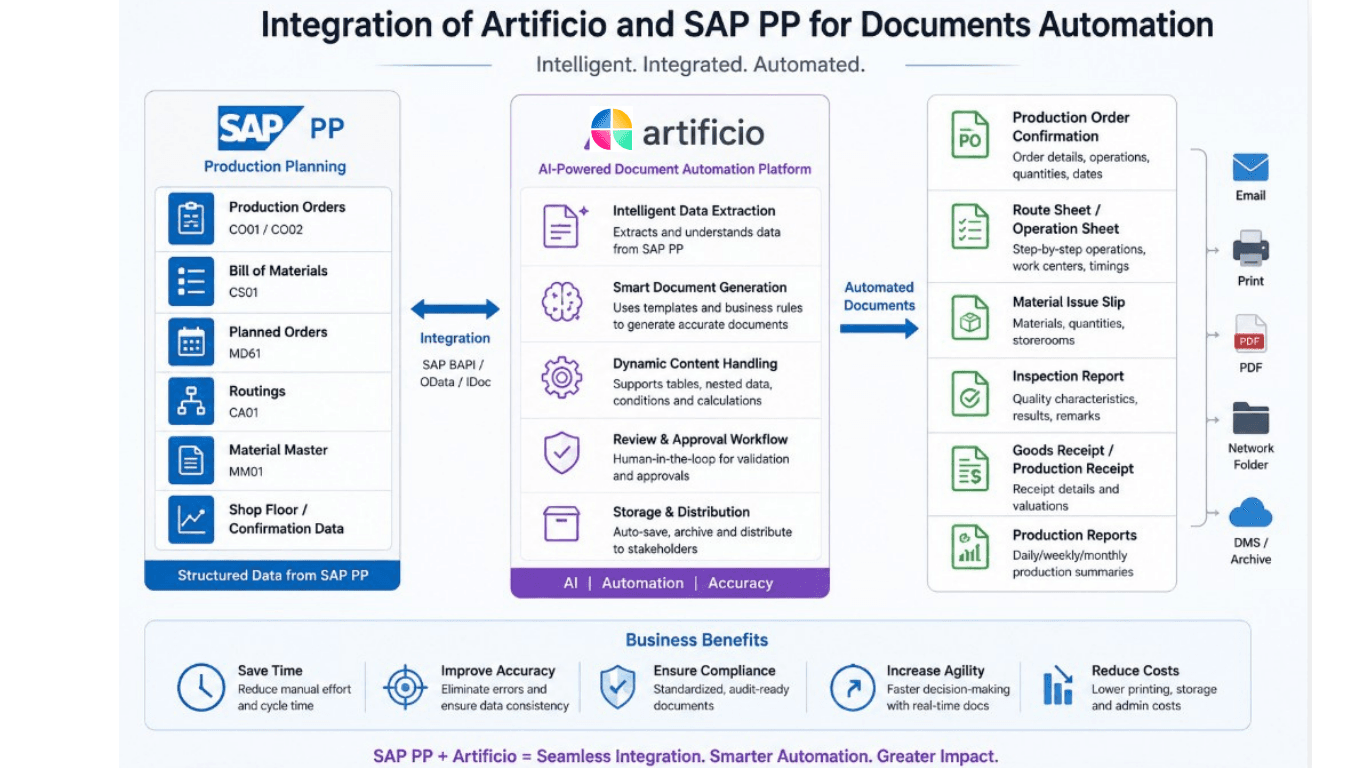
That reasoning is the difference between extraction and understanding, and it is why Artificio built its document processing on AI agents rather than template matching. The agent reads the whole page in context, cross-checks fields against each other, resolves the strikethrough by arithmetic rather than by pixel position, and returns a structured confirmation with a confidence score attached to each field. Fields it is not sure about get flagged rather than guessed, which is the opposite of what a template engine does when the handwriting drifts out of the zone.
Picking the right confirmation, not just the right numbers
Extracting the numbers is only half the job. A confirmation that posts to the wrong object or through the wrong mechanism is worse than no confirmation, because it looks correct in reporting.
SAP gives several ways to confirm the same physical event, and the plant's configuration decides which one applies. Time ticket confirmation through CO11N posts yield, scrap, rework, and activity quantities against a specific operation. Time event confirmation through CO19 records discrete start, finish, setup start, and interruption events, which suits plants tracking machine states more granularly. Order header confirmation through CO15 posts against the order without operation detail, common on short routings. Milestone confirmation lets one operation automatically confirm every preceding operation up to the previous milestone, which means a single slip legitimately generates confirmations for steps nobody wrote a slip for.
The operation control key decides whether confirmation is required, optional, or not possible at all, and whether the operation is a milestone. An extraction pipeline that ignores the control key will happily try to confirm an operation SAP will not accept.
Under the surface, the posting itself goes through the confirmation BAPIs. BAPI_PRODORDCONF_CREATE_TT for time tickets, BAPI_PRODORDCONF_CREATE_TE for time events, BAPI_PRODORDCONF_CREATE_HDR for header confirmations, with the process order equivalents for PP-PI plants. The proposal BAPI is the underrated one. Calling BAPI_PRODORDCONF_GET_TT_PROP first returns SAP's own default values for that order and operation, including remaining quantities and proposed activity values from the routing. Comparing extracted values against that proposal catches a large share of errors before anything posts, because SAP is effectively telling you what it expects to see.
The validation gate is where the value actually lives
Between extraction and posting sits a set of checks, and this layer is what separates a working system from a fast way to corrupt production data.
The order has to exist and be in a status that accepts confirmation, which means released and not technically complete, deleted, or locked. The operation number has to exist on that order and match the work center printed on the slip, because a mismatch usually means the operator grabbed last week's ticket off the wrong clipboard. Yield plus scrap plus rework has to reconcile against the remaining quantity, allowing for the order's over-delivery tolerance, and anything beyond tolerance stops rather than posts. The posting date has to fall in an open period, which sounds trivial until the first slip from the 30th gets captured on the 3rd. The scrap reason has to map to a configured variance reason code, and if it does not map cleanly, the free text goes to a human instead of getting forced into the nearest bucket. Activity values have to land in the right activity slots, so machine minutes never end up in the setup field. The personnel number has to resolve to a real employee. The final confirmation flag has to be treated as the significant decision it is, because setting it wrongly closes an operation that still has work coming.
Each of those checks is simple. Together they are the reason a plant can let extracted data post without a person reviewing every record. Confirmations that pass every check post automatically. Confirmations that fail any check go to a queue with the original slip image attached, the extracted values shown, and the specific rule that failed named in plain language. The reviewer is not re-reading a document. She is answering one question about one field.

What fires downstream, and where it breaks
A posted confirmation is not the end of the transaction. It is the trigger for several others, and knowing which ones can fail independently matters for how the exception handling gets designed.
The confirmation record itself lands in AFRU and updates the operation status to partially confirmed or confirmed. Activity quantities post as actual costs to the order through the cost center and activity type combination on the work center. Capacity requirements at that work center reduce by the confirmed amount. If components carry the backflush indicator, goods issues post automatically for the confirmed yield. If the operation triggers automatic goods receipt, the finished quantity posts to stock.
The important detail is that the confirmation can succeed while the goods movements fail. A backflush against a component with insufficient stock, a blocked batch, or a missing storage location does not roll back the confirmation. It drops the movement into the postprocessing queue that plants know as COGI, with CO1P holding automatic goods receipt failures. Every plant running backflush has a COGI queue, and in a lot of plants that queue is measured in thousands of records and worked once a quarter by whoever draws the short straw.
Speeding up confirmations without addressing that makes the COGI pile grow faster, which is a real risk worth naming rather than glossing over. The upside is that a capture system that already holds the original slip image, the extraction, and the posting result can attach that context to the failed movement. A COGI record that says "insufficient stock, component 4471, from confirmation posted 14:52 against order 800014521 operation 0030" with the slip image one click away is a record somebody can actually clear. The queue stops being anonymous.
Exceptions are the product, not the failure mode
The instinct on projects like this is to chase extraction accuracy as the headline number. Accuracy matters, but the number that decides whether the plant keeps using the system is what happens to the records that do not pass.
Handwritten shop floor documents will never hit a perfect read rate, and any vendor promising otherwise has not seen a slip that spent a shift in a machinist's back pocket. The realistic target is that the large majority of slips post without a human touching them, and that everything else lands in a queue that is fast to clear because the failure is specific.
The design consequences follow from that. Every field carries a confidence value, and the threshold for auto-posting is set per field rather than per document, because a misread yield is expensive and a misread confirmation text is not. Every posted confirmation keeps a link to the source image, which gives the auditor a document trail from AFRU back to the operator's handwriting. Every human correction gets recorded as training signal, so the recurring quirks of a specific plant get learned rather than re-corrected forever. When a particular operator's sevens read as ones, the system stops making that mistake after a handful of examples rather than after a process improvement project.
The queue also needs an owner and a service level, or it becomes the new tray on the supervisor's desk. Same failure, different medium.
Rolling this out without arguing with the shop floor
The deployments that work start narrow and prove the number before touching anything else.
Pick one cell or one line, ideally one with a cooperative supervisor and a decent volume of slips. Run capture in parallel with the existing process for two or three weeks, posting nothing. Extract every slip, generate the confirmation that would have posted, and reconcile it against the confirmation the clerk actually keyed. That comparison does two things at once. It measures extraction quality against ground truth, and it exposes how often the manual process itself was wrong, which is usually the more uncomfortable finding and the more persuasive one.
Once the reconciliation holds, switch that cell to automatic posting with a low confidence threshold, so more records route to review than strictly need to. Tighten the threshold as the evidence accumulates. Expand to the next cell only after the first one runs a full period close cleanly, because period close is where the accumulated small errors surface.
Nothing about this changes what the operator does. He fills in the same slip, hangs it on the same clipboard, and drops it in the same tray. The only new step is holding the page up to a camera for four seconds. That is the reason it survives contact with the plant.
What changes when the lag goes away
Once confirmations post within minutes of the work, several things become possible that were not before, and most of them have nothing to do with saving the clerk's time.
Capacity becomes honest. The dispatcher sequencing the afternoon is looking at load that reflects this morning, so cell four is available the moment it actually frees up rather than the next day. Rescheduling decisions get made on the current state of the shop instead of yesterday's.
Actual versus standard comparison becomes an operating tool rather than a monthly autopsy. When the routing says 280 minutes of machine time and the floor has been booking 310 for two weeks running, that gap is visible while the cause is still knowable. Somebody can walk out and look at the fixture. A month later, nobody remembers.
Scrap analysis gets its raw material back. The reason the operator wrote in the margin arrives intact, attached to the order, the operation, the work center, the shift, and the personnel number. Patterns that were previously buried under a generic reason code become obvious, and the tooling replacement that keeps causing a four-piece loss every third run stops being invisible.
Material accuracy improves as a side effect. Backflushes fire close to when the components were physically consumed, so stock in SAP tracks the bins more closely, and MRP stops generating requirements against inventory that left the building yesterday.
Period close gets shorter for the simple reason that there is nothing sitting in the tray. WIP is valued on confirmations that are actually in the system.
None of that requires new hardware on every machine, a works council negotiation, or a wireless survey of the paint line. It requires reading a piece of paper the plant is already producing, and giving SAP the same information eighteen hours earlier.
The slip on the clipboard at cell four is not the problem. Waiting until tomorrow to read it is.
Artificio turns unstructured production documents into structured, validated SAP transactions using AI agents rather than template-based OCR. For plants running SAP PP or PP-PI, that means handwritten time tickets and confirmation slips captured at the machine, extracted with per-field confidence, validated against live order and operation data, and posted through the standard confirmation BAPIs with a full audit trail back to the original image. To see it run against your own shop floor papers, get in touch at artificio.ai.