

Blog
SAP PP Runs on Documents That Nobody Wants to Type
Automate non-EDI inputs in SAP PP. Bridge the gap between unstructured emails, PDFs, and spreadsheets and live master data to run timely, error-free MRP.
Blog
Automate non-EDI inputs in SAP PP. Bridge the gap between unstructured emails, PDFs, and spreadsheets and live master data to run timely, error-free MRP.
It is 6:40 on a Tuesday morning and the production planner at a mid-sized automotive components plant already has forty-one unread emails. Nine of them are customer delivery schedules. Three are PDFs from a customer portal that exports releases as printable reports instead of flat files. Two are Excel sheets where the part numbers sit in column D and the quantities in column G, except for one customer who puts weekly buckets across the top row. One is a scanned supplier confirmation with a handwritten date correction. Four are engineering change notices from a customer engineering team that still sends drawings as attachments with revision notes in the email body.
None of that is data yet. It is paper wearing a digital costume.
By 9:00 the planner needs the demand loaded so the MRP run at 9:30 produces something worth looking at. So the morning goes the way it always goes. Open the PDF, read the part number, switch to MD61, key the planned independent requirements period by period, switch back, check the next one. Somewhere in the middle of that a phone call about a line stoppage eats twenty minutes. The MRP run happens on time because it is scheduled, not because the inputs were ready. Three of the nine customer schedules go in after lunch, which means the planned orders they generate are already a shift behind reality.
This is the part of SAP PP that nobody puts in the demo. The module itself is powerful. The BOM explodes correctly, the routing calculates capacity correctly, the MRP logic does exactly what it was configured to do. The weakness sits upstream, in the gap between a document arriving and that document becoming a record in SAP. That gap is filled with human typing, and human typing is slow, expensive, and inconsistent at exactly the moment when speed and consistency matter most.
Manufacturing companies invested heavily in EDI, and for the largest trading partners it works. The 830 forecast and the 862 shipping schedule flow in, hit the scheduling agreement, and update requirements without anyone touching a keyboard. That covers the top tier of customers at most plants.
Then there is everyone else.
The second-tier and third-tier customers send spreadsheets. Aftermarket and service accounts send emailed purchase orders. Contract manufacturing partners send monthly volume commitments as PDF letters. Distributors send rolling forecasts as attachments generated by whatever planning tool they happen to run. Plants serving multiple industries face this at scale, because the customer mix is broad and each customer has its own idea of what a delivery schedule looks like.
The same fragmentation runs backward into the supply base. Supplier order confirmations arrive as PDFs with acknowledged dates that differ from the requested dates. Subcontractors send back component reconciliation sheets showing what they consumed and what they scrapped. Tooling vendors send readiness confirmations that determine whether a planned order can be firmed at all.
And it runs downward into the shop floor. Plenty of plants still run paper travelers. Operators record start time, finish time, good quantity, scrap quantity, scrap reason code, and machine number on a printed sheet that follows the job through the line. At the end of the shift somebody collects the travelers and keys the confirmations into CO11N. If that person is out sick, confirmations sit for a day and WIP visibility goes stale.
Each of these documents maps to a specific SAP PP transaction. The mapping is well understood. The problem is that the mapping is executed by a person reading a screen and typing into another screen, hundreds of times a week, under time pressure, with a keying error rate that nobody measures because measuring it would be depressing.
Finance teams automated document intake first, and the reason is structural. An invoice is mostly self-contained. It has a vendor, a number, a date, line items, and a total. The total has to match the sum of the lines, so the document validates itself. Three-way matching against a purchase order and a goods receipt adds a second layer of confirmation. When something is wrong, the failure is loud.
Production planning documents are not self-validating in the same way. A customer delivery schedule contains a customer part number that has to resolve to your internal material number. It contains a plant identifier that may or may not be your plant code. It contains quantities in the customer's unit of measure, which might be pieces where you plan in thousands of pieces. It contains dates that could be ship dates, delivery dates, or dock dates, and the difference between those is your transit time.
Get any one of those wrong and SAP will accept the entry without complaint. The MRP run will faithfully explode a wrong requirement into wrong planned orders, wrong purchase requisitions, and wrong capacity load. The error surfaces two weeks later as a shortage or a pile of material nobody needed.
That difference explains why so many PP automation projects stall. Teams try to apply a template-based extraction tool, discover that customer schedule formats change every time a customer upgrades a planning system, and conclude that the documents are simply too variable to automate. The conclusion is wrong, but the experience behind it is real.
Template systems fail here because they treat a document as a fixed grid of coordinates. Manufacturing documents are not fixed grids. They are structured arguments about demand, and the structure varies by author. What works is a system that reads the document the way a planner reads it, by understanding what a part number looks like, what a date bucket means, and how a quantity column relates to a period header, and then checks every one of those understandings against the master data that already lives in SAP.
The useful definition is narrow and practical. Automated intake means a document arrives, gets classified, gets read, gets validated against live SAP master data, and gets posted to the correct PP object through a supported interface, with a human reviewing only the cases that fail validation.
That last clause carries most of the weight. Nobody serious is proposing that quantities post into a production system without a control layer. The goal is to move the human from data entry into exception handling. A planner who reviews eleven flagged lines out of four hundred is doing skilled work. A planner who keys all four hundred is doing work that a system should have done.
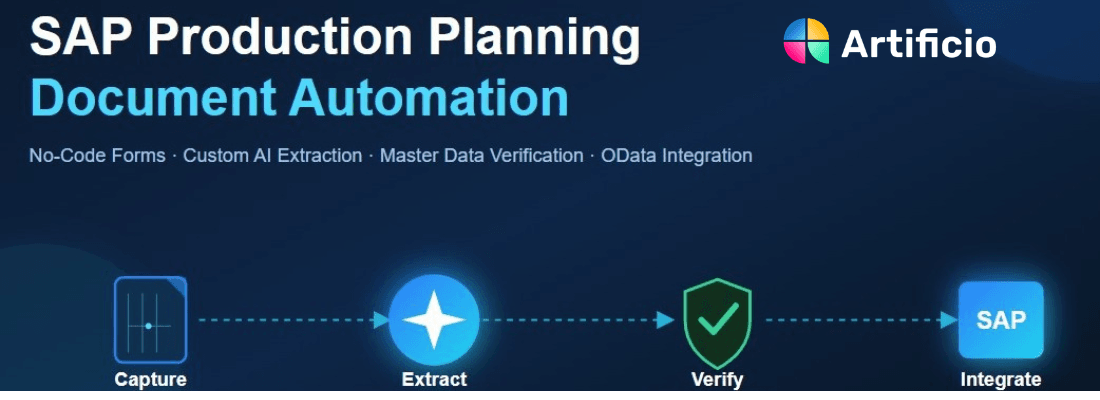
The pipeline has four stages, and each stage matters.
Classification comes first. The system determines what kind of document it received. A customer delivery schedule, a supplier order confirmation, a shop floor traveler, an engineering change notice, and a subcontractor consumption report all follow different downstream paths. Classification decides the path. In a real mailbox this matters more than people expect, because the same customer sends schedules, invoices, quality complaints, and general correspondence to the same address.
Extraction comes second. The system pulls out the fields that the target SAP object needs. For a delivery schedule that means customer part number, quantity, date, date type, unit of measure, ship-to location, and any release number or schedule reference. For a shop floor confirmation that means order number, operation number, yield quantity, scrap quantity, reason code, work center, and labor time.
Validation comes third, and this is where the value concentrates. Every extracted field gets checked against what SAP already knows. Customer part number resolves against the customer material info record. Plant code resolves against the plant master. Unit of measure gets converted using the material master conversion factors. Quantities get range-checked against historical volumes for that customer and material. Dates get sanity-checked against lead time and the production calendar. Anything that does not resolve cleanly gets held.
Posting comes fourth. The validated record goes into SAP through a standard interface, which means a BAPI call, an IDoc, an OData service on S/4HANA, or an RFC-enabled function module. No screen scraping, no robotic keystroke replay against transaction codes that break the moment a screen layout changes.

The abstraction only becomes useful when you map it to specific transactions. Here is what the common flows look like in practice.
A rolling forecast from a customer becomes planned independent requirements. In classic ECC terms that is MD61 or a demand management upload. The document supplies a material, a plant, a version, and a set of period quantities. The agent extracts the period grid, converts the customer part number to your material number using the customer material info record, converts the customer date buckets into your planning periods, and posts the requirements.
Firm delivery schedules follow a different path. Where a scheduling agreement exists, releases update the delivery schedule lines on that agreement rather than creating independent requirements. The distinction matters because posting a firm release as a forecast requirement double-counts demand and inflates the MRP result.
Emailed purchase orders from smaller accounts create sales orders that carry requirements into MRP through the requirements class configuration. Same intake pipeline, different landing object.
The common failure mode in all three cases is quantity interpretation. Customers send cumulative quantities and discrete quantities, and they rarely label which one they mean. A cumulative release of 12,400 pieces against a prior cumulative of 11,900 means 500 pieces of new demand. Post the 12,400 as discrete and you have just told MRP to build twenty-five times what the customer wants. A validation layer that tracks cumulative received quantity per customer and material catches this before the MRP run does damage.
Engineering changes arrive as documents long before they arrive as master data. A customer sends a revision notice. An internal engineer sends a redlined drawing with a component substitution. A supplier sends a notification that a purchased part number is being superseded.
Each of these should eventually produce a BOM change, a routing change, or both, with an effective-out date tied to a change number. The document intake layer will not make the engineering decision, and it should not try. What it can do is extract the affected material, the affected component, the proposed effectivity date, and the change reference, then create a structured change request record and route it to the right engineer with the source document attached.
That alone removes a large amount of hunting. The engineer receives a populated change request instead of a forwarded email with an attachment. Once approved, the extracted values populate the change master and the BOM item without retyping.
A supplier confirms a purchase order with a delivery date that differs from the requested date. That confirmed date belongs in the purchase order confirmation control record, because MRP uses it. When confirmations sit in a mailbox unprocessed, MRP plans against requested dates that the supplier has already declined to meet, and the plant discovers the gap when the material fails to arrive.
Automated intake reads the confirmation, matches it to the purchase order line by number and material, compares confirmed date and quantity against the order, and posts the confirmation. Deviations beyond a configured tolerance route to the buyer as an exception with both documents side by side.
Subcontracting adds another layer. A subcontractor returns finished components along with a consumption and scrap report showing what they used from the material you provided. Those numbers drive the component consumption posting and the reconciliation of your subcontracting stock. Manual entry of subcontractor reports is one of the most reliably neglected tasks in plant operations, and the resulting stock discrepancies surface at physical inventory when nobody can reconstruct what happened.
Paper travelers remain common, and the reasons are practical. Terminals near presses and welding cells get damaged. Operators wearing gloves do not enjoy touchscreens. Some processes run in areas where network coverage is unreliable.
The traveler carries everything CO11N needs. Order number, operation, yield, scrap, reason codes, machine, operator, start and stop times. A phone photo of a completed traveler, or a batch scan at shift change, feeds the same pipeline. The agent reads handwriting, validates the order number against open production orders, checks that the operation exists and is in a confirmable status, verifies that yield plus scrap stays within a sane range of the order quantity, and posts the confirmation.
The gain is not only the typing. It is timing. Confirmations posted within minutes of shift end give the next shift accurate WIP, accurate remaining quantities, and accurate capacity load. Confirmations posted the following afternoon give the next shift a guess.
Repetitive manufacturing environments follow a similar pattern through backflush postings, where the reporting point quantity drives component consumption automatically. The document intake layer supplies the reporting point quantity from whatever the line records, and the standard backflush logic handles the rest.
Material staging lists, kanban cards, receiving paperwork from external processors, and internal transfer requests all end in goods movements. Movement type 261 for order consumption, 101 for production receipt, 541 and 543 for subcontracting flows, 311 for internal transfers.
These postings are individually small and collectively enormous. A plant might process several thousand movement documents a week, most of them recorded first on paper or in a spreadsheet and then keyed. This is the highest-volume, lowest-judgment work in the entire flow, which makes it the best candidate for automation and often the fastest place to prove value.
Teams that succeed with PP document automation spend most of their configuration effort on validation rules, not on extraction. Extraction accuracy on a modern agent-based system is high enough that it stops being the constraint. What separates a system that planners trust from one they quietly bypass is what happens between extraction and posting.
Master data resolution is the foundation. Customer part number to internal material number. Supplier part number to internal material number. Customer plant designation to your plant code. Customer unit of measure to your base unit of measure, using the material master conversion, not a hardcoded factor. A document that cannot resolve every one of these against live SAP data does not post. It queues.
Tolerance checking comes next. A customer whose weekly release has run between 800 and 1,200 pieces for eight months suddenly sends 12,000. That might be real, because programs ramp and customers win business. It might also be a decimal error or a cumulative figure misread as discrete. Either way it deserves eight seconds of human attention before it reshapes the production plan. Tolerances should be configurable per customer, per material, and per document type, because a 20 percent swing on a low-volume service part means nothing while the same swing on a high-runner means everything.
Duplicate detection matters more than people anticipate. Customers resend schedules. Suppliers resend confirmations. Somebody forwards an email chain that contains the same attachment three times. Posting the same release twice creates phantom demand that survives until somebody notices the planned orders do not make sense. Hash-based duplicate checks on document content, combined with release number tracking per customer, close this cleanly.
Status validation prevents postings that SAP would technically accept but that make no operational sense. Confirming an operation on a technically completed order. Posting consumption against a deleted order. Receiving against an order whose target quantity was already met. The system checks order status, operation status, and remaining quantity before it attempts the call.
And every held document needs somewhere useful to go. An exception queue that shows the source document image next to the extracted values, highlights the field that failed, and lets a planner correct and release in one screen is the difference between an automation project that scales and one that generates a second full-time job. The correction should also feed back into the system so the same customer format does not fail the same way next month.
The obvious gain is hours returned. A plant processing 300 customer schedule documents a month at fifteen minutes each is spending 75 hours on transcription. Add supplier confirmations, shop floor travelers, and subcontractor reports and the figure at a mid-sized plant runs well past two full-time positions. Those hours do not disappear from the payroll. They move into work that actually needs a planner, which is expediting, capacity negotiation, and supplier escalation.
The less obvious gain is planning quality, and it is worth more.
MRP quality depends entirely on input timeliness. An MRP run at 9:30 that reflects every schedule received by 9:00 produces a plan people can act on. The same run missing three customer schedules produces a plan that will be corrected manually all week. Automated intake compresses the lag between document arrival and system record from hours or days down to minutes, which means the daily MRP run reflects reality rather than yesterday's approximation.
Confirmation timeliness changes WIP accuracy the same way. When shop floor confirmations post within minutes of shift end, the remaining quantity on every open order is current, capacity load reflects what actually ran, and the scheduler plans the next shift against real numbers.
Supplier confirmation processing changes exposure. Confirmations posted the day they arrive mean MRP plans against dates the supplier has committed to. Shortages surface as exceptions weeks ahead instead of as a stopped line.
There is a compliance dimension as well. Automated intake creates an audit trail linking every SAP entry to its source document, with the extracted values, the validation results, and the identity of anyone who corrected an exception. For plants operating under IATF 16949, AS9100, or FDA-regulated conditions, that traceability satisfies a requirement that manual entry has never satisfied well. When an auditor asks why a production order was confirmed at a particular quantity, the answer is a document image linked to the entry, not a memory.
Scalability is the last piece. Volume increases from a new program, a new customer, or a seasonal peak currently translate into overtime or temporary staffing in the planning office. Document throughput that scales without headcount removes that coupling entirely.
The plants that get this working share an approach. They pick one document type, one flow, and one measurable outcome, and they run it for a quarter before expanding.
Pick the document type by volume and pain, not by how interesting it is. For most plants that means customer delivery schedules from non-EDI accounts, because the volume is high and the consequences of delay are immediate. For plants running heavy shop floor paper, confirmations are the better first target.
Set the accuracy baseline before you start. Sample a month of manual entries and count the errors. Most teams have never done this and are surprised by the result. Without the baseline you cannot demonstrate improvement, and someone will eventually ask.
Run in parallel for the first several weeks. The system extracts and validates, a planner reviews everything before it posts, and the disagreements get logged. The review rate drops quickly as validation rules absorb the patterns the first weeks reveal. When the disagreement rate falls below the threshold the team is comfortable with, straight-through posting turns on for the clean cases and the planner keeps the exceptions.
Design the exception path before go-live rather than after. Who reviews. How fast. What happens to a document that sits unresolved for two days. Automation projects fail more often on unowned exception queues than on extraction accuracy.
Expand by adjacency once the first flow is stable. Customer schedules lead naturally to supplier confirmations, because the master data resolution logic is largely the same. Shop floor confirmations lead naturally to goods movements. Each addition reuses the integration layer and the validation framework already built.
SAP PP was designed on an assumption that the data reaching it would already be structured. For thirty years the assumption has been wrong at the edges, and the correction has been human labor. Planners have absorbed the gap between how trading partners communicate and how the ERP expects to receive information, and they have absorbed it by typing.
The technology to close that gap has changed in a specific way. Systems that read documents by matching them to templates were never going to work here, because manufacturing documents vary too much and change too often. Systems that read documents by understanding their content, and that check every understanding against the master data already sitting in SAP, work on the messy ninety percent that templates could never touch.
For a plant, that means the morning starts with a plan instead of a pile. The MRP run reflects everything that arrived overnight. Confirmations from second shift are already posted. Supplier date changes are already in the system, and the three that need a buyer conversation are flagged and waiting. The planner spends the morning on the eleven things that need judgment rather than the four hundred that needed typing.
That is a different job. It is also the job the planner was hired to do.

Lal Singh, SAP AI Automation Expert
CEO & Founder of Artificio
See it in your SAP environment
Bring us a document, a process, or a bottleneck. We'll show how Artificio captures, validates, and posts into SAP — then scale from there.
Security & compliance
ISO 27001:2013 certified, SOC 2 Type 2 compliant, GDPR and HIPAA ready. Every agent action is logged, auditable, and runs in isolated environments.