

Blog
SAP Joule vs Artificio: Best AI Agents for SAP Automation?
Compare SAP Joule vs Artificio for SAP ECC and S/4HANA. Explore AI agents for sales orders, invoices, MRP exceptions, QM COA and PP master data.
Blog
Compare SAP Joule vs Artificio for SAP ECC and S/4HANA. Explore AI agents for sales orders, invoices, MRP exceptions, QM COA and PP master data.
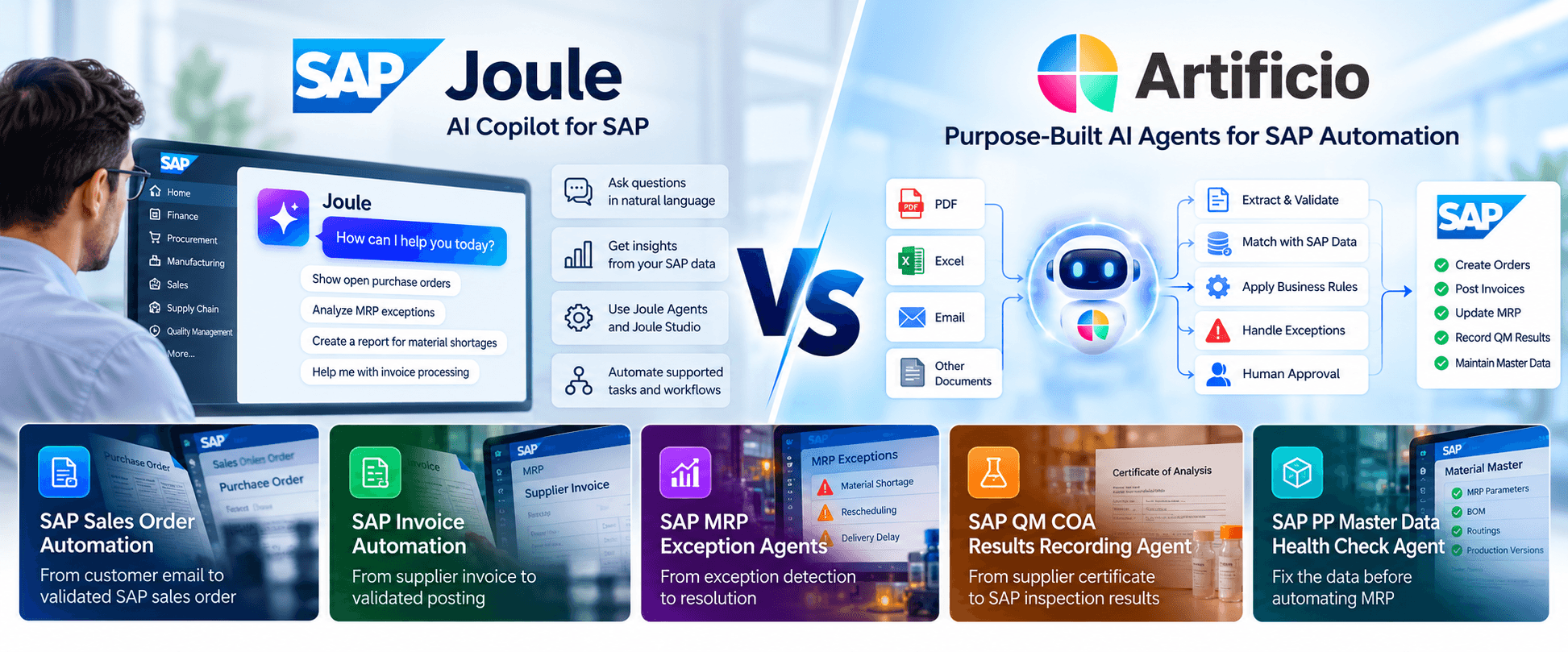
Your company invested millions in SAP. Now everyone wants AI agents. But are those agents actually completing business transactions — or just creating more work for your employees?
SAP Joule is transforming how businesses interact with enterprise applications. With Joule Agents and Joule Studio, organizations can use AI to access business information, build agents, and automate supported workflows.
But many SAP customers face a more immediate challenge.
Their employees are still manually entering sales orders from PDFs, matching supplier invoices, investigating MRP exceptions, recording quality inspection results, and correcting production planning master data.
The question is no longer whether AI can help.
The real question is: Should you build your own AI agents with SAP Joule Studio, or use purpose-built SAP automation agents that already exist?
This is where Artificio enters the conversation.
Artificio provides specialized AI automation solutions for SAP ECC and SAP S/4HANA, including Sales Order Automation, Supplier Invoice Automation, MRP Exception Management, QM COA Results Recording, and PP Master Data Health Checks.
In this comparison, we examine SAP Joule vs Artificio, their strengths, their differences, and how to choose the right approach for your business.
SAP Joule is SAP's AI experience for interacting with enterprise applications, accessing business information, and performing supported tasks using natural language and AI-powered capabilities.
SAP has expanded its AI strategy with Joule Agents and Joule Studio.
Joule Studio enables organizations to develop custom AI agents, applications, and workflows using SAP business context, integration services, and supported development tools.
These capabilities can support multistep automation, external system connectivity, and human approval processes.
Therefore, SAP Joule is not simply a chatbot. It is part of SAP's broader enterprise AI architecture.
Organizations evaluating Joule should understand which capabilities are available for their specific SAP applications, deployment models, and licensing arrangements.
Learn more: SAP Joule Studio – Official SAP Documentation.
Artificio is an enterprise AI automation platform designed to eliminate repetitive manual data entry and automate operational workflows.
Its AI agents capture information from business documents, emails, and enterprise systems, validate it against business rules and master data, handle exceptions, and complete approved transactions.
Artificio provides purpose-built SAP automation solutions, including:
These solutions share a common platform for AI extraction, validation, business rules, exception management, approvals, and enterprise integration.
Artificio supports SAP ECC and SAP S/4HANA through compatible enterprise interfaces, including OData, BAPIs, RFC, and approved integration services.
Artificio's differentiation is its focus on completing specific business processes rather than simply providing a general-purpose AI interface.
Explore the Artificio SAP AI Automation Platform.
| Capability | SAP Joule | Artificio |
|---|---|---|
| Primary focus | SAP AI experience, agents, apps, and workflows | Purpose-built operational AI automation (Agents, apps and workflows and human in the loop) |
| AI agent development | Joule Studio | No-code AI agent and workflow platform |
| SAP ECC | Capability-specific prerequisites | ECC-oriented integration support |
| SAP S/4HANA | Native SAP ecosystem capabilities | SAP integration through supported interfaces |
| Sales order capture | SAP services and configurable agents | Existing dedicated automation solution |
| Supplier invoice processing | SAP invoice solutions and agent extensions | Existing dedicated automation solution |
| MRP exception management | SAP planning services and custom agents | Existing MRP Exception Agent |
| QM COA results recording | SAP QM services and custom automation | Existing QM COA Results Recording Agent |
| PP master data health checks | SAP data quality tools and custom agents | Existing PP Master Data Health Check Agent |
| Human-in-the-loop | Supported in applicable workflows | Configurable review and approval workflows |
| Integration | SAP and third-party integration capabilities | SAP and other enterprise system integrations |
This comparison describes product positioning and available approaches. It is not a claim that SAP Joule lacks the ability to implement the listed workflows.
Imagine a manufacturing company receiving 30,000 customer purchase orders every year.
The orders arrive through emails, PDFs, spreadsheets, and other formats.
Each order may require someone to:
Even when the final SAP transaction takes only a few minutes, the surrounding validation work can consume substantial time.
Organizations can use supported SAP AI capabilities and Joule Studio to build agents that retrieve customer information, interact with business services, and automate order-related tasks.
The scope depends on the available applications, APIs, and configured workflows.
Artificio already provides a dedicated SAP Sales Order Automation solution.
The solution captures customer purchase orders, extracts header and line-item information, validates customer and material references, checks pricing and availability, and creates approved orders through supported SAP interfaces.
If the purchase order references an incorrect material, contains an unexpected price, or has missing information, the workflow can route the exception to the appropriate employee.
The goal is not simply to read a customer purchase order. It is to convert that document into a validated SAP sales order.
For companies handling thousands of orders, the business case should focus on reduced processing time, fewer manual corrections, and faster order confirmation.
Explore Artificio SAP Sales Order Automation.
Accounts payable teams frequently spend time handling supplier invoices that arrive through email and PDF attachments.
The work includes extracting invoice details, identifying suppliers, matching purchase orders, checking goods receipts, and resolving discrepancies.
Traditional OCR can extract text, but extraction alone does not complete the invoice processing workflow.
SAP provides invoice processing capabilities and AI extensions that organizations can evaluate alongside Joule Agents and Joule Studio.
The appropriate solution depends on the customer's SAP finance architecture and automation requirements.
Artificio SAP Invoice Automation provides an integrated process covering:
For example, when a supplier invoice quantity exceeds the goods receipt quantity, Artificio can flag the discrepancy rather than allowing an unchecked posting.
The workflow can then route the invoice for review according to the organization's configured controls.
The value of invoice automation should be measured by correctly processed invoices, exception rates, and manual effort eliminated — not merely extraction accuracy.
Explore Artificio SAP Invoice Automation.
SAP MRP runs every night. Why are your planners still fighting the same exceptions every morning?
Material Requirements Planning is one of SAP's most important manufacturing capabilities.
MRP evaluates demand, inventory, procurement, and production requirements to generate supply proposals and planning exception messages.
But identifying a shortage or rescheduling requirement is not the same as resolving it.
A planner may still need to investigate:
SAP's AI and agent development capabilities can support planning analysis and automated workflows where the required data and business services are available.
Organizations can build agents that retrieve planning information, evaluate alternatives, and coordinate supported actions.
Artificio SAP MRP Exception Agents are designed specifically for MRP exception investigation and resolution.
The process includes:
SAP recommends rescheduling a purchase order six days earlier.
A basic notification tells the planner that the purchase order needs attention.
Artificio's workflow goes further by evaluating the supply situation, preparing a resolution recommendation, and supporting supplier communication and approval.
A date change should only be applied when the necessary business conditions and authorization requirements are satisfied.
The objective is not to eliminate MRP exception messages blindly. It is to resolve actionable exceptions without creating new planning problems.
Explore SAP MRP Exception Agents.
Your supplier sends a Certificate of Analysis. Your quality team opens the PDF, reads the results, and enters them into SAP QM. Why is this still manual?
Quality teams in pharmaceutical, chemical, food, medical device, and industrial manufacturing environments frequently receive Certificates of Analysis (COAs) and laboratory reports.
These documents contain test results, units of measure, batch information, and other quality data.
Before recording results, quality technicians must identify the relevant inspection lot, match the reported tests with SAP inspection characteristics, verify values, and determine whether exceptions require review.
Artificio's SAP QM COA Automation solution automates the document-to-results workflow.
Its capabilities include:
A supplier provides a COA with the following results:
| Characteristic | Reported value | SAP specification |
|---|---|---|
| Assay | 99.2% | 98.0–102.0% |
| Moisture | 0.3% | Maximum 0.5% |
| pH | 6.8 | 6.5–7.5 |
The agent extracts the values, identifies the relevant SAP inspection characteristics, checks the applicable specifications, and determines whether the results satisfy the configured recording rules.
If a result is ambiguous or outside specification, the workflow flags it for quality review.
Results that satisfy the approved controls can be recorded in SAP QM.
SAP's AI and development capabilities can support quality-related agents and workflows.
Artificio offers an existing, specialized COA-to-SAP-QM solution focused on the inspection results recording process.
For regulated environments, implementation should include appropriate validation, auditability, authorization, and quality approval controls.
Artificio is not replacing quality judgment. It is automating repetitive quality data entry while keeping the required controls in place.
Explore SAP QM COA Results Recording Automation.
What if your biggest SAP MRP problem isn't MRP configuration, planning logic, or the planner — but the master data feeding the planning engine?
Manufacturers frequently experience recurring shortages, excessive planned order changes, unrealistic delivery dates, and unstable production schedules.
Some of these problems originate from incorrect or inconsistent production planning master data.
For example:
An AI agent that processes MRP exceptions without understanding these underlying conditions may repeatedly recommend actions that do not address the root cause.
Artificio's SAP PP Master Data Health Check Agent is designed to identify master data inconsistencies, assess planning risks, and recommend corrective actions.
The agent focuses on important SAP PP data areas.
Material master and MRP parameters
Bills of Materials
Routings and work centers
Production versions
MRP planning behavior
Consider a purchased component with a planned delivery time of five days in SAP.
Historical supplier performance indicates that replenishment usually takes approximately 21 days.
MRP may create proposals based on the configured five-day lead time, potentially generating unrealistic replenishment expectations.
The Artificio health check can identify the discrepancy and recommend reviewing the planned delivery time.
However, the correct parameter must be confirmed against supplier agreements, purchasing conditions, and business requirements before updating SAP.
A traditional validation report may identify a missing field or inconsistent parameter.
An AI-assisted master data health check can connect the finding to its potential business impact.
For example:
Finding: Planned delivery time differs materially from observed supplier lead time.
Business risk: Unrealistic procurement planning and recurring shortages.
Recommended action: Review supplier performance and the relevant material planning settings.
Priority: Determined by the affected material's demand, supply risk, and business criticality.
SAP provides established master data management, governance, planning, and extensibility capabilities.
Joule Studio can be used to develop additional data analysis and workflow capabilities.
Artificio's PP Master Data Health Check Agent provides an existing, purpose-built approach focused on production planning data quality and actionable recommendations.
This is particularly valuable when organizations are preparing to introduce AI into MRP exception handling.
Before asking AI to fix your MRP exceptions, make sure your MRP master data is reliable.
Explore Artificio SAP Master Data Automation and Production Planning Automation.
Many manufacturers still operate SAP ECC systems supporting critical business processes.
These organizations may be planning an S/4HANA migration but cannot afford to delay operational improvements.
SAP Joule features have product-specific availability and technical prerequisites. Customers should verify the capabilities supported by their particular SAP landscape.
Artificio's SAP automation architecture can connect to compatible ECC environments using supported enterprise interfaces.
This allows organizations to evaluate automation for existing processes such as:
The exact integration design depends on the SAP version, available services, authorizations, and customer-specific requirements.
You do not necessarily need to wait for an S/4HANA migration to begin automating manual work around SAP ECC.
Explore AI Automation for SAP ECC and S/4HANA.
The decision often comes down to whether the organization wants to develop and maintain custom AI automation or deploy a specialized solution.
SAP Joule Studio provides tools for developing agents, workflows, and applications using SAP business context.
For organizations with established SAP development teams and a broader SAP AI strategy, this may be attractive.
However, building an agent is only part of the implementation.
A production automation solution may also require:
Artificio's purpose-built solutions address these workflow components within its existing platform.
This does not eliminate customer-specific implementation work. Integration, configuration, testing, and governance remain necessary.
But organizations should evaluate whether an existing solution can reduce the amount of custom work required.
The build-versus-buy question should be: What will it cost to deliver, operate, and maintain the complete business outcome — not simply to create the AI agent?
There is no universal pricing comparison.
SAP Joule-related costs depend on the applicable SAP products, licensing arrangements, AI usage, and development requirements.
Artificio pricing depends on the selected solutions, processing volumes, integrations, deployment model, and support requirements.
A proper evaluation should compare:
| Cost factor | What to evaluate |
|---|---|
| Software licensing | Subscription and usage costs |
| Implementation | Configuration, development, and integration |
| Maintenance | Agent, workflow, and business rule updates |
| Exceptions | Remaining manual review effort |
| Data quality | Remediation and ongoing monitoring |
| Governance | Security, validation, and audit requirements |
| Business value | Hours saved, errors avoided, and process cycle time |
Suppose a company processes 30,000 customer orders annually.
If automation saves an average of four minutes per order:
30,000 orders × 4 minutes = 120,000 minutes
That equals 2,000 hours of annual processing capacity.
At an illustrative fully loaded labor cost of $35 per hour, this represents $70,000 in potential annual capacity value.
This example is illustrative, not a guaranteed saving or customer result.
Actual ROI depends on implementation cost, exception rates, adoption, and measured processing performance.
Yes, the two approaches can potentially complement each other.
An organization may use SAP Joule for supported AI experiences across SAP applications while deploying Artificio for specialized operational workflows.
For example:
Both approaches can support SAP as the system of record.
Any direct Joule-to-Artificio interoperability would require appropriate technical integration and should be validated rather than assumed.
You have an enterprise-wide SAP AI strategy but also need specialized solutions for high-volume operational processes.
Artificio can serve as an alternative for specific SAP automation use cases, including sales order processing, supplier invoices, MRP exceptions, QM COA results recording, and PP master data analysis. It is not a complete replacement for SAP Joule's broader enterprise AI experience.
Yes. SAP Joule Studio provides capabilities for building custom AI agents, applications, and workflows. Availability and prerequisites depend on the relevant SAP products and services.
Yes. Artificio supports ECC-oriented automation through compatible SAP interfaces, subject to the customer's technical landscape.
Not necessarily. Artificio can use supported SAP interfaces without SAP BTP in every deployment. The final architecture depends on security, connectivity, and enterprise integration requirements.
Yes. Artificio has built an SAP QM COA Results Recording Agent that extracts certificate data, matches inspection characteristics, validates results, manages exceptions, and records approved results through supported SAP interfaces.
Yes. Artificio has built an AI-powered PP Master Data Health Check Agent designed to analyze production planning master data, identify inconsistencies, assess planning risks, and recommend corrective actions.
Artificio's MRP Exception Agents support exception diagnosis, resolution recommendations, supplier communication, approvals, and controlled SAP updates. The available actions depend on the customer's configured workflows and integrations.
Organizations should compare the cost, time, maintenance effort, governance requirements, and expected business outcomes of both approaches. A purpose-built solution may reduce implementation work for a well-defined use case, while custom development may be preferable for highly specialized requirements.
SAP Joule is an important part of SAP's evolving enterprise AI strategy.
Its agents, development tools, and integration capabilities provide organizations with powerful options for introducing AI into business operations.
Artificio approaches the opportunity from the perspective of specific operational problems.
Instead of starting with the question, "What AI agent should we build?" Artificio starts with a different question:
"What manual work is still happening around SAP, and how can we automate it reliably?"
For sales teams, the result may be a validated SAP sales order.
For finance teams, it may be a correctly processed supplier invoice.
For supply chain planners, it may be an MRP exception resolved and verified.
For quality teams, it may be COA results accurately recorded in SAP QM.
For manufacturing organizations, it may be improved PP master data before the next planning run.
Why build every SAP AI agent from scratch when purpose-built solutions already exist?
The right choice is the one that delivers measurable business value with appropriate controls, reliability, and maintainability.
Before investing in another custom AI automation project, explore whether Artificio already provides a solution for your business process.
Explore Artificio's SAP AI Agents:
See how purpose-built AI agents can help reduce manual processing, improve data quality, and automate SAP business workflows.
Artificio — See more. Do more.
Disclaimer: SAP, SAP Joule, SAP ECC, and SAP S/4HANA are trademarks or registered trademarks of SAP SE or its affiliates. Artificio Products Inc. is an independent enterprise automation provider. Product capabilities, technical prerequisites, and commercial terms may change. This comparison is based on publicly available SAP information and Artificio product descriptions as of October 2026.

Lal Singh, SAP AI Automation Expert
CEO & Founder of Artificio
See it in your SAP environment
Bring us a document, a process, or a bottleneck. We'll show how Artificio captures, validates, and posts into SAP — then scale from there.
Security & compliance
ISO 27001:2013 certified, SOC 2 Type 2 compliant, GDPR and HIPAA ready. Every agent action is logged, auditable, and runs in isolated environments.