The email lands in your inbox on a Monday. A vendor wants to schedule "a 90-day enterprise pilot." Your head of finance is asking whether document processing automation can actually work for your AP team. Your IT lead wants a security review before anyone touches a single invoice.
Ninety days. For a proof of concept.
This is how document AI evaluations quietly die. The timeline drags, the stakeholder energy fades, and somewhere around week six the project gets deprioritised for something more urgent. The vendor moves on. You are back to square one.
The good news is that a document AI POC does not need to take three months. With the right preparation and a tight structure, two weeks is enough to generate real signal on whether a platform will work for your operation. Not a polished demo. Not a sales engineer running cherry-picked documents. Actual results from your documents, in your workflows, measured against criteria you defined.
This guide walks through exactly how to do that.
Why Most POCs Fail Before They Start
The failure usually happens before the first document is uploaded. Teams go into a POC without clear success criteria, hand over a random sample of documents pulled from different time periods, and rely on the vendor to define what "good" looks like. That is not evaluation. That is outsourcing your judgment to someone with an obvious interest in the outcome.
Two other patterns are common. The first is scope creep: teams try to test every document type, every edge case, and every possible integration in the same two-week window. The second is the opposite: teams test such a narrow slice that the results tell them almost nothing about production readiness.
A well-run POC threads the needle. It tests the workflows that actually matter, with documents that reflect real-world variation, against criteria that map directly to business value.
The Pre-Work That Makes or Breaks the POC
Before you talk to any vendor about scheduling time, spend two or three days doing internal preparation. This investment pays back immediately once the evaluation begins.
Define your target workflow. Pick one or two document types that represent a real operational pain point. Invoices from non-EDI suppliers are a common starting point for AP teams. Supplier statements work well for reconciliation use cases. Patient referral documents, freight bills of lading, trade finance instruments - the specific type matters less than the fact that it is actually causing you problems right now. Avoid the temptation to test everything. A focused POC gives you clear data. A sprawling one gives you noise.
Prepare your document sample. This is the step most teams get wrong. Pull at least 50 to 100 real documents from production, not samples the vendor provides and not documents you tidied up before sharing. Include the ugly ones: the scanned fax from a supplier using a dot matrix printer, the invoice where the PO number is in an unusual location, the statement that spans 14 pages. Variety in your sample is not a problem to manage. It is the whole point. If a platform performs well only on clean, consistent documents, you will find out during the POC rather than after go-live.
Write your success criteria before you see a single demo. Three or four specific, measurable thresholds are enough. Something like: straight-through extraction accuracy above 92% on key fields, exception handling that flags ambiguous documents rather than silently passing wrong values, processing time under 30 seconds per document, and no requirement for manual template configuration per supplier. These numbers can be adjusted after you understand what is realistic, but writing them first forces clarity about what your operation actually needs.
Identify your internal POC owner. This person does not need to be technical. They need to be close enough to the operational workflow to judge whether the output is actually useful, and empowered enough to make a recommendation at the end of week two. 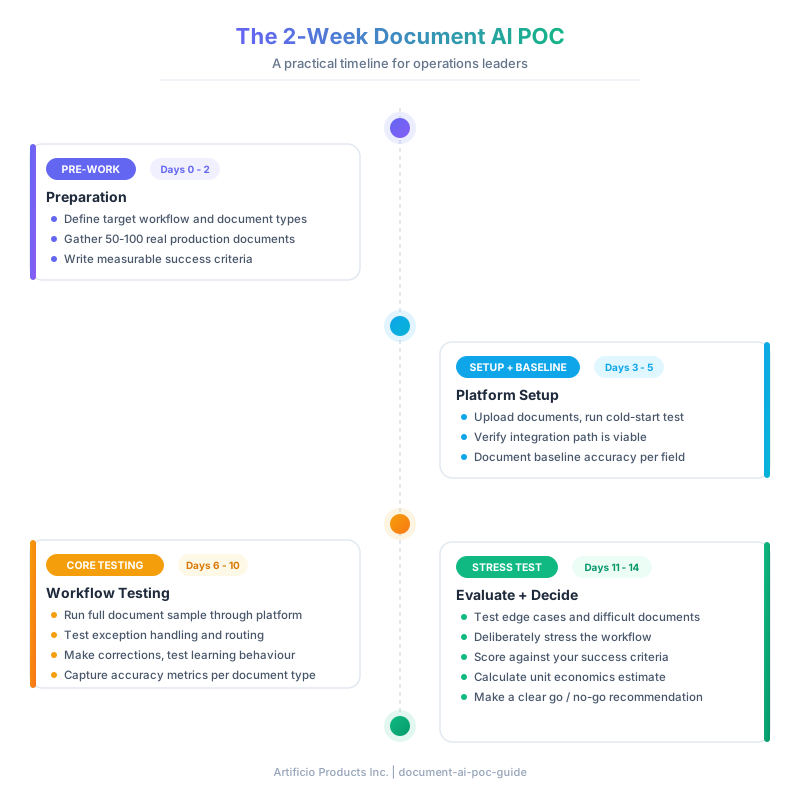
The Two-Week Schedule
Phase 1: Setup and Baseline (Days 1 to 3)
The first three days are about getting the platform running on your documents and establishing a baseline, not optimising anything.
Start by uploading your document sample and running it through the platform with no customisation. This cold-start result is valuable. It tells you how much out-of-the-box capability you are getting versus how much configuration work the vendor is quietly doing for you during the pilot. Some platforms will tell you their AI needs two to three weeks of training before results are meaningful. That is a flag worth noting, not because training is inherently wrong, but because it compresses your evaluation window significantly.
Check that the integration path is viable. You do not need a full integration built by day three. You need confirmation that the API, the file ingestion method, or the native connector to your ERP or workflow tool actually works as described. Many evaluation failures happen here. The integration that looked smooth in the sales demo runs into an authentication problem, a data format mismatch, or a permissions issue that takes longer than expected to resolve.
Document everything you observe. Screenshot the outputs. Note which fields extracted correctly, which were wrong, and which were missing entirely. This becomes your baseline against which all subsequent results are measured.
Phase 2: Core Workflow Testing (Days 4 to 8)
This is where the bulk of the evaluation happens. You are testing the platform against the specific workflow you identified in pre-work, with your real documents.
Run your complete document sample through the platform. For each document, capture extraction accuracy on your priority fields, whether the document was processed without manual intervention, and how the platform handled ambiguous cases. That last point matters more than it initially seems. Any platform can handle a clean, high-resolution PDF invoice from a major supplier. The question is what happens when the document is ambiguous. Does the platform flag it for human review with useful context? Does it pass wrong values silently? Does it fail entirely?
Pay attention to where the exceptions land. A platform that generates 200 exceptions per 1,000 documents and routes each one to a human reviewer with the relevant field highlighted is operationally manageable. A platform that generates 200 exceptions and drops them into an undifferentiated queue is not. The exception management workflow is often the difference between automation that actually reduces workload and automation that just redistributes it.
Test the learning behaviour if the platform claims adaptive capability. Make five or ten corrections on documents where the extraction was wrong. Then run a new batch of similar documents. Does accuracy improve? How quickly? The answer tells you a lot about how much ongoing maintenance your team will carry after go-live.
Phase 3: Stress Testing (Days 9 to 11)
By day nine you should have a reasonable view of how the platform performs on typical documents. Now you test the edges.
Pull the documents from your sample that you knew were going to be hard: the low-resolution scans, the handwritten annotations, the multi-currency invoices from overseas suppliers, the documents in languages other than English if that applies to your operation. Run them. Document the results.
Try to break the workflow on purpose. Upload a document in an unexpected format. Submit a corrupted file. Upload a document that is technically the right type but structured completely differently from your usual suppliers. What happens? Does the platform degrade gracefully, or does it fail in ways that would be hard to catch in production?
Also spend time with the reporting and monitoring capabilities. A platform might process documents accurately during the POC, but if your ops team cannot see what the system is doing or catch problems before they compound, the production experience will be very different from what you observed in week two.
Phase 4: Evaluation and Decision (Days 12 to 14)
The final phase is structured analysis, not more testing. You should already have your data. Now you score it.
Go back to the success criteria you wrote before the POC started. How did the platform perform against each threshold? Be specific. "Extraction accuracy was generally good" is not an evaluation. "Key field extraction accuracy on vendor name, invoice number, invoice date, and total amount was 94.3% across 87 documents tested" is an evaluation.
Look at the gap between your best-case and worst-case results. High variance across document types often indicates that the platform depends heavily on consistent document structure, which is a real constraint in most production environments. Low variance, even if the average is slightly lower, often indicates a more robust underlying approach.
Calculate a rough unit economics estimate. If the platform costs X per document processed and your current manual processing costs Y per document in labour time, what does the breakeven look like at your expected volume? This does not need to be precise. It needs to be directionally correct. 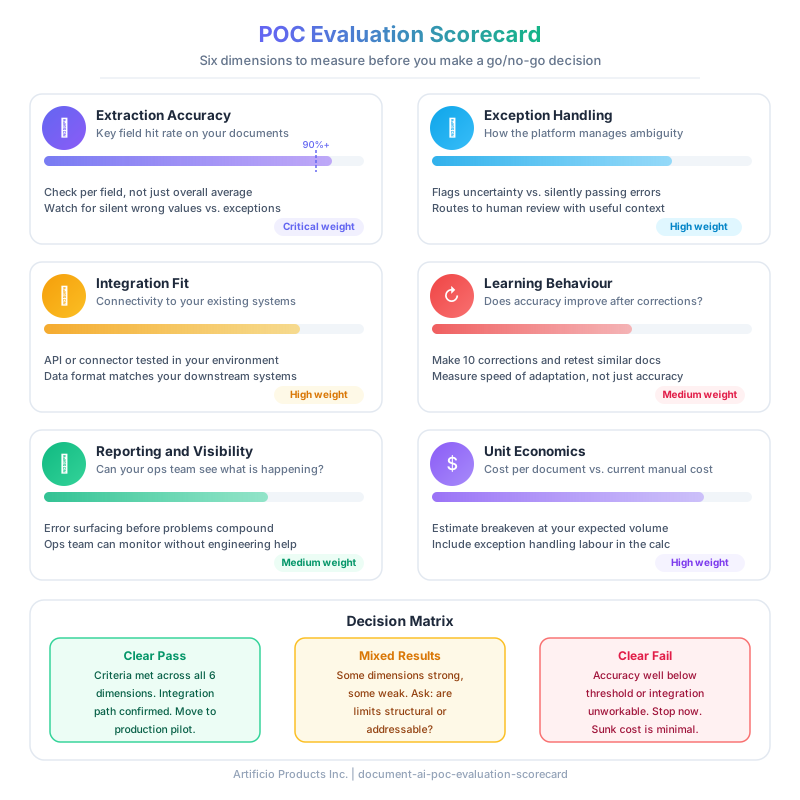
What to Do With the Results
A two-week POC will give you one of three outcomes. The first is a clear pass: the platform met or exceeded your success criteria, integration looks viable, and the unit economics work. Move to a production pilot with a defined scope and timeline.
The second is a clear fail: extraction accuracy was well below your threshold on the documents that matter most, or the integration path turned out to be unworkable, or the exception management was so manual that you would not actually be reducing your team's workload. Do not proceed. The sunk cost of two weeks is far less than the sunk cost of a failed deployment six months from now.
The third outcome is the most common: mixed results. The platform works well for some document types and poorly for others. Extraction accuracy is strong on clean PDFs but falls apart on scanned documents. The core technology is solid but the reporting capabilities are limited. In this case, the question is whether the limitations are structural or addressable. Ask the vendor directly. A good vendor will be specific about what is on the roadmap and when. A vendor who responds to every limitation with "we can build that for you" in the enterprise deal is a different situation from a vendor who can point to shipped functionality.
The Question Most Ops Leaders Forget to Ask
After two weeks of testing, most teams focus on accuracy metrics. That is the right instinct, but there is a question that matters equally: what happens when something goes wrong?
Ask the vendor to walk you through their support escalation process for a production issue. Ask how errors in the AI output are surfaced to operators and how they are corrected. Ask what the process is for reprocessing documents that were incorrectly handled. The answers to these questions are not visible in a POC, but they determine what your day-to-day experience will look like six months after go-live.
The strongest indication of a platform worth deploying is not that it performs perfectly in a controlled evaluation. It is that the vendor understands where their system will struggle and has built the tooling to manage it well.
Getting Started
A two-week POC is achievable for any ops team with the right documents and clear criteria. The preparation takes three days. The evaluation takes two weeks. The decision is yours to make from real data, not from a sales deck.
Start with one workflow. Test it properly. The results will tell you everything you need to know.