

Blog
Kill the Copy-Paste: How Email Templates Pull Live Data from Extracted Documents
Automate personalized email confirmations using extracted document data (invoices, forms, etc.). Eliminate copy-paste errors and save hours daily.
Blog
Automate personalized email confirmations using extracted document data (invoices, forms, etc.). Eliminate copy-paste errors and save hours daily.
An invoice arrives in your accounts payable inbox. Within seconds, the vendor receives a personalized email: "We've received your invoice #38847 for $12,450.00 dated December 10. Payment will be processed by January 10."
Nobody typed that email. Nobody opened the invoice, found the invoice number, copied it, switched to their email client, pasted it, went back for the amount, copied that, pasted it, checked the date, typed the payment timeline. None of that happened.
The email wrote itself from extracted data. The invoice came in, the system read it, pulled the relevant fields, populated an email template, and sent a professional confirmation to the vendor. All automatically. All accurately. All in the time it takes to blink.
This is what happens when document extraction connects directly to communication workflows. And it changes how organizations handle one of the most invisible productivity drains in modern business.
Here's something that happens in your organization right now, probably dozens or hundreds of times per day. Someone receives a document. They need to send an email about that document. They open the document, find a piece of information, copy it, switch to email, paste it, go back to the document, find another piece of information, copy it, switch to email, paste it. Repeat until the email is complete.
This happens with invoices. With applications. With contracts. With purchase orders. With customer requests. With form submissions. Every time a document arrives and triggers a communication, someone is manually transferring information from one place to another.
The task is so routine that people forget it's work. It doesn't feel like a task that could be automated because it only takes a minute or two each time. But those minutes add up. A hundred copy-paste email sessions per day across your organization means hours of cumulative time spent on pure mechanical data transfer.
There's also the error factor. Every manual copy-paste is an opportunity for mistakes. Transpose two digits in an invoice number and you've created confusion. Miss a decimal point in an amount and you've created a dispute. Send the wrong date and you've set incorrect expectations. These errors happen because humans aren't built for repetitive data transfer. We get tired. We get distracted. We make mistakes.
And then there's the delay. Manual processes create bottlenecks. If the person who handles vendor communications is in a meeting, invoices sit without acknowledgment. If someone's out sick, applications don't get confirmation emails. The speed of your communication depends on the availability of whoever does the copying and pasting. 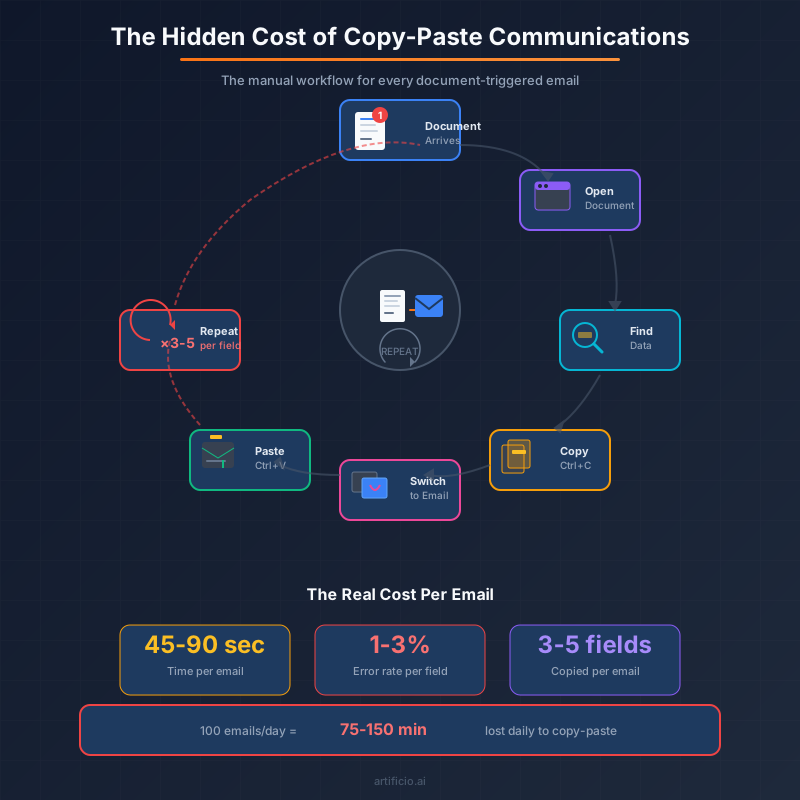
The concept is straightforward once you see it. You have documents coming in. Those documents contain data. You have emails that need to go out. Those emails need to include data from the documents. Instead of a human manually transferring that data, the system does it automatically.
When a document arrives, extraction pulls out the relevant fields. Invoice number, amount, date, vendor name, line items, whatever you need. Those fields get mapped to placeholders in an email template. The template populates with real data and sends to the appropriate recipient.
The vendor who sent an invoice gets a confirmation email with their specific invoice details. The applicant who submitted a form gets an acknowledgment with their application reference number. The customer who requested a quote gets a response that references their specific request. Each email is personalized with accurate data from the source document.
This works because modern document extraction doesn't just pull data into a database somewhere. It makes that data available for immediate action. The extracted fields become variables that can flow into any downstream process, including email composition.
The email template is the other half of the equation. You design it once with placeholders for dynamic content. "We've received your invoice #{{invoice_number}} for {{amount}} dated {{date}}." When the system sends the email, those placeholders get replaced with actual values from the extraction. Every recipient gets a personalized message that looks like someone carefully typed it just for them.
Most people think of email tools and document extraction as separate categories. Email belongs in marketing or communications. Document extraction belongs in operations or data processing. They live in different parts of the software landscape and different parts of the org chart.
Connecting them creates something more powerful than either one alone.
Document extraction without action is just data sitting in a system. You've converted unstructured documents into structured information, which is valuable, but that information still needs to go somewhere and do something. Someone still needs to act on it.
Email templates without dynamic data are just form letters. They can save time on typing, but they still require manual customization to be relevant. Someone still needs to fill in the specifics.
Put them together and you get automated, personalized communication triggered by document events. The document arrives, the data extracts, the email sends. No human intervention required for routine communications. The system handles the mechanical work while your team focuses on exceptions and complex situations.
This combination also means your communication speed matches your extraction speed. If documents process in seconds, confirmations go out in seconds. Your vendors know immediately that their invoice was received. Your applicants know immediately that their submission went through. Your customers know immediately that you're working on their request.
That responsiveness builds trust and reduces inbound inquiries. When people get quick confirmation that their document was received, they don't need to call or email asking "did you get it?" You've eliminated a whole category of follow-up communication by proactively closing the loop.
This pattern applies anywhere documents trigger communications. And that's more places than you might initially think.
Accounts payable sends invoice receipt confirmations to vendors. Every invoice that arrives gets acknowledged with its specific details. Vendors know their invoice is in the system, what amount was recorded, and when to expect payment. No more vendor calls asking about invoice status.
HR and recruiting sends application acknowledgments to candidates. Every resume or application that comes in triggers a personalized confirmation. The candidate knows their materials were received and gets relevant next-step information. It's a better candidate experience with zero additional HR effort.
Customer service sends request confirmations to customers. When a customer submits a form or sends a document, they get immediate acknowledgment with their specific request details. They know what was received and what happens next. It reduces anxiety and support tickets.
Sales operations sends quote follow-ups to prospects. When a prospect requests information or submits requirements, the system can automatically send relevant materials with personalized details. The response time drops from hours to seconds.
Compliance and legal sends document receipt confirmations for regulatory submissions. When required documents arrive, senders get confirmation that specific documents were received on specific dates. You've created an automatic audit trail for compliance purposes.
The pattern repeats across any function that receives documents and needs to communicate about them. The specific templates and data fields change, but the underlying workflow stays the same. Document in, data extracted, email out. 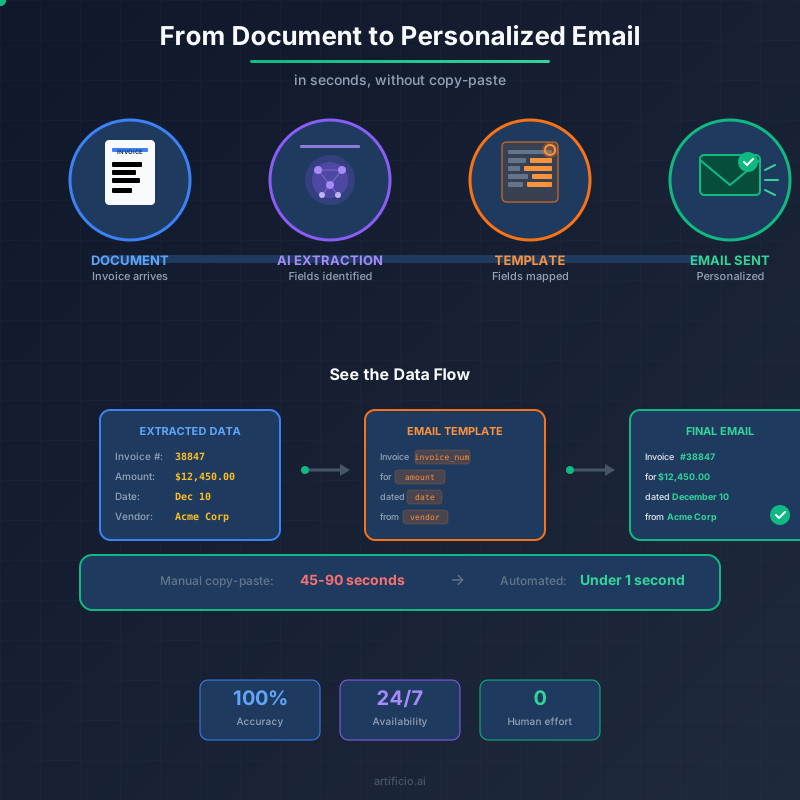
One of the best things about connecting extraction to email templates is that it doesn't require custom development. You're configuring existing capabilities, not building new software.
The extraction side uses pre-trained models or custom extractors you've already set up. If you're processing invoices, you've already defined what fields to extract. Invoice number, amount, date, vendor name. Those fields exist in your extraction workflow.
The email template side uses a visual designer. You write your email content, insert placeholders where dynamic data should appear, and style it to match your brand. No coding required. If you can write an email, you can create a template.
The connection between them is field mapping. You tell the system which extracted field goes into which template placeholder. Invoice number from extraction maps to {{invoice_number}} in the template. Amount maps to {{amount}}. Date maps to {{date}}. It's configuration, not programming.
Once mapped, the workflow runs automatically. Documents arrive, extraction happens, emails send. You monitor it, handle exceptions, and refine templates based on feedback. But the routine flow requires no ongoing manual effort.
This setup can happen in a day. Not a sprint. Not a quarter. A day. You could start this morning and have automated confirmations going out this afternoon. The time to value is measured in hours, not months.
There's a counterintuitive benefit to automated emails that becomes clear once you start using them. They're actually more personal and accurate than manually typed emails.
That sounds backwards. How can an automated email be more personal than one a human wrote? Because the automated email includes specific details that humans often skip.
When someone manually types a confirmation email, they take shortcuts. Instead of looking up the exact invoice number, they might write "your recent invoice." Instead of including the precise amount, they might skip it entirely. Instead of calculating the payment date, they might say "within our standard terms." The email is faster to write but less useful to receive.
Automated emails include every detail every time because including details costs nothing extra. The invoice number is right there from extraction. The amount is right there. The date is right there. Populating all of them takes the same effort as populating none of them, which is to say zero effort.
Accuracy also improves because there's no transcription step. The data in the email is the data from the document. No human looked at "12,450.00" and typed "12,540.00" by mistake. No human misread "December 10" as "December 16." The extraction reads the document once, accurately, and that accurate data flows directly into the email.
Your automated emails end up being more detailed, more accurate, and more useful than the manual emails they replace. Recipients get better communication while your team spends less time creating it.
Not every document should trigger an automatic email. Some situations need human review before communication goes out. The system needs to handle these gracefully.
Validation rules create the first filter. If an invoice amount exceeds a threshold, maybe it shouldn't auto-confirm. If extracted data has low confidence scores, maybe it needs human verification first. If required fields are missing, the document should route to exception handling rather than triggering an incomplete email.
Conditional logic handles different scenarios. Different document types might trigger different templates. Different vendors might get different communication styles. Different amounts might include different payment timeline information. The system can apply rules to determine not just whether to send, but what to send.
Human oversight remains available for complex situations. The automation handles routine cases automatically, but anything unusual surfaces for review. You're not removing humans from the process. You're focusing human attention on the situations that actually need it.
This layered approach means you get the efficiency of automation for the 90% of cases that are straightforward, while maintaining control over the 10% that need special handling.
The benefits of automated email templates show up in several measurable ways.
Time savings are the most direct. If your team spends 30 seconds per email on copy-paste data transfer, and you send 200 such emails per day, that's over 100 minutes daily. Eliminating that time frees up almost two hours of productive capacity every day.
Error reduction matters for relationship quality. Every invoice number you don't mistype is a dispute you don't have to resolve. Every amount you don't transpose is a confusion you don't have to clarify. Fewer errors mean smoother relationships with vendors, customers, and partners.
Response time improvements affect perception. When confirmations go out in seconds instead of hours, senders know you're responsive and organized. That perception has real value for vendor relationships, candidate experience, and customer satisfaction.
Inbound inquiry reduction saves additional time. When people get immediate confirmation with specific details, they don't need to follow up asking questions. Fewer "did you receive my invoice?" emails mean less interruption for your team.
These benefits compound. Faster responses lead to fewer inquiries. Fewer errors lead to fewer disputes. Less time on routine emails means more time for complex work. The automation creates space for higher-value activities while improving the quality of routine communications.
You don't need to automate every document-triggered email at once. Start with one high-volume, routine communication and prove the concept.
Invoice receipt confirmations are a natural starting point for many organizations. The volume is high, the format is consistent, and the benefit is immediate. Vendors appreciate confirmation, and your AP team appreciates not having to send them manually.
Once that workflow runs smoothly, expand to other document types. Applications, requests, submissions, whatever generates the most communication volume in your organization. Each new workflow follows the same pattern: define extraction fields, create email template, map fields to placeholders, activate automation.
The organizations that get the most value treat this as an ongoing practice rather than a one-time project. They continuously identify copy-paste communication patterns and convert them to automated workflows. Over time, manual data transfer becomes the exception rather than the rule.
Every time someone in your organization copies data from a document and pastes it into an email, that's work a machine could do better. Faster, more accurately, more consistently, at any time of day.
The technology to eliminate this work exists and it's not complicated to implement. Document extraction captures the data. Email templates provide the structure. Field mapping connects them. The result is personalized, accurate communication that sends itself.
Your team's time is too valuable for copy-paste. Their attention is too valuable for repetitive data transfer. Their skills are too valuable for mechanical tasks that add no real value.
Let the machines move the data. Let your people do the work that actually matters.

Head IT Operations - Co Founder of Artificio
See it in your SAP environment
Bring us a document, a process, or a bottleneck. We'll show how Artificio captures, validates, and posts into SAP — then scale from there.
Security & compliance
ISO 27001:2013 certified, SOC 2 Type 2 compliant, GDPR and HIPAA ready. Every agent action is logged, auditable, and runs in isolated environments.