

Blog
AI Generative Forms: The Future of Design & 67% Lead Loss
Ditch the 10-page form. Discover how AI-generative forms build complex, adaptive paths, reducing abandonment and multiplying lead conversion.

Blog
Ditch the 10-page form. Discover how AI-generative forms build complex, adaptive paths, reducing abandonment and multiplying lead conversion.
You know that feeling when you're filling out a form online and you hit question seven, and suddenly you're staring at a dropdown menu with 47 options that don't quite fit your situation? That moment when you realize you're about to spend the next fifteen minutes explaining your specific circumstances in a tiny text box that nobody will actually read? That's the exact moment 67% of people abandon forms.
Not because they don't want what you're offering. Not because they changed their minds. They leave because the form you spent three weeks perfecting with your design team is fundamentally broken. And the worst part? You didn't even know there was a better way.
Until now.
Let's talk about what happens inside a form designer's brain when they're building something complex. Take a typical loan application form. Simple enough, right? Name, address, income, employment history. But then reality creeps in.
What if they're self-employed? Well, you need different questions. What if they have multiple income sources? Different questions again. What if they're applying with a co-borrower? Completely different flow. What if that co-borrower is self-employed with multiple income sources and one of those sources is from a foreign country?
Now multiply this by every possible combination. You're looking at roughly 2,847 different paths through what started as a "simple" loan application. And that's before you add business logic like, "If they answer yes to question 12, skip to question 19, but only if they also answered 'Option C' on question 8, unless they're in one of these seven states, in which case..."
This is where every human form designer hits the wall. Not because they're not smart enough. Not because they don't care. But because the human brain simply can't hold all these conditional paths in working memory at once. Cognitive scientists call this "working memory capacity limitation," but you don't need a PhD to understand it. You just need to have tried building a complex form.
Most designers do what any reasonable person would do. They simplify. They create linear forms that ask everyone every question, even when half the questions don't apply. Or they create separate forms for different scenarios, forcing users to figure out which form they need before they even start. Or they build forms with three or four conditional branches and call it good enough, knowing they're leaving dozens of edge cases unhandled.
The average enterprise form handles maybe 15 conditional paths. The really sophisticated ones, built by specialized UX teams over months, might handle 40 or 50. But that still leaves hundreds of scenarios where users are forced into boxes that don't quite fit. And every one of those mismatches is another abandoned form, another lost lead, another frustrated customer who decides your competitor's simpler product is actually better than your more comprehensive one.
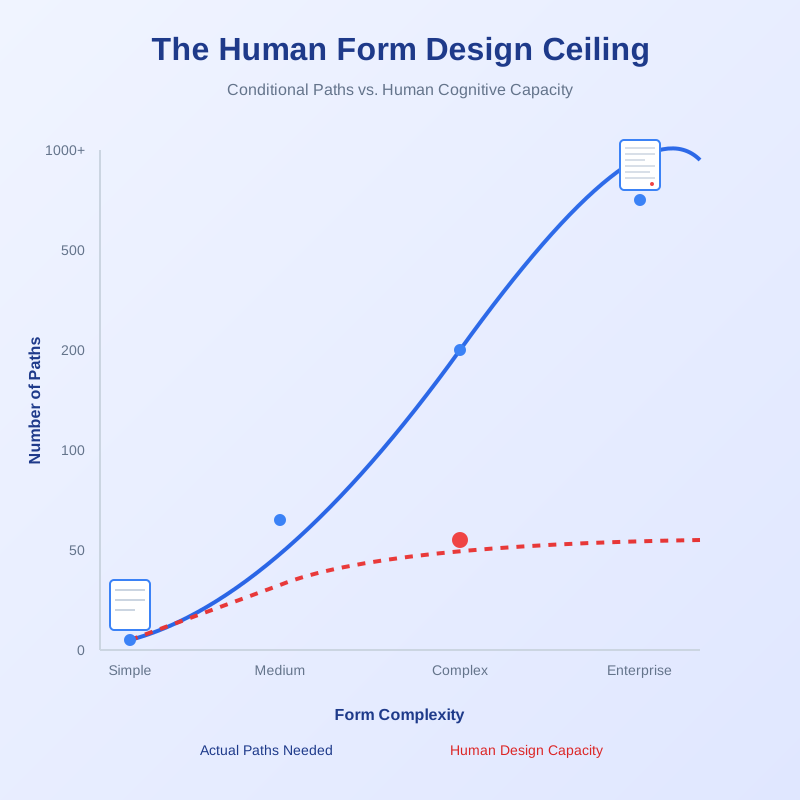
Here's what changed everything. AI doesn't have working memory limitations. When an AI system looks at your form requirements, it doesn't see a confusing maze of if-then statements. It sees patterns.
It sees that certain types of customers cluster together. That specific answers predict other answers with surprising accuracy. That question sequences that seem random to humans actually follow logical progressions that AI can map in microseconds. Most importantly, it sees all the paths at once. Not the 40 paths your design team mapped out over three months, but all 2,847 possible paths through your loan application. And it can generate a form structure that handles every single one.
But it gets better. Traditional form builders, even the really good ones, work like this: you tell them what fields you need, you manually set up conditional logic, and you test every branch to make sure it works. You're the architect, the builder, and the quality control inspector. With AI generative forms, you describe what you need to accomplish, and the AI builds the entire structure. Not just the fields and the branching logic, but the optimal question sequencing, the validation rules, the error messages that actually help instead of confuse, and even the visual hierarchy that guides users through complex scenarios without overwhelming them.
A senior product manager at a financial services company told me they spent four months building a commercial loan application form. Their team included two UX designers, a developer, a business analyst, and a compliance officer. The final form handled 23 different applicant scenarios. When they fed the same requirements to an AI generative form system, it created a form that handled 187 scenarios. In four minutes.
That's not a typo. Four minutes versus four months. And the AI version handled eight times as many scenarios.
Let's talk about what that 67% abandonment rate actually means. Not in abstract percentages, but in real money walking away from your business.
Say you're a mid-size insurance company. You get 10,000 people starting your quote form every month. That's people who found your website, liked what they saw, and took the time to click "Get a Quote." These are warm leads. They want what you're selling.
With a 67% abandonment rate, you lose 6,700 of them. If your average policy is worth $1,200 annually, and you typically convert 30% of completed forms, you're watching $2,412,000 in potential annual revenue evaporate. Every single month.
But here's what most companies miss. That abandonment rate isn't evenly distributed. The people most likely to abandon are actually your most valuable customers. Why? Because they're the ones with complex situations that don't fit neatly into your rigid form structure. The self-employed consultant with multiple income streams. The family with the unique property situation. The business with the non-standard coverage needs.
These are exactly the customers willing to pay premium rates because their needs are more sophisticated. They're abandoning your form because your form is too simple for them. Think about that. You're losing your best customers because you tried to make things simple.
One enterprise software company tracked this precisely. Their standard demo request form had a 64% abandonment rate and led to an average deal size of $47,000. When they rebuilt it as an AI generative form that adapted to different company sizes, industries, and use cases, abandonment dropped to 23%. But the average deal size jumped to $89,000. Why? Because they stopped losing the complex, high-value prospects who needed a form that understood their sophisticated requirements.
The math tells the story. They went from 3,600 completed forms per month at $47,000 average to 7,700 completed forms at $89,000 average. That's not incremental improvement. That's a complete transformation of their pipeline. And it happened because they stopped asking every prospect to squeeze into the same oversimplified box.
Let's walk through what happens when you create an AI generative form. Not the technical backend stuff, but what it actually does that's different from what a human designer would do.
You start with intent, not structure. Instead of saying "I need a field for name, a field for email, a dropdown for industry," you say something like "I need to qualify enterprise software leads, understand their current tech stack, identify pain points, and route them to the right sales team." That's it. That's your entire design brief.
The AI starts by analyzing similar forms and their performance data. Not just completion rates, but where people hesitate, which questions cause confusion, which answer combinations predict successful conversions. It's looking at patterns across millions of form interactions, understanding what actually works in practice rather than what seems logical in theory.
Then it builds the question tree. This is where it gets interesting. A human designer typically thinks linearly. Question one leads to question two leads to question three. Maybe with some branching at key decision points. The AI thinks multidimensionally. Every question is a node in a network, and every answer opens or closes multiple paths simultaneously. It's not building a form. It's building a conversation that adapts in real time.
For that enterprise software qualification form, the AI might generate 40 different question variations. It doesn't show all 40 to everyone. It shows each person exactly the sequence that makes sense for their situation. Someone from a startup sees a completely different flow than someone from a Fortune 500 company. Someone who mentions "legacy system migration" triggers a different path than someone who mentions "scaling challenges." And these aren't separate forms. It's one adaptive form that reconfigures itself based on every answer.
The really sophisticated part? The AI adds validation logic that goes way beyond "this field is required." It understands context. If someone says they're a five-person startup but then mentions managing 50 team members, it flags the inconsistency and gently prompts for clarification. If someone's budget range doesn't align with their described needs, it suggests they might want to look at different product tiers. This isn't just data collection. It's intelligent conversation.
One healthcare company needed a patient intake form that handled 17 different appointment types, each with its own prerequisites, insurance requirements, and preparation instructions. A human design team estimated six months to build it properly. The AI generated it in 11 minutes. But here's the part that amazed them: the AI included conditional logic they never thought to specify. Like automatically adjusting medication questions based on the patient's age and the appointment type. Or changing insurance verification requirements based on whether this was a first visit or follow-up. The AI found patterns in their historical data that humans never noticed.
There's a commercial real estate firm that implemented AI generative forms for their property listing submissions. Within the first week, their agents started reporting something strange. The forms felt like they were reading minds.
Not really, of course. But here's what was happening. The AI had analyzed thousands of previous property listings and found patterns humans never consciously noticed. Like the fact that when someone selects "historic building" as a property type, they almost always need to provide information about renovations and historic preservation compliance. Or that listings in certain zip codes require flood zone documentation 89% of the time.
The AI built all of this into the form logic. So when an agent started entering a historic property, the form automatically expanded to include relevant fields. Not buried at the end, but right where they made contextual sense. The agent didn't feel like they were filling out a longer form. They felt like the form understood what they were trying to do.
This is the subtle magic of AI generative forms. They don't just branch based on explicit answers. They anticipate needs based on patterns. They reorder questions to match the natural flow of information gathering for each specific scenario. They adjust their language and formatting based on what works best for different user types.
A financial advisory firm built an AI form for retirement planning assessments. Standard stuff: age, income, savings, goals. But the AI did something clever. It noticed that people over 55 tended to abandon the form when asked about "investment risk tolerance" using standard industry terminology. So for that age group, the AI rephrased the questions using plain language and added contextual examples. For younger users, who were more familiar with investment terms, it kept the standard phrasing. Same information collected, but abandonment rates dropped 41% in the over-55 segment.
The AI was also smart about progressive disclosure. Instead of showing all optional questions upfront, which makes forms feel overwhelming, it revealed additional questions only when it detected user engagement patterns suggesting they were willing to provide more detail. Someone who's been thoughtfully answering questions for three minutes gets shown optional enrichment questions. Someone who's clicking through quickly gets the streamlined path. Same form, different experiences, all driven by real-time engagement signals.
Most companies treat forms as necessary evils. Things you have to have to collect information. But a handful of companies figured out that forms can be strategic weapons.
An insurance brokerage was losing deals to direct-to-consumer competitors with simpler products. Their comprehensive coverage was better, but prospects couldn't get through the quote form to discover that. Their average completion time was 23 minutes, and they were losing half their prospects around the 12-minute mark.
They rebuilt their quote form using AI generation. Not just to make it shorter, but to make it smarter. The new form started with three simple questions that let the AI understand the prospect's situation. Then it built a custom path that asked only relevant questions. A renter with no vehicles got a 4-minute form. A homeowner with three cars, a boat, and a vacation property got a 15-minute form, but every question clearly related to their specific situation.
Average completion time actually went up slightly, to 14 minutes. But completion rates jumped from 48% to 81%. Why? Because people don't mind spending time when every question makes sense. They abandon when they're wasting time on irrelevant questions.
The competitive advantage wasn't just better completion rates. It was better data. The AI form collected 40% more useful information than the old form, despite asking fewer total questions. It did this by asking the right questions at the right time in the right way. A prospect who mentions they work from home gets asked about home office equipment. Someone who mentions a teenage driver gets appropriate questions about that risk factor. The form became intelligent enough to have a real conversation.
Within six months, they were closing deals they never could before. Not because they changed their product or pricing, but because their form made it easy for prospects to discover they were the best option. Their competitors were still asking everyone the same 80 questions. They were asking each person their own personalized 20 questions.
Let's be honest about something. Not every AI-generated form is brilliant. Just like not every human-designed form is terrible. The technology is powerful, but it's not magic, and it can go wrong in interesting ways.
An e-commerce company tried building an AI form for custom product configurations. The AI got a little too clever. It started asking highly technical questions about specifications that made perfect sense to engineers but completely confused regular customers. The form was technically accurate but practically useless.
The problem? They trained the AI on internal product documentation rather than actual customer conversations. The AI learned the company's internal language, not the customer's language. Garbage in, garbage out, as they say. The solution was retraining the AI on customer service transcripts and sales call recordings. Same technical requirements, completely different language.
Another company discovered their AI form was inadvertently discriminating. Not intentionally, but because it had learned patterns from historical data that reflected past biases. Certain answers were triggering question paths that made assumptions about the user. They caught it in testing, but it was a stark reminder that AI learns from data, and if your data has problems, your AI will have problems.
The best implementations treat AI generative forms as collaborative tools, not replacement tools. The AI generates the structure and logic, but humans review the output for bias, clarity, and brand alignment. One company has a great process: their AI generates the form, then their UX team and subject matter experts spend a day testing it, suggesting refinements, and ensuring it feels right. The AI handles the complexity humans can't manage. The humans handle the nuance AI might miss.
If you're planning to build a form anytime soon, whether it's lead generation, customer onboarding, data collection, or anything else, you need to think differently about the process.
The old model was: gather requirements, sketch wireframes, design the UI, build the logic, test everything, launch, then iterate based on feedback. That might take weeks or months depending on complexity. The new model is: describe what you need to accomplish, let AI generate the foundation, refine the output, test, and launch. We're talking days, not months.
But the time savings isn't the real story. The real story is capability. You can now build forms that would have been impossible before. Forms with hundreds of conditional paths. Forms that adapt in real time. Forms that feel like conversations. Forms that collect better data while asking fewer questions.
A B2B software company shared their implementation experience. They needed a form for product demo requests that qualified leads, scheduled demos, and collected necessary technical information. Their marketing team estimated three weeks to spec it out, another month to build and test it. Instead, they spent two hours writing a detailed prompt describing what they needed. The AI generated the form structure in minutes. They spent another day refining the output, testing edge cases, and ensuring it matched their brand voice. Total time from concept to launch: four days.
But here's the best part. Six weeks after launch, they analyzed the data. The AI form was collecting 34% more information per completed form than they had even requested. Why? Because the AI had analyzed their CRM data and identified additional qualification questions that correlated with closed deals. It built those questions into conditional paths that appeared only for prospects matching certain patterns. The form was making their sales team smarter without anyone explicitly programming that behavior.
Let's translate all of this into the language that matters to decision makers. Money.
Take a mid-size B2B company. They get 8,000 form starts per month. With a 67% abandonment rate and 40% conversion rate on completed forms, they're generating about 1,056 qualified leads monthly. If their average customer value is $50,000 and they close 25% of qualified leads, that's $13.2 million in monthly revenue.
Now they implement AI generative forms. Abandonment drops to 25%. Conversion rate on completed forms increases to 52% because better-qualified leads are coming through. They're now generating 3,120 qualified leads per month. With the same 25% close rate and $50,000 average value, that's $39 million in monthly revenue.
That's not incremental improvement. That's nearly 3x revenue from the same traffic. And it required changing one thing: the form.
The implementation cost? For most companies, it's less than what they'd spend on a single traditional form development project. The ongoing cost? Typically a fraction of what they're already spending on form abandonment cart recovery emails and remarketing campaigns trying to win back people who left their forms.
One company did the full calculation. Their old approach to forms: $180,000 annually in design, development, and ongoing optimization. Plus approximately $2.8 million in lost revenue from form abandonment. New approach: $24,000 implementation cost, $18,000 annually for the AI platform, and abandonment-related revenue loss down to $780,000. Net improvement: $2.14 million annually.
That's the kind of ROI that makes CFOs ask why you didn't do this sooner.
Here's something most companies don't realize. Your forms are telling prospects things about your company. Things you might not intend to communicate.
A long, linear form that asks everyone the same questions says "we built this for our convenience, not yours." A form that asks irrelevant questions says "we don't actually understand our customers." A form that makes you create an account before you can even see what you're signing up for says "we value our data more than your time."
AI generative forms send a different message. They say "we understand your situation is unique." They say "we respect your time." They say "we're sophisticated enough to handle complexity without making you suffer through it."
An enterprise software company noticed something after implementing AI forms. Their close rates improved, obviously. But so did their average contract value. Sales asked prospects why they were choosing them over competitors. The most common answer? "Your sales process felt more professional." The only thing that changed was the initial form.
Prospects couldn't articulate what made it better. They just knew that filling out the form felt different. It felt like talking to someone who understood their business rather than filling out paperwork. That small difference in initial impression carried through the entire sales cycle.
Some companies are already doing things with AI generative forms that sound like science fiction. Real-time translation that lets the same form work in 50 languages with culturally appropriate phrasing. Voice input that turns conversations into structured data. Forms that integrate with calendar systems to automatically schedule follow-ups at optimal times. Multi-step forms that remember where you left off across devices and sessions.
But you don't need any of that to start benefiting from AI generative forms. The basic capability, creating forms that adapt to each user and handle complex conditional logic automatically, is available right now. The technology isn't experimental. It's proven. Companies across industries are using it today.
The question isn't whether AI generative forms are ready for your business. They are. The question is whether your business is ready to rethink something as fundamental as how you collect information from customers and prospects.
Because here's the reality. Your competitors are reading this too. Some of them are already implementing AI generative forms. In six months, the companies still using static, linear forms are going to look outdated. In a year, they're going to be at a measurable disadvantage.
The form you build today won't just collect data. It'll tell prospects whether you're a company that understands the future or one that's stuck in the past. Make sure it's telling the right story.

Head IT Operations - Co Founder of Artificio
See it in your SAP environment
Bring us a document, a process, or a bottleneck. We'll show how Artificio captures, validates, and posts into SAP — then scale from there.
Security & compliance
ISO 27001:2013 certified, SOC 2 Type 2 compliant, GDPR and HIPAA ready. Every agent action is logged, auditable, and runs in isolated environments.