

Blog
12 Signals Your Documents Send Before Big Problems Hit
Learn to spot the 12 subtle document signals (Reply-All, Orphan, etc.) that reveal broken, expensive business processes.

Blog
Learn to spot the 12 subtle document signals (Reply-All, Orphan, etc.) that reveal broken, expensive business processes.
Your documents are talking. Most businesses just aren't listening.
Walk into any office, open any inbox, check any shared drive, and you'll see it. Documents moving through workflows, people uploading files, teams exchanging information. Everything looks normal on the surface. Systems are running, work is getting done, nobody's panicking. But if you know what to look for, you'll start noticing small patterns that tell a completely different story. These patterns are like smoke before the fire, tiny signals that something bigger is brewing beneath the surface. The problem is that most people are too busy processing documents to actually observe how their documents behave.
Think about it this way. A mechanic doesn't just fix broken engines. The good ones listen to how an engine sounds, watch how it idles, notice small vibrations that most people ignore. They're reading signals that tell them what's about to fail before it actually does. Documents work the same way. They leave clues about systemic issues, broken processes, and inefficiencies that cost companies thousands of dollars every month. But you need to know what you're looking for.
This isn't about buying new software or implementing complex solutions. This is about developing document intuition, learning to spot the everyday signals that reveal what's really happening in your workflows. Once you see these patterns, you can't unsee them. And more importantly, you can fix problems before they become expensive disasters.
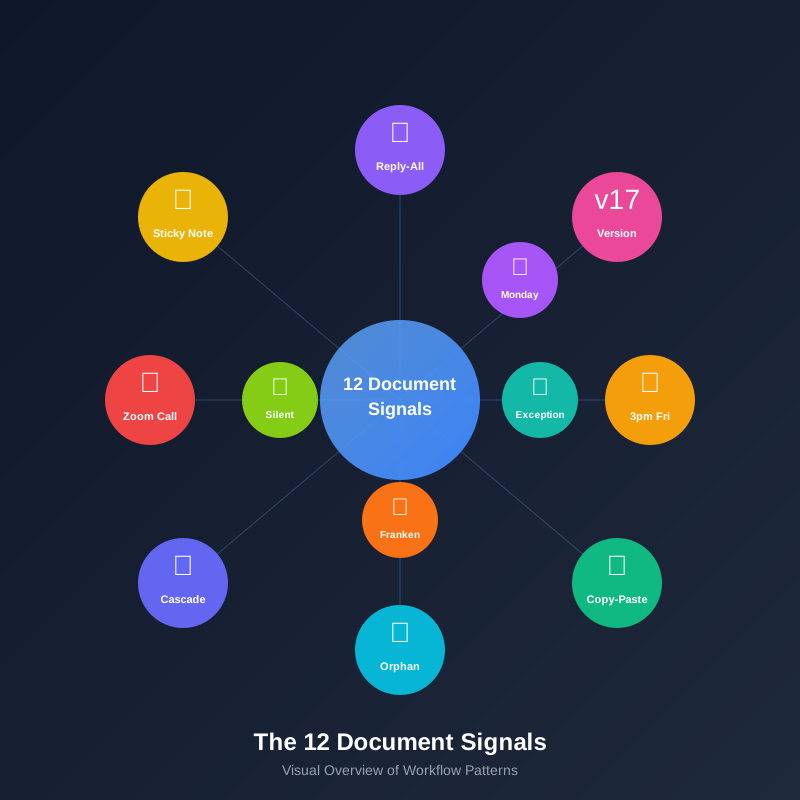
Let's talk about the 12 signals your documents are sending you right now.
You've seen this one. Someone uploads a document to the shared drive, or sends it via email, or drops it into the system. Then a few hours later, or maybe the next day, someone else sends a message asking if anyone has seen that document. Then someone replies saying they think they saw it somewhere. Then someone else chimes in with a different location. Before you know it, there's a whole email thread with eight people trying to track down a document that was supposedly filed correctly.
This is the Reply-All Document signal, and it's telling you something critical. Your search and retrieval system is fundamentally broken. It doesn't matter if you're using the latest cloud storage or an enterprise document management platform. If people can't find documents when they need them, the system isn't working. What makes this signal particularly interesting is that it's not about technology failing. It's about the gap between how your system thinks documents should be organized and how people actually look for them. Maybe your system requires perfect metadata tagging, but nobody has time to fill out twelve fields every time they upload something. Maybe your folder structure made sense when someone designed it three years ago, but it doesn't match how the business actually works today. Maybe the search function only looks for exact filename matches, but people remember documents by content or context, not by what they were named.
The diagnostic test here is simple. Pick a document that was uploaded in the last month. Now ask three different people on your team to find it without telling them the filename. Time how long it takes. If it takes more than 60 seconds, or if even one person can't find it at all, you're seeing the Reply-All Document signal. The cost of this signal adds up faster than you'd think. Every search that takes five minutes instead of 30 seconds is productivity lost. Every email thread asking for document locations is time wasted. Every duplicate download or re-creation of documents that already exist somewhere is inefficiency multiplied. When documents are talking through the Reply-All pattern, they're telling you that the way you store and organize information doesn't match the way your people actually work.
Document_final.pdf. Document_final_v2.pdf. Document_final_ACTUAL.pdf. Document_final_v2_revised.pdf. Document_final_USE_THIS_ONE.pdf. We've all been there. The Version Number Olympics happens when the same document exists in multiple versions, each one claiming to be the definitive copy, and nobody's really sure which one is actually current. This signal appears most often in collaborative work, contract reviews, proposal development, and anywhere multiple people need to contribute to the same document over time.
What this signal is really telling you goes deeper than poor naming conventions. It's revealing that you don't have a single source of truth. Your team doesn't trust that there's one definitive location where the current version lives, so they create safety copies. They email versions to themselves. They save versions locally. They create backups of backups because they've learned, probably through painful experience, that documents have a way of disappearing or getting overwritten or somehow becoming inaccessible at the worst possible moment. The Version Number Olympics is actually a trust signal. Your team doesn't trust the system to preserve their work, maintain version history, or allow them to roll back if something goes wrong.
You can spot this signal by looking at any folder where collaborative work happens. Count the number of files with "final" in the name. Count the number of files with version numbers, dates, or names in the filename. If you're seeing more than three versions of anything, you're in the Olympics. The really telling part is when you ask people which version is correct and they hesitate, or say they're not sure, or need to open multiple files to compare. That hesitation tells you everything. Nobody knows where truth lives in your system. The cost here isn't just storage space for duplicate files, though that adds up. The real cost is in the time spent reconciling versions, the errors that creep in when someone works from an outdated copy, the delays when people have to track down the right version before they can move forward. Documents participating in the Version Number Olympics are screaming that your version control doesn't work, and your team has developed workarounds that make the problem worse instead of better.
Here's a pattern that's easy to miss if you're not paying attention. Check your document upload timestamps. If you notice a consistent spike in document uploads late on Friday afternoons, or end of month, or end of quarter, you're seeing the 3pm Friday Upload signal. This one's particularly interesting because it reveals something about how work actually flows through your organization versus how it's supposed to flow. Documents that consistently arrive in batches at predictable intervals are telling you that manual workarounds are happening somewhere in the chain.
Think about what should happen in a healthy document workflow. Information arrives throughout the week, gets processed as it comes in, and flows through the system in real time. But the 3pm Friday Upload pattern means something different is happening. Someone, somewhere, is collecting documents throughout the week, probably in their email inbox or on their desktop, and then batch-uploading them all at once when they have time to sit down and process everything. They're doing this because the actual upload process is too cumbersome, too time-consuming, or too disruptive to do in the moment. Maybe the system requires too many steps. Maybe it's slow. Maybe they're waiting to gather enough documents to make the effort worthwhile. Whatever the reason, they've developed a workaround that makes sense for them but creates bottlenecks in the overall workflow.
You can diagnose this by pulling upload timestamps for any high-volume document type in your system. Look for patterns. If you see clustering around specific times or days, start asking questions about why. The cost of the 3pm Friday Upload signal is hidden in the delays it creates. Documents that arrive on Monday but don't get uploaded until Friday spend four days invisible to the rest of your workflow. Decisions get delayed. Follow-up actions get pushed back. Customers wait longer for responses. The person doing the batch uploading thinks they're being efficient, and from their individual perspective they probably are. But from a system perspective, they've created a delay that ripples through every downstream process. Documents sending this signal are telling you that your upload process needs to be simpler, faster, and less disruptive so people will do it in real time instead of batching it when they can't avoid it anymore.
This signal is subtle, but once you see it, you'll spot it everywhere. Open up a bunch of different documents that should be unique, things like customer intake forms, vendor contracts, project proposals, or expense reports. Now look closely at the formatting, the data patterns, the way information is structured. If you notice that certain fields have identical formatting quirks, or specific data points that look copied and pasted, or sections that are suspiciously similar across documents that should be different, you're seeing the Suspicious Similarity signal. This tells you that copy-paste data entry is happening somewhere in your workflow.
The Suspicious Similarity appears because someone in your organization has figured out that it's faster to copy data from an old document and modify it than to enter everything from scratch. On the surface, this seems like smart efficiency. Why type out a full address when you can copy it from last month's form? Why manually enter product specifications when they're identical to the last order? The problem is that copy-paste data entry is incredibly error-prone. When you copy information, you also copy any errors that existed in the source. You might forget to update a field that changed. You might leave in information that doesn't apply to the new document. And because the data looks professionally formatted, nobody catches the mistakes until much later when they cause real problems.
The diagnostic test for Suspicious Similarity is to compare documents that should have unique data. Look for patterns that shouldn't exist. Two customer records with addresses formatted in exactly the same unusual way. Three invoices with descriptions that are identical except for one word. Five contracts where the legal language has the same typo. These patterns reveal that someone is copying instead of creating fresh data. The cost here goes beyond accuracy issues, though those can be expensive enough. The deeper problem is that you've got a data entry process that's so cumbersome or time-consuming that people have resorted to shortcuts. They'd rather risk copy-paste errors than deal with the official process. Documents showing Suspicious Similarity are telling you that your data entry workflows need to be redesigned, probably with better templates, auto-fill capabilities, or integration with source systems so people don't have to enter the same information repeatedly.
Every organization has them. Documents that get uploaded, filed, or submitted into the system and then just sit there. Nobody opens them. Nobody references them. Nobody follows up. They're uploaded on Monday, and by Friday they're still sitting in exactly the same place, untouched. These are Orphan Documents, and they're sending you a critical signal about routing and ownership in your workflows. When documents consistently become orphans, it means your system doesn't have clear rules about what happens after upload, or who's responsible for the next step, or how work gets assigned to the right person.
The Orphan Document signal is particularly common in organizations that have grown quickly or gone through transitions. The routing rules that made sense when the team was smaller don't scale. The person who used to handle certain document types has moved to a different role, but the system still routes things to them. Or maybe there are documents that fall into gray areas where nobody's quite sure who should handle them, so everybody assumes somebody else is taking care of it. The documents keep arriving, the system keeps accepting them, but nothing happens because there's no clear ownership. You can spot this signal by looking at document age reports. Pull up everything that's been in your system for more than 48 hours without any activity. If you're seeing a consistent percentage of documents that just sit there, you've got orphans. The percentage matters less than the pattern. Even five percent orphan documents is a signal that routing logic is failing somewhere.
The cost of orphan documents is measured in missed opportunities and broken commitments. That orphaned customer inquiry sits unread while your competitor responds. That orphaned invoice doesn't get paid on time, damaging vendor relationships. That orphaned compliance document creates audit exposure. And the person who submitted these documents is waiting for something to happen, probably getting increasingly frustrated, and forming negative opinions about your organization's responsiveness. Documents that become orphans are telling you that the handoff between upload and processing is broken. Someone needs to own the next step, and your system needs to make that ownership clear, automatic, and visible.
You see this signal most often in email workflows, though it happens in other communication channels too. Someone sends an email with three document attachments. Then they send a follow-up email with two more attachments they forgot the first time. Then they send another email with a revised version of one of the original attachments. Then someone else replies asking for clarification and attaches their own document. Before you know it, there's a thread with eight emails and fifteen attachments, and nobody's entirely sure which attachments matter, which ones are superseded, or what the current state of things actually is. This is the Attachment Cascade, and it reveals something important about how context travels with your documents.
When you see attachment cascades happening regularly, it's telling you that documents are moving through your organization without the context needed to understand them. Someone attaches a document to an email, but the document itself doesn't contain enough information to be self-explanatory. So they write explanations in the email body. Then they realize they need to add more context, so they send another email. Then someone else needs different context, so they add their own explanation. The documents themselves are technically complete. All the data is there. But without the surrounding context from the emails, the documents don't make sense. This signal appears most often when documents are structured for system consumption rather than human understanding. The invoice has all the line items and totals, but it doesn't explain what project they're related to. The contract has all the terms, but it doesn't reference the business relationship context. The report has all the metrics, but it doesn't connect them to strategic goals.
You can diagnose the Attachment Cascade by tracking email threads in your organization. Look for threads where the number of attachments exceeds the number of emails, or where the same document gets attached multiple times in revised versions, or where people are writing long email explanations because the attachments aren't self-sufficient. The cost here is in the cognitive overhead of maintaining context across fragmented communications. People spend time reconstructing understanding every time they need to work with these documents. Information gets lost between email threads. Context that was clear to the original sender becomes murky for recipients. When documents create attachment cascades, they're telling you that your document structure doesn't match your communication needs. The documents need to carry their own context so they can be understood in isolation, not just as part of an email thread that may or may not be forwarded completely.
Here's one that became much more obvious during remote work transitions, but it existed long before that. Certain documents consistently require a meeting to explain. You can't just send the document and expect people to understand it. You need to schedule a call, walk through it, answer questions, clarify sections, and basically narrate the document while people look at it. These are Zoom Call Documents, and they're revealing a fundamental mismatch between how your documents are structured and how your business logic actually works. The document format made sense to whoever created it, probably because they understand the underlying business process intimately. But to everyone else, the document is confusing, ambiguous, or organized in a way that doesn't match their mental model of how things should work.
The Zoom Call Document signal appears frequently with reports, proposals, technical specifications, and process documentation. The information is all there, technically accurate and complete, but the structure doesn't align with how people need to consume it. Maybe the document is organized chronologically when people need to understand it by category. Maybe it uses internal terminology that makes sense to one department but confuses everyone else. Maybe it includes too much detail in some areas and not enough in others. Whatever the specific issue, the document requires real-time human translation to be useful, which defeats the entire purpose of documenting information in the first place. You can spot this signal by tracking which documents consistently generate follow-up meetings or clarification requests. If the same document types always need to be explained in person, that's not a coincidence. It's a signal that the document structure doesn't work.
The cost of Zoom Call Documents is measured in meeting time. Every 30-minute meeting to explain a document is 30 minutes that didn't need to happen if the document was structured correctly. Multiply that across an organization, and you're looking at hundreds or thousands of hours spent on explanatory meetings that could have been avoided. The deeper issue is that these documents don't travel well. You can email them, upload them, share them all you want, but they're not actually communicating without a human narrator. That limits their value and creates dependency on specific people who know how to read them. Documents that require Zoom calls are telling you that your document templates need to be redesigned around how people actually consume information, not around how systems store data or how creators naturally organize their thoughts.
This is one of the most visible signals, and also one of the most telling. Walk through any office where people work with physical documents, and you'll see them. Printed documents covered in sticky notes. Yellow notes marking pages. Pink notes with arrows pointing to specific sections. Blue notes with additional information written in pen. These are Sticky Note Documents, and they're sending you a clear message about the gap between what your digital systems capture and what information people actually need to do their work. Every sticky note represents a piece of information that should exist in your digital workflow but doesn't.
The Sticky Note Document signal appears because your official document system doesn't have fields for certain types of information that turn out to be critical in practice. Maybe your invoice template doesn't include space for special handling instructions, so people write them on sticky notes. Maybe your application forms don't capture verbal commitments made during phone calls, so people add sticky notes to remind themselves. Maybe your contracts don't include project context that helps people understand why certain terms were negotiated, so sticky notes provide that missing link. Each sticky note is a workaround, a manual addition that patches gaps in your formal system. The problem is that sticky notes don't travel well. They fall off during scanning. They get lost during filing. They're invisible in digital workflows. The information they contain is critical enough that someone took time to write it down, but fragile enough that it can disappear at any moment.
You can diagnose this by observing work areas where people handle documents. Count the sticky notes. Read what's written on them. Ask people why they're adding these notes instead of putting information directly in the system. The answers will tell you exactly what's missing from your digital document structure. The cost of Sticky Note Documents isn't just about sticky notes themselves, though those costs add up. It's about information loss. Every sticky note that falls off, every note that doesn't get transferred to the digital system, is information that could have prevented an error, clarified a decision, or helped someone do their job better. Documents that accumulate sticky notes are telling you that your templates are incomplete. They capture the information that seemed important when the forms were designed, but they're missing the information that turns out to be important when work actually happens.
Pull up your document processing metrics and look at the distribution across the week. In a healthy workflow, you'd expect document activity to be relatively consistent, maybe a bit lower on Fridays and ramping up through the week. But if you see a massive spike on Monday mornings, with dramatically higher processing volumes than any other day, you're seeing the Monday Morning Spike signal. This tells you that documents are piling up over the weekend because your workflows don't run continuously, and someone has to manually clear the backlog when they get back to work on Monday. The spike reveals insufficient automation in your document processing chain.
The Monday Morning Spike happens because somewhere in your workflow, there's a human bottleneck. Documents arrive continuously, including over weekends when customers and partners are using self-service systems. But processing stops when your team goes home. So documents accumulate in queues, sitting idle for 48 hours or more, waiting for someone to come back and start working through them. Then Monday morning arrives, and whoever's responsible for document processing walks into a backlog that's two or three times larger than a typical day. They spend the morning playing catch-up, trying to get back to baseline. The spike isn't about Monday being busier. It's about Saturday and Sunday creating a dam that breaks on Monday. You can spot this signal in any system that timestamps document processing. Compare Monday volumes to mid-week volumes. If Monday is consistently 40% higher or more, you've got a weekend accumulation problem. The same pattern can appear on the first day back after holidays or after anyone on the processing team takes vacation.
The cost of the Monday Morning Spike is measured in delayed response times and stress on processing teams. Customers who submitted documents on Saturday morning wait until Tuesday to hear anything. That might be acceptable in your industry, or it might be losing you business to competitors who process continuously. Your processing team starts every week in fire-fighting mode, trying to clear a backlog before they can get to proactive work. And because the spike creates pressure, quality suffers. People rush through documents to get volume down, increasing the likelihood of errors. Documents creating Monday Morning Spikes are telling you that your automation isn't comprehensive enough. The parts of your workflow that still require human intervention are creating bottlenecks, and those bottlenecks are most visible when humans aren't available but documents keep arriving.
This might be the most expensive signal on this list, and it's remarkably common. You've set up exception queues to handle unusual cases that don't fit standard processing rules. That's good practice. Exceptions happen in every business, and you need a way to handle them. But if you start analyzing your exception queue and discover that the same "exception" is appearing 30 times a month, or 50 times a quarter, it's not actually an exception anymore. It's a pattern you haven't automated. This is the Exception That Isn't signal, and it reveals gaps between how your workflows were designed and how your business actually operates. Your rules and templates were built around assumptions about what's normal and what's rare. But those assumptions don't match reality.
The Exception That Isn't signal appears when business conditions change but workflows don't adapt. Maybe you've added a new product line that doesn't fit your original invoice template. Maybe you've started working with a new category of vendors whose documents use different formats. Maybe regulatory requirements changed and now there's additional information that gets flagged as an exception even though it's actually required. Whatever the cause, you've got something routing to exception handling that should be routing to standard processing because it happens all the time. The problem is that exception handling is expensive. It requires human review, manual decisions, and individual treatment of each case. It's designed for rare situations where the cost is justified. But when you're treating frequent patterns as exceptions, you're paying exception-level costs for something that should be automated.
You diagnose this signal by analyzing your exception queue. Pull reports on the most common exception types. If anything appears more than once a week, it's probably not a real exception. It's a business pattern that your current rules don't handle. The cost here is direct labor time. Every false exception is time spent on manual review that could have been automated. It's also frustration for whoever handles exceptions, because they're doing repetitive work that feels like it should be automatic. And it's slower processing times for those documents, because exception queues always have lower throughput than automated paths. Documents that keep appearing in exception queues are telling you that your processing rules need to evolve. What was exceptional when you set up the system has become routine, and your automation needs to catch up.
Open up documents that have been through multiple revision cycles, particularly things like proposals, reports, or presentations that get updated over time. If you notice formatting inconsistencies where different sections clearly came from different templates, or where fonts change mid-document, or where the style of one section doesn't match the style of another, you're looking at Franken-Format documents. These documents are cobbled together from multiple sources, and they're revealing that your templates don't match real-world use cases. People are creating hybrid documents by combining pieces from different templates because none of your official templates actually fit what they need to produce.
The Franken-Format signal happens when businesses try to force complex, variable content into rigid templates. Your template library was designed around standard cases, but real work involves combinations and variations that the templates don't accommodate. So people get creative. They copy sections from one template, paste in parts from another template, add custom content that doesn't exist in any template, and try to make it all look coherent. The resulting documents technically contain all the necessary information, but they look unprofessional and inconsistent. More importantly, they're difficult to process systematically because they don't follow predictable structures. You can spot Franken-Format documents easily if you know what to look for. Inconsistent spacing between sections, headers that don't match the body text style, tables formatted differently from page to page, logos or branding elements that appear in different sizes or positions. These visual inconsistencies are symptoms of the underlying problem, which is that your template library doesn't match the diversity of documents your business actually needs.
The cost of Franken-Format documents is measured in both internal efficiency and external perception. Internally, these documents are harder to process because they don't follow standard structures. Data extraction becomes more difficult. Validation rules break because fields aren't where they're expected. Routing logic fails because document classification is ambiguous. Externally, these documents make your organization look less professional than it is. Clients notice when proposals look like they were assembled from mismatched parts. Partners notice when contracts have inconsistent formatting. The visual incoherence suggests organizational incoherence. Documents showing Franken-Format characteristics are telling you that your template library needs to expand. You need more variation, more flexibility, and probably better tools for combining template elements in systematic ways rather than forcing people to hack things together manually.
This is the quietest signal on this list, which makes it easy to miss but important to watch for. Documents get uploaded into your system, processed through your workflows, and then nothing happens. Nobody references them later. Nobody pulls data from them. Nobody uses them to make decisions. They're technically in the system, successfully processed according to all your rules, but they're silently rejected by the people who were supposed to use them. This Signal tells you that there's a disconnect between your document processing and your downstream systems. The data is being extracted correctly, but it's not making it to where people actually work.
The Silent Rejection signal appears most often when document processing is treated as a standalone activity rather than as part of a larger workflow. You've invested in extraction technology, validation rules, and storage systems. Documents go in, data comes out, everything looks successful from a processing perspective. But then you discover that people are manually re-entering the same data into their working systems because they don't trust the extracted data, or they can't access it easily, or it's not in the right format for their needs. So they ignore the official processed documents and create their own version of the truth. You can diagnose Silent Rejection by tracking document usage after processing. Pull reports on how many documents are actually referenced, accessed, or used in downstream activities. If you've got a significant percentage that never get touched after initial processing, that's silent rejection happening.
The cost of Silent Rejection is perhaps the most painful on this list because it means your document processing investment isn't delivering value. You're paying for extraction, storage, and processing, but the information isn't actually making it into business workflows where it matters. You've automated the wrong part of the problem. The document processing works fine, but the integration with working systems doesn't. So people fall back on manual processes, and your automation becomes technical success but business failure. Documents that suffer Silent Rejection are telling you that extraction alone isn't enough. You need to ensure that extracted data flows seamlessly into the systems where people actually make decisions, take actions, and do their daily work.
Now that you know what to look for, the natural question is what to do about it. The good news is that recognizing these signals is more than half the battle. Once you see the patterns, the fixes often become obvious. The Reply-All Document signal tells you to improve search and retrieval. The Version Number Olympics signal tells you to implement version control. The 3pm Friday Upload signal tells you to simplify your upload process. Each signal points directly to its own solution.
But there's a deeper pattern worth noting across all twelve signals. They're all symptoms of the same root cause, which is that your document systems were designed around how documents should work in theory rather than how they actually work in practice. Templates get designed based on what data needs to be captured, not based on how people need to consume information. Workflows get designed based on ideal-case scenarios, not based on the variations and exceptions that happen in real business. Storage gets organized based on logical taxonomies, not based on how people actually search. The gap between theory and practice is where all these signals emerge.
The most effective response to document signals isn't to fix each one individually. It's to redesign your document workflows around observation of how work actually happens. Watch how people use documents. Notice where they struggle. Pay attention to the workarounds they create. Those workarounds are innovations that your people have developed because your official systems don't serve their needs. Instead of fighting the workarounds, learn from them. They're telling you exactly what your systems should do.
This is where intelligent document processing starts to make sense not as a technology solution but as a response to these signals. When your documents are telling you that search doesn't work, that versions proliferate, that batching happens, that exceptions aren't exceptional, you need systems that can adapt to how work actually flows rather than forcing work to flow through rigid rules. You need classification that understands context, not just keywords. You need validation that learns from patterns, not just checks fixed rules. You need routing that recognizes the Exception That Isn't and turns it into automation. You need integration that ensures processed documents actually make it into working systems.
The Document Whisperer's real skill isn't fixing document problems. It's reading the signals that documents send, understanding what those signals reveal about underlying workflows, and designing systems that align with reality rather than fighting against it. Every document that moves through your organization is generating signals right now. The question is whether you're listening.
Here's what I want you to do this week. Don't change anything yet. Don't implement new systems or redesign workflows. Just observe. Pick three of the twelve signals from this list and watch for them in your actual workflows. Set aside 15 minutes a day to notice patterns. When you see a Reply-All Document situation developing in your inbox, notice it. When someone uploads files at 4:45pm on Friday, notice it. When people create version 17 of something that's supposed to be final, notice it.
Keep a simple log. Write down what you observe. Not what you think is happening or what should be happening, but what you actually see. After a week, you'll have real data about which signals are active in your organization. That data will tell you exactly where to focus improvement efforts, not based on vendor recommendations or industry best practices, but based on what your own documents are telling you about your own workflows.
You might be surprised what you discover when you start paying attention. Most organizations have two or three signals that are particularly strong, creating problems that everyone feels but nobody has quite articulated. Once you name the signals, once you see the patterns clearly, solutions that seemed complex suddenly become straightforward. That's the power of learning to listen to what your documents are telling you.
Your documents are talking right now. You just learned how to hear them. What are they saying about your workflows? What signals are you seeing that you've been ignoring? And more importantly, what are you going to do about it now that you know what to look for?
The documents don't lie. They just need someone who knows how to read the signals they're sending. Become that person, and you'll solve problems before they become expensive. You'll spot inefficiencies that everyone else walks past. You'll understand your workflows at a level that most people never achieve. That's what it means to be a Document Whisperer.
Start observing. The signals are already there.

Head IT Operations - Co Founder of Artificio
See it in your SAP environment
Bring us a document, a process, or a bottleneck. We'll show how Artificio captures, validates, and posts into SAP — then scale from there.
Security & compliance
ISO 27001:2013 certified, SOC 2 Type 2 compliant, GDPR and HIPAA ready. Every agent action is logged, auditable, and runs in isolated environments.