

Blog
The Overnight Backlog: Scheduled Workflows That Process While You Sleep
Automate document processing overnight. Teams arrive to completed data and focus on exceptions, not manual entry. Configure once, run automatically.

Blog
Automate document processing overnight. Teams arrive to completed data and focus on exceptions, not manual entry. Configure once, run automatically.
It's 5:47 PM on a Tuesday. Your accounts payable team has been heads-down all day, but the inbox keeps filling faster than they can empty it. Three hundred invoices landed in SharePoint throughout the afternoon, courtesy of suppliers uploading their October statements. The team logs off, the office goes dark, and those documents sit there. Waiting.
Tomorrow morning, someone will start the extraction process manually. They'll pull the files, run them through the system, validate the results, and push the clean data to QuickBooks. That's four hours of processing before anyone can do actual work. Four hours of a skilled employee babysitting software instead of handling exceptions that need human judgment.
There's a better way. Scheduled workflows turn overnight accumulation into morning-ready data. Configure once, run automatically. The documents that pile up during business hours get processed while everyone sleeps.
Most businesses don't process documents one at a time. They accumulate. Invoices arrive throughout the day. Purchase orders collect in shared folders. Healthcare claims stack up before end-of-day cutoffs. Customer applications sit in email attachments until someone has time to download them.
This accumulation isn't a flaw to fix. It's how work actually flows. Field teams upload receipts at the end of their routes. Sales reps attach contracts after customer meetings. Suppliers batch their invoices and send them all at once before leaving for the day.
The problem isn't the batching. It's what happens next.
Manual batch processing creates a morning crunch. The first few hours of every workday become document triage instead of productive work. Your most capable people spend their freshest mental energy on repetitive extraction tasks. The actual exceptions that need human intelligence get pushed to the afternoon when everyone's running low on focus.
Scheduled automation flips this pattern. Processing happens during off-hours when nobody's waiting. Morning teams arrive to results, not raw documents.
Let's trace a concrete cycle. This isn't hypothetical. It's the kind of automation running right now in finance departments, healthcare operations, and logistics teams across industries.
6 PM: The day ends. SharePoint contains 287 new supplier invoices, uploaded throughout the afternoon. Your AP team has gone home. The documents sit in a monitored folder, tagged with today's date.
11 PM: The scheduler triggers. Artificio's automation engine wakes up and checks the source folder. It finds the new files, pulls them into the processing queue, and begins extraction.
11:02 PM to 2:47 AM: The workflow runs. Each invoice goes through the same pipeline. Document classification confirms it's actually an invoice and not a packing slip or remittance advice that got uploaded to the wrong folder. Data extraction pulls vendor names, invoice numbers, line items, totals, tax amounts, and payment terms. Validation rules check for duplicates, verify vendor IDs against the master list, and flag any invoices that exceed approval thresholds.
2:47 AM: Processing completes. Of the 287 invoices, 261 passed all validation checks. Their data flows directly into QuickBooks, creating draft entries ready for review. The remaining 26 invoices hit various exceptions. Twelve have vendor IDs that don't match existing records. Eight exceeded the $10,000 threshold requiring manager approval. Six had extraction confidence scores below the acceptable level due to poor scan quality.
8 AM: Your AP team arrives. They don't face a queue of 287 raw documents. They find 261 entries already in QuickBooks, needing only quick confirmation. Their actual work is the 26 exceptions that need human judgment. New vendor onboarding. Approval routing. Requests for rescans. Two hours of focused exception handling instead of four hours of processing plus exceptions. 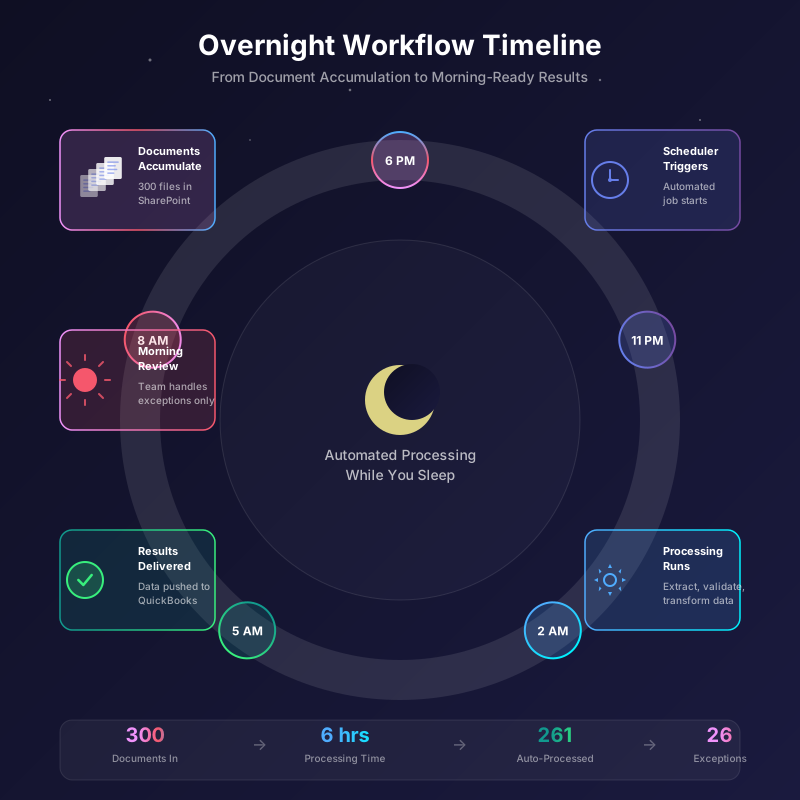
Scheduling isn't one-size-fits-all. Different document types accumulate at different rhythms, and your automation should match.
Nightly runs work best for documents that batch throughout the day. Invoices, purchase orders, employee expense receipts. Anything that accumulates during business hours and doesn't need immediate turnaround. Set the trigger for late night when server resources are abundant and nobody's competing for bandwidth.
Hourly processing makes sense for higher-volume, time-sensitive documents. Healthcare claims that need same-day adjudication. Customer applications where faster response improves conversion. Logistics paperwork that affects shipping schedules. Running every hour keeps the queue from building while still batching enough documents to process efficiently.
Weekly schedules fit periodic bulk uploads. Monthly statements from suppliers who send everything at once. Quarterly compliance documents. Annual renewal paperwork. These aren't daily workflows, so why check daily?
Custom cron expressions give you precise control. Every Tuesday and Thursday at 4 AM. The first Monday of each month. Fifteen minutes after every hour during business hours. If you can express it in cron syntax, you can schedule it.
Timezone handling matters more than people expect. A multinational company with offices in Tokyo, London, and Chicago has documents arriving around the clock. "Overnight" doesn't mean the same thing everywhere. Artificio lets you set schedules in specific timezones or coordinate multiple schedules for different regions. Your Tokyo team's end-of-day can trigger processing that's ready when London starts, and London's results can be waiting when Chicago arrives.
Scheduled automation only matters if documents can flow in and data can flow out without manual intervention. This is where integration sync ties everything together.
Inbound integrations pull documents from wherever they accumulate. SharePoint, Google Drive, Amazon S3, Box, Dropbox, and OneDrive all support automated monitoring. New files in designated folders get picked up automatically. No manual downloads. No daily batch transfers by IT. The integration watches and pulls as part of the scheduled workflow.
You can monitor multiple sources in a single workflow. Invoices might come from supplier portals, email attachments saved to SharePoint, and direct uploads to an S3 bucket. One scheduled workflow consolidates them all, applies consistent processing, and routes the results appropriately.
Outbound integrations push clean data to business systems. QuickBooks, NetSuite, Salesforce, SAP, Microsoft Dynamics. ERPs and accounting systems and CRMs all accept structured data. Once extraction and validation complete, the workflow pushes results directly to where they're needed. No re-keying. No import files that someone has to manually upload. No copy-paste from extraction results into transaction forms.
The integration layer also handles status updates. When a document finishes processing, the workflow can update a SharePoint list, send a Slack notification, or log completion to a tracking database. Your morning audit trail is built automatically. 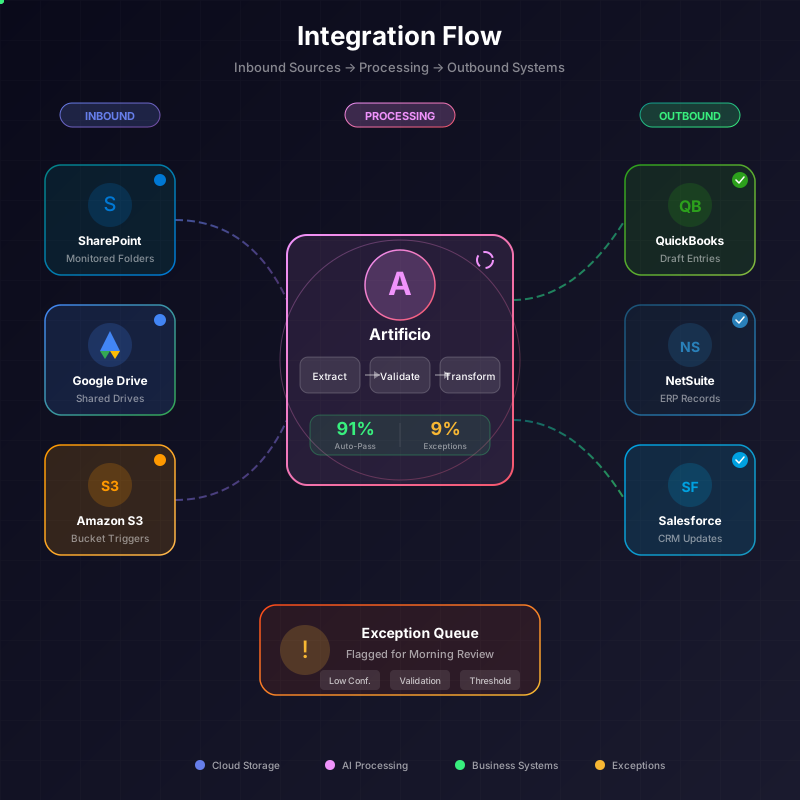
Automation running while everyone sleeps raises an obvious question. What happens when something fails?
A document gets stuck mid-extraction. The network connection to SharePoint hiccups. The QuickBooks API returns an error. These things happen, and they don't wait for convenient timing.
Good scheduled workflows expect failures and handle them gracefully.
Automatic retry logic handles transient issues. If a network timeout causes an extraction failure, the workflow waits a few minutes and tries again. Many errors resolve themselves. A brief S3 outage, a momentary rate limit, a temporary authentication glitch. Retry logic catches these without human intervention.
Exception queues capture persistent failures. Documents that fail extraction repeatedly don't crash the workflow. They get routed to an exception queue where they'll wait for morning review. The rest of the batch continues processing normally. One problem document doesn't hold up 286 successful ones.
Notification rules alert the right people when attention is actually needed. Not every error deserves a 2 AM text message. Configure escalation based on severity. Log-level notifications for routine issues. Email alerts for batches with high exception rates. SMS or Slack alerts for total workflow failures. Match the notification to the urgency.
Morning exception reports summarize overnight issues. Instead of paging through logs, your team gets a digest. 287 documents processed. 261 successful. 26 exceptions by type. Links to review each exception category. Five minutes of reading tells you exactly where to focus.
The goal isn't preventing all failures. It's ensuring failures don't cascade, easy issues resolve automatically, and genuine problems surface clearly for human attention.
There's a financial case for overnight automation beyond just labor efficiency.
Cloud compute costs follow demand curves. Daytime processing competes with everyone else's daytime processing. Network traffic is heavier. Spot instance prices are higher. Rate limits feel tighter because more customers are hitting the same APIs.
Night processing runs against lighter infrastructure loads. If you're paying for cloud resources, off-hours usage often costs less. If you're working with APIs that have daily rate limits, overnight processing consumes that allocation when nothing else needs it.
More importantly, overnight processing removes bottlenecks from the workday. Your team's productive hours go to exceptions and decisions, not watching progress bars. The morning meeting discusses what to do about flagged items, not whether the overnight batch finished in time.
The shift from manual batch processing to scheduled automation changes how work feels.
Without automation, the morning starts with a backlog. Someone checks the shared folder, sees 300 new documents, and begins the processing routine. Other work waits. Emails pile up. Questions go unanswered while extraction runs.
With scheduled automation, the morning starts with results. The shared folder is empty because everything's been processed. QuickBooks shows entries ready for review. The exception dashboard lists the 15 items that need attention. Real work begins immediately.
The difference is subtle but compounds. Teams that start with processed results have time for proactive work. They catch cash flow issues before they escalate. They follow up on discrepancies same-day. They build relationships with vendors instead of just processing their paperwork.
Teams that start with backlogs stay reactive. Every morning is triage. Proactive work gets pushed to "when we have time," and that time never arrives.
Implementing scheduled workflows doesn't require overhauling your entire document operation. Start with one high-volume, routine document type. Invoices are common. So are expense receipts, sales orders, and membership applications.
Map the current process. Where do documents come from? What extraction do they need? Where does the data go? What exceptions require human review?
Configure the workflow to match. Set up source monitoring on the relevant folders. Define extraction fields and validation rules. Connect the outbound integration to your business system. Build the exception routing.
Set the schedule. For your first automation, nightly is usually right. Pick a time when the source folder has stopped accumulating for the day and before your team arrives.
Monitor the first few runs. Check exception rates. Tune validation thresholds. Adjust notification rules. The first week is calibration.
Then let it run. The overnight backlog becomes the morning's completed work. Documents process while you sleep. And your team arrives to results instead of tasks.

Head IT Operations - Co Founder of Artificio
See it in your SAP environment
Bring us a document, a process, or a bottleneck. We'll show how Artificio captures, validates, and posts into SAP — then scale from there.
Security & compliance
ISO 27001:2013 certified, SOC 2 Type 2 compliant, GDPR and HIPAA ready. Every agent action is logged, auditable, and runs in isolated environments.