

Blog
Creating Dynamic, Data-Driven Documents at Scale with Artificio
The real enterprise document problem is an unscalable architectural disconnect between operational data and customer-facing documents.

Blog
The real enterprise document problem is an unscalable architectural disconnect between operational data and customer-facing documents.
The document problem in enterprise software isn't what most people think it is.
It's not that PDFs are outdated or that manual processes are slow. The real issue is that somewhere between your operational data and your customer-facing documents, there's a translation layer that fundamentally doesn't scale. And most companies don't realize they have this problem until they're already paying for it in ways that don't show up on a balance sheet.
Consider this: Your CRM tracks every customer interaction. Your billing system knows exactly what each client owes. Your inventory database updates in real-time. But when you need to generate a contract addendum, a compliance report, or a customized proposal, you're back to downloading a Word template and manually filling in fields.
The disconnect isn't technical anymore. It's architectural. We've built sophisticated systems to manage data, but we're still treating document generation as an afterthought, a final step that happens outside the system, handled by someone who understands both the data model and the document requirements.
That approach worked when documents were occasional outputs. It breaks completely when documents become your primary interface with customers, regulators, or partners.
Most organizations underestimate what's actually involved in document generation at scale. They see the surface problem (creating PDFs takes too long) without recognizing the underlying structural issues.
A mid-sized insurance company needs to generate policy documents. Each policy has standard sections, but the specific coverage details, exclusions, premium calculations, and regulatory disclosures vary by state, coverage type, customer profile, and underwriting decisions. That's not just variable data insertion. It's conditional logic, dynamic section inclusion, nested data structures, and compliance requirements that change by jurisdiction.
Their initial solution was straightforward: build templates for common scenarios, handle edge cases manually. This worked fine when they operated in three states and offered four product lines. But now they're in 15 states with 20 product variations, and suddenly they have 300 document templates to maintain. Every regulatory change means updating multiple templates. Every new product requires creating several new versions. They've essentially built a document management problem that scales exponentially with business complexity.
The manual approach isn't just slow. It creates a structural limitation on how fast the business can move. Want to launch in a new state? You're waiting two weeks for document templates. Need to test a new pricing model? You can't do it until someone builds the contract version. The document layer has become a bottleneck for business agility.
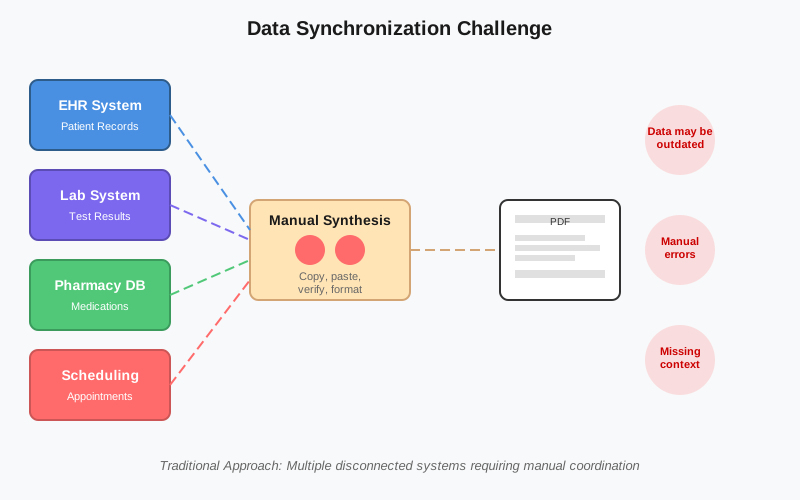
Here's a scenario that doesn't get enough attention: A healthcare network generates patient care summaries that need to include medication lists, lab results, treatment plans, and follow-up instructions. The data exists across multiple systems (EHR, lab system, pharmacy database, scheduling system). Someone has to pull data from four different places, synthesize it into a coherent document, ensure nothing is missing or contradictory, and produce a PDF that's both clinically accurate and patient-friendly.
The obvious risk is data entry errors. But the deeper problem is synchronization. The medication list in the EHR might have been updated after the document was generated. The lab results might include a critical value that should trigger specific discharge instructions, but the person creating the document doesn't have the clinical context to recognize that. You're not just manually creating documents. You're manually maintaining data consistency across disconnected systems, and you're doing it at the exact moment when accuracy matters most.
Traditional solutions treat this as a workflow problem (add more checkpoints, more approvals). But it's actually a system design problem. The document shouldn't be separate from the data. It should be a dynamic view of the data, generated on-demand with the current state of information.
Most companies approach document generation as a formatting challenge. You have data, you need a template, you merge them together. Tools like mail merge or basic PDF libraries solve this problem adequately for simple use cases.
But enterprise document needs are rarely simple. They're complex information products that require:
This is where traditional approaches start requiring significant custom development. You're not just filling in a template anymore. You're building document generation logic that needs to understand your data model, business rules, and output requirements.
The conventional solution is to hire developers to write code that handles this complexity. And that works, technically. But it creates a different problem: your document templates are now embedded in application code, which means business users can't update them without engineering tickets. Simple changes (updating a footer, adjusting column widths, changing conditional logic) require developer time, testing, and deployment cycles.
You've traded one bottleneck for another.
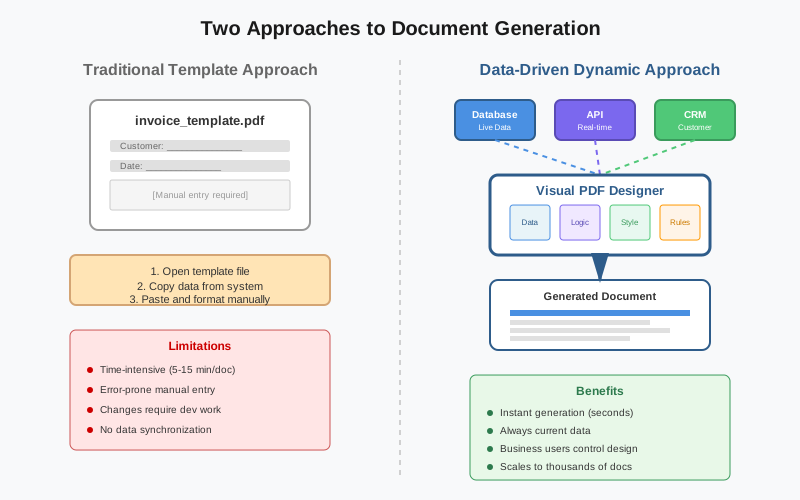
Artificio's PDF Designer approaches this differently. Instead of treating document generation as either a template problem (requiring manual work) or a coding problem (requiring developers), it creates a middle layer where business users can build sophisticated document generation logic through a visual interface.
The key insight is that most document complexity isn't actually that complex. It's just tedious to implement. Conditional sections, dynamic tables, calculated fields—these are straightforward concepts that become complicated only because they require translation into code. If you can express these concepts visually, directly connecting data sources to design elements, you eliminate the translation layer.
Rather than starting with a static template, you start with a design canvas that understands data structures. You can drag in a table component and point it at a dataset. The table automatically handles variable row counts, pagination, column calculations, and formatting. You can add conditional sections that show or hide based on data values. You can nest components inside each other (a customer detail card that contains a table of line items, each with calculated subtotals).
The difference is subtle but important. You're not building a template and hoping your data fits. You're building a document structure that adapts to your data.
This matters most when requirements change. Add a new field to your database? You can map it to your document layout in minutes, not hours. Need to adjust conditional logic? You're changing visual rules, not debugging code. Want to create a variant for a different customer segment? You're duplicating and modifying a design, not managing template versioning across file systems.
The real sophistication happens in how data connects to design elements. Traditional PDF tools treat data as simple key-value pairs. You have a field called "customer_name" and you put it somewhere in the document. But enterprise data is rarely that simple.
Consider an invoice. You don't just have line items. You have line items that might have associated discounts, tax calculations that vary by jurisdiction, shipping charges that depend on item weight, and promotional codes that apply to specific product categories. This isn't simple mail merge. It's a data structure with relationships, calculations, and conditional logic.
Artificio's approach treats your data model as a first-class citizen. You can map nested data structures, define calculated fields within the document logic, apply transformations, and handle missing data gracefully. The document template becomes an intelligent layer that understands your data semantics, not just field names.
The applications become clear once you understand the architecture.
A wealth management firm needs to generate quarterly portfolio statements for 5,000 clients. Each statement includes holdings across multiple asset classes, performance calculations, fee breakdowns, regulatory disclosures, and personalized commentary from advisors. The data comes from portfolio management systems, market data feeds, and CRM notes.
Without dynamic document generation, they're either producing generic statements (poor client experience) or spending significant time customizing outputs (doesn't scale). With Artificio's PDF Designer, they build templates that pull current portfolio data, apply performance calculations within the document logic, conditionally include disclosure text based on holdings, and personalize sections based on client segments. The statements are generated nightly, always current, always compliant.
A hospital system generates discharge summaries, referral letters, and prior authorization requests. Each document type has specific data requirements, formatting standards, and compliance needs. The challenge isn't just creating the document. It's ensuring it includes all necessary information from multiple source systems while remaining readable and clinically useful.
Their PDF Designer templates pull data from EHR, lab systems, and pharmacy databases. They include conditional sections (show radiology results only if imaging was performed), dynamic tables (medication lists with dosing instructions), and calculated fields (length of stay, risk scores). When a clinician requests a document, it's generated instantly with current data, properly formatted, and ready for review.
A university issues thousands of transcripts, certificates, and enrollment verifications annually. Each document needs institutional branding, student data, course history with grades, and specific formatting based on document type. They also need to maintain historical accuracy (a transcript from 2015 should reflect policies and formatting from 2015, not current versions).
Using PDF Designer, they create versioned templates with dynamic tables for course listings, calculated GPAs, conditional honors notations, and official seals. Students can request documents through a portal, and the system generates them instantly. Template updates don't affect historical documents, maintaining integrity of the academic record.
Most discussions about document automation focus on time savings and error reduction. These are real benefits, but they miss the larger strategic implications.
When document generation is bottlenecked by template creation or custom development, it directly impacts how fast you can launch new offerings. If it takes two weeks to build contract templates for a new product line, you're delaying revenue. If every pricing change requires document updates that need developer time, you're limiting commercial agility.
With visual document design tools, the business teams closest to customer needs can create and modify documents directly. Product managers can build proposal templates. Operations teams can update invoices. Compliance officers can adjust disclosure language. The cycle time from "we need a new document" to "documents are being generated" shrinks from weeks to days or hours.
Generic documents are a missed opportunity. You have rich customer data, but you're sending everyone the same basic output. Personalized documents (customized recommendations, tailored content, specific examples relevant to each recipient) create better customer experiences, but they're impractical if personalization requires manual work.
When document generation is tightly coupled with your data, personalization becomes a design choice, not a labor issue. You can create templates that adapt content based on customer segments, past behavior, or specific attributes. The same template generates different outputs for different recipients, automatically using the most relevant data and messaging.
Regulatory requirements change frequently. In industries like finance, healthcare, or insurance, staying compliant means constantly updating document content, disclosures, formatting, and data inclusion. If these changes require touching custom code or manually updating hundreds of templates, compliance becomes expensive and risky.
When compliance requirements are embedded in document templates rather than scattered across code and files, updates are centralized and auditable. Change a disclosure requirement? Update it once in the template library. Need to prove what disclosure was included in documents from Q2 2023? The versioned templates provide a clear audit trail.
Adopting dynamic document generation isn't just a tool decision. It's a shift in how your organization thinks about documents.
When more people can create templates, you need clear governance. Who owns the canonical template for customer invoices? How do you prevent well-intentioned updates from breaking downstream systems? What's the approval process for templates that generate legally binding documents?
The answer isn't to restrict access. It's to build appropriate controls into the workflow. Version control, approval chains, testing environments, and rollback capabilities. Treat your template library like code: it needs similar rigor around changes, testing, and deployment.
Dynamic documents expose data quality issues that manual processes hide. If a human is creating documents, they can work around missing fields, correct obvious errors, or apply judgment when data seems wrong. Automated systems can't do that without explicit handling.
This is actually a benefit disguised as a challenge. When document generation breaks because of data quality issues, you're identifying problems in your source systems. Fixing those problems improves not just documents but all downstream processes that rely on that data.
Moving from manual document creation or developer-dependent solutions to business-user-driven templates requires new skills. People need to understand data mapping, conditional logic, and template design principles. This isn't coding, but it's more technical than using Word.
The investment pays off quickly. A few days of training enables team members to build and maintain templates that previously required developer time or external consultants. The ROI isn't just in time savings. It's in organizational capability.
The future of enterprise documents isn't about eliminating PDFs or moving everything to interactive web experiences. PDFs remain the standard for official records, contracts, statements, and anything that needs to be archived or shared across systems. The format isn't the problem.
The problem is how we create them. Treating document generation as a separate step, disconnected from operational data, made sense when documents were occasional outputs. It doesn't make sense anymore.
As businesses become more data-driven, documents need to be data-driven too. Not just because it's more efficient, but because it's the only way to maintain consistency, enable personalization, and move at the speed modern business requires.
Artificio's PDF Designer represents a pragmatic approach to this transition. It doesn't require reimagining your entire document strategy or migrating away from PDFs. It creates a bridge between your existing data infrastructure and your document outputs, making the connection dynamic, maintainable, and accessible to the people who understand your business needs.
The question isn't whether your organization will adopt dynamic document generation. The question is how long you'll continue paying the hidden costs of not having it.

Head IT Operations - Co Founder of Artificio
See it in your SAP environment
Bring us a document, a process, or a bottleneck. We'll show how Artificio captures, validates, and posts into SAP — then scale from there.
Security & compliance
ISO 27001:2013 certified, SOC 2 Type 2 compliant, GDPR and HIPAA ready. Every agent action is logged, auditable, and runs in isolated environments.