Your company runs on Microsoft. Teams for communication, SharePoint for document storage, Power Automate for workflows, Azure for infrastructure. When you need to automate document processing, the obvious question is: why wouldn't you just use Microsoft Syntex?
It's a reasonable assumption. Staying in the Microsoft ecosystem feels safe. Procurement is simpler. IT already knows the stack. And Syntex comes bundled with Microsoft 365, so it feels like you're already paying for it.
But "already in the ecosystem" and "best tool for the job" are two different things. Companies that default to Syntex because it's the Microsoft option often find themselves rebuilding workflows six months later when extraction accuracy plateaus or when the document types they actually need to process don't fit the templates Syntex was designed for. This isn't a knock on Microsoft. It's just that Syntex was built to solve a specific problem, and if your problem is different, a different tool will serve you better.
Here's an honest comparison, written for teams already deep in the Microsoft stack who want to make a genuinely informed decision.
Syntex started life as a SharePoint feature, and that origin story still shapes what it's good at. It's designed to classify and tag documents stored in SharePoint, extract metadata, and push that metadata into Microsoft 365 apps and Power Automate workflows. If your primary challenge is making SharePoint libraries more searchable and organised, Syntex genuinely shines.
It uses a mix of approaches: document understanding models (which require training on sample documents you label in SharePoint), prebuilt models for things like invoices and receipts, and more recently, generative AI features via Azure OpenAI that Microsoft markets as "pay-as-you-go" processing.
The setup experience is familiar if you're an M365 administrator. You work inside SharePoint content centres. Training models feels like tagging documents in a library, not writing code. For teams with no data science resource, that low-friction entry point is genuinely valuable.
The limitations show up when you move beyond well-structured, consistent documents in SharePoint. Syntex's extraction accuracy on complex or variable documents, such as contracts with dozens of clause variations, logistics documents with non-standard layouts, or multi-page financial statements, tends to be inconsistent without significant model retraining effort. And it's inherently document-centric: the intelligence lives in SharePoint, which means any document that doesn't flow through SharePoint first creates a gap.
How Artificio Approaches the Same Problem Differently
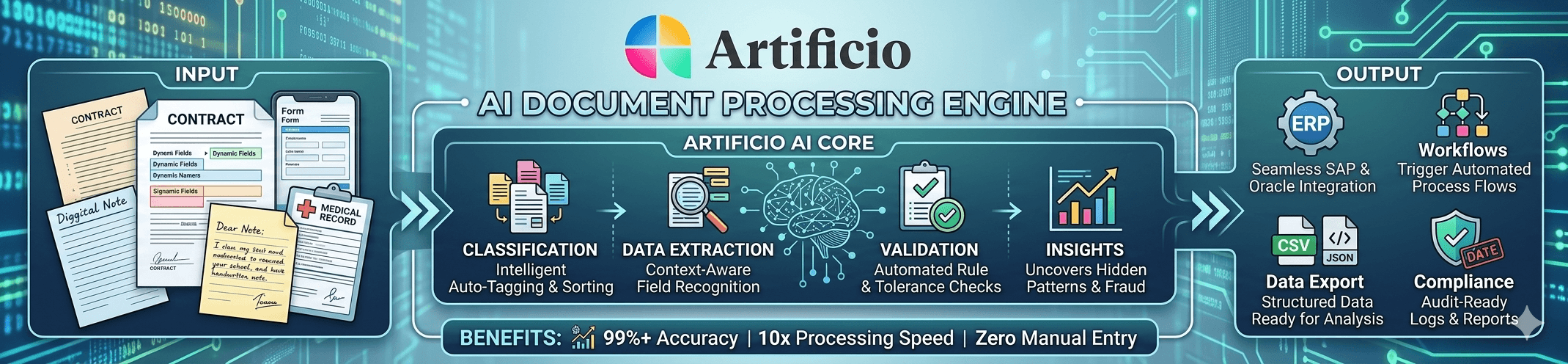
Artificio was built as an AI-native document processing platform, not as an extension of a storage system. The core architecture difference matters: where Syntex classifies and tags documents that already live in SharePoint, Artificio processes documents regardless of where they originate. PDFs arriving by email, images uploaded through a web portal, documents pulled from an FTP server, files shared via API, they all go through the same extraction pipeline.
The AI agents behind Artificio's extraction don't rely on traditional OCR or rigid template matching. They interpret document structure semantically, which means they handle layout variation the way a trained human would: by understanding context rather than by matching fields to fixed positions on a page. That distinction matters most for the document types that give most platforms trouble, things like supplier invoices from dozens of different vendors, bills of lading with non-standard field ordering, or clinical documents with inconsistent terminology.
Artificio also separates extraction from workflow. You can build complex multi-step workflows on top of extracted data, including approvals, validation rules, exception routing, and integrations with systems like SAP, NetSuite, Salesforce, or your own databases, without being constrained by what Power Automate supports natively. 
The Eight Dimensions That Actually Separate Them
Document origin and ingestion. Syntex is SharePoint-first. Documents need to be in or routed through SharePoint for the classification and extraction to work. Artificio ingests from anywhere: email attachments, web portals, API calls, SFTP, cloud storage, and direct uploads. If your document volumes include sources outside SharePoint (and for most enterprises they do), Artificio's architecture handles that more naturally.
Extraction accuracy on messy documents. For clean, consistent document types with little layout variation, Syntex performs well after model training. For documents with variable layouts, mixed formats, handwritten annotations, or multi-page structures, the performance gap between semantic AI extraction and template-based approaches is significant. Artificio's extraction handles variability better because it's reasoning about content rather than matching patterns.
AI approach under the hood. Syntex recently added Azure OpenAI-based processing, which improves its handling of unstructured content. The "pay-as-you-go" model for these features can get expensive quickly at scale, and the integration between the generative AI features and older Syntex models isn't always seamless. Artificio's AI is purpose-built for document workflows end to end, so there's no seam between the classification layer, the extraction layer, and the workflow layer.
ERP and back-end system integration. This is where the difference becomes most commercially relevant. Syntex integrates naturally with Microsoft Dynamics 365 and Power Platform. Connecting it to SAP, Oracle, or NetSuite requires Power Automate connectors and custom development work. Artificio has native integrations with SAP S/4HANA, NetSuite, Salesforce, and other enterprise systems, including the ability to write back structured data in the formats those systems expect without intermediate transformation steps.
Workflow flexibility. Power Automate is a capable automation tool, but it's designed as a general-purpose automation layer. Building document-specific workflows with complex validation logic, multi-party approvals, or exception handling across different document types typically requires significant flow development effort in Power Automate. Artificio's workflow engine is purpose-built for document processing, so the common patterns (straight-through processing for clean documents, human-in-the-loop review for exceptions, parallel approval routing) are available as native configurations rather than custom builds.
Setup and ongoing maintenance. Syntex's SharePoint-based model training is accessible to business users, which is a genuine advantage for teams without technical resources. The trade-off is that models trained on small document sets in SharePoint libraries can be brittle when document layouts change or new variants appear. Artificio's AI handles layout variation generatively, which reduces the ongoing retraining burden as your document landscape evolves.
Microsoft 365 native experience. Syntex wins this one clearly. If your workflow starts and ends in Teams, SharePoint, and Microsoft 365 apps, the native integration is smoother. Extracted metadata surfaces directly in SharePoint columns. Triggering a Power Automate flow from a classified document is a native operation. For use cases that live entirely within M365, that seamless connectivity has real value.
Pricing model. Syntex licensing is structured per user or per consumption for generative AI features. For high-volume document processing, the per-consumption pricing on the AI-powered features adds up quickly and can make budgeting unpredictable. Artificio's pricing is volume-based, which makes it more predictable at scale and often more cost-effective once document volumes exceed a few thousand documents per month.
Where Microsoft Companies Get This Wrong
The most common mistake is treating "it connects to SharePoint" as the primary evaluation criterion. SharePoint connectivity matters, but it's rarely the bottleneck in a document processing workflow. The bottlenecks are usually extraction accuracy, exception handling, and getting clean structured data into the systems where decisions get made.
A pharma company processing clinical trial documents doesn't need a better SharePoint library. It needs extraction accuracy high enough to trust without manual review on every document. A logistics company processing hundreds of bills of lading daily doesn't need documents tagged in SharePoint. It needs clean structured data flowing into its TMS or ERP in real time.
Syntex solves the SharePoint organisation problem extremely well. For companies where the core challenge is accuracy, speed, volume, or integration with non-Microsoft back-end systems, that's not the same problem.
There's also a less obvious risk: Syntex lock-in. Because models are trained inside SharePoint content centres and the architecture is tightly coupled to M365, switching platforms later requires rebuilding from scratch. If your document processing needs will grow in complexity or volume, starting with a purpose-built platform gives you more room to scale without re-platforming.
If You're Microsoft-First, Here's the Real Question to Ask
The question isn't "which platform connects to Microsoft?" Both do. The question is: "Where does the intelligence need to live, and where does the output need to go?"
If your documents live entirely in SharePoint, your downstream systems are Dynamics 365 and Power BI, and your document types are relatively standardised, Syntex probably covers your needs with less friction than any alternative.
If your documents come from multiple sources, your downstream systems include SAP or NetSuite, your document types are variable and complex, or you need extraction accuracy high enough to reduce manual review to a small exception set, Artificio is the better fit. And it still integrates with SharePoint, Teams, and the rest of your Microsoft stack through standard APIs and native connectors. You don't have to choose between Microsoft and Artificio. You choose what role each plays.
Artificio handles the extraction and workflow intelligence. SharePoint stays your document repository. Power Automate or Teams can be notification and approval layers. The Microsoft ecosystem remains intact. What changes is that the AI doing the heavy lifting is purpose-built for documents rather than retrofitted onto a content management platform.
Choosing on Evidence, Not Assumptions
The companies that make the best platform decisions run pilots before they commit. Both Syntex and Artificio offer ways to test against your actual documents, and the results on your real document types will tell you more than any comparison article can.
If you're evaluating options, bring a representative sample of your highest-volume or most complex document types. Run them through both platforms. Look at extraction accuracy, time to configure, and what the output looks like when it reaches your back-end system. The results on your documents, with your layouts and your field structures, will be the most useful evidence you can gather.
What tends to surprise teams that assume Syntex is the safe default is how quickly purpose-built AI closes the gap on Microsoft connectivity while opening up a significant gap on extraction performance. The ecosystem advantage is real. The question is whether it outweighs everything else that matters for your specific use case.
For most enterprise document processing challenges, it doesn't