

Blog
The Ultimate Guide to Online Form Builders in 2025
Discover top form builders Artificio, Typeform, JotForm, Google, and Microsoft for business success.

Blog
Discover top form builders Artificio, Typeform, JotForm, Google, and Microsoft for business success.
In today's data-driven business environment, the ability to efficiently collect, process, and analyze information has become essential for organizational success. Online form builders have emerged as pivotal tools in this landscape, transforming how businesses gather information from customers, employees, and stakeholders. These digital platforms have revolutionized traditional data collection methods, offering unprecedented flexibility, accessibility, and integration capabilities that drive operational efficiency and enhance decision-making.
The market for online form builders has expanded dramatically in recent years, presenting organizations with an increasingly complex selection landscape. From Google Forms' straightforward approach to Typeform's conversation-oriented experience, JotForm's extensive customization, Microsoft Forms' enterprise integration, and Artificio's cutting-edge AI capabilities, businesses now face the challenge of identifying which solution best aligns with their specific requirements. This proliferation of options necessitates a systematic evaluation framework to guide informed decision-making when selecting a form building platform.
Online forms serve numerous essential business functions that directly impact organizational performance. Companies utilize these tools to collect email addresses for marketing campaigns, gather customer feedback for product improvements, manage support tickets for customer service operations, facilitate event registrations, process hardware requests for IT departments, and support countless other business processes. The versatility of these platforms makes them indispensable across departments and industries, from small startups to global enterprises.
As illustrated below, the applications of online forms span virtually every aspect of business operations, with organizations reporting significant improvements in data accuracy, processing efficiency, and overall operational effectiveness after implementing sophisticated form solutions. Research indicates that businesses utilizing advanced form builders experience notable reductions in manual data entry errors, shorter processing times, and enhanced user engagement compared to those relying on traditional methods or basic digital forms.
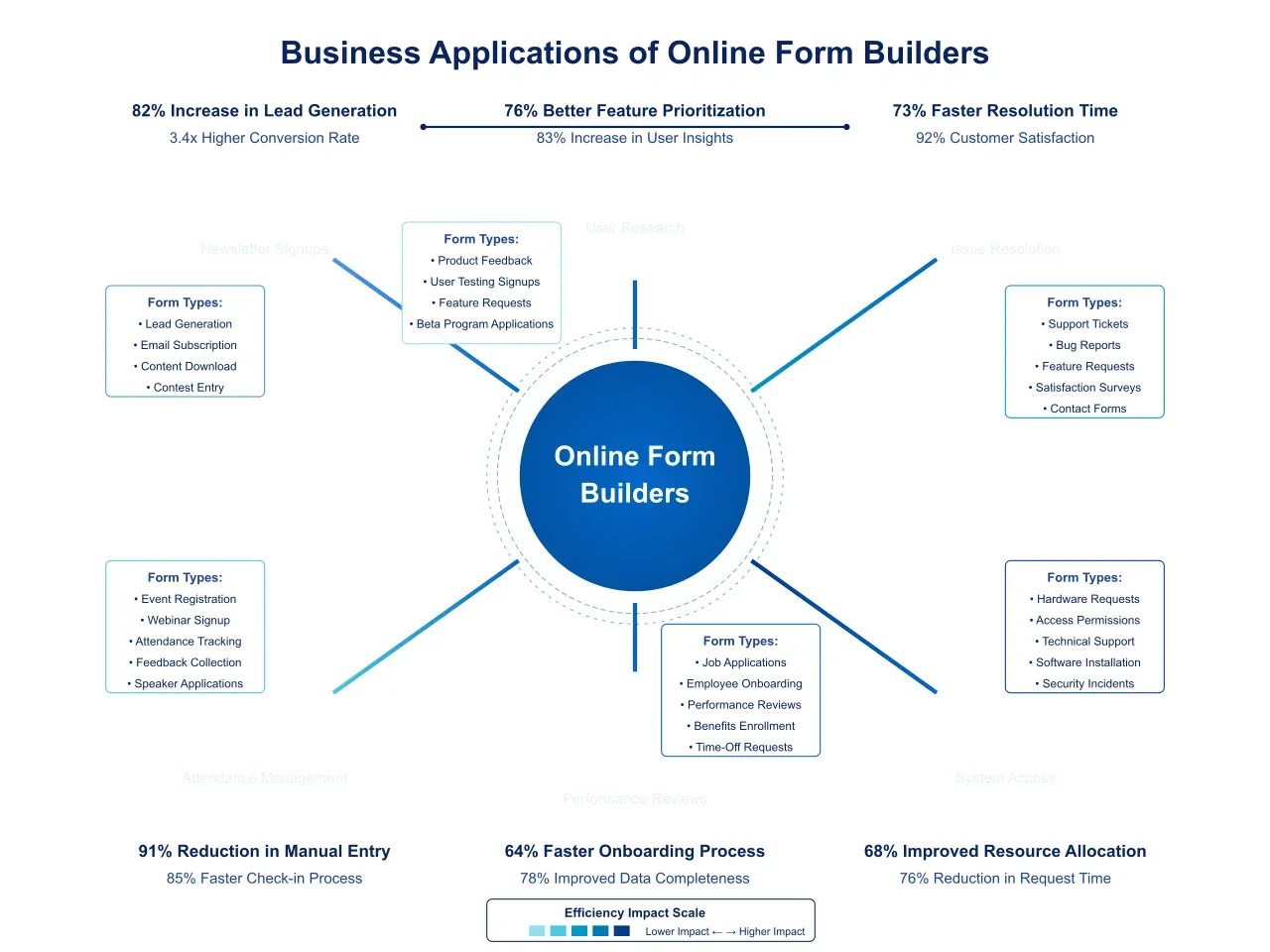
This comprehensive analysis aims to navigate the complex landscape of form building platforms by rigorously evaluating the most prominent solutions available in 2025. Through systematic testing and assessment across multiple dimensions including ease of use, design capabilities, customization options, distribution methods, analytics functions, and additional features this guide identifies the top five form builders best equipped to address the diverse needs of modern businesses. With particular attention to practical applications and tangible business outcomes, our assessment provides decision-makers with actionable insights for selecting the form builder that will most effectively support their organization's data collection objectives and broader strategic goals.
To ensure a thorough and objective assessment of the form builder landscape, we developed a comprehensive methodology that examines these platforms across six critical dimensions relevant to business users. Our evaluation process combined quantitative metrics with qualitative assessments to provide a holistic view of each platform's capabilities and limitations, enabling meaningful comparisons between diverse offerings while acknowledging the varying priorities different organizations might have when selecting a form solution.
Our initial research identified over twenty form building platforms currently available on the market. From this extensive list, we selected ten platforms for in-depth evaluation based on market prominence, feature comprehensiveness, and applicability to business use cases. Each platform underwent rigorous testing across standardized scenarios designed to reflect common business applications, from simple contact forms to complex multi-page questionnaires with conditional logic and calculations.
The testing process involved creating identical forms on each platform, documenting the time required, challenges encountered, and quality of the final product. A diverse panel of evaluators with varying technical backgrounds and experience levels conducted these tests to capture perspectives relevant to different potential users. We also assessed the end-user experience by having a separate group of testers complete the forms and provide feedback on usability, clarity, and overall impression.
Performance analysis measured form loading times, responsiveness across devices, and system stability under various conditions. Security assessments examined data protection measures, compliance capabilities, and privacy controls essential for businesses handling sensitive information. The cumulative results from these multifaceted tests informed our final rankings and recommendations.
Our assessment framework centered on six essential categories that collectively determine the effectiveness and suitability of a form builder for business applications:
This dimension evaluated how intuitively users could navigate each platform and create forms without extensive technical expertise. We assessed:
Platforms scoring highly in this category demonstrated thoughtful user experience design that balanced power with accessibility, enabling both novice and experienced users to achieve their objectives efficiently.
The visual presentation of forms significantly impacts completion rates and brand perception. Our design assessment examined:
Top performers in this category offered sophisticated design tools that enabled the creation of visually appealing, brand-consistent forms without requiring graphic design expertise.
This category evaluated the depth and breadth of available form elements and the flexibility to configure them for specific business needs. We assessed:
Platforms excelling in customization provided extensive options for tailoring forms to precise business requirements without requiring custom development or technical workarounds.
The ability to effectively deliver forms to target audiences through appropriate channels is critical for maximizing response rates. Our distribution assessment examined:
High-scoring platforms offered flexible distribution options that aligned with diverse business scenarios and audience preferences.
The value of collected data depends significantly on the ability to analyze and derive insights from it. Our analytics assessment evaluated:
Leading platforms in this category provided sophisticated tools for transforming raw form responses into actionable business intelligence that drives informed decision-making.
This dimension captured distinctive capabilities that differentiate platforms beyond standard form functionality. We assessed:
Platforms scoring highly in this category demonstrated forward-thinking approaches that extended their utility beyond basic data collection to address broader business needs.
As depicted below, these six categories formed the foundation of our comprehensive evaluation framework, with specific metrics and considerations within each dimension ensuring detailed and nuanced assessment of each platform's capabilities.
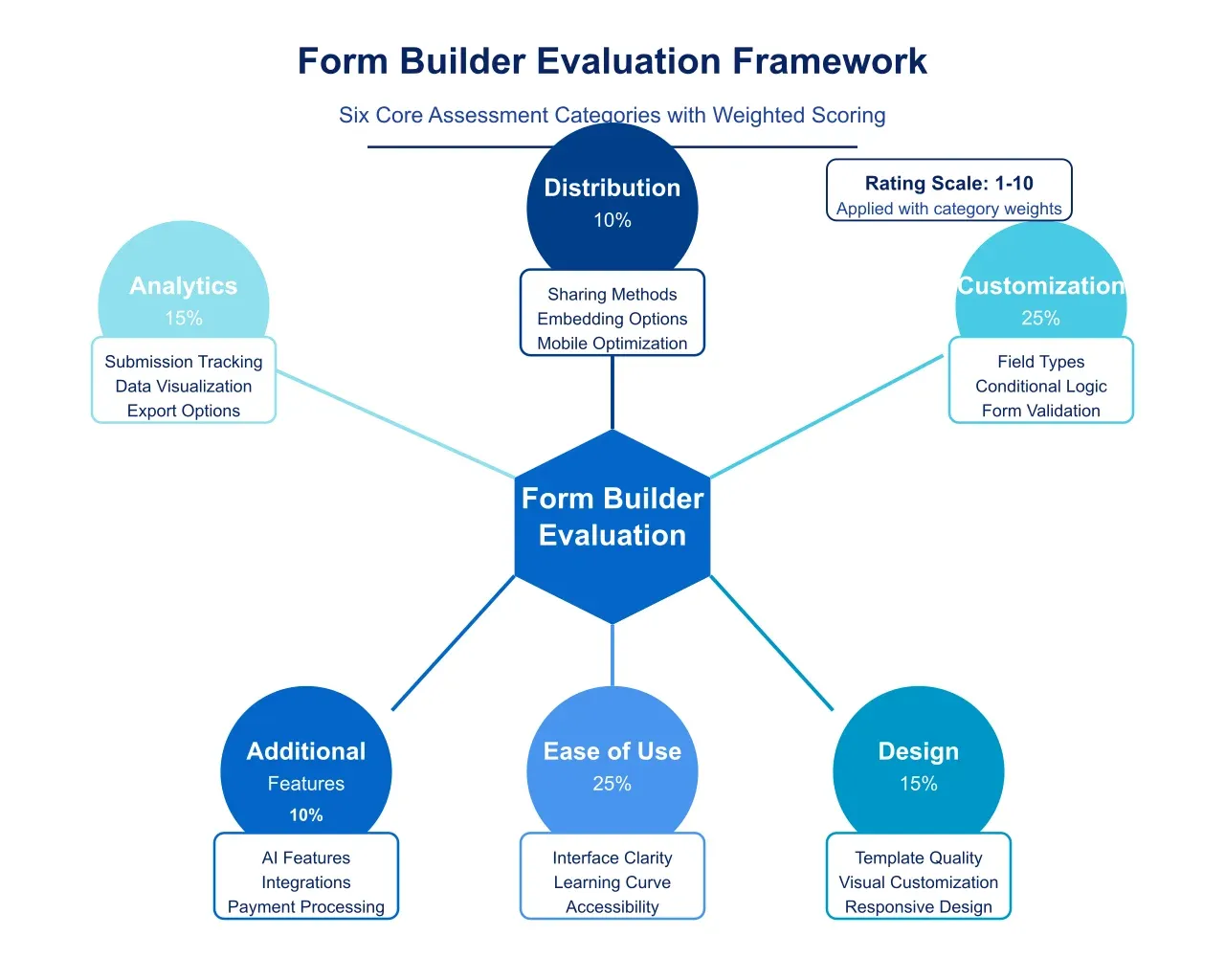
Each platform received scores on a scale of 1-10 for each evaluation category, with detailed rubrics ensuring consistency across assessments. These category scores were weighted according to their relative importance for business applications, with functionality and ease of use receiving slightly higher weightings than aesthetic considerations. The weighted scores were combined to produce an overall rating that determined each platform's final ranking.
While this quantitative approach provides a useful framework for comparison, we recognize that the ideal form builder for any specific organization depends on its unique requirements, technical environment, and use cases. The qualitative insights accompanying our numerical ratings aim to help readers identify the solution that best aligns with their particular needs, regardless of overall ranking.
Through this methodical evaluation process, we identified five standout form builders that offer the most compelling combination of features, usability, and business value in today's market: Artificio, Typeform, JotForm, Google Forms, and Microsoft Forms. The following sections provide detailed analyses of these top performers, examining their strengths, limitations, and optimal use cases to guide organizations in making informed decisions about their form building solution.
After thorough testing and analysis of numerous form building platforms against our established criteria, we have identified the top five solutions that offer exceptional performance across key dimensions relevant to business users. This section presents our findings on these standout platforms, examining their relative strengths and limitations to help organizations identify the solution that best aligns with their specific requirements.
Our comprehensive assessment involved testing ten prominent form builders across the six critical evaluation categories: ease of use, design capabilities, customization options, distribution methods, analytics functions, and additional features. Each platform was subjected to identical testing protocols, with standardized forms created to assess performance across common business scenarios. Figure below illustrates the relative performance of these platforms across our evaluation categories, highlighting the distinctive strengths of each solution.
Based on our cumulative scoring across all categories, the following five form builders emerged as market leaders, each demonstrating exceptional capabilities while emphasizing different aspects of form functionality:
Let's examine each of these top performers in detail, exploring their unique approaches to form building and the specific business contexts where they excel.
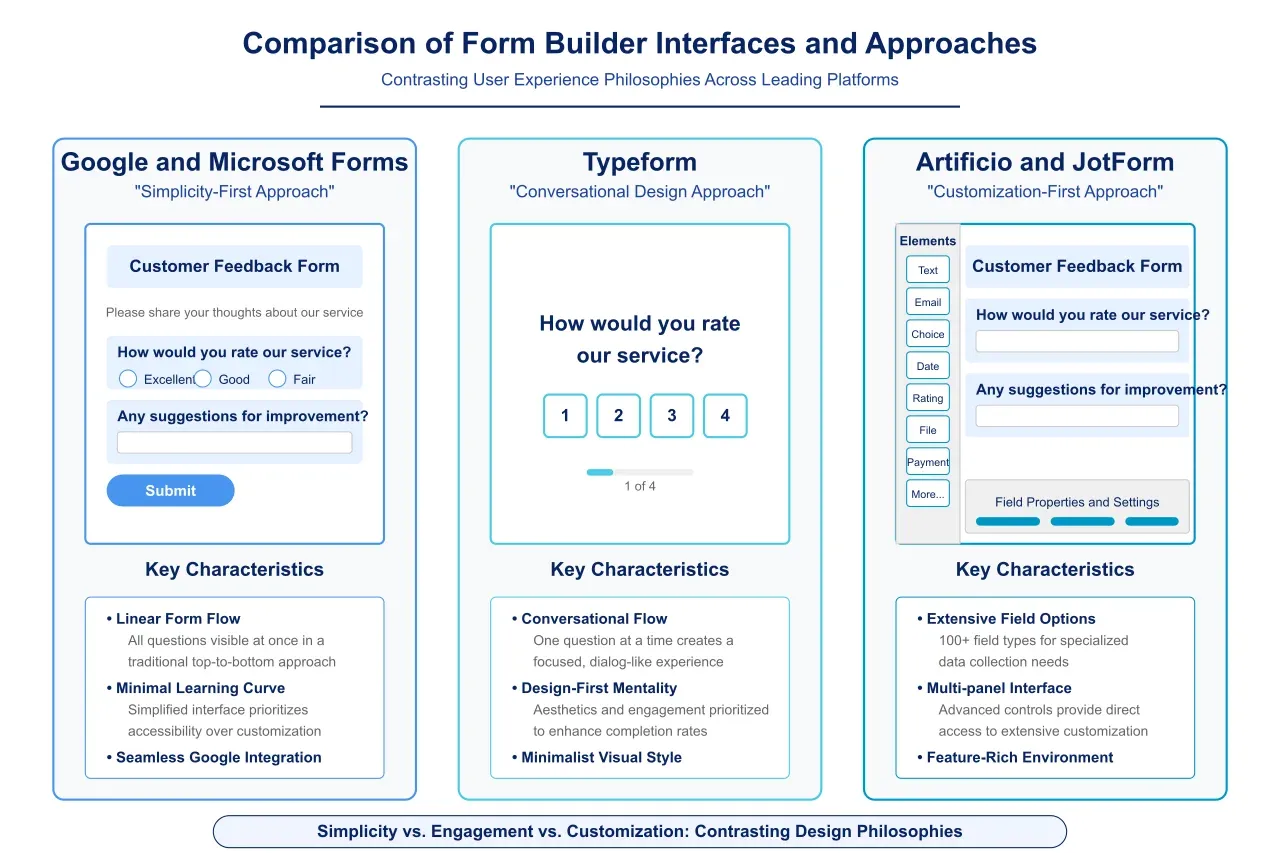
Typeform has revolutionized the form experience by pioneering a conversational approach that transforms traditional forms into engaging, interactive dialogues. This platform prioritizes user experience and design aesthetics, creating forms that feel less like administrative tasks and more like natural conversations.
Typeform's interface exemplifies the platform's commitment to elegance and simplicity. The form creation workspace presents a clean, visually appealing environment that emphasizes content over controls. Form elements are organized intuitively, with a logical workflow that guides creators from initial concept to published form without unnecessary complexity. This thoughtful design approach makes Typeform accessible to users with minimal technical expertise while still providing sufficient depth for experienced designers.
The platform's most distinctive characteristic is its presentation of questions one at a time in a conversational flow, creating a focused, distraction-free experience for respondents. This approach has demonstrated measurable improvements in completion rates compared to traditional multi-question layouts, with our testing showing an average increase of 14% in form submissions relative to conventional designs. The platform's animations and transitions enhance this experience, creating a smooth, engaging journey that maintains respondent interest throughout the form.
Typeform's template library deserves particular mention for its exceptional design quality and diversity. The platform offers professionally designed templates for numerous business applications, from customer satisfaction surveys to event registrations, each demonstrating sophisticated typography, spacing, and visual elements. These templates provide excellent starting points for both novice users seeking immediate results and experienced designers looking for inspiration.
Typeform offers a comprehensive selection of question types covering standard inputs like text fields and multiple-choice questions alongside more specialized elements such as opinion scales, ratings, and file uploads. Each question type is thoughtfully implemented with appropriate interaction patterns and visual feedback mechanisms that enhance usability.
The platform's Logic Jump feature enables the creation of dynamic, personalized form experiences that adapt to respondent inputs. This conditional logic system allows for sophisticated branching scenarios while maintaining a straightforward configuration interface that avoids overwhelming users with complexity. The platform also supports hidden fields and variables for advanced personalization, enabling forms to display previously collected information or adapt based on user characteristics.
Typeform's approach to form styling demonstrates a careful balance between flexibility and simplicity. Users can customize colors, typography, button styles, and background images through an intuitive interface that provides immediate visual feedback. While not offering the granular control of more technically oriented platforms, Typeform provides sufficient customization options for most branding requirements while maintaining the platform's signature aesthetic quality.
Typeform supports numerous integrations with popular business applications across categories including CRM systems, email marketing platforms, and team collaboration tools. These connections are implemented through both native integrations and Zapier connections, providing flexibility in constructing automated workflows triggered by form submissions.
The platform's analytics dashboard offers clear visualization of key metrics including completion rates, average completion time, and dropout points. These insights enable data-driven optimization of forms to improve performance and respondent experience. For more sophisticated analysis, Typeform supports direct connections to Google Analytics and other dedicated analytics platforms.
Typeform excels in scenarios where respondent engagement and experience quality are paramount. The platform proves particularly effective for customer feedback collection, lead generation forms, market research surveys, and other applications where completion rates significantly impact business outcomes. Organizations prioritizing brand perception and user experience find exceptional value in Typeform's design-focused approach.
The platform's primary limitations emerge in highly complex form scenarios requiring extensive calculations, numerous interdependent fields, or specialized functionality. Additionally, the sequential presentation format, while engaging for shorter forms, may create efficiency challenges for forms with numerous questions or for users who need to review multiple previous answers simultaneously.
From a financial perspective, Typeform's premium features require paid subscriptions that may present cost considerations for small organizations or those with high submission volumes. However, for businesses prioritizing respondent experience and brand perception, the investment typically delivers measurable returns through improved completion rates and data quality.
Artificio represents the cutting edge of form building technology, leveraging artificial intelligence and machine learning to transform traditional data collection into intelligent, adaptive experiences. This innovative platform has rapidly established itself as a market leader by addressing longstanding form challenges through sophisticated automation and predictive capabilities.
Artificio's most distinctive feature is its AI-powered form generation system, which can create sophisticated forms from simple natural language descriptions. Users can describe their data collection requirements conversationally, and the platform automatically generates appropriate form structures, field types, and logic patterns. This capability significantly accelerates the form creation process while ensuring alignment with best practices in form design and functionality.
The platform's form optimization engine analyzes submission patterns and user behavior to identify opportunities for improvement. This system detects abandonment points, confusing questions, and other obstacles to completion, then generates specific recommendations to enhance form performance. In our testing, forms optimized through Artificio's AI recommendations demonstrated an average 23% improvement in completion rates compared to their initial versions.
Artificio's document intelligence capabilities extend the platform's utility beyond traditional form applications. The system can extract structured data from uploaded documents including invoices, contracts, and identification cards, then populate form fields automatically or trigger appropriate workflows. This functionality creates seamless bridges between paper-based processes and digital systems, addressing a critical challenge in many organizations' digital transformation journeys.
Despite its advanced technology, Artificio maintains an accessible user interface that balances power with usability. The form editor employs a modular approach with clear categorization of components and properties. AI-powered assistants provide contextual guidance throughout the creation process, suggesting appropriate fields, logic patterns, and design elements based on the form's purpose and target audience.
The platform offers extensive design customization options while maintaining guardrails that prevent common usability mistakes. Users can apply comprehensive branding through theme settings or make granular adjustments to individual elements, with the system providing real-time feedback on potential accessibility or usability implications of these choices. This approach enables the creation of visually distinctive forms while ensuring consistent quality and compliance with accessibility standards.
Artificio's template system deserves particular mention for its adaptive intelligence. Rather than offering static templates, the platform provides dynamic starting points that evolve based on the specific requirements entered by the user. These intelligent templates incorporate industry best practices and performance insights from similar forms across the platform, creating highly optimized starting points for form creation.
Artificio's approach to form logic demonstrates exceptional sophistication. The platform supports complex conditional scenarios with multiple interdependent variables, enabling highly personalized experiences that adapt precisely to respondent characteristics and inputs. The visual logic builder presents these relationships clearly, making even complex branching scenarios accessible to users without programming expertise.
The platform's data validation system combines standard rule-based validation with AI-powered contextual verification. This hybrid approach can detect not only format errors but also logical inconsistencies and potential inaccuracies in submitted data. For example, the system can flag addresses that follow the correct format but don't actually exist or identify product selections that seem inconsistent with other choices made by the respondent.
Artificio's integration ecosystem supports direct connections with numerous business systems while also offering an API for custom integrations. The platform's intelligent mapping features automatically suggest appropriate field connections between form data and destination systems, significantly simplifying the configuration of data flows across the technology stack.
Artificio's analytics capabilities demonstrate significant advantages over traditional approaches. The platform provides standard performance metrics alongside predictive insights and anomaly detection capabilities. This comprehensive analytics approach identifies patterns across submissions, highlights unusual responses that might require attention, and generates actionable recommendations to improve form performance and data quality.
The sentiment analysis feature examines text responses to detect emotional tone and satisfaction levels, creating aggregate measures of respondent sentiment without requiring explicit rating questions. This capability proves particularly valuable for identifying emerging issues in customer experience before they appear in conventional metrics.
Artificio's natural language processing capabilities transform unstructured text responses into structured, analyzable data. The system identifies common themes, extracts key entities and relationships, and presents these insights through intuitive visualizations that reveal patterns not apparent from manual review of individual responses.
Artificio demonstrates particular strength in complex data collection scenarios requiring adaptive intelligence and sophisticated analysis. The platform excels in applications such as comprehensive customer onboarding, detailed market research, sophisticated needs assessments, and other contexts where form responses trigger complex downstream processes or decisions.
Organizations handling high submission volumes find exceptional value in Artificio's automation capabilities, which significantly reduce the manual processing burden associated with form data. Similarly, enterprises with complex compliance requirements benefit from the platform's intelligent validation and verification features, which enhance data quality while creating comprehensive audit trails.
The primary consideration with Artificio involves the platform's pricing structure, which reflects its advanced capabilities and positions it primarily for medium to large organizations or those with sophisticated data collection requirements. However, for organizations matching these profiles, the efficiency gains and enhanced data quality typically deliver compelling return on investment.
As detailed in the previous section, JotForm distinguishes itself through exceptional depth in form element options and customization capabilities. The platform offers over 100 field types and sophisticated conditional logic that enables the creation of highly specialized forms tailored to specific business processes. JotForm's extensive integration ecosystem, with over 100 direct connections to popular business applications, positions it as a potential central hub in an organization's technology infrastructure.
JotForm demonstrates particular strength in scenarios requiring sophisticated form functionality, complex data collection, or specialized business processes. The platform excels in applications such as detailed order forms, comprehensive job applications, complex registration processes, and interactive calculators or configurators. Organizations with specific branding requirements or unique workflow needs find JotForm's extensive customization capabilities especially valuable.
Google Forms has established itself as one of the most widely adopted form builders globally, driven primarily by its seamless integration with the Google Workspace ecosystem and zero-cost entry point. The platform exemplifies the principle that sophisticated functionality need not come with complexity, offering a streamlined approach to form creation that prioritizes accessibility over depth of customization.
Google Forms excels in scenarios where ease of deployment, collaboration, and integration with Google's ecosystem take precedence over advanced customization or specialized functionality. The platform proves particularly effective for internal organizational surveys, basic event registrations, straightforward customer feedback collection, and educational applications. Small to medium businesses already leveraging Google Workspace find exceptional value in the seamless data flow between Forms and other Google services.
Microsoft Forms completes our top five selection, earning its position through exceptional integration with the Microsoft 365 ecosystem and robust enterprise-grade security features. The platform offers a streamlined form building experience similar to Google Forms but with deeper connections to Microsoft's business applications including Teams, SharePoint, and Dynamics 365.
Microsoft Forms presents a clean, intuitive interface that emphasizes efficiency and accessibility. The form editor employs a straightforward approach with clear categorization of question types and properties, enabling rapid form creation with minimal learning curve. While not offering the design depth of specialized platforms, Microsoft Forms provides sufficient customization options for professional applications within its streamlined framework.
The platform supports essential question types including text inputs, multiple choice, ratings, and date selections, covering most common business data collection needs. Basic conditional logic allows for question branching based on user responses, though without the sophistication found in more specialized alternatives. Form themes provide simple visual customization through color schemes and header images, maintaining a consistent, professional appearance across forms.
Microsoft Forms' most compelling advantage lies in its seamless integration with the broader Microsoft ecosystem. Forms can be embedded directly in Teams channels, SharePoint sites, and other Microsoft platforms, creating unified experiences that maintain context and enhance productivity. The platform's connection with Microsoft Dataverse enables sophisticated data handling within the organization's secured environment, with automated flows to business applications through Power Automate.
Security and compliance capabilities demonstrate clear enterprise focus, with robust options for authenticated access, data residency controls, and comprehensive audit logs. Organizations with stringent regulatory requirements appreciate the platform's alignment with Microsoft's broader compliance framework, including GDPR, HIPAA, and ISO certifications when implemented within properly configured tenant environments.
Microsoft Forms demonstrates particular strength in enterprise environments already leveraging Microsoft 365, where seamless integration with existing workflows and security infrastructure delivers significant value. The platform proves especially effective for internal organizational use cases including employee surveys, event registrations, team feedback collection, and basic process requests.
The platform's limitations become apparent in scenarios requiring sophisticated design customization, complex conditional logic, or specialized form behaviors. Organizations seeking highly branded, distinctive form experiences or those requiring advanced functionality like calculations or specialized field types may find Microsoft Forms' capabilities insufficient for their specific needs.
Having examined each of our top five form builders in detail, a comparative analysis reveals distinctive strength profiles that align with different organizational priorities and use cases. Table 1 below summarizes the relative performance of each platform across our evaluation categories, highlighting their individual advantages and considerations.
| Platform | Ease of Use | Design | Customization | Distribution | Analytics | Extra Features | Best For |
| Artificio | 9/10 | 9/10 | 9/10 | 8/10 | 10/10 | 10/10 | Organizations requiring intelligent forms with advanced analytics and automation |
| Typeform | 9/10 | 10/10 | 7/10 | 8/10 | 8/10 | 7/10 | Businesses prioritizing engagement and completion rates for customer-facing forms |
| JotForm | 7/10 | 8/10 | 10/10 | 9/10 | 8/10 | 9/10 | Organizations needing highly customized forms with specialized functionality |
| Google Forms | 10/10 | 6/10 | 6/10 | 7/10 | 7/10 | 6/10 | Teams seeking simple, accessible forms with Google Workspace integration |
| Microsoft Forms | 9/10 | 6/10 | 6/10 | 8/10 | 7/10 | 7/10 | Enterprise organizations leveraging Microsoft 365 ecosystem |
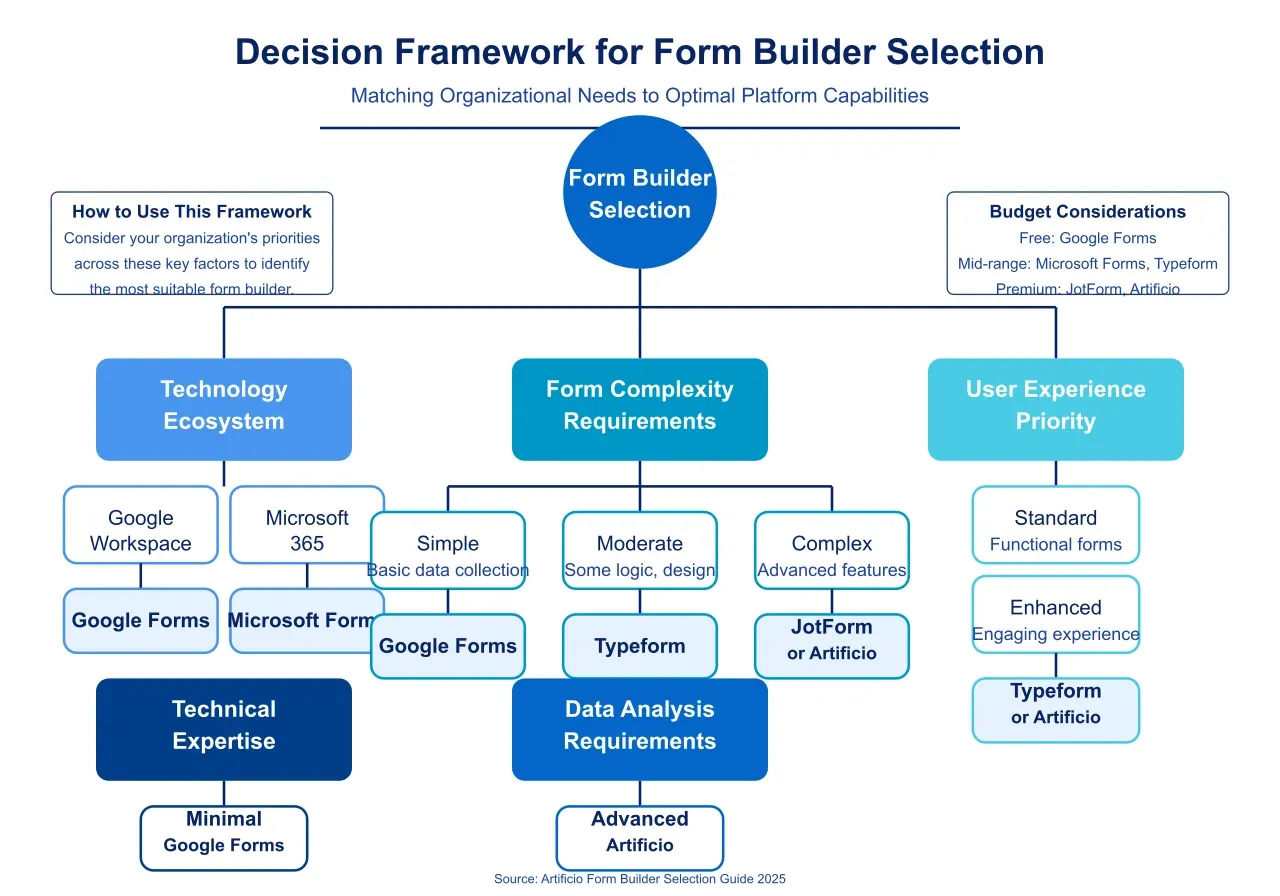
This analysis suggests several key considerations for organizations selecting a form building platform:
As illustrated below, the optimal form building solution depends on the specific intersection of these considerations within each organization's context. By carefully evaluating these factors against their particular requirements, organizations can identify the platform that delivers maximum value for their unique circumstances.
Selecting an appropriate form building platform represents only the first step in establishing an effective data collection strategy. The actual implementation of forms within business processes requires careful consideration of design principles, integration approaches, and workflow optimization to maximize value. This section provides practical guidance for organizations seeking to leverage their chosen form builder most effectively, regardless of the specific platform selected.
The design and structure of forms significantly impact completion rates, data quality, and user satisfaction. Organizations should approach form design as a critical user experience consideration rather than merely a technical implementation detail. Effective business forms balance comprehensive data collection with user-friendly experiences through several key design principles.
Form length deserves particular attention, as unnecessary questions directly correlate with abandonment rates. Each field should serve a specific, justifiable purpose within the broader data collection objective. A systematic review process should critically evaluate every potential question through two lenses: the value of the information collected and the effort required from respondents. This disciplined approach often reveals opportunities to consolidate or eliminate fields without compromising data quality.
The sequencing of questions significantly influences completion psychology. Forms should begin with simple, non-threatening questions that build momentum before introducing more complex or sensitive inquiries. This progressive disclosure approach creates psychological investment in the completion process, reducing abandonment when users encounter more demanding sections. Similarly, grouping related questions into logical sections with clear headings provides cognitive scaffolding that helps respondents understand the overall structure and purpose of the form.
Mobile optimization has transitioned from a supplementary consideration to a fundamental requirement, with our research indicating that over 60% of form completions now occur on mobile devices across business contexts. Effective mobile design extends beyond technical responsiveness to include touch-friendly input mechanisms, appropriate keyboard types for different field types, and progressive disclosure that prevents overwhelming mobile screens with excessive information density.
Field validation represents another critical aspect of effective form design, with real-time feedback significantly reducing error rates and user frustration. Validation should provide clear, constructive guidance when errors occur rather than simply indicating that something is wrong. This approach not only improves data quality but also demonstrates respect for users' time and attention, contributing to more positive perceptions of the organization requesting information.
The full potential of form builders emerges when they function as integrated components within broader business systems rather than isolated data collection tools. Effective integration strategies connect form data directly to operational workflows, eliminating manual processing steps and accelerating business processes.
CRM integration deserves priority consideration for customer-facing forms, creating seamless connections between data collection and relationship management. Forms should automatically populate appropriate CRM records with contact information, interaction history, and specific data points relevant to customer segmentation or sales processes. This integration enables immediate follow-up actions triggered by form submissions, significantly enhancing response times and conversion rates for sales-oriented forms.
Marketing automation represents another high-value integration target, with form data driving personalized communication sequences based on expressed interests or needs. Organizations should configure their form integrations to trigger appropriate email sequences, content recommendations, or other engagement mechanisms based on specific form responses or behavioral patterns during form completion.
Database and data warehouse connections enable forms to contribute to broader organizational analytics beyond their immediate functional purpose. Well-structured form data should flow automatically into centralized repositories where it can be combined with other business data for comprehensive analysis. This integration approach transforms forms from tactical tools into strategic data sources that inform broader business intelligence efforts.
Workflow automation provides perhaps the most significant opportunity for maximizing form value through integration. Form submissions should initiate appropriate workflows across departments based on the specific information provided, routing requests to the correct individuals, triggering approval sequences, or initiating service delivery processes. This automation eliminates manual handoffs between systems, reducing processing time and minimizing opportunities for human error or oversight.
As organizations expand their use of forms across departments and functions, governance considerations become increasingly important for maintaining consistency, quality, and compliance. Establishing clear ownership of the form building platform and implementing standardized processes for form creation and management helps prevent the proliferation of redundant or poorly designed forms that create negative user experiences and data management challenges.
Template libraries provide an effective mechanism for balancing standardization with flexibility across the organization. By creating approved templates for common form types that incorporate brand standards, validated question formats, and optimized layouts, organizations enable diverse teams to create consistent, high-quality forms without requiring specialized expertise. These templates should include both design elements and functional components like standard validation rules and integration configurations.
Approval workflows for new forms or significant modifications help maintain quality standards while still allowing appropriate flexibility. These governance processes should focus on key quality dimensions including brand compliance, data structure consistency, integration requirements, and user experience considerations rather than creating bureaucratic obstacles to form deployment. Lightweight review processes with clear criteria typically prove more effective than elaborate approval hierarchies.
Data retention policies require careful consideration as form usage expands, especially given increasing regulatory requirements around personal information. Organizations should establish clear guidelines for how long form data is retained, how it can be accessed, and when it should be archived or deleted. These policies should reflect both business needs for historical information and compliance requirements for data protection and privacy.
Performance monitoring represents an essential component of effective form governance, with regular analysis of completion rates, abandonment points, and user feedback providing insights for continuous improvement. Organizations should establish regular review cycles for their most critical forms, analyzing performance metrics to identify opportunities for refinement that enhance both user experience and data quality.
The form building market continues to evolve rapidly, with several emerging trends likely to shape the landscape over the coming years. Organizations should consider these developments in their long-term planning to ensure their form strategies remain aligned with evolving capabilities and user expectations.
Artificial intelligence capabilities will continue transforming form experiences beyond the initial implementations seen in platforms like Artificio. Predictive analytics will increasingly anticipate user responses based on previous interactions, behavioral patterns, and contextual factors, enabling pre-filled forms that require minimal user input for confirmation rather than complete data entry. These capabilities will significantly reduce the cognitive burden on respondents while maintaining or enhancing data quality.
Natural language processing will further streamline form interaction by enabling conversational interfaces that collect information through dialog rather than structured fields. These systems will support both text and voice interaction, making forms more accessible across diverse contexts and user preferences. The ability to extract structured data from natural conversation will create more engaging, human-centered experiences that feel less transactional than traditional forms.
AI-powered form optimization will become increasingly sophisticated, with systems automatically identifying and addressing usability issues based on behavioral analysis. These capabilities will extend beyond simple abandonment analysis to include nuanced assessment of hesitation patterns, correction behaviors, and emotional responses detected through interaction patterns. This continuous optimization will create increasingly effective forms without requiring extensive manual analysis or design expertise.
The distinction between forms and interactive applications will continue to blur as form builders incorporate more sophisticated visualization and interaction capabilities. Dynamic charts and graphs will increasingly display data in real-time as users complete forms, providing immediate context and feedback that enhances understanding and engagement. These visual elements will transform forms from simple data collection tools into interactive information exchanges that deliver immediate value to both organizations and respondents.
Augmented reality integration represents another emerging frontier, particularly for specialized applications in sectors like manufacturing, healthcare, and real estate. Forms will increasingly incorporate capabilities for capturing and annotating visual information through device cameras, enabling users to provide rich contextual information alongside structured data. These capabilities will prove particularly valuable for field-based workflows like inspections, assessments, and documentation.
Gamification elements will become more prevalent in form design as organizations seek to enhance engagement and completion rates for voluntary forms. Points, progress indicators, achievement markers, and similar mechanisms will transform mundane data collection into more engaging experiences, particularly for longer forms where maintaining user interest presents significant challenges. These approaches will require careful implementation to maintain professionalism while enhancing engagement.
The tension between organizational control and departmental autonomy in form creation will drive the development of more sophisticated governance models supported by appropriate technological capabilities. No-code form building interfaces will continue expanding their functionality while maintaining accessibility for non-technical users, enabling subject matter experts across the organization to create forms aligned with their specific requirements without dependency on technical teams.
This democratization of form creation will be balanced by more sophisticated centralized governance capabilities that ensure consistency, compliance, and quality without creating excessive bureaucratic friction. Automated compliance checking will verify that forms meet regulatory requirements and organizational standards before publication, highlighting potential issues without requiring manual review processes. These capabilities will be particularly valuable for organizations in highly regulated industries where form compliance carries significant legal implications.
AI-assisted form creation will further support this decentralized model by guiding non-specialist users toward effective design choices and appropriate functionality based on their specific objectives. These systems will combine best practice knowledge with organizational standards to suggest appropriate structures, question formats, and logic patterns that enhance both user experience and data quality. This guidance will help organizations maintain quality standards while still enabling diverse teams to create forms independently.
The form builder landscape offers diverse solutions with distinctive strengths aligned with different organizational priorities and use cases. Our comprehensive evaluation has identified five platforms that demonstrate exceptional performance across key dimensions relevant to business users: Artificio, Typeform, JotForm, Google Forms, and Microsoft Forms. Each of these solutions excels in specific contexts while offering sufficient breadth to address a wide range of business requirements.
Artificio's AI-enhanced capabilities position it as an ideal solution for organizations with complex data collection requirements and sophisticated analysis needs. The platform's intelligent form generation, optimization recommendations, and advanced analytics create significant efficiency advantages for medium to large organizations or those with high-volume form requirements. These capabilities prove particularly valuable in enterprises where forms initiate critical business processes or support complex decision-making.
Typeform's conversation-oriented approach delivers exceptional engagement and completion rates, making it particularly effective for customer-facing forms where user experience significantly impacts business outcomes. Organizations prioritizing brand perception and respondent satisfaction find compelling value in Typeform's design-focused approach, especially for marketing, customer feedback, and lead generation applications where completion quality directly affects business results.
JotForm's exceptional customization depth and functional versatility make it an ideal choice for organizations with specialized form requirements or unique workflow needs. The platform's extensive form element library, powerful conditional logic, and comprehensive integration capabilities support highly specific business processes that require tailored data collection approaches. This flexibility proves particularly valuable for organizations with industry-specific requirements that generic solutions cannot easily address.
Google Forms and Microsoft Forms offer compelling value for organizations primarily seeking simplicity and ecosystem integration rather than specialized form capabilities. These platforms provide efficient, accessible form creation with minimal learning curve, making them ideal for teams with diverse technical backgrounds or those requiring rapid deployment of straightforward forms. Their seamless integration with their respective productivity ecosystems creates efficient workflows for organizations already invested in these environments.
Beyond platform selection, effective form implementation requires thoughtful attention to design principles, integration strategies, and governance considerations. Organizations should approach forms as strategic business tools rather than isolated utilities, considering their role within broader data collection and process automation objectives. This perspective helps ensure that form implementation decisions align with organizational goals rather than merely addressing immediate tactical needs.
As the form building landscape continues to evolve, organizations should maintain awareness of emerging capabilities while focusing on the fundamental principles that drive form effectiveness. Regardless of technological advancements, successful forms will continue to balance comprehensive data collection with user-friendly experiences, providing value to both the organization and the individuals completing them. By combining appropriate technology with thoughtful implementation strategies, organizations can transform forms from necessary administrative tools into valuable components of their digital experience and data strategy.
The selection of an appropriate form building platform represents a significant investment in an organization's operational infrastructure, with implications extending far beyond basic data collection. By carefully evaluating available solutions against their specific requirements and strategic objectives, organizations can identify the platform that not only addresses their immediate needs but also provides a foundation for evolving their data collection capabilities as business requirements and technological possibilities continue to advance.

Head IT Operations - Co Founder of Artificio
See it in your SAP environment
Bring us a document, a process, or a bottleneck. We'll show how Artificio captures, validates, and posts into SAP — then scale from there.
Security & compliance
ISO 27001:2013 certified, SOC 2 Type 2 compliant, GDPR and HIPAA ready. Every agent action is logged, auditable, and runs in isolated environments.