

Blog
Smart Forms + Scheduled Jobs: Solving the Continuous Data Paradox
Automate month-end close! Combine continuous data capture with scheduled batch processing for efficiency.

Blog
Automate month-end close! Combine continuous data capture with scheduled batch processing for efficiency.
There's something oddly satisfying about knowing work is getting done while you sleep. Not the kind of work that keeps you tossing and turning at 2 AM, but actual productive work that makes tomorrow easier. For most businesses, this kind of automated midnight magic doesn't exist. Instead, they face a frustrating timing mismatch where data trickles in throughout the day, but processing it immediately creates more problems than it solves.
Take monthly expense reimbursements as an example. All month long, employees submit expense forms whenever they remember. Day 3, a handful trickle in. Day 15, a few more arrive. Day 30, there's a predictable last-minute flood. But here's the catch: you can't actually process these expenses individually as they arrive. Payment systems require batch files. Budgets need complete month-end data. Manager approvals work better when reviewing an entire team's expenses together. The whole month's worth of submissions needs to sit in a queue until the calendar flips, and then everything processes at once.
This creates what I call the continuous collection paradox. You want employees to submit expenses anytime (immediate data capture is good). But you can't do anything meaningful with those expenses until month-end (batch processing is required). Traditional systems handle this terribly, leaving finance teams drowning in manual work on the first of every month. Smart systems solve it elegantly by combining intelligent form capture with scheduled batch processing.
Let me show you how this actually works and why it changes everything about handling periodic business processes.
Picture this familiar scene. It's the first business day of the new month, and the finance team arrives knowing exactly what's waiting for them. Throughout last month, 83 employees submitted expense reports via an online form. Those submissions have been sitting in someone's inbox, completely untouched. Why? Because there's no point starting until all the data is in and the previous month is officially closed.
So at 8:30 AM, someone on the finance team starts the manual aggregation process. First, they export all submissions from the form system. This takes about 30 minutes because the export format doesn't match what the accounting system needs, so there's manual cleanup involved. Then comes the tedious part: opening each submission, checking if receipts are attached, validating that amounts match what's claimed, and cross-referencing everything against corporate card statements that arrived yesterday.
For submissions that look good, data gets manually entered into the accounting system. For submissions with problems (missing receipts, amounts that don't match, expenses over policy limits), emails go out requesting clarification. Then the waiting begins. Some people respond quickly. Others take days. Meanwhile, the legitimate expenses that could be paid sit in limbo alongside the problematic ones.
Around midday, budget checks begin. Has the marketing department exceeded their monthly budget? Is the sales team's travel spending within limits? These questions can't be answered until all the data is aggregated, so more waiting happens. By late afternoon, assuming most employees responded to clarification requests, manager approval emails finally go out. "Please review your team's expenses for last month."
Managers, being managers, get to this when they can. Some approve everything that evening. Others take two or three days. When approvals finally come back, the finance team generates the payment file for the bank. If everything goes smoothly (it rarely does), payments go out on day three or four of the new month. More commonly, it's day five or six.
During this entire multi-day process, the finance team handles virtually nothing else. Month-end close consumes their week. Employees complain about slow reimbursements. Managers resent being chased for approvals. And the finance team wishes there was a better way.
There is.
Here's what changes when you combine intelligent forms with scheduled batch processing. Throughout the month, employees still submit expense forms whenever they want. But now, the moment someone hits submit, AI kicks in immediately to do initial processing.
The document classification agent identifies what's been uploaded. Those are damage photos, this is a receipt, that's a mileage log. The data extraction agent pulls structured information from the form fields and uploaded documents. Date of expense, merchant name, amount, category, business purpose. Everything gets extracted and stored in a clean database format within seconds.
The validation agent runs quick checks right away. Is the receipt legible? Does the claimed amount match what's on the receipt? Is this merchant on the approved vendor list? Are there any obvious policy violations like a dinner expense claiming $300 when the limit is $75? Problems get flagged immediately, and the employee receives an automated response: "Thanks for your submission. We need a clearer photo of your receipt. Please upload it here."
This immediate processing serves two purposes. First, it gives employees instant feedback instead of making them wait weeks to find out something was wrong. Second, it means all the time-consuming document analysis and data extraction happens throughout the month, not in one overwhelming batch on day one of the next month.
But here's the important part: the system doesn't try to complete the full workflow immediately. It doesn't check budgets yet (the month isn't over, so budget totals are meaningless). It doesn't route to managers for approval (they don't want 83 separate emails spread across 30 days). It doesn't generate payment files (the bank won't accept 83 individual payments when one monthly batch works fine). Instead, it marks each validated submission as "ready for month-end processing" and waits.
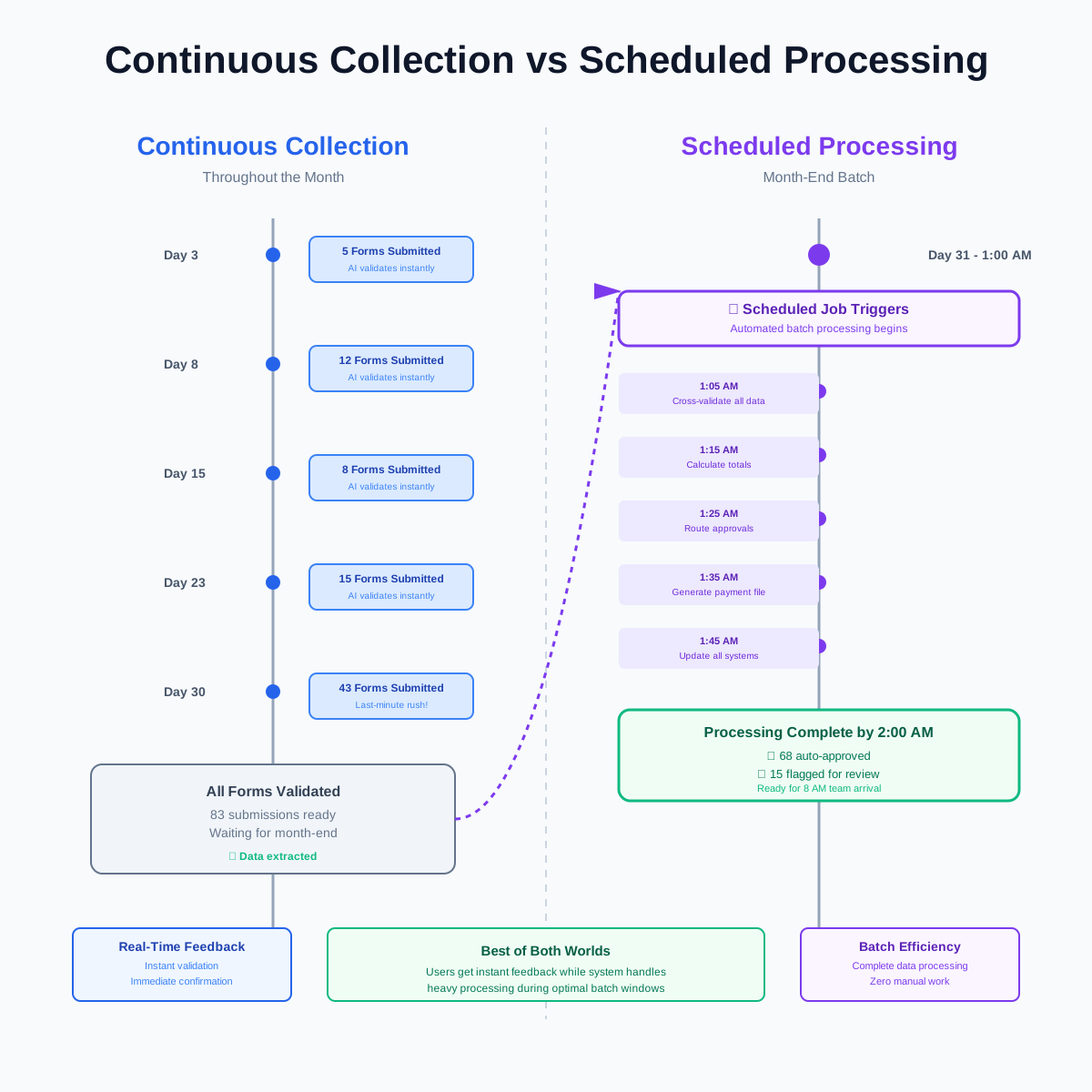
On the last day of the month, after business hours end, something happens that changes everything. At 1 AM (or 2 AM, or whatever time the IT team configured), a scheduled job triggers automatically. This isn't someone remembering to click a button. It's not a manual process that depends on someone being available. It's a cron job, a scheduled task that runs precisely when it's supposed to, every single time.
The moment this job triggers, it gathers every expense submission from the previous month that passed initial validation. All 83 submissions, now sitting in a clean, structured database format thanks to the AI processing that happened when they were submitted. The scheduled job pulls corporate card statement data that posted at month-end. It retrieves updated budget information showing what each department spent during the month. It accesses employee records to confirm bank details are current.
Now the real batch processing begins. Every expense gets cross-referenced against corporate card transactions. Did this claimed dinner expense of $127 actually appear on someone's card? The system checks. It finds the transaction. Amount matches. Merchant matches. Date matches. Good. Mark it as verified and move on to the next one.
This kind of automated matching happens for all card-based expenses. For cash expenses (parking meters, tips, small purchases), the system flags them for manual review since there's no card transaction to verify against. But that's a small subset. Maybe 15 of the 83 submissions have cash expenses needing human eyes. The other 68 are card-based and verify automatically.
Budget validation runs next. The scheduled job calculates totals by department. Marketing submitted $8,400 in expenses. Their monthly budget was $12,000. They're under. Sales submitted $15,600 against a $15,000 budget. They're $600 over. The system flags the overage and routes those particular expenses to the VP of Sales for special approval, noting the budget exception.
Then comes the categorization and calculation phase. Every expense gets properly coded for accounting purposes. Client entertainment goes to account 6150. Office supplies go to 6200. Travel expenses split between airfare (6310), lodging (6320), and meals (6330). Mileage gets calculated at the current IRS rate, which the system looks up automatically because tax rates change and nobody wants to manually track that.
By 1:45 AM, all the data crunching is done. Now the system generates outputs. For the 68 expenses that passed all automated checks (card verified, under budget, policy compliant), approval letters generate automatically. For the 15 that need manager review, complete packets get created showing the expense details, what needs attention, and why. These packets route to the appropriate manager's review queue.
The scheduled job also creates a payment file formatted exactly how the bank's ACH system expects it. Employee names, bank routing numbers, account numbers, amounts, all in the precise format required. This file sits ready for the finance team to review and submit to the bank in the morning.
At 1:50 AM, system integrations run. The accounting system gets updated with all approved expenses, properly categorized and coded. The budget tracking system shows updated balances per department. The employee database gets flagged showing who has pending reimbursements. All the downstream systems that need to know about these expenses get updated automatically, with data flowing exactly where it needs to go.
By 2 AM, the scheduled job completes. Total processing time for 83 expense submissions: 60 minutes of automated work. Zero humans involved. Everything ready for the morning.
When the finance team arrives at 8 AM on the first business day of the new month, they find a completely different situation than the traditional nightmare. There's no pile of unprocessed submissions waiting. There's no need to spend hours doing data entry. The payment file is ready, already formatted for the bank.
What they do find is a clean exception queue. Fifteen expense submissions need human review, and each one comes with a complete packet explaining exactly what needs attention. This employee submitted a cash expense with no receipt. That employee claimed mileage to a location that doesn't match any client address in the system. This other employee has a dinner expense that exceeds policy limits but included a note explaining it was a large client meeting.
A finance team member opens the first exception packet. Everything is already there. The original form submission, the extracted data, the reason it's flagged, the company policy that applies, even an AI-generated recommendation ("This appears legitimate but exceeds standard approval limits. Recommend routing to VP approval."). Instead of spending 20 minutes gathering information and figuring out what's wrong, the review takes three minutes. Approve, deny, or escalate. Next.
By 9:30 AM, all fifteen exceptions are handled. The payment file gets one final human review (always a good practice before moving money), then submits to the bank. Payments will process that day. Employees get an email notification: "Your expense reimbursement of $487 is processing and will appear in your account within 24 hours."
The entire month-end close process that used to consume three to five days now takes 90 minutes of human time. The scheduled job did everything else overnight. Finance team members spend the rest of their day on actual financial analysis instead of data entry drudgery. Employees get faster reimbursements. Managers aren't chased for approvals because the system automatically routed only the items needing their attention.
This is what happens when you correctly match data collection timing with data processing timing.
You might wonder why we need scheduled batch processing at all. If AI can validate expenses immediately when submitted, why not just process payments immediately too? Why wait until month-end?
The answer involves understanding business constraints that technology can't eliminate. Some processes are genuinely period-dependent, and trying to work around that creates more problems than it solves.
Take bank ACH transfers as an example. Sure, technically you could initiate 83 separate payment transactions throughout the month, one for each expense submission. But banks charge per transaction. Processing 83 individual payments costs significantly more than processing one monthly batch file with 83 line items. Plus, your accounting team would spend all month reconciling a constant stream of small transactions instead of handling one monthly reconciliation.
Budget management presents similar constraints. Department budgets operate on monthly cycles. You can't meaningfully validate whether marketing is over budget on day 15 of the month when you don't know what the other half of their expenses will be. Half the team might not have submitted anything yet. Budget validation only makes sense with complete month-end data.
Manager approvals work better in batch too. Imagine being a manager and getting 83 separate approval emails spread across 30 days: "Please approve this expense." "Please approve this expense." "Please approve this expense." You'd ignore most of them, batch them mentally anyway, and probably miss some. But one email at month-end saying "Please review your team's combined expenses: 12 items, $8,400 total" is actionable. Managers can see patterns, spot anomalies, and make informed decisions when reviewing expenses together instead of in isolation.
The accounting close process itself is period-dependent. You can't close last month's books until you know all of last month's expenses. If expenses could be approved and paid anytime, you'd constantly be reopening prior periods to add late submissions. That creates audit nightmares and defeats the purpose of period-based financial reporting.
So batch processing isn't a limitation to work around. It's the correct approach for processes that genuinely depend on complete period data. The mistake most businesses make isn't that they do batch processing. It's that they do manual batch processing, spending the first week of every month on work that could run automatically overnight.
Not every business process needs scheduled batch jobs. Some workflows genuinely work better with immediate real-time processing. Knowing when to schedule and when to process immediately saves a lot of wasted effort building the wrong solution.
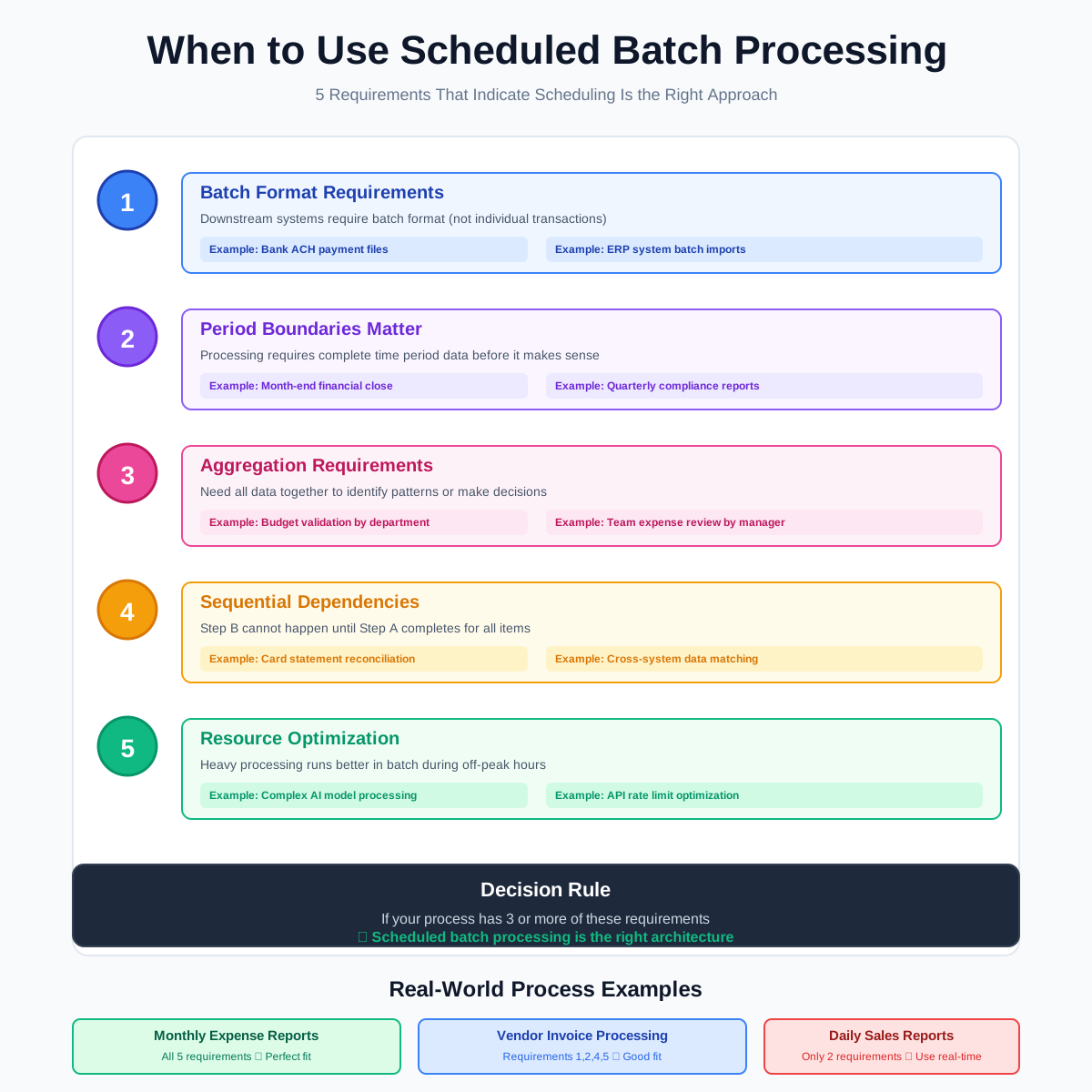
Scheduled batch processing makes sense when you have period-dependent constraints that prevent processing items individually as they arrive. Here are the five requirements that indicate scheduling is the right approach.
First, you need batch format requirements from downstream systems. When your bank requires monthly payment files in a specific format, or your ERP system imports data in batch rather than real-time, or your reporting systems expect period-based loads, you're dealing with systems that naturally align with batch processing. Fighting against this by trying to do real-time individual processing creates integration headaches and usually costs more.
Second, you need period boundaries that matter. Month-end close, quarter-end reporting, annual reconciliation. These aren't arbitrary deadlines. They're meaningful business cycles where you genuinely need complete period data before processing makes sense. If someone asks "what were our total expenses last month," the question itself implies you need to wait until the month ends to answer it.
Third, you need aggregation requirements where individual items don't tell the story. Budget validation, trend analysis, comparative reporting. These all require looking at multiple data points together to make decisions. Processing items individually misses the patterns that only appear when you analyze the complete set.
Fourth, you need sequential dependencies where step B can't happen until step A completes for everything. If manager approval requires seeing all team expenses together, you can't approve item one until you've collected item twelve. If payment file generation requires budget validation across all departments, you can't generate the file until all departments have submitted complete data.
Fifth, you need resource optimization benefits from batch processing. Running complex AI models, calling external APIs with rate limits, performing intensive data transformations. These operations often cost less and run faster when batched together during off-peak hours than when spread throughout the day as individual real-time transactions.
When you have three or more of these five requirements, scheduled batch processing is probably the right architecture. When you have fewer than three, real-time processing might work better.
Different business processes have different natural rhythms, and the smartest implementations match scheduled job timing to business reality rather than forcing everything into the same pattern. There's no one-size-fits-all schedule. The right timing depends on when data becomes complete, when downstream systems are available, and when humans need results.
Monthly processing follows the most common pattern. Expense reimbursements, month-end financial close, budget reconciliation, subscription billing. These all operate on monthly cycles because that's how businesses naturally organize financial reporting. The scheduled job typically runs in the early hours of the first business day of the new month, around 1 or 2 AM. This timing ensures the previous month is completely closed, any end-of-day posting from banks or payment processors has finished, and results are ready when teams arrive at 8 AM.
Twice-monthly processing works well for payment-dependent workflows. Many businesses run payroll twice monthly (1st and 15th). Vendor payment runs often follow the same schedule to optimize cash flow. The scheduled jobs run the night before payment dates, around 2 AM, gathering all approved invoices, generating payment files, and updating systems so finance teams can submit payments first thing in the morning.
Weekly processing suits operational reporting and recurring reviews. Sales pipeline updates, inventory reconciliation for retail businesses, weekly timesheet aggregation for hourly workers. These scheduled jobs typically run Sunday night or Monday at 3 AM, preparing complete week-over-week comparison data ready for Monday morning management reviews.
Quarterly processing handles the heavy compliance and analysis work. Financial statements for stakeholders, regulatory reporting, comprehensive budget reviews, annual contract renewals that happen quarterly. These jobs run the night after the quarter closes, often taking several hours because they're aggregating and analyzing three months of data across multiple systems.
Daily processing occupies an interesting middle ground. It works for operational workflows that need regular batch handling but can't wait a full month. Bank reconciliation, inventory cycle counts, daily sales reporting, customer inquiry aggregation. These jobs run during the lowest-traffic hours, usually between 2 and 5 AM, completing before business hours start.
The specific timing matters more than you might think. A job scheduled for 2 AM has different characteristics than one scheduled for 6 AM. At 2 AM, system resources are plentiful, API rate limits have reset, and you have a comfortable buffer before employees arrive. At 6 AM, you're racing against the clock, and if something goes wrong, there's less time to fix it before people need the results. For critical processes, earlier is better.
Batch processing creates a challenge that real-time processing doesn't face. When you process 83 expense submissions overnight, what happens when five of them have problems? You can't fail the entire batch because five items are problematic. But you also can't just skip those five and hope nobody notices. Smart exception handling separates successful scheduled implementations from ones that create more problems than they solve.
The first category of exceptions involves incomplete data. An employee submitted an expense form but forgot to attach the receipt. The scheduled job runs at 1 AM, finds a claim for $127 with no supporting documentation, and needs to decide what to do. The wrong approach is failing the job or marking the entire submission as rejected. The right approach is processing everything that is complete, flagging this particular item as "pending documentation," and automatically triggering a follow-up email to the employee: "Your expense submission from last month is approved except for the $127 dinner expense, which needs a receipt. Please upload it here, and we'll include it in next week's payment run."
This approach means 82 out of 83 submissions process successfully. The employee gets paid for everything else on schedule. The problematic item doesn't hold up the entire batch. And there's a clear path forward with automatic follow-up rather than someone having to remember to chase the employee manually.
The second category involves policy violations that need human judgment. The scheduled job identifies a dinner expense for $215 when company policy limits dinners to $75. This isn't incomplete data that needs correction. It's a situation requiring human decision-making. Was this a large client meeting that justifies the exception? Was it multiple people on one receipt? Or is someone trying to submit a personal expense?
The right handling creates a separate "policy exception" queue with complete context for the approver. The scheduled job processes normally for the 78 policy-compliant submissions. It routes the five policy exceptions to a manager with all relevant information: the expense details, the policy that was violated, the employee's explanation from the form, any history showing if this person frequently submits exceptions or if this is unusual. The manager reviews during business hours and approves or denies with full context. Those items then flow into the next payment run.
The third category involves system integration failures. The scheduled job tries to verify an expense against corporate card transactions, but the card processor's API is down at 1 AM. This isn't a problem with the submission. It's a temporary technical issue. The smart approach includes retry logic. Try again in 30 minutes. If it's still down, try again in another 30 minutes. After three attempts, mark the integration step as "needs manual verification" and continue processing everything else.
When the finance team arrives in the morning, they see a note: "Card verification service was unavailable during processing. These 12 expenses need manual verification against card statements." That's a manageable 15-minute task. The alternative would be failing the entire batch, leaving all 83 submissions unprocessed, and forcing the team to spend their day doing what should have been automated overnight.
The fourth category involves data conflicts between systems. The scheduled job finds an invoice claiming $1,000, but the purchase order in the ERP system says $900. Which one is right? This genuinely needs human review because there are multiple possible explanations. Maybe the invoice is wrong. Maybe the PO is wrong. Maybe there was a legitimate change order. Maybe shipping charges were added. The scheduled job can't guess.
The right handling shows both values side by side in the exception queue: "PO amount: $900. Invoice amount: $1,000. Variance: $100. Requires review." Include context showing the vendor, the PO date, the invoice date, and any notes or attachments that might explain the discrepancy. Then let a human make the call during business hours. Don't block the other 82 clean invoices while waiting for this one discrepancy to be resolved.
What makes exception handling work is creating separate queues based on what action is needed. Technical retries go in one queue with automatic retry logic. Policy violations go to manager approval queues. Missing data goes to employee correction queues with automated follow-up. Data conflicts go to specialist review queues with full context. Each queue has different handling appropriate for its category instead of dumping everything into one generic "failed items" bucket.
When you match data collection timing with data processing timing correctly, the operational improvements compound in ways that basic time savings calculations don't capture. Yes, the finance team saves 30 hours per month by not doing manual data entry. That's $9,000 in labor costs avoided annually, which alone justifies the implementation. But the real impact goes deeper.
Employees get faster reimbursements, which improves satisfaction and reduces the number of times someone has to check when their expense will be paid. Finance gets fewer "when will I be reimbursed" emails and calls. That might save another two hours per month, but more importantly, it improves employee relations and reduces friction between departments.
Month-end close finishes faster, which means management gets financial reports sooner. When executives can see last month's results on day two instead of day seven, they make better-informed decisions. They spot problems earlier. They can course-correct while the data is still fresh instead of reacting to week-old information.
Compliance documentation happens automatically instead of being reconstructed after the fact. Every expense has a complete audit trail showing when it was submitted, what AI checks it passed, which human approved it, and when payment occurred. If auditors ask about any transaction, you can pull the complete history in seconds instead of digging through email threads and file systems trying to piece together what happened.
Accuracy improves because the system doesn't get tired or make transcription errors. When a human manually types 83 expense amounts from forms into an accounting system, mistakes happen. Amounts get transposed. Decimal points get misplaced. Categories get mis-coded. When AI extracts the data once at submission time and the scheduled job uses that extracted data directly, the error rate drops dramatically. You go from 3-5% error rates in manual entry to less than 1% in automated processing.
Cash flow optimization becomes possible when payment timing is consistent and predictable. If expenses get paid on day one or two of every month without fail, employees know what to expect. They're not constantly checking or worrying. And the company can plan cash flow around predictable payment dates instead of scrambling to accommodate sporadic payment runs that happen whenever the finance team finishes manual processing.
The finance team's role shifts from data entry to exception handling and analysis. Instead of spending the first week of every month on administrative drudgery, they spend their time investigating anomalies, identifying spending patterns, and providing actual financial insight. This changes the nature of the work from tedious to interesting, which improves retention and means the company can hire more analytical people instead of just looking for someone willing to do data entry.
Managers get better information for approvals. When reviewing expenses individually throughout the month, you have no context. When reviewing an entire team's expenses together at month-end, patterns become obvious. You notice that three different people all claimed dinner expenses at the same restaurant on the same night, suggesting it was one team meal that should have been submitted as a single expense. You see that someone is consistently just under policy limits, suggesting they know the rules. You observe that another person's expenses spiked 300% this month, prompting a conversation about whether they need a higher budget or if something unusual happened.
All these compounding benefits come from solving the fundamental timing mismatch between continuous data collection and period-dependent processing. Get the timing right, and everything else falls into place.
Building this kind of scheduled batch processing used to require significant custom development. You needed developers writing API integrations, building database schemas, creating job scheduling logic, implementing error handling, and maintaining it all. The barrier to entry was high enough that only large enterprises with substantial IT budgets could afford it.
Modern document AI platforms like Artificio change this equation by providing the building blocks as configurable components rather than custom code projects. The form capture part uses intelligent web forms that connect to Artificio's document processing agents. You configure what fields you need, what documents to collect, what validation rules apply. The AI agents handle extraction, classification, and initial validation automatically.
The scheduled processing part uses Artificio's Intelligent Scheduler, which is essentially a business-friendly interface on top of industrial-strength job scheduling. Instead of writing cron syntax and custom scripts, you configure when jobs should run, what data sources to pull from, what processing steps to execute, and where outputs should go. The platform handles the technical details of reliable execution, retry logic, and failure handling.
The integration part uses pre-built connectors to common business systems. Banks, ERP platforms, accounting software, payment processors. If you're using mainstream business software, there's probably a connector already built. Configuration instead of coding. For unique systems, Artificio's API framework lets developers build custom integrations without starting from scratch.
This doesn't mean implementation is trivial. You still need to map your specific business process, configure validation rules that match your policies, set up approval workflows that reflect your organization structure, and test thoroughly before going live. But you're working at the business logic level, not the technical infrastructure level. A business analyst can configure most of it. Developers get involved only for custom integrations or complex business rules.
The typical implementation timeline runs about three to four weeks for a process like expense reimbursement. Week one involves mapping the current process, identifying data sources, and defining business rules. Week two covers configuring the form and AI agents, setting up validation logic, and testing with historical data. Week three builds the scheduled job workflow, integrates with downstream systems, and conducts end-to-end testing. Week four handles user training, final testing, and go-live.
After that first implementation, subsequent processes move faster because the patterns become familiar. Adding vendor invoice processing after you've done expense reimbursement takes two weeks instead of four. The learning curve is front-loaded.
The continuous collection and scheduled processing pattern solves a fundamental challenge that every business faces: data arrives on its own schedule, but processing often needs to wait for complete datasets or period boundaries. Fighting against this reality by trying to force real-time processing onto inherently batch-dependent workflows creates more problems than it solves.
The smart approach embraces the timing mismatch. Let data collection happen continuously with immediate validation feedback. Let heavy processing happen on schedule when you have complete data and systems are available. Use AI to do the tedious work of extraction and validation so humans focus on exceptions and judgment calls. Use scheduled jobs to orchestrate batch operations reliably without someone having to remember to trigger them.
This isn't particularly complicated conceptually. It's mostly about recognizing that different parts of a workflow have different optimal timing, and building systems that respect those differences instead of forcing everything into one timing model.
The businesses that get this right stop fighting against month-end close deadlines and start using them strategically. They collect data all month, validate it immediately, and process it efficiently in batch when timing makes sense. Their finance teams stop drowning in manual work. Their employees get faster service. Their managers get better information for decisions.
And the work that used to consume the first week of every month now happens automatically at 1 AM while everyone sleeps. There's something satisfying about that.

Head IT Operations - Co Founder of Artificio
See it in your SAP environment
Bring us a document, a process, or a bottleneck. We'll show how Artificio captures, validates, and posts into SAP — then scale from there.
Security & compliance
ISO 27001:2013 certified, SOC 2 Type 2 compliant, GDPR and HIPAA ready. Every agent action is logged, auditable, and runs in isolated environments.