SAP Production Planning (PP) Document Automation : The Complete Guide
How businesses automate SAP PP documents end-to-end — mobile form apps, custom AI extraction models, SAP master data verification, and OData integration for BOMs, routings, and production confirmations
SAP Production Planning (PP) Document Automation: The Complete Guide to No-Code Forms, Custom AI Extraction, and OData Integration
In 21+ years of SAP implementation work across SCM, PP, QM, and APO — at IBM, TCS, Accenture, Deloitte, and L&T Infotech, with manufacturers like Ford, Nestlé, Campbell Soup, NVIDIA, Estée Lauder, and The Gill Corporation — I've configured more bills of material and routings by hand than I'd care to count. And the pattern I see in almost every Production Planning (PP) implementation is the mirror image of what I see in Plant Maintenance: SAP PP is built to plan and execute production with precision, but the master data and shop floor confirmations that feed it almost always originate outside SAP, in documents nobody designed for machine readability.
An engineering drawing exported from CAD. A supplier's component spec sheet. A handwritten shop floor traveler. A Certificate of Analysis from a raw material vendor. An engineering change notice marked up in red pen. None of it is structured. All of it eventually becomes a bill of material line, a routing operation, or a production order confirmation — typed in by hand, transaction by transaction.
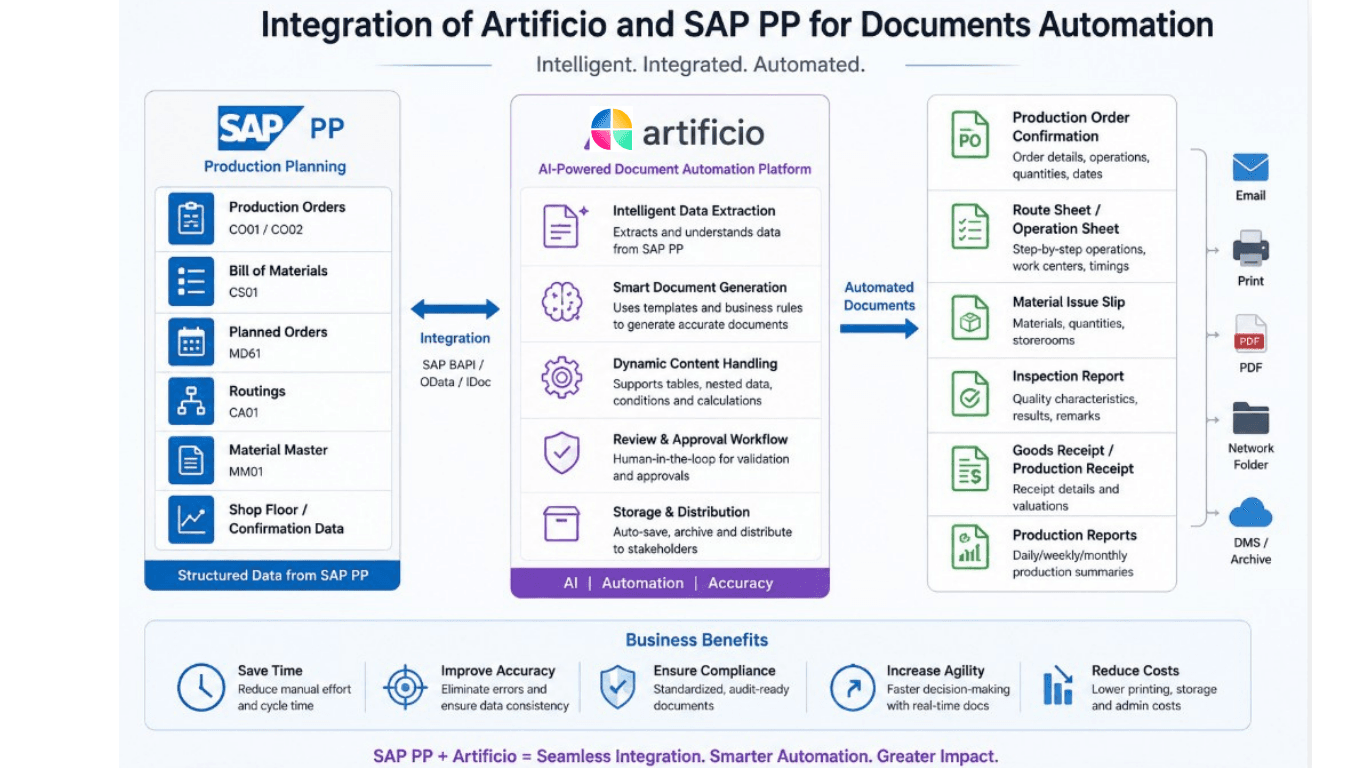
This guide covers how to close that gap for SAP PP specifically, following the same four-part framework I use with manufacturing clients:
A no-code form app that captures shop floor and engineering data from any device
SAP OData services that push verified data into BOMs, routings, and production orders in real time
Let's get into the specifics.
Key Takeaways
SAP PP master data — bills of material, routings, work centers — and execution data — production order confirmations — both originate in unstructured documents far more often than people assume: engineering drawings, vendor process sheets, paper travelers, and Certificates of Analysis.
A no-code form applets shop floor operators, quality technicians, and engineers capture confirmations, in-process inspections, and engineering change requests from a tablet or phone, replacing the paper traveler entirely.
A custom AI extraction model trained specifically on engineering and shop floor document types — not a generic invoice OCR engine — is what makes BOM, routing, and CoA data machine-readable.
Extracted and captured data should be validated against SAP master data — material master existence, BOM component validity, work center capacity, batch specification limits — before write-back, not discovered as a problem during MRP or costing runs.
SAP OData services — including the Production Order API (API_PRODUCTION_ORDER_2_SRV) and Production Order Confirmation API (API_PROD_ORDER_CONFIRMATION_2_SRV), or custom Z-OData where standard coverage is thin — are the delivery mechanism that turns verified data into live BOMs, routings, and confirmations.
Table of Contents
What SAP PP Document Automation Actually Means
The Document Bottleneck Inside Every SAP PP Workflow
Pillar 1 — A No-Code Form App That Captures Data From Any Device
Pillar 2 — Training a Custom AI Extraction Model for SAP PP Documents
Pillar 3 — Verifying Extracted Data Against SAP Master Data
Pillar 4 — Pushing Verified Data Into SAP via OData: 10 Concrete Use Cases
The Business Case: What This Is Actually Worth
What to Look For in an SAP PP Automation Platform
Frequently Asked Questions
1. What SAP PP Document Automation Actually Means
Most document automation content online is written about accounts payable, and most of what exists for manufacturing focuses on shop floor connectivity — PLCs, sensors, MES integration. SAP PP document automation is a third, less-discussed category: the unstructured paper and PDF trail that surrounds engineering and production master data, which is just as document-heavy as AP but far less standardized.
A few things make PP distinct from PM or AP automation:
Master data is engineering-driven, not transactional. A bill of material doesn't arrive as a clean spreadsheet — it's reconstructed from a CAD export, a supplier's component datasheet, and an engineer's markup, often across multiple revisions tracked by an Engineering Change Notice (ECN).
Execution data is time-pressured and shop-floor-based. A production order confirmation needs to happen in near real time on the shop floor — via T-codes like CO11N or CO15 — but the actual yield, scrap, and downtime data is still frequently captured first on a paper traveler and re-keyed later.
Quality and specification data is interleaved with production data. A Certificate of Analysis (CoA) for an incoming raw material batch has to be checked against material specification limits before that batch can even be backflushed into a production order — a verification step, not just a data entry step.
So "SAP PP document automation" means a system that can capture new shop floor and engineering data through a flexible interface, read and structure the documents already in circulation — drawings, CoAs, vendor process sheets — check the result against what SAP's master data already says is true, and write it into the correct PP transaction through SAP's own integration layer.
2. The Document Bottleneck Inside Every SAP PP Workflow
Here's the document-to-transaction map I use when scoping a PP automation project:
Yield, scrap quantity, downtime reason, operation start/end time
Production order confirmation (CO11N/CO15)
Shop floor operator
Certificate of Analysis (raw material vendor)
Specification values, batch test results, pass/fail
Batch characteristics, QM inspection results
Quality technician
Demand forecast / S&OP spreadsheet from sales
Planned quantities by period, planning strategy
Planned Independent Requirements (MD61)
Demand planner
OEM machine manual for new equipment
Capacity, setup time, technical specs
Work center master (CR01/CR02)
Industrial engineer
Setup/changeover instruction sheet
Standard text, setup time, control parameters
Routing operation detail
Process engineer
Downtime/reason code log from shop floor
Reason code, duration, affected operation
Confirmation reason codes, COGI error resolution
Shop floor supervisor
The pattern across this table is consistent with what I see in PP: the data nearly always originates outside SAP, and a meaningful share of it gets typed more than once — an engineer writes a component change on a marked-up drawing, an ECN coordinator re-keys it into the change number, and a planner later re-confirms the same change when the next production order is created. Every one of those steps is where a quantity gets transposed, a scrap percentage gets misread, or — as I've seen more than once in real implementations — a BOM component gets assigned to the wrong routing operation entirely, which silently throws off backflushing and component availability the moment the order is confirmed.
3. Pillar 1 — A No-Code Form App That Captures Data From Any Device
As with PP, the first half of the fix is making sure new data never lands on paper or in an unstructured PDF if it doesn't have to.
What it needs to do for PP specifically
Run on any device, on or off the shop floor — a tablet mounted at a work center, an operator's handheld scanner, or a desktop for office-based engineers reviewing ECNs.
Work offline, since plant floors and warehouse areas are frequently dead zones for Wi-Fi, with automatic sync once connectivity returns.
Capture barcode/QR scans of the production order, so an operator confirming yield doesn't have to manually type a 10-digit order number — they scan it.
Apply conditional logic to downtime and scrap reason capture. If an operator records scrap, the form should require a reason code and, ideally, a photo of the defect; if yield matches plan exactly, those fields stay hidden.
Support engineering markup capture. An engineer proposing a BOM or routing change should be able to photograph a marked-up drawing or sketch the change directly on a tablet, attach it to a structured ECN request form, and route it for approval — instead of emailing a PDF that someone re-keys days later.
Map directly to PP data structures — a "Downtime Reason" field in the form should map to the exact catalog/reason code SAP expects in the confirmation, not a free-text description that needs reinterpretation.
Where this changes the workflow in practice
Shop floor confirmation form — an operator scans the production order barcode, enters yield and scrap quantity, selects a downtime reason from a constrained list, and submits — replacing the paper traveler that used to sit in a bin until a clerk got around to keying it into CO11N.
In-process quality check-in form — a quality technician records an in-process inspection result directly against the operation, rather than on a separate paper checklist that's reconciled with the order later.
Engineering change request form — an engineer captures a proposed BOM or routing change, attaches a marked-up drawing photo, and routes it through approval, generating a structured input for the change management process instead of an email thread.
New work center onboarding form — when a new machine arrives, a technician photographs the OEM nameplate/manual and fills in capacity and setup-time fields directly from the job site, instead of a planner manually transcribing the manual back at a desk.
Changeover/setup completion form — captures actual setup time and any deviation from the standard, which is often tracked informally today and never makes it back into the routing's standard values for future scheduling accuracy.
These forms eliminate the paper-to-screen re-entry step. But the documents that already exist in circulation — the CAD exports, the CoAs, the vendor process sheets sitting in inboxes — need the second pillar.
4. Pillar 2 — Training a Custom AI Extraction Model for SAP PP Documents
Why generic extraction tools struggle here
A generic invoice-OCR model is trained on typed, tabular financial documents. PP-related documents are a different challenge entirely:
CAD-exported component lists and supplier spec sheets vary enormously by engineering tool and supplier — some are clean tables, others are PDF exports of a drawing's bill-of-materials block embedded in a title frame.
Certificates of Analysis mix structured test-result tables with narrative comments, and the layout is entirely vendor-specific — a chemical supplier's CoA looks nothing like a metals supplier's.
Engineering Change Notices are frequently semi-structured forms with handwritten or typed change descriptions, approval signatures, and effective dates that need to be reconciled against the current BOM/routing revision, not just read in isolation.
Vendor process sheets and OEM work instructions have no shared template — some are step-by-step numbered instructions, others are flowcharts, others are dense paragraphs of setup narrative.
How a custom extraction model gets built for PP
Collect a representative document corpus across the actual document types in circulation — real CAD exports, real supplier CoAs, real ECNs from the engineering change log, not generic samples.
Define an extraction schema per document type, mapped explicitly to the SAP fields it will populate — for a CoA, that's specification parameter, test result value, unit of measure, and pass/fail; for an ECN, it's change number, affected material/BOM, affected routing, and effective date.
Train or fine-tune the model against each schema, combining layout-aware extraction for tables (test results, component lists) with language-model reasoning for narrative sections (a vendor's written commentary on a CoA, or an engineer's free-text change description on an ECN).
Score every extracted field with a confidence level, so a CoA test result extracted cleanly from a digital PDF is treated differently than one extracted from a faxed or scanned copy with visible noise.
Route low-confidence extractions to a human review screen showing the source document and extracted value side by side, with corrections feeding back to improve the model.
Re-train as new suppliers, document formats, or engineering tools are introduced — a model trained once against today's supplier base will degrade as the supplier and document population shifts.
Practical use cases this unlocks
CAD-to-BOM extraction: a component list exported from CAD or a supplier's spec sheet is converted directly into structured BOM line items — material number, quantity, unit of measure, scrap percentage — instead of being manually re-keyed into CS01.
CoA-to-batch-verification automation: a raw material Certificate of Analysis is parsed into structured test results and automatically compared against the material's specification limits before the batch is released for production.
ECN-to-change-management automation: a scanned or PDF engineering change notice is parsed into change number, affected objects, and effective date, structured for review instead of manual transcription into the change management transaction.
Vendor process sheet digitization: a supplier's free-text setup or process instructions are converted into structured routing operation text and standard values.
Bulk legacy BOM/routing digitization: during an S/4HANA migration or a plant consolidation, a custom model can process thousands of historical engineering documents far faster than manual re-entry.
5. Pillar 3 — Verifying Extracted Data Against SAP Master Data
Extraction alone isn't the finish line in PP any more than it is in PM — and the failure modes here are specifically the kind that don't show up until much later, during an MRP run, a costing run, or a shop floor confirmation that fails for reasons nobody can immediately trace.
Before extracted or captured data gets written into SAP, it should pass through a verification layer that checks it against PP master data in real time:
Material master existence check — does this component number actually exist in the material master, or does it need to be created first?
BOM component validity — is the component allowed for this BOM usage and alternative, and does the quantity/unit of measure match the material master's base unit?
Routing operation assignment consistency — is the component being assigned to the operation the engineering document actually specifies, avoiding the classic failure mode where a component silently defaults to the first operation and breaks backflush timing?
Work center capacity and existence check — does the work center referenced in a new or updated routing actually exist with valid capacity data for the relevant planning plant?
Specification limit validation — does a CoA's test result actually fall within the material specification's tolerance range, or should this batch be flagged for quality review before it's available for consumption?
Engineering change sequencing — does this ECN's effective date conflict with production orders already open against the current BOM/routing revision, which could cause a costing or component mismatch mid-order?
Vendor/business partner validation — is the supplier on the CoA or component spec an approved vendor in the business partner and source list records?
Demand quantity reasonableness — does an incoming forecast quantity from a sales spreadsheet fall within a sane range relative to historical consumption, flagging an outlier before it distorts an MRP run?
Records that pass every relevant check flow straight through to write-back. Records that fail — an unknown component, an out-of-spec CoA result, a work center that doesn't exist in the target plant — get routed to a human reviewer with the specific mismatch identified, rather than silently writing data that surfaces as a costing error or a COGI (goods movement error) days later, after it's far more expensive to trace back to its source.
6. Pillar 4 — Pushing Verified Data Into SAP via OData: 10 Concrete Use Cases
A brief, practical explanation of OData in this context
OData is the standard, web-based API protocol SAP exposes across S/4HANA (and, via SAP Gateway, many ECC landscapes) so that an external application can read and write directly to business objects — materials, BOMs, production orders, confirmations — over HTTPS, using SAP's own business logic and authorization checks rather than simulating GUI screen navigation. For PP specifically, SAP provides standard APIs including the Production Order API (API_PRODUCTION_ORDER_2_SRV), the Production Order Confirmation API (API_PROD_ORDER_CONFIRMATION_2_SRV), and a Process Order Confirmation API (API_PROC_ORDER_CONFIRMATION_2_SRV) for process manufacturing — alongside material master, purchase order, and business partner APIs that PP processes routinely touch. Coverage for BOM and routing maintenance specifically tends to be thinner in the standard API catalog and is frequently filled with custom Z-OData services built on the relevant CDS views, particularly in ECC-based landscapes — so the exact service inventory should always be confirmed against the release in play.
Ten use cases, document-to-SAP-object
New BOM creation from an engineering drawing. A component list extracted from a CAD export or supplier spec sheet is verified against the material master (Pillar 3) and pushed to create or update the bill of material, populating component, quantity, and scrap percentage without manual CS01 entry.
Routing creation from a vendor process sheet. Extracted operation sequences, standard times, and work center assignments are pushed to create or update a routing or master recipe, with the verification layer catching any operation pointed at a non-existent work center before it's written.
ECN-driven BOM and routing updates. A structured engineering change notice — change number, affected objects, effective date — drives an update to the relevant BOM and routing revisions, keeping the change history intact rather than overwriting it.
Shop floor confirmation from a mobile form. An operator's confirmation form submission (Pillar 1) is pushed via the Production Order Confirmation API, posting yield, scrap, and downtime in real time — the equivalent of a CO11N/CO15 entry generated without the operator touching SAP GUI.
Process order confirmation for process manufacturing. For pharma, chemical, or food and beverage operations running process orders rather than discrete production orders, the equivalent confirmation flows through the Process Order Confirmation API.
Certificate of Analysis ingestion and batch release. Extracted and specification-verified CoA results are pushed to update batch characteristics and quality inspection results, supporting (or blocking) the batch's release for production consumption.
Demand forecast ingestion. A sales or S&OP spreadsheet's planned quantities, once verified for reasonableness against historical consumption, are pushed to create or update Planned Independent Requirements feeding MRP.
New work center onboarding. Technical specifications extracted from an OEM machine manual or nameplate are pushed to create or update the work center master, including capacity and standard value key data.
Production order status and exception monitoring. Rather than writing data, this use case reads it: the Production Order API is queried in near real time to power dashboards or exception alerts — for example, flagging orders stuck in a particular status or missing component availability — without building a custom report from scratch.
Bulk legacy BOM/routing migration. During an S/4HANA migration or multi-plant consolidation, a large batch of historical engineering documents is processed and pushed through the same OData services in bulk, with the verification layer catching duplicate components, invalid work centers, or inconsistent units of measure as records are created rather than after go-live.
Across all ten, the pattern stays the same: capture or extract → verify against master data → push through OData into the correct SAP business object — preserving SAP's own validation logic rather than bypassing it.
Discrete vs. process manufacturing: same pattern, different objects
It's worth being explicit about how this plays out differently depending on manufacturing type, because the document types and target objects shift even though the four-pillar approach doesn't:
Discrete manufacturing (automotive components, electronics, industrial equipment) revolves around bills of material, routings, and production orders. The dominant document challenge is engineering-driven — CAD exports, supplier component specs, and ECNs — and the confirmation side is largely about yield, scrap, and downtime capture at distinct work centers.
Process manufacturing (pharma, chemical, food and beverage) revolves around master recipes and process orders instead of routings and production orders, with batch records and Certificates of Analysis playing a much larger role than in discrete manufacturing. Specification-limit verification against CoA data isn't optional here — it's the difference between a batch that's compliant for release and one that isn't, and regulatory audit trails depend on that verification having actually happened, not just been assumed.
Repetitive manufacturing (high-volume, stable product lines) tends to generate fewer one-off engineering documents but a higher volume of confirmation data, since production runs continuously against a production version rather than discrete lot-by-lot orders — which shifts the automation priority almost entirely toward Pillar 1's form-based capture and Pillar 4's confirmation API integration, with comparatively less reliance on Pillar 2's document extraction.
The practical implication: a platform built for SAP PP document automation needs to support both the Production Order Confirmation API and the Process Order Confirmation API, and needs extraction models that can be configured per industry rather than assuming every customer's document population looks like a discrete manufacturer's.
7. The Business Case: What This Is Actually Worth
Engineering change cycle time. A BOM or routing change that today takes days to move from a marked-up drawing through manual re-entry and verification can move in hours when the extraction and verification steps are automated — which matters directly for time-to-production on new or changed parts.
Shop floor data lag. Confirmations captured at the moment of production, rather than re-keyed from a paper traveler at the end of a shift, mean planners and schedulers are working from current data instead of a delayed paper trail — directly affecting the accuracy of the next MRP run.
Error and rework cost. A component silently assigned to the wrong routing operation, or a BOM quantity transposed during manual entry, doesn't just cause an inconvenience — it can mean a costing variance that takes a controller hours to trace back to its root cause, or a COGI error that stalls a goods movement until someone manually resolves it.
Quality and compliance exposure. A Certificate of Analysis that's verified against specification limits automatically, rather than eyeballed by a technician under time pressure, reduces the risk of an out-of-spec batch entering production undetected.
I've seen the same underlying pattern deliver over $100,000 in documented annual savings on a comparable document-to-SAP automation engagement in Sales Order processing — and PP, given how much of its master data and execution data originates in unstructured engineering and shop floor documents, represents at least as much opportunity, particularly for manufacturers managing frequent engineering changes or multi-supplier component sourcing.
To make this concrete: a mid-sized discrete manufacturer processing roughly 200 engineering changes and 5,000 production order confirmations a month, at even five minutes of manual re-entry and verification time saved per document, is looking at over 600 hours of labor reclaimed monthly — well before accounting for the harder-to-quantify cost of the costing variances and COGI errors that manual re-entry mistakes tend to generate downstream.
8. What to Look For in an SAP PP Automation Platform
A genuine no-code form builder that an industrial engineer or shop supervisor can configure without a developer.
Document-type-specific extraction models — a platform that treats a CoA, an ECN, and a CAD export as the distinct extraction problems they actually are, rather than running everything through one generic OCR engine.
A real master-data verification engine that checks against current SAP material master, BOM, routing, and specification data in real time.
A fast human-in-the-loop review experience, with corrections feeding back into the model.
Enterprise security certifications — SOC 2 Type II, ISO 27001, HIPAA, and GDPR — given the engineering and quality data involved.
Actual SAP PP domain depth, not just AI capability. A platform that doesn't understand the difference between a BOM alternative and a production version, or what backflushing actually does to component consumption timing, will build something that looks right and behaves wrong.
This is the approach we've taken at Artificio — native SAP integration, document-specific extraction models, and a master-data verification layer, built on two decades of hands-on SAP PP, QM, and SCM implementation experience.
9. Frequently Asked Questions
What is SAP Production Planning (PP) used for?
SAP PP is the module within SAP ERP and S/4HANA that manages manufacturing planning and execution — bills of material, routings and master recipes, work centers, material requirements planning (MRP), and production or process order execution and confirmation.
What documents typically feed SAP PP master data?
The most common are engineering drawings and CAD exports, supplier component specification sheets, vendor process sheets and OEM work instructions, Engineering Change Notices, Certificates of Analysis from raw material suppliers, and demand forecast spreadsheets from sales or S&OP teams.
Can production order confirmations be submitted without SAP GUI?
Yes. Through SAP's OData API layer — specifically the Production Order Confirmation API for discrete manufacturing or the Process Order Confirmation API for process manufacturing — an external mobile or web form can post confirmations directly, without a user opening transactions like CO11N or CO15.
How is a BOM created from an engineering drawing without manual re-entry?
A custom AI extraction model trained on the relevant CAD export or supplier spec sheet format extracts the component list, quantities, and unit of measure into a structured schema, which is then verified against the material master and pushed into SAP as a new or updated bill of material through the appropriate API.
How does AI verify Certificate of Analysis data against SAP specifications?
A verification layer compares the extracted test result values from the CoA against the material's specification limits as defined in SAP, flagging any out-of-tolerance result for quality review before the batch is released for production consumption, rather than relying on manual visual comparison.
What's the difference between automating SAP PP documents and automating SAP PM documents?
PM document automation centers on equipment and maintenance documents — nameplates, service reports, calibration certificates — feeding equipment master and notification/order objects. PP document automation centers on engineering and shop floor documents — CAD exports, process sheets, CoAs, paper travelers — feeding BOM, routing, and production order confirmation objects. The underlying four-pillar approach (capture, extract, verify, integrate via OData) is the same, but the document types, extraction schemas, and verification rules are specific to each module.
Does this approach work for process manufacturing (pharma, chemical, food) as well as discrete manufacturing?
Yes. Process manufacturing uses master recipes instead of routings and process orders instead of production orders, with a corresponding Process Order Confirmation API, but the same capture-extract-verify-integrate pattern applies — and Certificate of Analysis verification against specification limits is especially relevant in these industries given the regulatory scrutiny on batch records.
Is this only useful for new BOM/routing creation, or also for ongoing changes?
Both. New equipment, new parts, and new suppliers all generate the kind of unstructured documents this approach is built to handle, but the more common day-to-day use case is ongoing engineering changes — ECNs, supplier substitutions, process sheet updates — which generate just as much manual re-entry, spread out continuously rather than concentrated at a single project's go-live.
What happens when an extraction or verification step fails?
A failed extraction (low confidence) or a failed verification check (an unknown component, an out-of-spec result, a missing work center) should never write data into SAP silently. Instead, the record is routed to a human reviewer with the specific issue flagged — the source document, the extracted value, and the reason it didn't pass — so a person makes the final call in seconds rather than discovering the problem weeks later during a costing run, an MRP exception, or a quality audit.