

Blog
Artificio Data Views: Your Central Command for Intelligent Data Management
The central command for validating extracted data. Specialized, context-aware interfaces for tables, forms, & PDFs.

Blog
The central command for validating extracted data. Specialized, context-aware interfaces for tables, forms, & PDFs.
Your extraction model just pulled data from 500 invoices. Now what?
Most organizations hit a wall right here. The AI did its job brilliantly, but someone still needs to verify that "Qty: 1,000" wasn't actually "Qty: 100" and that the vendor name didn't get mangled. This validation step is where document processing projects quietly fall apart.
The problem isn't just volume. It's variety. You're dealing with multi-page contracts, dense tables, PDF attachments, form submissions, and line-item details. Each data type has different validation needs. Spreadsheets can't handle this complexity. Custom dashboards take months to build. And toggling between five different tools to validate one document batch? That's a productivity nightmare.
Artificio's Data Views feature changes this equation entirely. Think of it as your central command for everything that happens after extraction. Every piece of data lands in an intelligent, purpose-built interface where you can verify, transform, take action, and push to downstream systems without ever leaving the platform.
Data Views are context-aware interfaces designed specifically for reviewing and validating extracted data. They're not generic spreadsheets pretending to handle document data. Each view type is optimized for the specific data structure it displays.
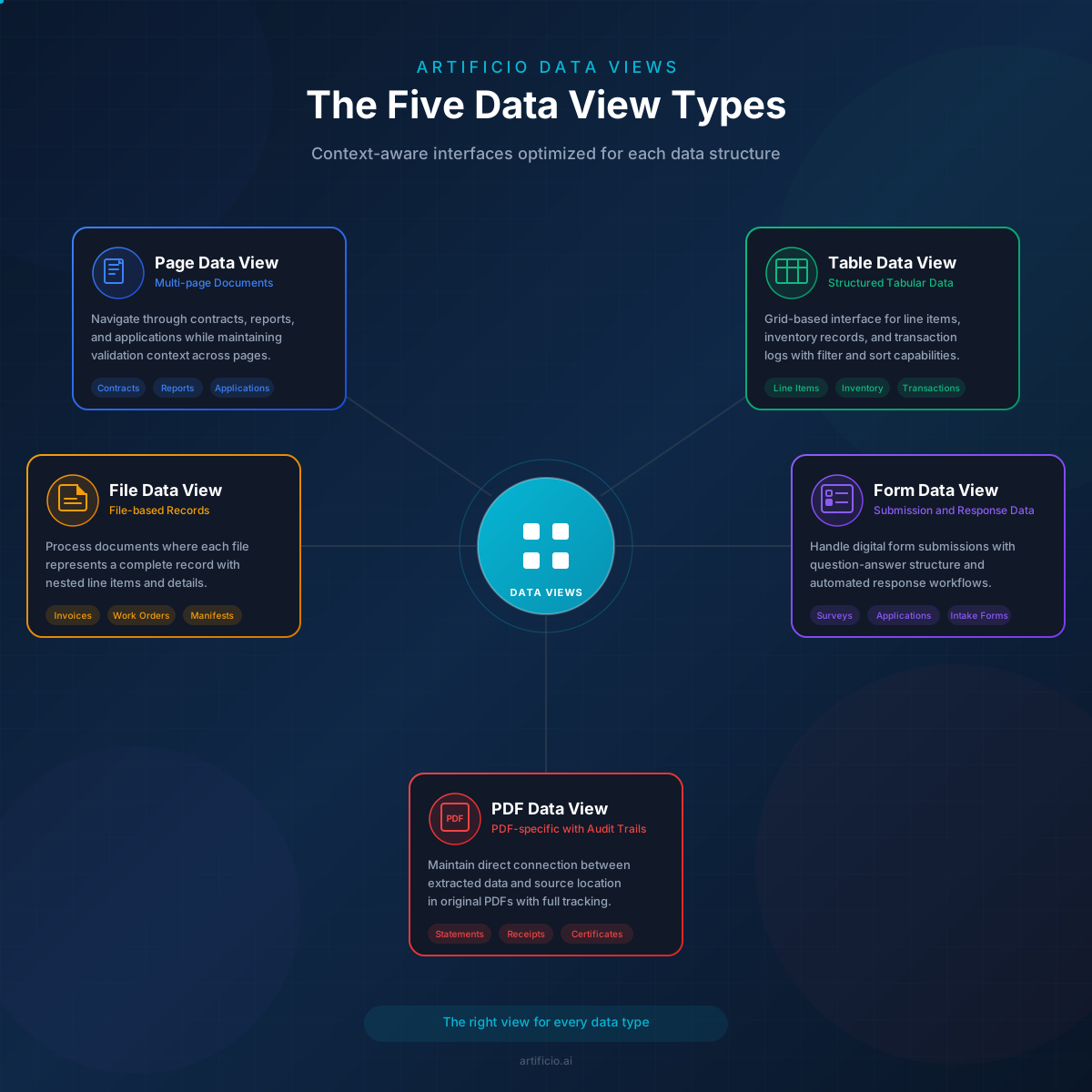
Artificio offers five specialized view types:
Page Data View handles multi-page document data where information spans across several pages. Think contracts, reports, or lengthy applications. You see all extracted fields in context with the ability to navigate between pages while maintaining your validation workflow.
Table Data View is built for structured tabular information. When your extraction model pulls row-after-row of line items, inventory records, or transaction logs, this view gives you the grid-based interface that makes sense for that data.
File Data View works with file-based data containing line items. It's particularly useful when you're processing documents where each file represents a complete record with nested details.
Form Data View handles submission and response data from digital forms. Survey responses, application submissions, customer intake forms. The view reflects the question-answer structure of form data.
PDF Data View is purpose-built for PDF-specific data with full audit trails. It maintains the connection between extracted data and its source location in the original PDF.
Why does this matter? Because validating a table of 200 line items requires different tools than verifying a form submission with 15 fields. A single generic interface forces you to adapt your workflow to the tool. Data Views flip that relationship. The tool adapts to your data.
Every Data View runs on enterprise-grade grid technology. This isn't a basic HTML table with some JavaScript bolted on. You get the full power of professional data grid frameworks with filtering, sorting, searching, and grouping that works instantly across thousands of records.
Need to find all invoices over $10,000 from a specific vendor? Filter and find them in seconds. Want to group records by status to tackle all pending validations together? Two clicks. Looking for a specific line item description across your entire dataset? The search handles it.
Custom cell editors adapt to different data types automatically. Date fields get date pickers. Dropdown fields get selection menus. Currency fields format correctly. You're not fighting the interface to enter data in the right format.
Context menus provide quick actions without hunting through toolbars. Right-click on any cell or row to access the operations you need most frequently. Copy, paste, bulk update, trigger workflows. Everything stays within reach.
Raw extracted data isn't trusted data. Artificio builds verification directly into the Data Views experience.
The manual verification system lets team members review individual records and mark them as verified, flagged for review, or rejected. Each verification action gets logged with who did it and when. No more "who approved this?" mysteries.
Approval processes support workflow hierarchies. A junior team member might verify the initial extraction accuracy while a senior reviewer handles final approval. You define the stages. The system enforces the sequence.
Audit trails track every change to every record. Who modified what, when they did it, and what the previous value was. This isn't just good practice for internal operations. It's essential for compliance-sensitive industries where you need to demonstrate your data handling processes.
Team collaboration features let multiple people work in the same Data View without stepping on each other's changes. Comments, assignments, and status updates keep everyone aligned on which records need attention.
Here's where Data Views become genuinely powerful. You can create validation rules and transformation formulas without writing a single line of code.
Set up rules that flag records automatically when something looks wrong. Invoice amount doesn't match the sum of line items? Flag it. Customer name is missing? Flag it. Date is in the future when it shouldn't be? You guessed it.
The formula engine handles calculations that would normally require export-to-Excel-and-back workflows. Slice operations extract portions of text fields. Split operations break combined values into separate columns. Aggregate functions sum, count, and average across related records.
Data transformation happens on the fly. Standardize date formats. Clean up phone numbers. Concatenate address fields. Convert currencies. The transformations you'd normally script or do manually become point-and-click operations.
Conditional logic lets rules adapt to context. Apply different validation criteria based on document type, customer category, or any other field value. The same Data View can handle multiple scenarios with rules that know when to apply.
Individual record editing is necessary. But efficient operations require bulk capabilities.
Update multiple records simultaneously when you need to apply the same change across a selection. Mark 50 records as approved in one action. Update a field value for all records matching your filter criteria. Bulk operations respect your verification workflows, so bulk approvals still get logged correctly.
Sequence automation connects Data Views to Artificio's broader automation capabilities. When records reach a certain status or match specific criteria, automated sequences can trigger. A verified invoice automatically queues for payment system sync. An approved application triggers a welcome email sequence.
Integration execution happens directly from Data Views. Push validated records to your ERP, CRM, or accounting system without leaving the interface. You see the sync status and can handle exceptions right where you validated the data.
Scheduled operations handle recurring tasks. Set up automatic exports, batch validations, or integration syncs that run on your defined schedule. The system handles the routine work while you focus on exceptions.
Data Views aren't just for looking at data. They're for taking action on it.
Take Action Directly from your validated data. Send emails, SMS messages, or WhatsApp campaigns to contacts in your dataset. You've validated the customer information, confirmed the order details, now trigger the notification without switching tools. Campaign execution is built into the same interface where you manage the data.
Generate PDFs from validated data on demand. Need to create confirmation documents, receipts, or reports? Define your template once and generate PDFs for any record or batch of records. The output uses your validated, transformed data with proper formatting.
AI Integration lets you query your data using natural language. The built-in chatbot understands your Data View context. Ask questions like "Which vendors have the most rejected invoices this month?" or "Show me all records with amounts over $50,000 that are pending approval." The AI translates your question into the right filters and views.
Chart Visualizations turn your data into instant insights. Toggle between grid view and chart view to see patterns, distributions, and trends. Spot anomalies visually. Identify bottlenecks in your validation pipeline. The charts update dynamically as you filter and modify data.
Data Joins combine information from multiple sources. Connect customer data from your CRM with transaction data from your invoices. Join form submissions with extracted document data. The relationships you define let you validate with full context.
Rich Text Editing supports notes and annotations directly in your data. Add context that helps the next person understand why a record was flagged or what special handling it requires. These annotations persist with the record through its lifecycle.
Download Management handles exports and reports systematically. Schedule recurring exports in your preferred format. Set up report generation for stakeholders. Manage download history so you can track what's been exported and when.
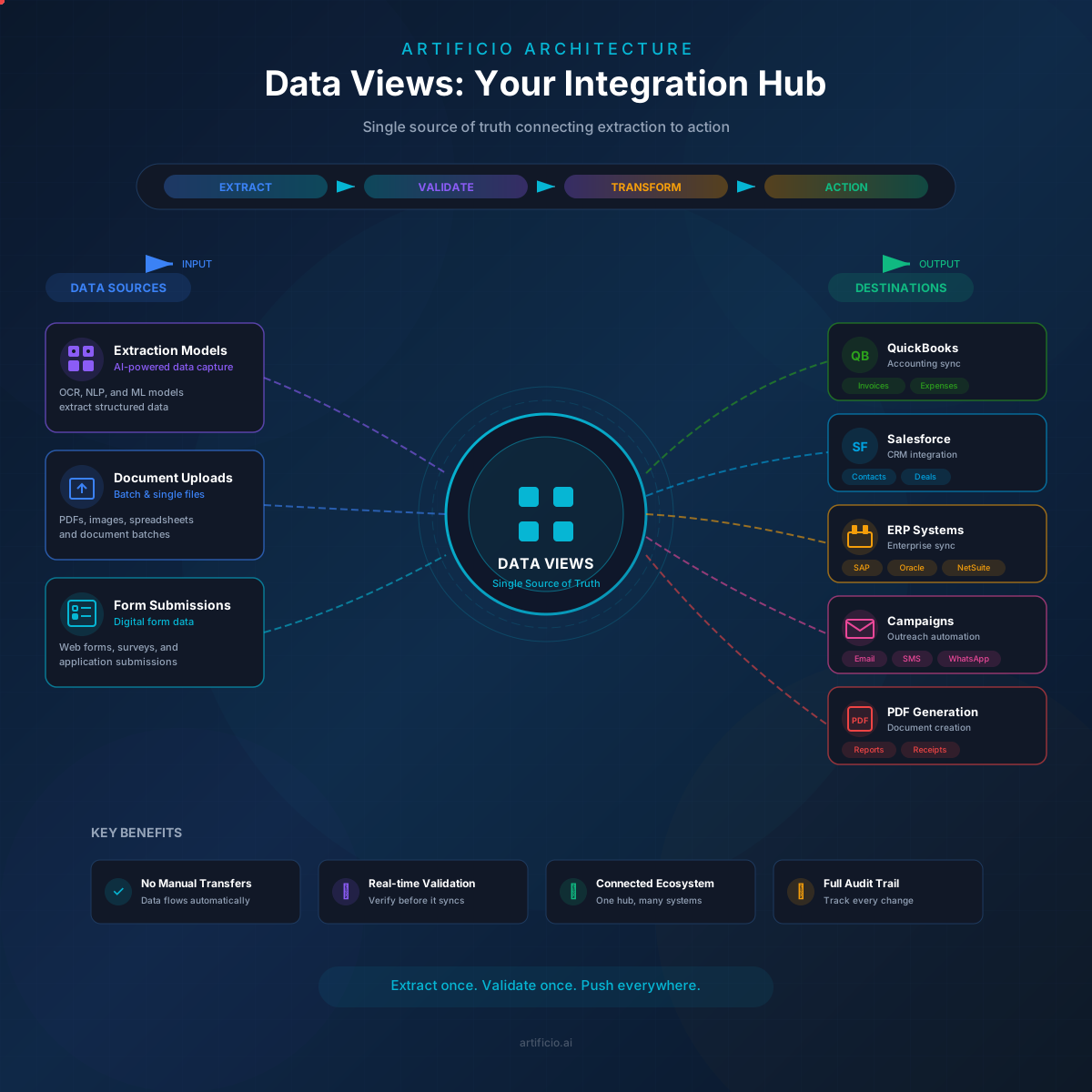
Data Views sit at the center of Artificio's ecosystem, connecting upstream extraction with downstream action.
Extraction models feed data into Data Views automatically. When your document processing pipelines complete, the extracted data appears in the appropriate view type, ready for validation. No manual import step. No file transfers. The connection is native.
Workflow automation pulls from Data Views as its data source. Automation sequences access your validated, transformed data with full awareness of verification status. Workflows can be conditional on approval states, ensuring that only fully verified data triggers downstream processes.
Integration sync reads from Data Views to push data to external systems. Your QuickBooks integration, Salesforce sync, or custom API connection uses validated data directly. Field mappings translate your Data View columns to destination system requirements.
Campaign execution sources contact data and personalization fields from Data Views. Email campaigns, SMS outreach, and messaging automations use the same validated data. One source of truth feeds every communication channel.
This architecture means you never need to manually move data between systems. Extract, validate, and take action in a connected workflow where each component knows what the others are doing.
A logistics company receives thousands of invoices monthly from dozens of vendors. Their workflow looks like this:
Documents hit the extraction model, which pulls vendor details, line items, amounts, and dates. Extracted data lands in a Table Data View configured for invoice validation. AP clerks filter by vendor, verify amounts against purchase orders (joined from their procurement system), and flag discrepancies. Verified invoices get bulk approved by a senior reviewer. Approved records automatically sync to QuickBooks with proper GL coding applied via transformation rules.
What used to take three systems and constant Excel wrangling now happens in one interface with full audit trails.
A healthcare organization collects patient intake forms digitally. Submissions arrive in a Form Data View where administrative staff review completeness and accuracy. Missing required fields get flagged automatically by validation rules. Staff can send follow-up requests directly from the interface to patients with incomplete submissions. Verified submissions trigger automated routing to the appropriate department based on the visit type field. The entire intake process has documented audit trails for compliance.
A financial services firm processes mixed document batches where contracts, applications, and supporting documents arrive together. AI classification identifies document types during extraction. Each type routes to a specialized Data View with appropriate validation rules. Verified documents get pushed to document management systems with proper metadata. Exceptions get flagged for manual classification. The routing happens automatically based on verified data.
An organization modernizing legacy systems needs to clean decades of historical data. They import records into Data Views, apply transformation rules to standardize formats, use validation to flag inconsistent records, manually review and correct exceptions, then export clean data in the format their new system requires. The transformation and validation that would take months of scripting happens through configuration.
Most validation tools treat all data the same. You get a spreadsheet interface and figure out how to make it work for invoices, forms, tables, and documents. That's backwards.
Context-aware design means each Data View type is optimized for its specific data structure. The interface elements, default configurations, and available operations match what you actually need for that data type. You're not fighting generic tooling.
All-in-one capability combines validation, action, and automation in a single interface. You don't validate data in one tool, then export to take action in another, then import results back for reporting. The complete workflow lives in one place.
No-code power makes complex operations accessible without programming. Validation rules, transformation formulas, conditional logic, bulk operations. These would normally require developer involvement or expensive custom solutions. In Data Views, business users configure them directly.
Integration-first architecture means Data Views were designed to connect, not to be standalone. Every feature considers how data flows in and how validated data flows out. The integrations aren't afterthoughts bolted onto a closed system.
Setting up your first Data View takes minutes, not days.
Start by running your extraction model on a batch of documents. When extraction completes, navigate to the Data Views section and create a new view. Select the view type that matches your data structure. The system automatically maps your extracted fields to columns.
Configure your validation rules early. Think about what makes a "good" record versus what signals a problem. Set up automatic flags for the obvious issues. You can always refine rules as you learn what your data actually looks like.
Establish your verification workflow before involving the broader team. Define who can verify, who can approve, and what sequence makes sense for your process. Get this right once and the system enforces it consistently.
Build transformation rules progressively. Start with the most common data quality issues you encounter during validation. Add new transformations as patterns emerge. Your rules become organizational knowledge that applies automatically to future batches.
Train your team on bulk operations early. Individual record editing is intuitive, but bulk capabilities are where efficiency gains compound. Make sure everyone knows how to filter, select, and apply bulk actions.
Data Views transform document processing from a collection of disconnected steps into a coherent system. Extraction feeds validation. Validation enables action. Action triggers automation. Everything connects.
The business impact is measurable. Faster validation cycles because the interface fits the data. Fewer errors because rules catch problems automatically. Reduced manual work because bulk operations and automation handle the repetitive tasks. Better compliance because audit trails document every decision.
Your documents contain business value. Data Views help you capture it reliably.

Head IT Operations - Co Founder of Artificio
See it in your SAP environment
Bring us a document, a process, or a bottleneck. We'll show how Artificio captures, validates, and posts into SAP — then scale from there.
Security & compliance
ISO 27001:2013 certified, SOC 2 Type 2 compliant, GDPR and HIPAA ready. Every agent action is logged, auditable, and runs in isolated environments.